

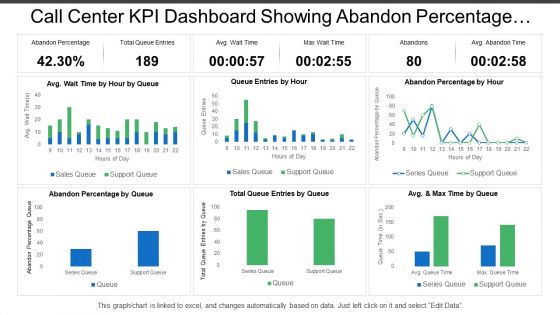
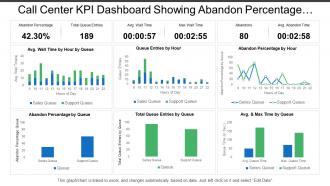
Call center kpi dashboard showing abandon percentage total queue entries





Try Before you Buy Download Free Sample Product
 Impress Your
 Audience
 100%
100% Editable
 Save Hours
 of Time


Have your boss asked you to share the information related to abandon calls? Don’t worry. Share the details in the professional manner using our Call Center KPI Dashboard PowerPoint slide. This presentation design highlights all the key aspects that your client wants to see in the report such as total calls, abandoned calls, answered calls and group calls. Now you can make them understand that this is the actual picture of the abandon calls and state your reason for the same as well. This PPT dashboard also helps you to analyze and monitor the performance at regular intervals. Dashboards are always useful to demonstrate the information related to key performance indicators, they enable you to work on the desired aspects and then change your work plan if required. Moreover, you can use this PPT design to explain the overall adequacy and performance of your services in the market and reduces cost or expense though the use of effective communication techniques. This presentation template is useful in many ways as you can change the information shown in it and can add your business metrics to keep a check on its performance. Share the numbers using it in your presentation. Monitor the performance of your business using Call Center KPI Dashboard PowerPoint template. This presentation slide has been designed for the people working in BPO (Business Process Outsource). It is vital to track key performance indicators for success. Our PPT layout can be used to demonstrate the aspects related to call center industry such as average time in queue, average abandonment rate, service level achieved, average speed of answer, average handle time and average after call work time, final call resolution etc. You can present all the above information with the help of this presentation design. There are thousands of people working in the BPO industry and it is not easy to keep a check on everyone’s performance. You can use this impressive PowerPoint slide to check the performance of your business and your team members. Having knowledge about the targets will not make you achieve your goals; you should have a clear picture of your targets at regular intervals so that you make change in your work policy or strategy. This graph chart PPT graphic enables you to monitor your business success and then make efforts to take it to next level. Download it to share with your team and clients. Highlight important articles included with our Call Center Kpi Dashboard Showing Abandon Percentage Total Queue Entries. It helps advertise the journal.
People who downloaded this PowerPoint presentation also viewed the following :
Call center kpi dashboard showing abandon percentage total queue entries with all 6 slides:
Handle all commitments with equal aplomb due to our Call Center Kpi Dashboard Showing Abandon Percentage Total Queue Entries. Be able to conduct back to back events.
FAQs for Call center kpi dashboard showing abandon percentage
Honestly, start with the big four: average handle time, first call resolution, customer satisfaction, and abandonment rate. Those will tell you everything about daily performance. Service level and agent utilization are must-haves too - without them you can't plan capacity worth a damn. Queue time and call volume trends help you catch patterns before they bite you. My old manager used to obsess over like 20 different metrics and it was chaos. Stick to these core ones first, then add whatever makes sense for your specific setup. Way less overwhelming that way.
Honestly, those dashboards work because agents can actually see their numbers in real-time. Once they're watching their call times and satisfaction scores update live, they start caring way more about hitting targets. Kind of like when you get a step counter and suddenly you're pacing around your kitchen at 11pm to hit 10k steps, you know? Supervisors love them too since they can jump in right when someone's struggling instead of waiting for weekly reports. Set up some alerts for when things go sideways - catches problems before they get messy. Really changes the whole accountability game.
Honestly, real-time data is a game changer for call center dashboards. You'll catch problems immediately instead of discovering them hours later when customers are already pissed off. Like if wait times suddenly jump or your agents are drowning, you know right away. Quick story - I've seen managers scramble because they didn't realize their whole team disappeared for lunch at once. Awkward. With live visibility, you can move people around fast or dive in yourself before things get messy. Just set up some alerts so you're not staring at screens all day.
Look, you gotta match your KPIs to whatever actually makes you money. B2B? Track lead quality and deal flow, not just how many calls you made. E-commerce needs conversion rates and order values per chat. SaaS is all about stopping churn and nailing those upsells - honestly, anything tied to recurring revenue. Support teams should watch resolution times and satisfaction scores. Here's the thing though - map out your customer journey first. Find those make-or-break moments where people either buy or bounce. That's where your KPIs need to live.
Honestly, budget's gonna be your biggest factor here. Tableau and Power BI are solid if you can swing it - they handle messy call center data pretty well. Excel's totally fine for basic stuff though, don't let the fancy tool people guilt you lol. Real-time dashboards are where it gets tricky. Grafana works, or you might need something custom that hooks into your phone system. Oh, and whatever you pick needs to actually play nice with your current software and refresh automatically. That's like... half the battle right there. Start basic, then get fancier once you know what you actually need.
Hey! Real-time updates are ideal if you can swing it, but honestly every 15-30 minutes during busy hours works too. The thing is, you'll catch problems way faster with fresh data - I've watched teams get blindsided by crazy call spikes because they were staring at hour-old numbers. Queue lengths and wait times? Those need constant refreshing. Your supervisors can't make quick staffing calls with stale info. Historical stuff like trends and reports can wait for hourly updates though. Set up auto-refresh so nobody's manually clicking around all day. Trust me, current data makes all the difference.
Honestly, charts and graphs are a game-changer for call center data. Your brain just processes visuals way faster than staring at endless spreadsheet rows. You'll spot problems like wait times spiking or satisfaction dropping before they blow up. People actually look at dashboards too - wild concept, right? Meanwhile those boring Excel reports just sit unopened in everyone's inbox. Start simple with bar charts for handle time and line graphs for first call resolution. The fancy stuff can wait. Trust me, once you see trends pop out instantly instead of hunting through numbers, you'll never go back.
Honestly, KPI dashboards are a game-changer for call centers. You get instant visibility into wait times, how your agents are doing, customer satisfaction - basically everything that keeps things running smoothly. No more waiting around for monthly reports or making decisions based on hunches. When you can see problems developing in real-time, you can actually do something about it - adjust staffing, spot who needs training, fix bottlenecks before they get ugly. Oh, and definitely set up alerts for your most critical stuff so nothing slips through the cracks.
CSAT, NPS, and First Call Resolution are your main ones to watch - they'll show you if customers are actually happy or just being polite. Customer Effort Score matters too since making people work hard for basic help is honestly just cruel. Average Handle Time is useful but don't let it pressure agents into rushing calls. That always backfires. I'd set up those post-call surveys to run automatically and check trends weekly instead of daily. Daily numbers are just too noisy to mean much, you know?
Honestly, historical data is a game changer for your dashboard. Without it you're just looking at today's numbers with zero context - pretty useless if you ask me. Pull at least 6-12 months of data so you can actually see patterns. Like maybe your call volume always spikes in December, or certain agents consistently improve over time. You'll start catching problems before they blow up into bigger issues. Plus you can finally see if those new strategies you tried actually worked or just felt good. Way better than flying blind with single-day snapshots.
Honestly, the data integration stuff will drive you crazy - your info is probably scattered across a dozen systems that hate each other. Plus agents think you're building Big Brother to watch them, which... fair enough I guess? Executives want every metric known to mankind on one dashboard too. Start small though. Pick maybe 3-5 KPIs that actually matter to everyone. Don't go crazy with the fancy features right away. Getting people on board early makes a huge difference. Focus on building something useful first, then worry about making it look nice later.
Honestly, dashboards are like having a scoreboard that's always on - nobody can claim they didn't know their numbers were tanking. When everyone's performance is right there in real-time, people naturally step up their game. You can track individual stuff like call resolution rates and customer satisfaction scores next to team averages. The transparency creates this healthy competition thing where people start monitoring themselves. I mean, who wants to be the one lagging behind when everyone can see it? Set up weekly reviews where your team can actually talk through their metrics and figure out how to improve. It's pretty effective tbh.
Check your dashboard daily for the basics - call volume, wait times, that stuff. Weekly deep dives work better for spotting real trends in agent performance and customer satisfaction. I learned this the hard way after driving myself crazy checking everything hourly (total waste unless something's actually on fire). Monthly reviews are perfect for bigger picture planning and figuring out training gaps. Oh and here's the thing - only track what you can actually do something about. There's no point staring at metrics you can't influence anyway.
Your KPIs are basically a roadmap for staffing decisions. High handle times? You need better training or different skills on the floor. Queue times going crazy means it's time to adjust your forecasting or get more people during busy periods. The data shows you exactly where your team's having trouble - like maybe mornings need your best agents, or certain campaigns need specialized help. Honestly, the dashboard makes these patterns so obvious once you start watching trends. Use those insights to build better schedules and figure out which training gaps to tackle first.
Honestly, KPI dashboards are game-changers for training. You can see exactly what's broken instead of guessing. Low first-call resolution? Your agents need better troubleshooting skills. Handle times through the roof? Time for efficiency training. I used to hate those generic training programs that felt useless. Now you just look at your worst metrics each quarter and build training around fixing those specific problems. Way more effective. Customer satisfaction tanking? Throw in some communication workshops. The data basically writes your training plan for you.
-
Content of slide is easy to understand and edit.
-
Great quality product.