

Change Control Process Powerpoint Presentation Slides




Try Before you Buy Download Free Sample Product
 Impress Your
 Audience
 100%
100% Editable
 Save Hours
 of Time


Change control process PowerPoint presentation slides help change management teams to focus on objective and results. The change management ppt contains visual graphics on types of change management, forces for change, gap analysis, vision statement, organizational change readiness, change management agents, role of leadership in CM, role of team members, role of key stakeholders, Lewin’s three-stage change model, ADKAR model, bridge transition model, Szpekman’s communication framework, Roger’s technology adoption curve, risk and barriers, risk assessment etc. Further our business process reengineering PPT presentation helps to present extensive planning through professionally designed slides such as risk matrix, resistance assessment survey, resistance to change, resistance management plan, implementation strategies, change transition plan, change transition curve, communication plan, CM training, and timeline, sustaining momentum, change management cost, evaluation, results, performance dashboard etc. Download this self-explanatory business transformation process presentation template to adopt new methods without difficulty. Climb away with our Change Control Process Powerpoint Presentation Slides. Get to the crest with complete ease.
People who downloaded this PowerPoint presentation also viewed the following :
Content of this Powerpoint Presentation
Slide 1: This is an introductory slide to Change Control Process. State company name and get started.
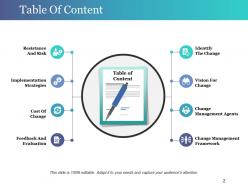
Slide 2: This slide presents Table of Contents showcasing- Identify The Change, Vision For Change, Change Management Agents, Change Management Framework, Resistance And Risk, Implementation Strategies, Cost Of Change, Feedback And Evaluation.
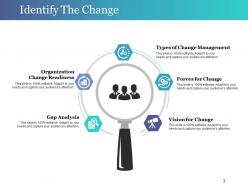
Slide 3: This is Identify The Change slide with magnifying glass imagery. State the following here- Types of Change Management, Forces for Change, Vision for Change, Gap Analysis, Organization Change Readiness.
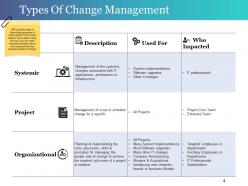
Slide 4: This slide states the Types Of Change Management with GAP analysis. GAP analysis helps in identifying key areas of improvement from current state to future state. Using this tool, you can make important decisions about the future and how the business needs to change.
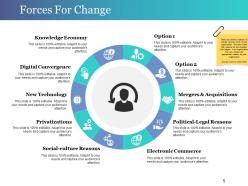
Slide 5: This slide states Forces For Change in a circular form. Some of its reasons are- Mergers & Acquisitions, Political-Legal Reasons, Electronic Commerce, Social-culture Reasons, Privatizations, New Technology, Digital Convergence, Knowledge Economy. There are several reasons for change at every level of your organization. We have listed a few reasons for the changes that happen in an organization. You can choose the appropriate reason for your organization.
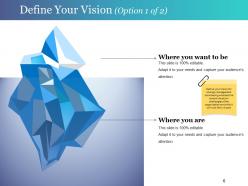
Slide 6: This is Define Your Vision slide stating- Where you want to be and Where you are. Define your Vision for change management considering what are the current situation/ challenges of the organization and what it will look like in future.
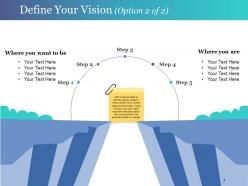
Slide 7: This is also Define Your Vision slide with steps. State them here.
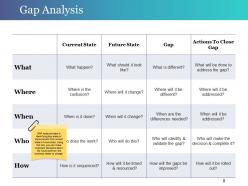
Slide 8: This slide states Gap Analysis in a tabular form. GAP analysis helps in identifying key areas of improvement from current state to future state. Using this tool, you can make important decisions about the future and how the business needs to change.
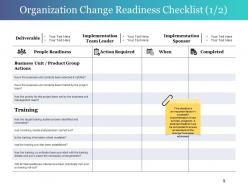
Slide 9: This slide showcases Organization Change Readiness Checklist. This checklist is an important factor in successful implementation of new policies, programs. A detailed checklist must be completed to ensure all elements of the change have been addressed.
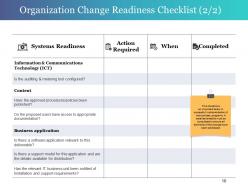
Slide 10: This slide also presents Organization Change Readiness Checklist. Use on the basis of your requirement.
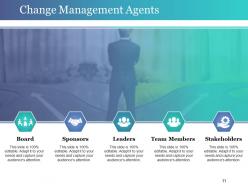
Slide 11: This slide states several Change Management Agents such as- Board, Sponsors, Leaders, Team Members, Stakeholders.
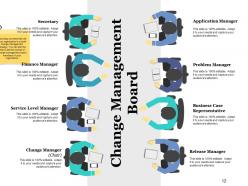
Slide 12: This slide displays Change Management Board with- Application Manager, Secretary, Problem Manager, Finance Manager, Business Case Representative, Service Level Manager, Release Manager, Change Manager (Chair). The board plays an essential role in an organization's overall change management strategy. You can edit the slide to add the names of change management board members of your organization.
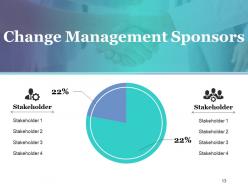
Slide 13: This slide displays Change Management Sponsors in percentage. Present them here.
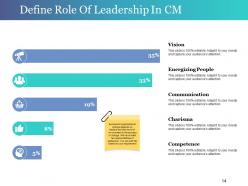
Slide 14: This is Define Role Of Leadership In CM slide. Few reponsibilities of a leader are- Vision, Energizing People, Communication, Charisma, Competence.
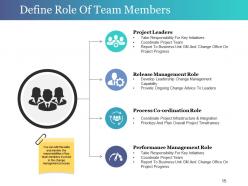
Slide 15: This is Define Role Of Team Members. Few of these responsibilities are- Project Leaders, Release Management Role, Process Co-ordination Role, Performance Management Role, You can edit this slide and mention the responsibilities of key team members involved in the change management process
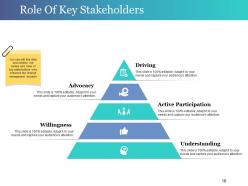
Slide 16: This slide states the Role Of Key Stakeholders such as- Driving, Active Participation, Understanding, Advocacy, Willingness. You can edit this slide and mention the names and roles of key stakeholders who influence the change management decision.
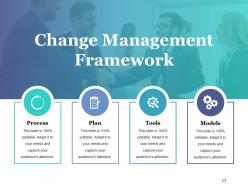
Slide 17: This slide showcases Change Management Framework with- Process, Plan, Tools, Models.
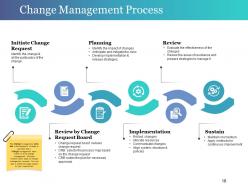
Slide 18: This slide showcases Change Management Process with its steps. These steps are- Initiate Change Request, Planning, Review, Sustain, Implementation, Review by Change Request Board. The change management process is the sequence of steps or activities that a change management team follow to drive change management. We have mention basic steps of change management process. You can add or delete the steps based on your requirement.
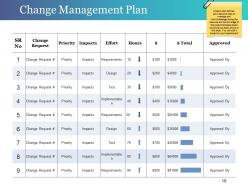
Slide 19: Thsis slide presents Change Management Plan in a tabular form.
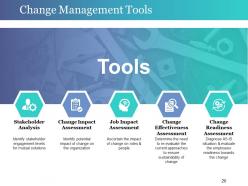
Slide 20: This slide showcases several Change Management Tools such as- Stakeholder Analysis, Change Impact Assessment, Job Impact Assessment, Change Effectiveness Assessment, Change Readiness Assessment.
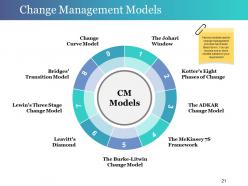
Slide 21: This slide showcases several Change Management Models which are- CM Models, The Johari Window, Kotter's Eight Phases of Change, The ADKAR Change Model, The McKinsey 7S Framework, The Burke-Litwin Change Model, Leavitt's Diamond, Lewin's Three Stage Change Model, Bridges' Transition Model, Change Curve Model. Various models used in change management process have been listed. You can choose one or more models based on your requirement.
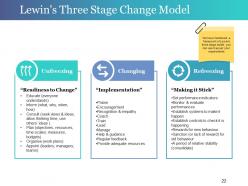
Slide 22: This slide showcases a framework of Lewin's Three Stage Change Model with the following sub headings- Unfreezing, Changing, Refreezing. This framework can be altered/ modified as per your requirement.
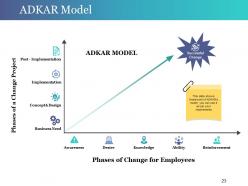
Slide 23: This slide shows a framework of ADKAR model, you can use it as per your requirements
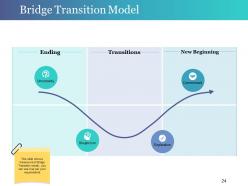
Slide 24: This is Bridge Transition Model framework slide.
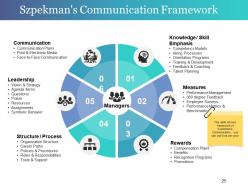
Slide 25: This slide showcases Szpekman's Communication Framework in a circular form. Its factors are- Knowledge / Skill Emphasis, Measures, Rewards, Structure / Process, Leadership, Communication.
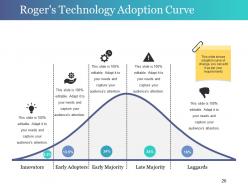
Slide 26: This slide shows Roger's Technology Adoption Curve. You can edit/ modify it as per your requirement.
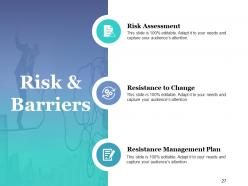
Slide 27: This slide states Risk & Barriers such as- Risk Assessment, Resistance to Change, Resistance Management Plan.
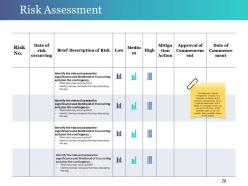
Slide 28: This is Risk Assessment slide in a tabular form. For effective change management process, it is important to identify all the possible risk elements which might get associated with it. Here is a template which you can use to list down all the possible types of risk and mention there possible impact on the project.
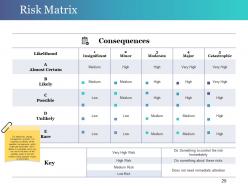
Slide 29: This is a Risk Matrix slide. Put relevant comparing data here.
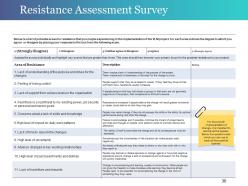
Slide 30: This slide showcases Resistance Assessment Survey. For the smooth implementation of change, it is important to identify all the barriers. Here is a questionnaire which you can use to track all the possible barriers.
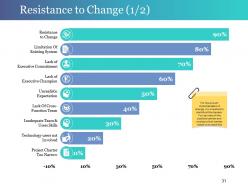
Slide 31: This slide states Resistance to Change
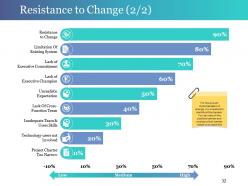
Slide 32: This is another slide stating Resistance to Change ranging form High, Medium to Low.
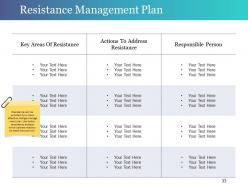
Slide 33: This slide shows Resistance Management Plan in a tabular form. Resistance can be avoided if you have effective change manage ment plan. Use this template to analyse which barriers need to be dealt first and how.
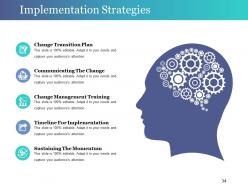
Slide 34: This slide states various Implementation Strategies with imagery.
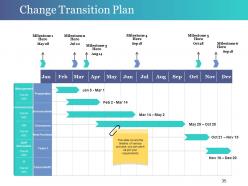
Slide 35: This slide showcases Change Transition Plan in a timeline form. Use it to present milestones etc.
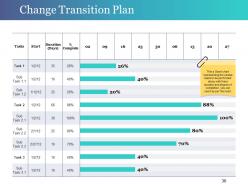
Slide 36: This slide states Change Transition Plan with a Gantt chart. This Gantt chart represents the various tasks to be performed along with their duration and degree of completion, you can use it as per the need.
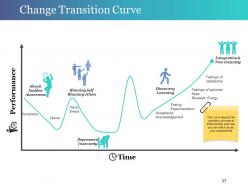
Slide 37: This is a Change Transition Curve slide. This curve depicts the transition process at different time intervals, you can edit it as per your requirements.
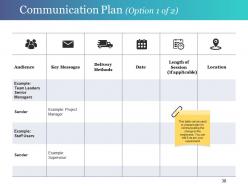
Slide 38: This slide states Communication Plan with a table. This table can be used to prepare a plan for communicating the change to the employees. You can edit it as per your requirement.
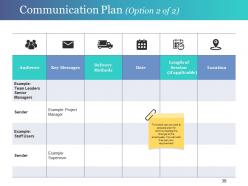
Slide 39: This slide also shows Communication Plan in a tabular form.
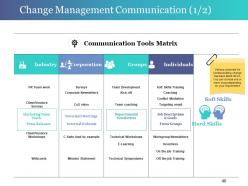
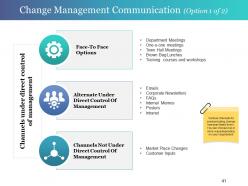
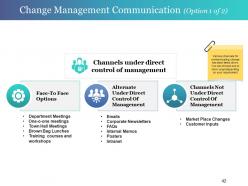
Slide 40: This slide presents Change Management Communication with Communication Tools Matrix. Various channels for communicating change has been listed down. You can choose one or more ways depending on your requirement.
Slide 41: This is another slide showing Change Management Communication (Option 1 of 2).
Slide 42: This is another variation of Change Management Communication slide.
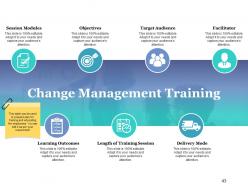
Slide 43: This slide shows Change Management Training with- Session Modules, Objectives, Length of Training Session, Target Audience, Delivery Mode, Facilitator, Learning Outcomes. This can be used to prepare plan for training and educating the employees. You can edit it as per your requirement.
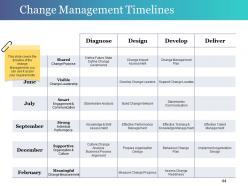
Slide 44: This slide presents Change Management Timelines. You can use it as per your requirement.
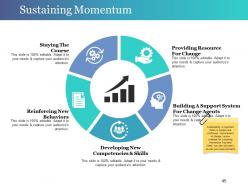
Slide 45: This is Sustaining Momentum slide in a circular form. you can use it as per your requirement.
Slide 46: This slide states the Cost Of Change Management with text boxes and imagery.
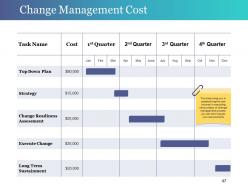
Slide 47: This slide states Change Management Cost in a tabular form. It helps you in ascertaining the cost incurred in executing various steps of change management process, you can edit it as per your requirements.
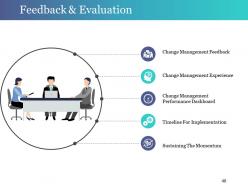
Slide 48: This is Feedback & Evaluation slide with imagery stating- Change Management Feedback, Sustaining The Momentum, Timeline For Implementation, Change Management Experience, Change Management Performance Dashboard.
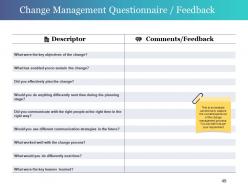
Slide 49: This slide presents Change Management Questionnaire / Feedback. It is an analysis carried out to capture the overall experience of the change management process. You can edit it as per your requirement.
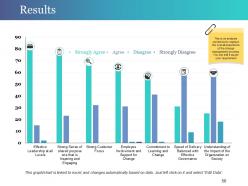
Slide 50: This slide presents Results in a bar graph/ chart form with the following parameters- Strongly Agree, Agree, Disagree, Strongly Disagree.
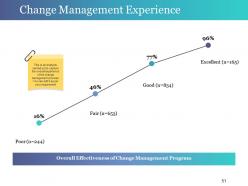
Slide 51: This slide states Change Management Experience for analysis.
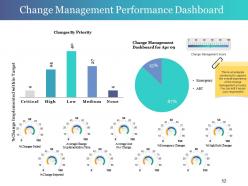
Slide 52: This slide showcases Change Management Performance Dashboard in charts and graphs. Use it as per your requirement.
Slide 53: This is Change Control Process Icon Slide. Use as per your requirement.
Slide 54: This is another variation of Change Control Process Icon Slide.
Slide 55: This is a Coffee Time slide to halt. You can change the slide content as per need.
Slide 56: This slide is titled Charts & Graphs to move forward. You can change the slide content as per need.
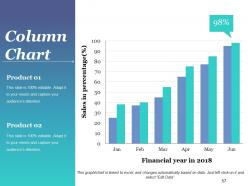
Slide 57: This slide presents a Column Chart for showcasing product/company growth, comparison etc.
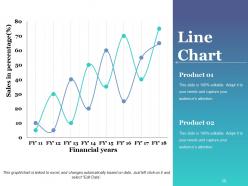
Slide 58: This slide presents a Line Chart for showcasing product/company growth, comparison etc.
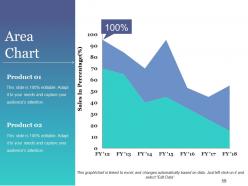
Slide 59: This slide shows an Area Chart. Use this for the comparison of product.
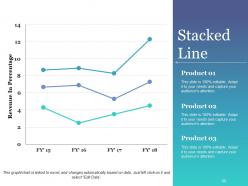
Slide 60: This slide presents Stacked Line graph to show product/ entity growth, comparison etc.
Slide 61: This slide is titled Additional Slides to proceed forward. You can change the slide content as per need.
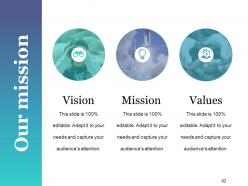
Slide 62: This is Our Mission slide stating Vision, Mission and Values with icons. Mention all these aspects here.
Slide 63: This slide showcases Our Team specifications with name, designation and image boxes.
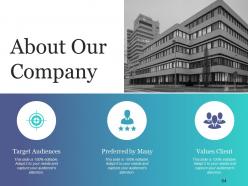
Slide 64: This is About Our Company slide. State business aspects/about the company facts, figures etc. here.
Slide 65: This is a Business Quote slide to show business value/policy/belief.
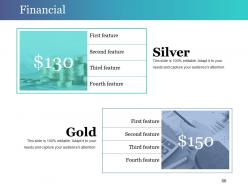
Slide 66: This is a Financial score slide. State financial aspects, information etc. here.
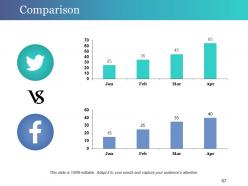
Slide 67: This slide showcases Comparison with which you can use for comapring two products/ entities etc.
Slide 68: This is Our Main Goal slide. State your goals here.
Slide 69: This is a Puzzle slide with text boxes. State information, specifications etc. here.
Slide 70: This is a Venn diagram image slide to show information, specifications etc.
Slide 71: This is a Target image slide. State your targets, goals etc. here.
Slide 72: This is a creative Mind Map image slide with text boxes to fill information.
Slide 73: This is a Bulb Or Idea image slide to state a new idea or highlight innovative specifications/information etc.
Slide 74: This is a Thank You slide with Email Address, Address# street number, city, state, Contact Numbers.
Change Control Process Powerpoint Presentation Slides with all 74 slides:
Our Change Control Process Powerpoint Presentation Slides are instruments of change. Implement improvements as you go forward.






FAQs for Change Control Process
So you'll need a proper change request process with impact assessments and approval workflows. Map out who approves what first - that's your foundation. Get reviewers who actually know the systems, not just whoever's available (I've seen too many disasters from rubber-stamping). Document your rollback plan before you touch anything. Match approval levels to risk - small config change doesn't need the same hoops as a major system update. Oh, and have a solid communication plan. Nobody likes surprises when stuff breaks.
So it's basically about risk and speed, you know? IT teams can push changes super fast with their automated pipelines - sometimes multiple times daily. Healthcare's more careful since patient safety is huge, but they can still move relatively quickly. Construction though? That's a whole different beast. Once you pour concrete, there's no ctrl+z, so everything needs tons of documentation and approvals beforehand. Really comes down to how much your industry can tolerate screwing something up. You'll want to match your process to that risk level.
Documentation saves your ass, trust me. You need that paper trail for every single change - capture the request, impact analysis, who signed off, implementation steps, plus rollback plans when stuff inevitably breaks. Real-time documentation is key here, don't try reconstructing it later because you'll forget half the details. When stakeholders start throwing blame around (which happens more than you'd think), proper docs let you track what changed and why. It's honestly like having insurance for your sanity.
Figure out what'll actually get hit by your change first - systems, people, processes, the whole deal. Then rate everything high/medium/low across operations, security, user experience, etc. I always use a simple scoring matrix for this stuff. Get stakeholders from each area involved early. They catch things you'd never think of, trust me. Those "simple" changes? Yeah, they love to cascade in weird ways that'll bite you later. Document it all in your change request so the approval folks aren't flying blind. Don't skip the ripple effects part - assess technical risks, resources needed, potential downtime.
Honestly, the worst part is dealing with people who think change management is just bureaucratic BS. Can't say I blame them sometimes. You'll also get those panic requests where everyone wants to skip the process, plus scope creep that makes tiny tweaks become full rewrites. Show them why the process actually saves their ass instead of just adding work. Different approval paths for big vs small changes help too. Document everything - you'd be surprised how many patterns emerge from tracking what goes wrong. Oh, and figure out what's driving your team crazy specifically first, then build around fixing those issues.
Stop sending people change requests out of nowhere - that's why they're ignoring you. Get them in a room first and walk through what's happening. People actually care when they understand why something needs to change, not just what you're asking for. Figure out who needs what info too. Finance only cares about money, ops wants timelines. Send weekly summaries so changes don't blindside anyone (learned this the hard way). Oh, and have casual conversations before big changes hit - saves so much drama later.
Honestly, most teams I know use Jira or ServiceNow for change requests - they're pretty solid for handling approvals and workflows. GitHub works great if you're dealing with code changes specifically. Some places still use SharePoint or even spreadsheets (which is kinda painful but whatever works, right?). The main thing is picking something that actually tracks your requests from start to finish. Oh, and make sure it can send automatic notifications - nobody wants to be that person constantly pinging people for approvals. I'd just start with whatever your team already knows instead of learning something brand new.
Honestly, just focus on business impact first - what's gonna move the needle? Quick wins are gold because they get everyone hyped and show progress fast. Security stuff obviously can't wait though, that jumps to the front of the line no matter what. After that, look at what helps your big goals or fixes major customer headaches. Don't get stuck overthinking this forever (I've watched teams debate prioritization for weeks, it's painful). Dependencies matter too - some changes have to happen in order. A simple scoring system with your team helps keep politics out of it and makes decisions way cleaner.
Start spreading the word early - cast that net wide. Hit up everyone who might get impacted, not just the obvious people but also folks downstream who rely on those outputs. I'd rather over-communicate than deal with angry "nobody told me!" messages later (learned that the hard way). Use whatever channels work - email, Slack, meetings, carrier pigeons if needed. Your messaging needs to spell out what's changing, when it happens, and what people actually need to do about it. Don't forget to create space for questions before you flip the switch.
Honestly, I'd focus on the basics first - track how often your changes actually work without breaking stuff. That's your change success rate right there. Also watch rollback frequency because nobody wants to be the person constantly undoing things at 2am (been there). Timeline accuracy matters too - are you hitting your planned dates? Don't forget stakeholder feedback since they'll let you know real quick if communication sucks. Downtime is obviously huge. Set up a monthly dashboard with these metrics. Makes it way easier to catch problems before they get worse.
Start with the basics - change forms, approval workflows, all that documentation stuff. Tabletop exercises work way better than just reading procedures, trust me. Have people walk through real scenarios they'll actually face. Different teams need different training since they interact with the process totally differently. Oh and definitely pair newbies with someone experienced for their first few changes - that mentoring thing actually works. The whole point is making it hands-on rather than theoretical. I've noticed people retain it better when they practice with examples from your actual environment instead of generic textbook stuff.
Dude, regulated industries are a whole different beast. FDA validation, SOX compliance - you can't just wing it like at a startup. Everything needs documentation and these crazy long approval chains. Your change process has to include regulatory impact assessments, sometimes external auditor reviews, plus mountains of paperwork that honestly feels ridiculous. Takes forever too because you're checking compliance risks on top of the usual technical stuff. My advice? Build those regulatory checkpoints into your normal workflow from day one. Trust me, you don't want to be figuring this out when auditors show up unannounced.
Okay so post-implementation reviews are basically making sure you didn't accidentally blow everything up. Check if your changes actually did what they were supposed to do. Did anything weird happen that you didn't see coming? I've learned this the hard way - sometimes fixes create whole new problems. The goal is figuring out what worked, what didn't, and why. You'll want to document lessons learned so you don't make the same mistakes twice. Honestly, skipping this step is like driving with your eyes closed. Set a reminder for 1-2 weeks after deployment or you'll totally forget.
Right after you close a change, write down what worked and what bombed - even the weird stuff nobody saw coming. Yeah, I know you're probably already fighting three other fires, but seriously do this anyway. Your future self will thank you. During planning meetings and CAB reviews, actually look at these old notes to catch patterns. Otherwise you'll just repeat the same dumb mistakes over and over. Make your team scan through similar past changes before they start new ones. Oh, and create some basic template so people don't have to reinvent the wheel every time.
Honestly? Change sucks for most people, so you gotta make it less terrifying. Celebrate teams when they roll with new processes quickly - people love getting recognized for stuff like that. Get your folks trained on basic change management so they actually get why being flexible matters. Leadership has to walk the walk too, not just talk about it. Oh, and create spaces where people can complain about changes without getting their heads bitten off. But here's the real trick - involve your team in creating the changes instead of just dumping them on people. When they help build the solution, they'll actually want to use it.
-
Unique and attractive product design.
-
Very unique and reliable designs.