

Client relationship management powerpoint presentation slides





Try Before you Buy Download Free Sample Product
 Impress Your
Audience
 100%
Editable
 Save Hours
of Time


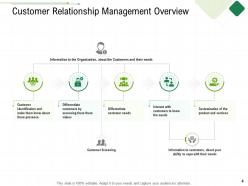
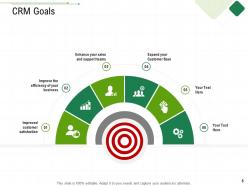
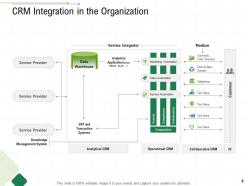
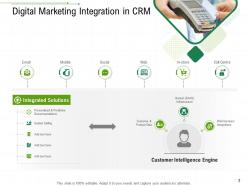
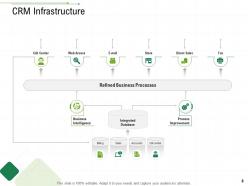
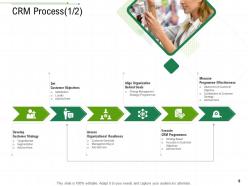
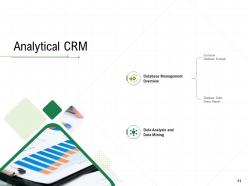
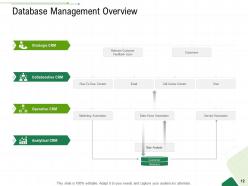
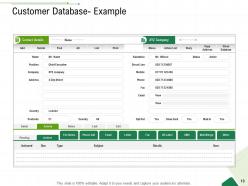
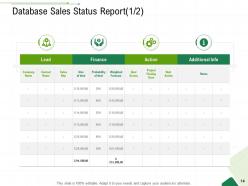
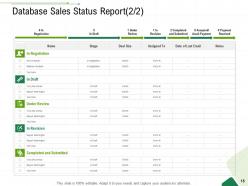
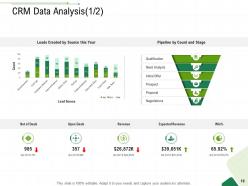
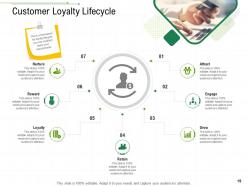
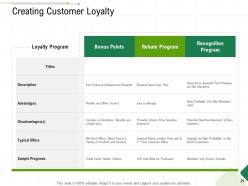
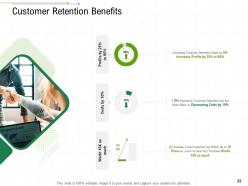
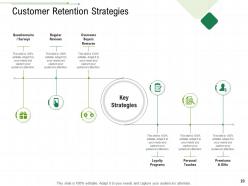
Employ this Client Relationship Management PowerPoint Presentation Slides and efficiently analyze the customer lifecycle in relation to your company. Provide a crisp and accurate overview of the customers and their needs by taking advantage of these customer-interactions PPT templates. Elaborate on the relationship management goals like an enhanced technical support system, improved customer satisfaction, and expansion of customer base through these consumer-centric PPT layouts. Mention the importance of maintaining and integrating customer relationship development infrastructure such as increased lead generation rate and conversion rate using our strategic management PPT slideshow. This client retention PPT presentation allows you to display the entire database sales status report and customer loyalty lifecycle in a well-organized and structured format. Employ this marketing tool PPT deck to highlight the list of various marketing channels that will ensure brand awareness and hence will help you reach the right target market and audience. Click the download button and illustrate the roadmap for effective brand positioning for your audiences.
People who downloaded this PowerPoint presentation also viewed the following :
Client relationship management powerpoint presentation slides with all 50 slides:
Use our Client Relationship Management Powerpoint Presentation Slides to effectively help you save your valuable time. They are readymade to fit into any presentation structure.










FAQs for Client relationship management
Honestly, you need three main things working together - good data, solid processes, and your team actually caring. Get one central database for all client stuff instead of having info scattered everywhere (I swear spreadsheets multiply when you're not looking). Map out consistent ways to follow up and onboard people. But here's the thing - the relationship part matters most. Regular check-ins, actually listening to what they need, understanding their goals. Your whole team has to buy in though, because if half your people ignore the system, you're screwed. I'd start by looking at where you currently touch clients and finding the biggest holes.
Honestly, CRM tools are game-changers for this stuff. They track every customer interaction so you can personalize your outreach based on what people actually bought and when they last engaged. It's basically a cheat sheet for conversations. I'd start by cleaning up whatever customer data you already have - that part's boring but necessary. Then set up automated follow-ups for people who've gone quiet. You can segment customers for targeted campaigns too. The cool thing is you'll start noticing patterns in how people behave, which helps you figure out who might be about to bail. Just focus on one strategy at a time though.
Dude, analytics is like having x-ray vision for your clients. You can actually predict who's about to bail on you and spot upselling chances your competition misses completely. Purchase history tells you SO much - honestly blew my mind when I first started digging into it. Patterns in client behavior become super obvious once you know what to look for. Plus you can finally measure what's actually moving the needle vs what just makes you feel productive. My advice? Don't go crazy at first. Pick something simple like satisfaction scores and really dive into what's driving those numbers. Way more effective than trying to track everything at once.
Honestly, clients eat this stuff up when you actually personalize things for them. Makes them feel like you give a damn about who they are, not just their wallet. I keep notes on how each person likes to communicate - some want quick texts, others need the full email breakdown. Even works on the super picky ones, which kinda surprised me at first. They stick around longer when they feel heard. Trust builds fast too because they realize you're not just copy-pasting the same response to everyone. Takes like two seconds to reference something from your last conversation, but it pays off huge.
Honestly, data migration is gonna be your worst nightmare - that stuff always takes twice as long as planned. Getting people to actually stick with the new system is brutal too, especially if they've been doing things the old way forever. Integration with your current tools will probably throw you some curveballs. Oh, and the setup? Way more complicated than they make it sound in demos. Training isn't just about showing people where to click - you gotta sell them on why it's worth the hassle. Start small with people who are actually excited about it, then roll out wider once you've fixed the inevitable problems.
Track the basics first - retention rates, repeat purchases, customer lifetime value. Sales cycle length matters too since CRM should speed things up. Customer satisfaction and NPS scores are solid indicators, even though getting people to actually fill out surveys is like pulling teeth. Here's what trips people up though - internal stuff like adoption rates and data quality. Your team has to actually USE the system or you're just wasting money. Pick maybe 3-4 metrics that match what you're trying to accomplish and check them monthly. Don't go crazy with too many.
B2B is all about relationships - you're dealing with specific people who take forever to make decisions. Think months, not minutes. You become their go-to advisor instead of just pushing products. B2C? Totally different game. Volume-based, quick decisions, and honestly way more about the overall brand experience. The communication styles are night and day too. Formal detailed stuff for B2B folks, but keep it casual and fun for regular consumers. B2B involves like 5 different people in every decision while B2C customers just... buy things. Match your approach to how they actually shop.
So first thing - add feedback fields to your CRM for client comments and survey stuff. Automated workflows are a game changer here, they'll pull feedback from emails and support tickets without you doing it manually (seriously saved my sanity). I like tagging everything as "complaint," "praise," whatever so you can actually find things later. Oh and make sure your team can access it too, otherwise what's the point? Honestly just start with one feedback section on client profiles. You can always expand from there once you get the hang of it.
Honestly, AI and machine learning are total game-changers for predicting what customers will do next and handling all that boring repetitive stuff automatically. Chatbots don't completely suck anymore either, which is nice. The analytics tools are getting crazy good at catching problems before they blow up. What I love most? Your team can actually focus on relationship-building instead of drowning in spreadsheets and data entry. Social media integration is way smoother now too. My advice - figure out what's driving you nuts operationally, then see which tech actually fixes that specific headache.
Honestly, social media is perfect for this. Follow your top clients on LinkedIn and actually engage with their stuff - not just liking everything but dropping real comments on their posts. I always congratulate people on promotions or company wins because it feels way more genuine than those endless email threads we all hate. Share articles you think they'd actually want to read, not just random industry fluff. Twitter and Instagram work too if that's more your scene. The trick is being genuinely interested in what they're doing, not turning every interaction into a sales pitch. Start small - maybe pick 10 clients and engage weekly.
Okay so first thing - train everyone on the basics like navigation and data entry. But here's where companies screw up: they stop there. Your people need to actually understand WHY they're entering all this data and how it helps hit sales targets. Different teams use CRM totally differently, so don't do one-size-fits-all training. Marketing vs sales need separate sessions. Set up some ongoing coaching and maybe get a few CRM champions on each team to help others. Oh, and tie usage to performance metrics so people can see it's actually worth their time - otherwise they'll just ignore it.
Yeah totally! Start with something free like HubSpot's basic version or honestly just a Google Sheet works great. I've literally seen companies waste money on expensive CRM software that nobody uses while others crush it with simple spreadsheets. Track every customer chat, what they like, what they've bought. Your phone contacts can work at first too - just add notes about each person. Set up reminders to follow up. The real trick is actually doing it consistently, you know? Doesn't matter if it's fancy software or not.
Honestly, just treat their data like you'd want yours treated. Only grab what you actually need - don't be one of those companies asking for everything. Be upfront about what you're doing with it instead of burying stuff in fine print. Get consent first, obviously. Follow whatever privacy laws apply to you (GDPR, CCPA, etc). Don't share anything without asking, even with your own team unless they need it for work. Oh, and limit who can access what. Every few months, take a step back and audit your practices. Would you be cool with how you're handling things if the roles were flipped?
Oh man, this is huge. Some cultures want you building relationships for *months* before talking business - others think you're wasting their time. Germans love direct feedback, but try that in Japan and you'll tank the whole deal. I learned this the hard way when I totally botched a gift exchange once (still cringe thinking about it). Meeting styles, hierarchy stuff, timing - it all changes by region. Honestly? Do your homework on their specific business customs before you even hop on that first call. Sounds obvious but you'd be surprised how many people skip this step.
CRM totally changes your forecasting game - all your client data and deal stages live in one spot instead of scattered everywhere. You'll actually know where your pipeline stands rather than throwing darts at a board. Historical patterns become super clear too. Without it? Good luck predicting anything accurately. The key is getting your team to update deal stages religiously (easier said than done, I know). Once that's happening consistently, you can spot bottlenecks fast and focus on deals that'll actually close. Makes the whole revenue prediction thing way less stressful.
-
Graphics are very appealing to eyes.
-
Understandable and informative presentation.
-
Easily Editable.
-
Awesome presentation, really professional and easy to edit.
-
Great product with effective design. Helped a lot in our corporate presentations. Easy to edit and stunning visuals.