


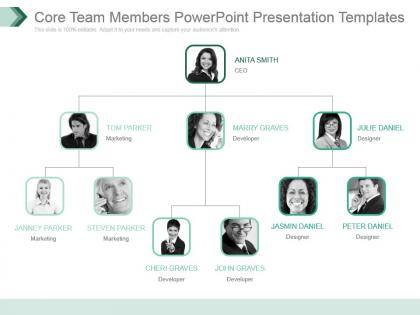
Core team members powerpoint presentation templates




Try Before you Buy Download Free Sample Product
 Impress Your
 Audience
 100%
100% Editable
 Save Hours
 of Time


Your advance becomes effortless with our Core Team Members Powerpoint Presentation Templates. They enable you to glide along.
People who downloaded this PowerPoint presentation also viewed the following :
Core team members powerpoint presentation templates with all 7 slides:
You have got your task cut out. Put it all in place with our Core Team Members Powerpoint Presentation Templates.


FAQs for Core team members
Definitely include team member intros with photos and backgrounds - that personal touch makes a huge difference. Make sure roles are crystal clear so there's no confusion about who handles what. Your team's wins and track record should be front and center too. Oh, and don't skip contact info! I've seen so many teams forget that basic stuff. The collaboration style section is honestly what most stakeholders care about anyway. Keep it flowing naturally, not like some boring org chart. Start simple with your slide structure, then tweak it based on who you're presenting to.
Look, a core team template is basically your cheat sheet for not driving each other crazy. It spells out who's responsible for what, how you'll communicate, and when you're meeting. No more "wait, whose job was this again?" moments. Honestly, it's like having house rules but for work - way less exciting than it sounds, but it saves so much headache later. You'll spend way less time confused about logistics and actually get stuff done together. I'd start by figuring out what's already making your team want to scream, then build the template around fixing those specific problems first.
Honestly, visual design makes or breaks whether your team will actually use those templates. Clean headers and bullet points help people scan fast instead of hunting for info. I've seen too many teams ignore messy templates that are just walls of text - even when the content's solid. Color coding and white space? Game changers. Your brain doesn't have to work overtime figuring out the format. Short story: make it scannable and people will stop avoiding it. Trustworthy-looking templates get used way more than cluttered ones.
Honestly, just tweak the templates to fit how your company actually works. Super collaborative culture? Add more group brainstorming and consensus stuff. More top-down? Focus on clear approval chains instead. Role definitions can be loose or detailed - whatever works for you guys. I'd probably start small though - pick one template, test it with a team, then adjust based on their feedback. Way easier than trying to perfect everything upfront. Some companies get way too caught up in making templates perfect when really you just need something that doesn't suck and matches your vibe.
Honestly, just walk through why each person matters to your startup - not just their title but their actual wins and experience. Previous exits? Domain knowledge? Weird skills that give you an advantage? Put that stuff front and center. Investors hate when teams just list job descriptions without the "so what" factor. Keep the bios short but meaty. Oh, and definitely connect how your combined background tackles the specific problems you'll hit. Like, if you're doing fintech, don't just say someone "has finance experience" - tell me they built payment systems at three different companies.
Get everyone involved right from the beginning - seriously, don't let leadership just decide this stuff alone. Do a survey or workshop where people can actually say what roles and communication styles matter to them. I've watched so many teams bomb this step and then act shocked when nobody uses the template! You need to capture different work styles and personality types in there. Oh, and experience levels too - that's huge. Make it collaborative instead of some top-down thing. That way everyone's actually invested and sees themselves in the final result.
Miro or Figma are solid picks if you want to map everything out visually - roles, responsibilities, the whole team structure. Though honestly? Google Workspace or Notion work just as well if your team's more into text-based stuff. I've watched people get completely paralyzed trying to pick the "perfect" tool for like three weeks straight. Just grab whatever your team already knows how to use. Don't stress about making it flawless right away. Get the basics down first, then tweak it as you go. That's literally all you need to start.
Honestly, just turn your updates into mini-stories. Like, start with whatever problem you were dealing with, then walk through how you guys figured it out, and finish with what happened. Way better than boring bullet points! I've noticed teams kill it when they share actual customer stories or talk through project wins and fails - people actually pay attention. Throw in real details instead of vague stuff. Oh, and make sure there's some kind of stakes involved, you know? Your team should feel like they're following along with something that actually matters, not just sitting through another data dump.
Track how engaged people actually are during your presentations - like how many real questions they ask, not just polite ones. Also watch if decisions happen in the room or get pushed to those dreaded "offline conversations" (ugh). Follow-up actions are huge too - do people actually complete what they said they'd do? Oh, and see if stakeholders can explain your main points to their own teams later without butchering everything. Time-to-decision matters a lot. Nothing kills momentum like presenting the same deck four times because everyone's afraid to commit. Pick maybe 2-3 of these and track consistently.
Dude, templates are seriously clutch for remote teams. When you can't just tap someone on the shoulder, having standardized meeting formats and role definitions saves so much confusion. Different time zones? No problem - everyone can jump in using the same processes. New people get up to speed way faster too since they can't just watch what others do. I'd honestly start with whatever meeting agendas you use most, then move to project workflows. It sounds boring but trust me, the structure makes everything smoother when everyone's scattered around.
Don't make your templates super rigid - you'll just end up jamming square pegs into round holes. Different projects need totally different skill sets, so that one-size-fits-all approach never works. Team chemistry matters way more than people think too. I've seen great people on paper who just couldn't click with the rest of the group. Oh, and resist stuffing too many people in there. Smaller teams usually crush it compared to those bloated ones. Build in some flex points where you can actually swap roles around once you figure out what you're really dealing with.
So basically, start with your standard template then tweak it based on what you're actually dealing with. Simple projects? Just keep the essentials - maybe a project lead and someone who knows their stuff. Complex ones need more people (and yeah, compliance will somehow worm their way in regardless). Change up the reporting structure or how often you meet depending on how urgent things are. I'd also adjust who makes decisions based on your company culture - some places are super hierarchical, others not so much. Don't overthink it though. Just match the roles to what'll actually get the job done.
Honestly, get feedback from your team - it's the only way your template won't just collect digital dust. I'd grab 3-4 people from different areas and tell them to roast it. They'll catch stuff you missed completely. Like, engineering might need way more technical specs while your boss just wants the big picture numbers. Had one template that got torn apart and rebuilt after the first review session (but it was actually good afterward). Different perspectives will show you which slides are confusing or don't make sense in order. Just be ready for brutal honesty.
Every 5-7 minutes, throw in something interactive - polls, quick breakouts, or "raise your hand if..." moments. Ask people to share examples from their actual work instead of made-up scenarios (way better engagement, trust me). Don't just lecture through your templates - use them as conversation starters and let the team jump in with their insights. Movement breaks help too if it's long. Oh, and start by asking what challenges they're currently dealing with rather than jumping straight into the template. Makes them contributors instead of just sitting there zoning out.
Honestly, culture plays a huge role in how you set up team templates. Some teams are super hierarchical and formal - they want clear chains of command and detailed docs for everything. Others are way more casual and prefer just talking things through. The feedback thing is big too - in some cultures, junior people would never openly critique senior members, while other teams expect everyone to speak up. I'd just ask your team directly what they prefer rather than guessing. Maybe send out a quick survey about communication styles and meeting preferences? Way easier than trying to read the room constantly. Oh, and don't assume what worked at your last company will work here - I learned that the hard way.
-
Understandable and informative presentation.
-
Great quality product.