

Cost Reduction Action Plan Risk Assessment And Mitigation Plan




Try Before you Buy Download Free Sample Product
 Impress Your
 Audience
 100%
100% Editable
 Save Hours
 of Time


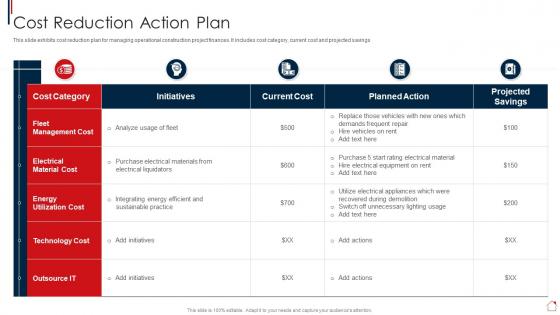
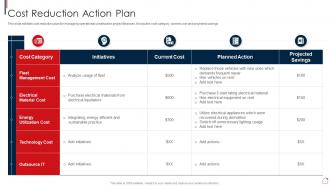
This slide exhibits cost reduction plan for managing operational construction project finances. It includes cost category, current cost and projected savings.
People who downloaded this PowerPoint presentation also viewed the following :
Cost Reduction Action Plan Risk Assessment And Mitigation Plan with all 6 slides:
Use our Cost Reduction Action Plan Risk Assessment And Mitigation Plan to effectively help you save your valuable time. They are readymade to fit into any presentation structure.





FAQs for Cost Reduction Action Plan Risk Assessment
Stop treating quality like an afterthought - bake it into every step instead of dumping everything on testing at the end. Way cheaper to catch stuff early. We learned this lesson brutally on one project where we skipped code reviews to "move faster" and holy shit, spent triple the time fixing bugs later. Automate the boring repetitive stuff and use risk-based testing so you're not wasting time on low-impact areas. Don't skimp on anything users actually touch though. Map out where you currently check quality and see what you can move earlier in the process.
First thing - map out where your money's actually going: staff costs, tech, vendors, rent, whatever. Hunt for stuff you're double-paying for or barely using (seriously, those software subscriptions add up fast). Manual processes are money drains, so see what you can automate. But here's the thing - don't touch anything customers directly see. Test changes on a small scale first, then watch your service metrics like a hawk when you roll things out. The sweet spot is trimming internal waste while your customers stay happy.
Look, tech is honestly your best friend for cutting costs smartly. Automate the boring stuff to save cash while getting real-time alerts when things start going wrong. AI can show you exactly where to trim without screwing up quality - honestly, those warning dashboards have saved my butt more times than I can count. Find solutions that do double duty: cut expenses AND keep you in the loop about risks. Start by figuring out what's bleeding money the most. Then hunt for tech that fixes those pain points while keeping you informed. It's like having a really smart assistant who actually pays attention.
Honestly, data analytics is a game-changer for catching problems before they mess up your cost-cutting plans. Look at your historical data first - you'll see patterns like which departments always struggle when budgets get tight. Predictive models are pretty neat because they can forecast employee turnover or customer churn when cuts kick in. I'd definitely run some scenario simulations to test different approaches beforehand. Oh, and set up real-time dashboards to track risk indicators. That way if things start going south during rollout, you can adjust fast instead of being blindsided.
Honestly, the worst thing you can do is slash too much too quickly - you'll wreck your operations and lose good people. Most companies just focus on the obvious stuff like layoffs but totally miss the sneaky costs that actually matter more. Also, if you don't explain WHY you're cutting things, your team's gonna panic and start looking for new jobs (which kinda defeats the whole point, right?). Don't be that person who cuts training budgets to save a few bucks then wonders why everything falls apart later. Start with a real plan, get your people involved in spotting waste, and actually check if changes are working before you make them permanent.
Honestly, cross-functional teams are a game changer for spotting risks and cutting costs. Finance people catch budget issues that ops totally miss. Tech teams see process problems that could save you tons of money. Getting everyone involved upfront means you're not scrambling to fix expensive mistakes later - and trust me, that cleanup phase sucks. The trick is giving these teams actual power to make decisions, not just having them sit there and nod. I'd start with whatever's bleeding the most money and build teams around those problem areas first.
Look at revenue per employee and customer satisfaction scores first - those tell the real story. Track employee turnover too because people bolt when cuts go too deep. Quality stuff matters: defect rates, complaints, all that. Honestly, monitoring just total expenses is pretty useless since obviously those drop. What you really need are productivity measures and how long it takes to get products out. Customer retention rates will show if you're being smart about this or just hacking away randomly. Monthly dashboards work best so you can fix things fast if stuff starts going sideways.
Honestly, regulations are such a pain when you're trying to cut costs. They force you to keep certain staffing levels and follow specific procedures whether you like it or not. Plus all that reporting stuff gets expensive fast. But here's what I've learned - sometimes they actually save you from making dumb mistakes that would cost way more later. Like, standardized processes can prevent major screw-ups. My suggestion? Run everything by your compliance people before you commit to changes. Trust me, it's better than having to undo everything halfway through because you missed some random requirement.
Look, when you're doing quick cost cuts, you're basically in crisis mode - worried about keeping quality up while budgets tank, or not completely destroying morale during layoffs. It's all damage control, and honestly? Those band-aid fixes can bite you later. Long-term cuts are totally different though. You've got time to think about market shifts, tech changes, whether your whole cost structure even makes sense in a few years. My advice: figure out which category your stuff falls into first. Then match your risk planning to that timeline. Short-term is survival, long-term is actually building something that lasts.
Look, if your people aren't on board with cost cuts, you're basically screwed from the start. I've seen this play out badly when leadership just announces changes without explanation. What actually works? Tell them WHY you're making cuts and get their input on HOW to do it. Honestly, employees often have the best money-saving ideas since they know the day-to-day waste better than anyone. Plus when they feel heard, they won't sabotage quality or drag their feet during changes. Open communication upfront = way fewer expensive screw-ups later.
Honestly, bring people into the conversation early - like way before you announce anything. Share the actual numbers driving this stuff so they don't feel totally blindsided (I've watched so many of these things crash and burn when leadership just drops news out of nowhere). Talk to your biggest influencers first, one-on-one if you can. Be super specific about how changes hit each group differently. Give them space to weigh in on how you roll things out. Most people will get on board if you show them the bigger picture and what's at stake long-term.
So outsourcing for cost cuts? Yeah, you're gonna deal with way more than just the money side now. Suddenly you've got vendor reliability issues, data security headaches, quality control problems - honestly feels like swapping one headache for like five smaller ones sometimes. But hopefully they ARE smaller, you know? Check their track record first. Look at their disaster recovery plans. Figure out how you'll actually keep tabs on the work they're doing. I'd make some kind of risk matrix that compares all these new operational headaches against what you'll actually save. Worth doing the math upfront.
Look, successful companies figured out something pretty smart - they don't treat cost-cutting and risk management as separate things. Map out your whole operation first to find where you're wasting money AND where you're vulnerable. Yeah, automation and analytics cost upfront, but honestly? The ROI is worth it. Here's the thing though - never just slash budgets randomly. Cut the fat while making your core stuff stronger. Oh, and start small with pilot programs. Test everything, measure like crazy, then expand what actually works. Way less painful than big changes that might backfire.
Don't just slash budgets and cross your fingers - that's a recipe for disaster. Build backup plans into every cost cut you make. Cutting staff? Have contractors on speed dial for when things get crazy. My old boss learned this the hard way when they downsized right before a major project hit. Think through what could blow up with each reduction and prep alternatives ahead of time. I always map out three scenarios: things go great, things go terrible, and the realistic middle ground. Sounds like overkill but it'll save you from scrambling later when problems hit.
Honestly, you've gotta speak different languages to different people. Execs just want the bottom line impact, but your team needs to know how this messes with their actual day-to-day stuff. Don't sugarcoat the bad news - I've watched that blow up so many times. Be upfront about concerns and give realistic timelines. What's changing vs. what's staying the same? Make that crystal clear. Your team especially needs to hear how you'll have their back during the transition. Oh, and don't do some big announcement and disappear. People will have questions later.
-
The designs are very attractive and easy to edit. Looking forward to downloading more of your PowerPoint Presentations.
-
This PowerPoint layout is very helpful from a business point of view, and it's visually stunning too! I'm so happy with this product because it has helped me understand and deliver great presentations.