

CRM In Real Estate Company Powerpoint Presentation Slides





Try Before you Buy Download Free Sample Product
 Impress Your
 Audience
 100%
100% Editable
 Save Hours
 of Time


Identify the best methods to grab the real estate customer attention with the CRM In Real Estate Company Powerpoint Presentation Slides. Utilize our real estate management system PPT slideshow and present challenges faced in the real estate business, and solutions to overcome those challenges. Present key benefits of CRM software such as built-in phone, email, best sales lead, etc. These real estate CRM software PowerPoint slides showcase the organizational structure of real estate through flow charts which allows your team to understand how CRM works in the real estate business. You can also show the benefits of CRM in the real estate business. This includes maximizing the conversion rate, giving reminders, updating information, etc. Also, present the various modes by which customer complaints can be collected such as telephone, personal visit, email, etc. This customer relationship management PPT slideshow is useful for showing the software cycle of CRM in real estate. Information related to the customer of real estate business can be easily presented with the help of these fully editable slides. Also, depict end to end sales execution, channels to capture customers, customer distribution criteria, lead generation roadmap, etc. kinds of information by downloading our ready-to-use CRM software Presentation.
People who downloaded this PowerPoint presentation also viewed the following :
Content of this Powerpoint Presentation
Slide 1: This slide introduces CRM In Real Estate Company. State your Company name and begin.
Slide 2: This slide displays Agenda
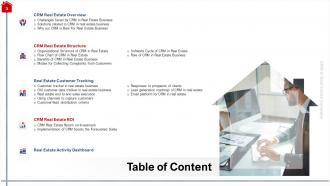
Slide 3: This slide represents Table of Content.
Slide 4: This slide presents Table of Content
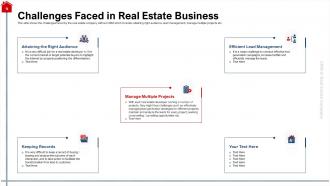
Slide 5: This slide shows the challenges faced by the real estate company without CRM which includes attaining right audience, lead management, manage multiple projects etc.
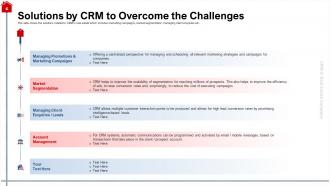
Slide 6: This slide shows the solutions related to CRM in real estate which includes marketing campaigns, market segmentation, managing client enquiries etc.
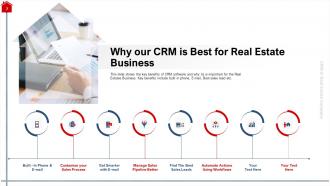
Slide 7: This slide shows the key benefits of CRM software and why its is important for the Real Estates Business. Key benefits include built in phone, E-mail, Best sales lead etc.
Slide 8: This slide depicts Table of Content.
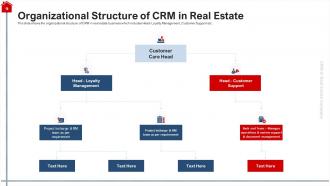
Slide 9: This slide shows the organizational structure of CRM in real estate business which includes Head- Loyalty Management, Customer Support etc.
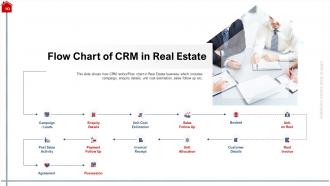
Slide 10: This slide shows how CRM works/Flow chart in Real Estate business which includes campaign, enquiry details, unit cost estimation, sales follow up etc.
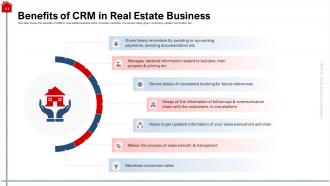
Slide 11: This slide shows the benefits of CRM in real estate business which includes maximize conversion rates, gives reminders, update information tec.
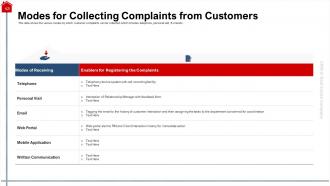
Slide 12: This slide shows the various modes by which customer complaints can be collected which includes telephone, personal visit, E-mail etc.
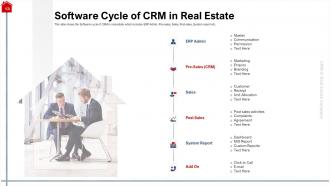
Slide 13: This slide shows the Software cycle of CRM in real estate which includes ERP Admin, Pre-sales, Sales, Post sales, System report etc.
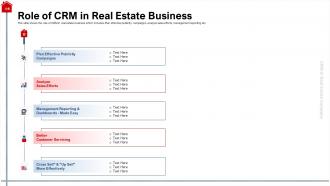
Slide 14: This slide shows the role of CRM in real estate business which includes Plan effective publicity campaigns, analyze sales efforts, management reporting etc.
Slide 15: This slide displays Table of Content.
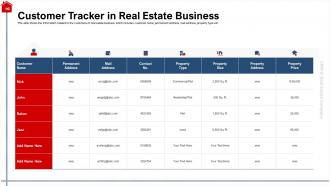
Slide 16: This slide shows the information related to the customers of real estate business which includes customer name, permanent address, mail address, property type etc.
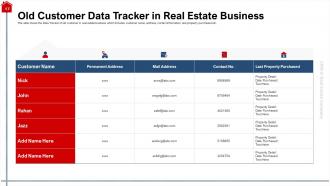
Slide 17: This slide shows the Data Tracker of old customer in real estate business which includes customer name, address, contact information, last property purchased etc.
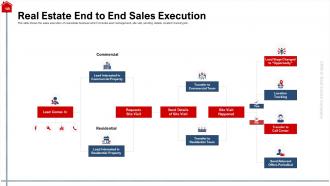
Slide 18: This slide shows the sales execution of real estate business which includes lead management, site visit, sending details, location tracking etc.
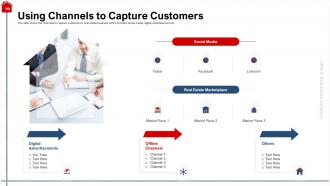
Slide 19: This slide shows the channels to capture customers in real estate business which includes social media, digital advertisement etc.
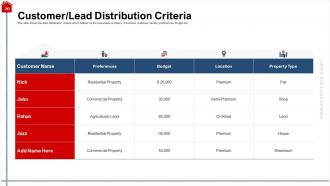
Slide 20: This slide shows the lead distribution criteria which follows by the real estate company. It includes customer names, preferences, budget etc.
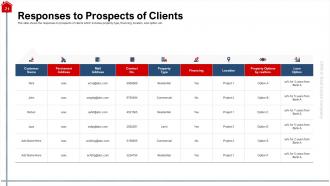
Slide 21: This slide presents the responses to prospects of clients which includes property type, financing, location, loan option etc.
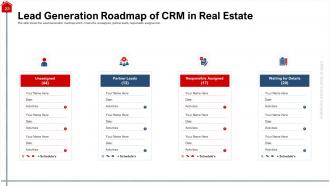
Slide 22: This slide shows the Lead Generation roadmap which covers the unassigned, partner leads, responsible assigned etc.
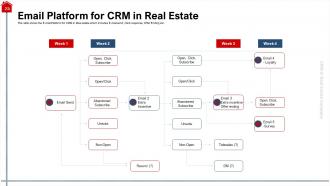
Slide 23: This slide shows the E-mail Platform for CRM in Real estate which includes E-mail send, Click response, Offer Ending etc.
Slide 24: This slide displays Table of Content
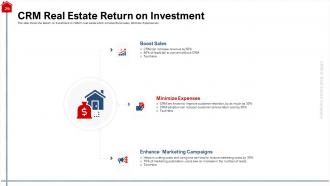
Slide 25: This slide shows the Return on Investment on CRM in real estate which includes Boost sales, Minimize Expenses etc.
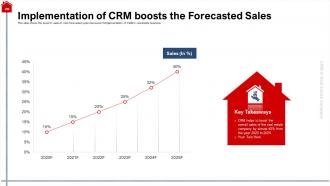
Slide 26: This slide shows the boost in sales in next forecasted years because of implementation of CRM in real estate business.
Slide 27: This slide displays Table of Content
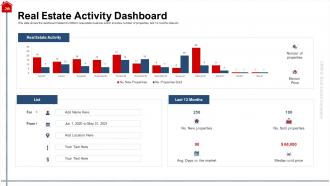
Slide 28: This slide shows the dashboard related to CRM in real estate business which includes number of properties, last 12 months data etc.
Slide 29: This is CRM in Real Estate Company Icons Slide.
Slide 30: This slide is titled as Additional Slides for moving forward.
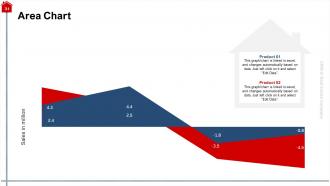
Slide 31: This slide displays Area Chart for Comparison of products.
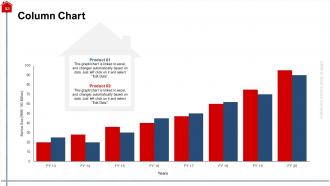
Slide 32: This slide displays Column Chart.
Slide 33: This slide represents Agenda.
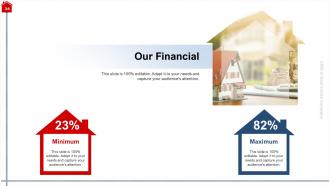
Slide 34: This is Financial slide.
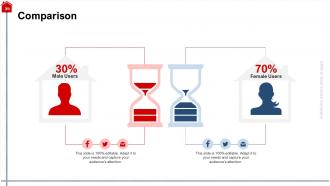
Slide 35: This slide shows Comparison between Male and Female users.
Slide 36: This is Puzzle slide.
Slide 37: This slide is titled as Post It Notes. Post your important notes.
Slide 38: This slide represents Magnifying Glass
Slide 39: This slide shows Venn diagram.
Slide 40: This slide represents Goals of the Company.
Slide 41: This is Thank You slide with Contact details.
CRM In Real Estate Company Powerpoint Presentation Slides with all 41 slides:
Use our CRM In Real Estate Company Powerpoint Presentation Slides to effectively help you save your valuable time. They are readymade to fit into any presentation structure.


FAQs for CRM In Real Estate Company
Honestly, start with the basics - solid contact management and automated follow-ups are non-negotiable. You want MLS integration obviously, plus email marketing and transaction tracking. Property matching is a game-changer though, it'll suggest listings based on what clients actually want instead of you digging through everything manually. Mobile app is crucial since you're never at your desk, and decent reporting so you can see what's working. Oh, and document storage with e-signatures - trust me on that one. I'd map out your biggest daily headaches first, then find whatever CRM fixes those pain points.
Honestly, it's a game changer - everything lives in one spot instead of random emails and notes everywhere. Your contact details, what properties they want, all your conversations, where each deal stands. Follow-ups happen automatically, plus it'll remind you about key dates (which I definitely need lol). You can nurture leads with automated campaigns without constantly texting people. Best feature? Having all this info on your phone during showings. Don't overwhelm yourself though - start with your top 50 contacts first. Uploading everything at once is just asking for trouble.
Dude, automation is a lifesaver - it handles all the boring stuff so you don't have to. Your CRM will send follow-up emails after showings, nurture leads automatically, and update client info when they check out listings. Pretty clutch for managing your pipeline without going crazy. Oh, and it triggers actions based on buyer behavior too - like if someone views the same property multiple times, it'll remind you to call them. Just make sure you set it up to sound personal, not like some generic bot. Nobody wants to feel like they're talking to a machine, you know?
Dude, CRM analytics is a game changer - it takes all your client data and shows you what's actually working. Like, you'll see which lead sources convert best and what price points people actually buy at. I was honestly shocked when I first ran the numbers on my sales cycle length. Short version: the data tells you where to spend your time instead of just winging it. You can finally figure out which marketing campaigns bring real leads vs the ones burning cash. Oh and tracking deal patterns? Super helpful for forecasting. Start simple though - pull your last 50 deals and just look for obvious trends.
Dude, connecting your CRM to listing sites is a game changer. No more copying contact info from Zillow by hand - that stuff syncs automatically. You'll grab leads way faster and hit them up while they're still browsing. Here's what I love about it: you can see which properties actually get people excited, not just what you think they want. Everything stays in one spot instead of scattered across different apps where leads disappear into the void. Oh, and set up those auto follow-up messages for new contacts. Trust me on that one.
So basically a CRM stops you from losing track of people - which happens way too often, trust me. You can set up those automated email sequences that keep nurturing leads for months without you doing anything. It'll show you which marketing channels actually bring in customers (spoiler: probably not the expensive ones you think). The lead scoring thing is pretty cool too - it ranks prospects so you focus on the hot ones first. Plus it bugs you to follow up when you inevitably forget to call someone back. Honestly just dump all your contacts in there and create some basic follow-up flows. You'll see better conversions fast.
Okay so first things first - get strong passwords and two-factor authentication set up. Role-based access is huge too, you don't want everyone seeing everything. Your CRM better have encryption for data in transit and at rest (I know it sounds techy but trust me on this one). Set up automatic session timeouts and honestly, train your people on phishing - it's wild how many breaches start there. Regular security audits aren't optional either. Oh and schedule a meeting with your CRM vendor ASAP to review your setup and find any holes.
Dude, mobile CRM is a total game changer. You can update client stuff right after showings instead of forgetting half the details later (guilty as charged). When leads call, you'll have all their property info right there. No more "let me get back to you" moments. Honestly, the speed thing is huge - whoever responds first usually wins the client. I'd go crazy without being able to manage my pipeline from anywhere. Even grabbed a listing once while waiting in line at Starbucks! Just make sure whatever CRM you pick actually works well on mobile and has decent notifications.
Dude, client segmentation in your CRM is totally worth setting up. Break people into groups - first-time buyers, investors, luxury vs budget shoppers, whatever makes sense for your business. Then you can actually send them stuff they care about instead of random property blasts. Like, why would a luxury buyer want to see starter homes, you know? Each group gets different follow-ups and messaging that actually speaks to them. Your response rates will get way better because you're not being generic anymore. I'd start with maybe 3 main segments based on who you work with most - don't overcomplicate it at first.
Track your conversion rates and deal sizes first - that's where you'll see the biggest difference. Also time how long deals take to close before vs after. Your agents should be way more productive too, hitting more leads with less paperwork dragging them down. Honestly, the relationship stuff is trickier to measure but just as crucial. I'd watch client retention and repeat business percentages since that's where CRMs really shine long-term. Monthly reports comparing everything to your old numbers will show you what's actually working.
Honestly? Your biggest pain will be getting old-school agents to actually use the thing. They hate change. Training costs add up fast too, and don't get me started on migrating all your messy data - client info spread across spreadsheets, random notes, property records everywhere. Some CRMs are just terrible for real estate workflow. Integration issues are brutal if it won't sync with your MLS properly. Oh, and generic CRMs? Total waste of time. Get something built for real estate and spend the money on proper training from day one. Trust me on this one.
Honestly, CRMs are game-changers for keeping everyone on the same page. Your whole team can see client interactions, property details, and where deals stand without the usual chaos of hunting through emails or playing phone tag. Tasks get assigned, notes are shared, and you'll actually know who's handling what when people are out at showings. The trick is getting everyone to consistently log their client contacts - sounds boring but that's what makes it work. Plus having someone's full history right there during meetings? Chef's kiss. Way better than the old days of scattered sticky notes everywhere.
Honestly, hands-on training is everything - get them actually inputting their own leads instead of just watching demos. Start with the daily stuff like contact management and follow-ups before you even touch the fancy reporting features. Create some basic step-by-step guides too because nobody's gonna remember all this from one session (I definitely wouldn't). Check in with them regularly that first month to fix whatever's broken. Here's the thing though - you really need to show them how it'll make their job easier and help close more deals. Once they see the actual benefits, they'll stop fighting it.
Honestly, CRMs are perfect for this stuff. You can slice up your database however you want - budget, timeline, what they've looked at before. So instead of sending the same boring email to everyone, you're hitting first-time buyers with totally different content than luxury investors. The automation is where it gets really good though - someone clicks on condos? Boom, they get condo-focused emails automatically. Way better than just blasting everyone and hoping something sticks. Plus it learns what works over time. I'd start simple with maybe 3-4 different buyer types and build from there.
Honestly, AI's gonna take over real estate CRMs pretty fast. You'll get predictive stuff that actually tells you which leads matter - no more wasting time on dead ends. Automated follow-ups won't sound like robots anymore either. Everything's going mobile-first because who wants to sit at their desk all day? Smart home data integration is coming too, which is kinda cool when you think about it. Social media and video tools will be built right in. My take? Find a CRM that already has some AI features now. Don't wait until everyone else figures it out.
-
Design layout is very impressive.
-
Easily Editable.