

CRM Software Implementation Powerpoint Presentation Slides




Try Before you Buy Download Free Sample Product
 Impress Your
 Audience
 100%
100% Editable
 Save Hours
 of Time


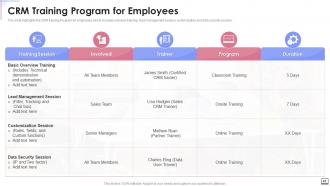
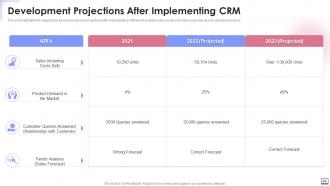
CRM Implementation is the procedure of deploying and installing a Customer Relationship Management Tool to streamline the process and improve the overall organizational performance. Check out our professionally designed presentation on CRM Software Implementation. The key objective of introducing this module is to track leads and evaluate customer interactions efficiently. The module also discusses the need for CRM in an organization, showcasing the efficiency indicators and features like marketing automation, data security, remote work, and order fulfillment. The given module incorporates a comparison chart and identifies the best CRM in the current market scenario. The critical components of the implementation strategy include setting up an account, adding roles, and enabling security. Other such elements are process automation, data transmission, and CRM deployment. After implementation, there is always a need for CRM optimization. This module includes challenges faced while installing CRM and its mitigation strategies and a training program for employees to acquaint them with CRM usability. At last, CRM future development projections help the organization track and monitor the overall business process. Get access now.
People who downloaded this PowerPoint presentation also viewed the following :
Content of this Powerpoint Presentation
Slide 1: This slide introduces CRM Software Implementation. State Your Company Name and begin.
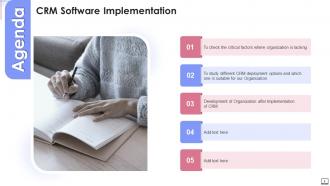
Slide 2: This is an Agenda slide. State your agendas here.
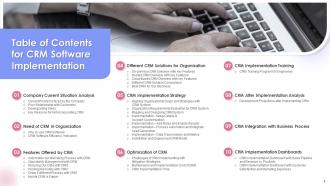
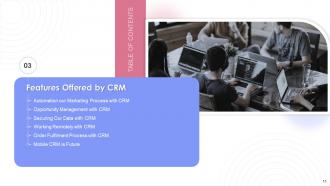
Slide 3: This slide presents Table of Content for the presentation.
Slide 4: This slide highlights title for topics that are to be covered next in the template.
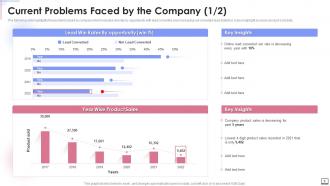
Slide 5: This slide presents Current Problems Faced by the Company.
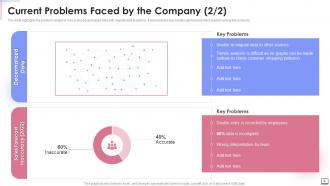
Slide 6: This is another slide continuing Current Problems Faced by the Company.
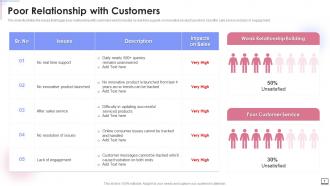
Slide 7: This slide illustrates the issues that trigger poor relationship with customers.
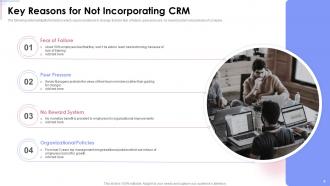
Slide 8: This slide displays Key Reasons for Not Incorporating CRM.
Slide 9: This slide highlights title for topics that are to be covered next in the template.
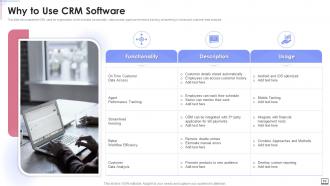
Slide 10: This slide showcases the CRM uses for organization which includes functionality data access, agent performance tracking, etc.
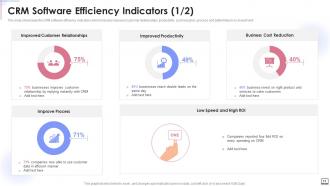
Slide 11: This slide showcases the CRM software efficiency indicators.
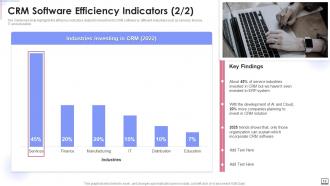
Slide 12: This is another slide continuing CRM Software Efficiency Indicators.
Slide 13: This slide highlights title for topics that are to be covered next in the template.
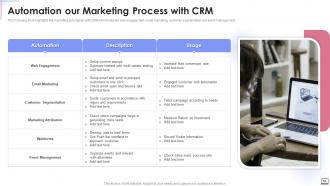
Slide 14: This slide represents Automation our Marketing Process with CRM.
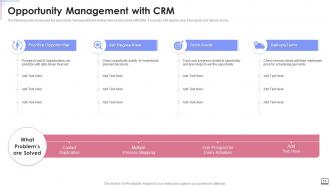
Slide 15: This slide displays opportunity management and what problems are solved with CRM.
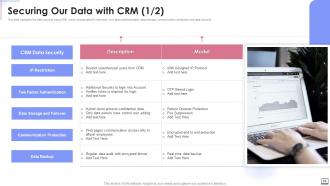
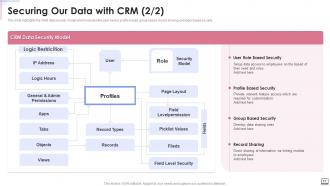
Slide 16: This slide highlights the data security using CRM which incorporates IP restriction.
Slide 17: This slide showcases CRM data security model which includes the user based, record sharing and login based security.
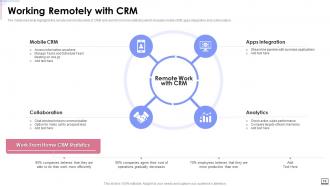
Slide 18: This slide shows remote work functionality of CRM and work from home statistics.
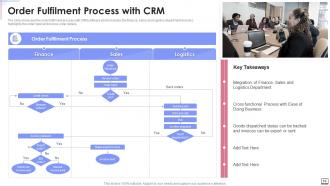
Slide 19: The slide showcase the order fulfilment process with CRM software.
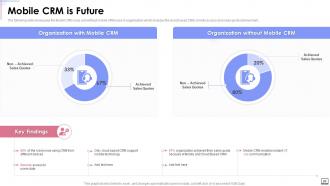
Slide 20: This slide presents Mobile CRM uses and without mobile CRM uses in organization.
Slide 21: This slide highlights title for topics that are to be covered next in the template.
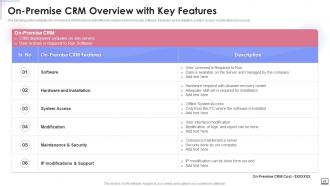
Slide 22: This slide represents On-Premise CRM Overview with Key Features.
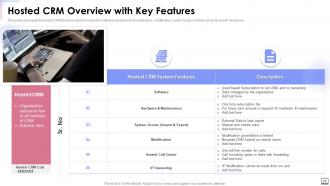
Slide 23: This slide showcases the Hosted CRM functions which includes the software, hardware and maintenance, modification, etc.
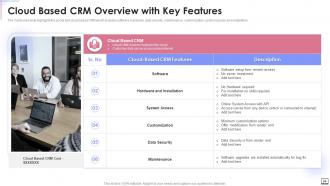
Slide 24: This slide shows Cloud Based CRM Overview with Key Features.
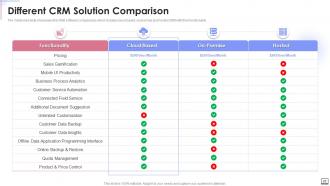
Slide 25: The mentioned slide showcases the CRM software comparisons.
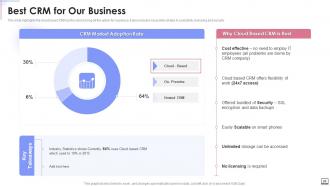
Slide 26: This slide highlights the cloud based CRM as the best among all the option for business.
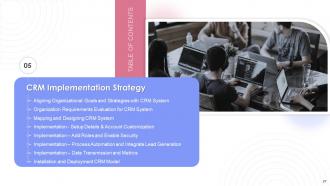
Slide 27: This slide highlights title for topics that are to be covered next in the template.
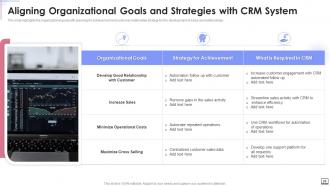
Slide 28: This slide shows Aligning Organizational Goals and Strategies with CRM System.
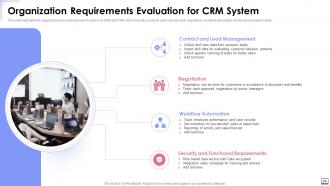
Slide 29: This slide presents Organization Requirements Evaluation for CRM System.
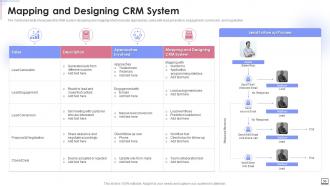
Slide 30: This slide displays Mapping and Designing CRM System.
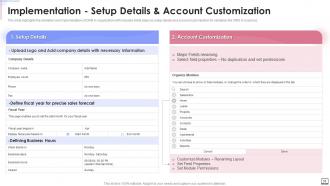
Slide 31: This slide represents Implementation Setup Details & Account Customization.
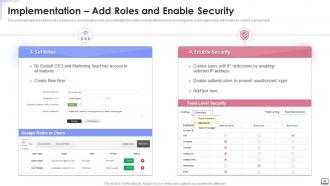
Slide 32: This slide showcases Implementation to Add Roles and Enable Security.
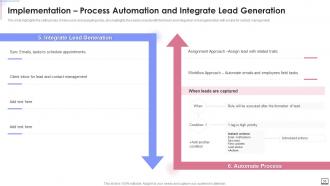
Slide 33: This slide shows Implementation for Process Automation and Integrate Lead Generation.
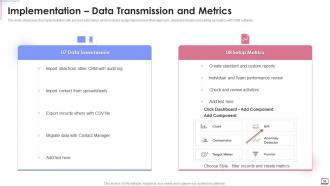
Slide 34: This slide presents Implementation with process automation.
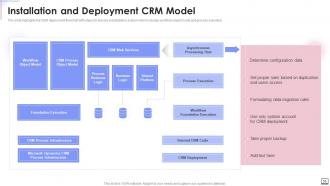
Slide 35: This slide displays CRM deployment flowchart with steps for precise installation.
Slide 36: This slide highlights title for topics that are to be covered next in the template.
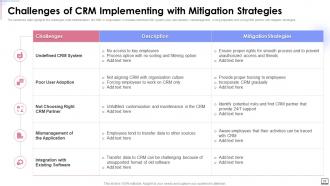
Slide 37: This slide represents Challenges of CRM Implementing with Mitigation Strategies.
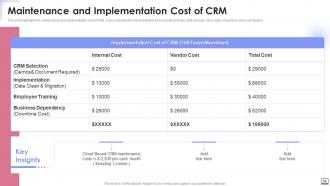
Slide 38: This slide showcases Maintenance and Implementation Cost of CRM.
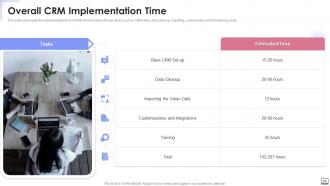
Slide 39: This slide shows implementation time of CRM which includes the key tasks.
Slide 40: This slide highlights title for topics that are to be covered next in the template.
Slide 41: This slide presents CRM Training Program for Employees.
Slide 42: This slide highlights title for topics that are to be covered next in the template.
Slide 43: This slide displays Development Projections after Implementing CRM.
Slide 44: This slide highlights title for topics that are to be covered next in the template.
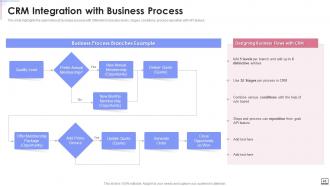
Slide 45: This slide represents automation of business process with CRM which includes levels, stages, conditions, etc.
Slide 46: This slide highlights title for topics that are to be covered next in the template.
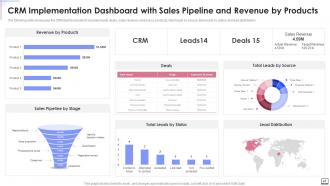
Slide 47: This slide showcases CRM Implementation Dashboard with Sales Pipeline and Revenue by Products.
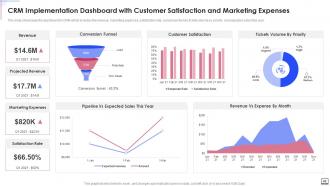
Slide 48: This slide shows CRM Implementation Dashboard with Customer Satisfaction and Marketing Expenses.
Slide 49: This slide displays Icons for CRM Software Implementation.
Slide 50: This slide is titled as Additional Slides for moving forward.
Slide 51: This is About Us slide to show company specifications etc.
Slide 52: This is Our Mission slide with related imagery and text.
Slide 53: This is a Financial slide. Show your finance related stuff here.
Slide 54: This slide presents Roadmap with additional textboxes.
Slide 55: This slide provides 30 60 90 Days Plan with text boxes.
Slide 56: This slide depicts Venn diagram with text boxes.
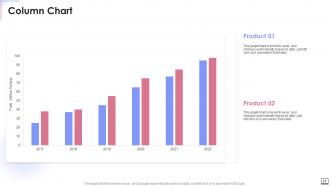
Slide 57: This slide displays Column chart with two products comparison.
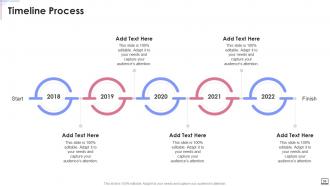
Slide 58: This is a Timeline slide. Show data related to time intervals here.
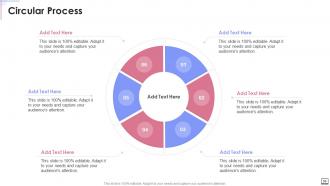
Slide 59: This slide shows Circular Diagram with additional textboxes.
Slide 60: This is a Thank You slide with address, contact numbers and email address.
CRM Software Implementation Powerpoint Presentation Slides with all 65 slides:
Use our CRM Software Implementation Powerpoint Presentation Slides to effectively help you save your valuable time. They are readymade to fit into any presentation structure.






FAQs for CRM Software Implementation
Honestly, start by figuring out what you actually want this thing to do for you. Map out your current sales mess first - where are the real pain points? Budget and timeline are critical because CRM projects always drag on way longer than expected (learned that the hard way). Get your stakeholders on board early or you'll be fighting an uphill battle. Your data is probably worse than you think it is, so audit that stuff now. Don't forget about training - I've seen great systems fail because nobody wanted to use them. Oh, and figure out if your team can handle the tech side or if you need outside help.
Look, three things matter before you dive in. Your data can't be a total mess - if customer info is spread across random spreadsheets and sticky notes, you're screwed from day one. Then there's your team - are they actually on board or will they hate learning another system? Buy-in makes or breaks this stuff. Oh, and you need someone internal who gets the tech side and can push things forward when they inevitably get stuck. Honestly though, just audit your current data situation and lock down leadership support first. Those two things will basically tell you everything you need to know about whether you're ready.
Honestly, training is what makes or breaks the whole thing. People need to get why they're using it, not just how to use it. I've watched so many teams just give up when they don't understand the point. Do hands-on stuff with real examples they'll actually deal with - way better than generic demos. Support them hard those first couple weeks too. Oh, and find your tech-savvy people early. They'll end up being your lifesavers when others get stuck. Skip this step and you're basically throwing money away.
So for small businesses, just focus on contact management and basic pipeline stuff - maybe email integration. Don't overcomplicate it when you're trying to get organized. Big enterprises though? They actually need the fancy workflow automation, analytics, territory management, all that integration with their existing systems. I've literally watched small companies drown in features they don't even touch. It's really about complexity versus having everything covered. Oh, and start with what's actually driving you crazy - like if you're still doing spreadsheets for leads (ugh), nail down simple contact tracking first.
Honestly, you need to measure both the obvious stuff and the softer gains. Revenue increases, faster sales cycles, lower acquisition costs - that's the easy part. But also track time saved on boring admin work and whether customers are sticking around longer. Your CRM should handle most of this tracking automatically, which is nice because otherwise it'd be a nightmare to manage. Oh, and don't forget to account for setup costs and training time at the beginning. Set up your tracking before you launch so you actually have something to compare against later. Most people skip that step and regret it.
Honestly, the biggest mistake is rushing everything and not getting your team on board first. Clean your data before migrating it - trust me on this one, dirty data will haunt you later. People need proper training or they'll just go back to their old spreadsheets (been there). Start simple with basic features instead of customizing everything right away. You can always add complexity once everyone's comfortable. Oh, and definitely assign someone as your CRM champion - someone who can help others and keep morale up during the transition. That person makes or breaks it.
First things first - clean up your data before you do anything else. Get rid of duplicates, fix incomplete stuff, update old info. Then map your old fields to the new CRM. Fair warning: this part sucks way more than anyone tells you! Try migrating just a small batch first to spot problems. Back up everything (obviously), and yeah, plan for some downtime when you actually do the transfer. Once it's done, test the hell out of it. Have your team check that their important records actually made it over in one piece.
Honestly, you just gotta make people see what's in it for them. Train them properly so they actually understand how it'll make their jobs easier - not just dump another system on them. Find your office influencers and get them excited first, they'll do half your selling for you. Customize the thing to match how your team actually works (not some generic setup). Those first couple weeks are crucial - be around to help when people get stuck. Oh, and definitely celebrate the small wins out loud when someone figures something out. Listen when people complain and fix stuff fast. Nothing tanks adoption like feeling ignored when the new system sucks.
First thing - do a full data audit so you know what's moving where and who needs access. Role-based permissions are clutch, set those up right away. I know it seems tedious but trust me on this one. Back everything up during the move and use encrypted transfers obviously. Oh and definitely test with dummy data first - learned that the hard way lol. Don't migrate everything at once either. Do it in phases so if stuff breaks you're not panicking over your whole database being toast.
Honestly, map out what you're already doing first - I can't stress this enough. Don't try changing everything at once or you'll lose your mind. Pick the stuff your team actually touches every day, not the fancy features that look cool in demos. Test changes with just a few people before rolling out to everyone. Write down what you modify because trust me, you won't remember later and it'll save you headaches. Oh, and definitely get your users involved early - they're gonna be the ones complaining if something sucks, so might as well get their input upfront.
Honestly, stakeholder involvement will make or break your CRM project. Get executives on board first - you need their budget and backing. Then talk to the actual users who'll be clicking around in this thing every day. IT needs to weigh in too on technical stuff. I know those stakeholder meetings feel tedious, but skipping them is where projects go to die. You'll end up with people fighting the system, nobody adopting it, and expensive fixes down the road. Map out your key players now and check in with them regularly. Trust me on this one.
Track how many people actually log in daily - that's your adoption rate right there. Data quality matters too, like are contact records complete? Sales cycle length and lead conversion rates show the real business impact. Revenue per customer is what the bosses care about anyway. Don't forget support ticket times since better CRM data speeds that up. Customer satisfaction scores are solid gold for proving value. Set up a monthly dashboard review - way easier to catch problems early. Honestly, pick 3-4 metrics max or you'll get overwhelmed trying to track everything.
Check it quarterly at minimum, but monthly tweaks are where the magic happens. Big changes? Maybe 2-3 times a year when you get solid feedback or business shifts. Here's the thing though - watch how your team actually uses it. Are they constantly finding workarounds? That's a red flag right there. Don't be one of those companies doing massive yearly overhauls (ugh). Instead, chat with your power users regularly and keep an eye on who's actually logging in. Small fixes beat giant renovations every time. Trust me on this one.
Honestly, I'd go with cloud-based unless you've got some weird compliance thing going on. Yeah, you'll pay monthly forever, but the upfront costs for on-premise are brutal. Plus your IT people will hate you - they're suddenly responsible for literally everything. Cloud's pretty solid these days security-wise, despite what some old-school folks say. You can access it from anywhere and updates happen automatically. Sure, customization is more limited. But most companies think they need custom features when they really don't. On-premise only makes sense if you actually need total control or have super specific requirements.
So basically you're creating this central hub where all your data lives instead of bouncing between like 5 different apps. Your email, accounting stuff, marketing tools - they all talk to each other automatically. No more copying and pasting customer info everywhere (which honestly was driving me crazy at my last job). The automation part is huge - leads just flow in from your website, sales numbers sync up with accounting, customer service can instantly see what someone bought. I'd start by figuring out which systems you use most together, then connect those first. It'll save you hours every week.
-
Best Representation of topics, really appreciable.
-
Helpful product design for delivering presentation.