


Crm Strategies Powerpoint Presentation Slides




Try Before you Buy Download Free Sample Product
 Impress Your
 Audience
 100%
100% Editable
 Save Hours
 of Time


Use CRM Strategies PowerPoint Presentation Slides to manage and evaluate customer interactions. Customer retention is utmost important process to drive sales growth for the company. Improve customer service relationship using Crm Strategies PowerPoint presentation show. This content-ready customer acquisition strategy PPT presentation covers every aspect of the topic and has designs on acquisition strategy plan, lead nurturing tactics, email and marketing automation, and sales enablement checklist. Get access to the customer database and manage it with ease using CRM database complete presentation. This deck has been crafted with an extensive research by our PowerPoint experts and is useful for various topics such as human resource management, lead management, workflow automation, sales force automation, marketing automation and more. Get your hands on ready-to-use CRM strategies PPT presentation deck to manage company’s interaction with current and potential customers. Improve business relationships with customers and focus on customer retention which will ultimately lead to sales growth. Endure through it all with our Crm Strategies Powerpoint Presentation Slides. They make it easy to bear.
People who downloaded this PowerPoint presentation also viewed the following :
Content of this Powerpoint Presentation
Slide 1: This is an introductory slide to CRM Strategies. State your company name an begin.
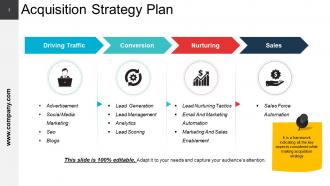
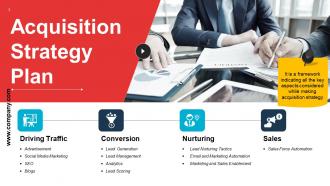
Slide 2: This slide showcases Acquisition Strategy Plan framework. It is a framework indicating all the key aspects considered while making acquisition strategy.
Slide 3: This slide also shows Acquisition Strategy Plan with the following four steps- Driving Traffic, Conversion, Nurturing, Sales.
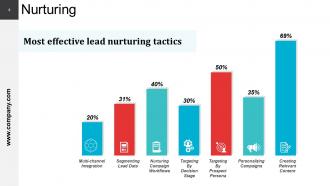
Slide 4: This is Nurturing slide showing Most effective lead nurturing tactics graphically.
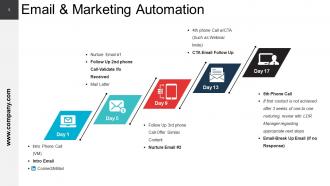
Slide 5: This slide shows Email & Marketing Automation with icon imagery.
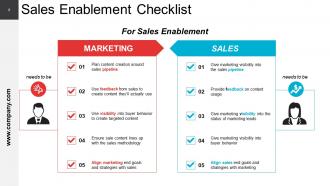
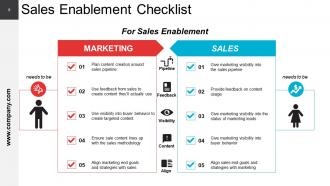
Slide 6: This slide shows Sales Enablement Checklist consisting of- MARKETING, SALES.
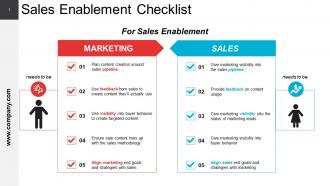
Slide 7: This slide also shows Sales Enablement Checklist.
Slide 8: This is another slide showing Sales Enablement Checklist.
Slide 9: This is CRM Strategies Icon Slide. Add/ remove icons based on your requirement.
Slide 10: This slide forwards to Chart & Graphs. Alter as per need.
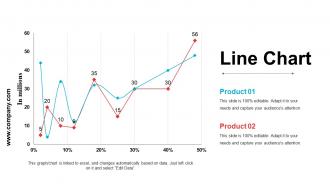
Slide 11: This slide shows a Line Chart for two product comparison.
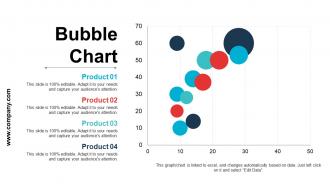
Slide 12: This is a Bubble Chart slide to show product/ entity comparison, specifications etc.
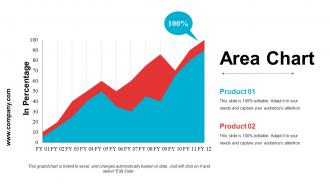
Slide 13: This slide presents an Area Chart for showcasing product/ company growth, comparison etc.
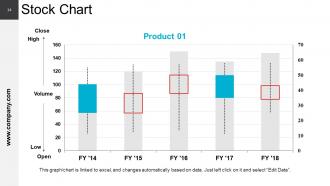
Slide 14: This is a Stock Chart slide to present product/ entity comparison, specifications etc.
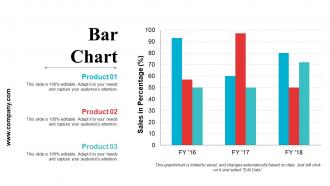
Slide 15: This is a Bar Graph slide to present product/ entity comparison, specifications etc.
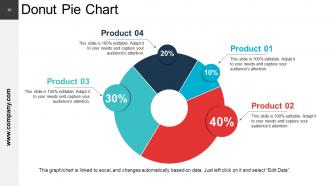
Slide 16: This is a Donut Pie Chart slide to present product/ entity comparison, specifications etc.
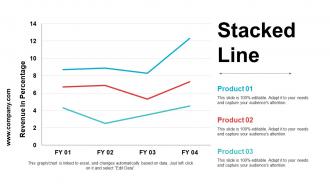
Slide 17: This slide presents Stacked Line graph to show product/ entity growth, comparison etc.
Slide 18: This slide is titled Additional Slides to move forward. You can change the slide content as per need.
Slide 19: This is Our Vision slide to state your vision, mission and goals.
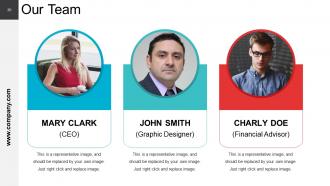
Slide 20: This slide showcases Our Team with Name and Designation to fill.
Slide 21: This is an About Us slide showing Target Audiences, Values Client, and Preferred by Many as examples.
Slide 22: This is an Our Goal slide with relevant imagery. State them here.
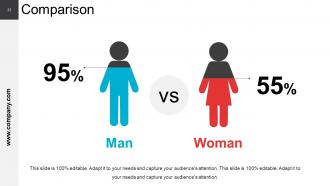
Slide 23: This slide states a Comparison between Man and Woman.
Slide 24: This slide is titled as Financials. State financial aspects etc. here.
Slide 25: This is a Quote slide. You can add your quote here to convey company messages, beliefs etc.
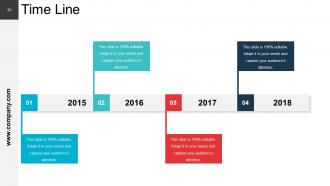
Slide 26: This is a Timeline slide to show growth, milestones, highlighting factors etc.
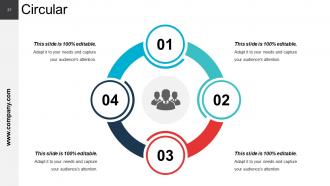
Slide 27: This is a Circular image slide to show information, specifications etc.
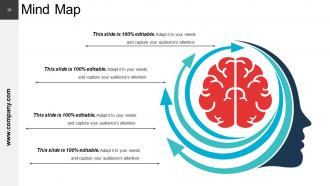
Slide 28: This is a Mind Map image slide to show information, specifications etc.
Slide 29: This is Thank You slide stating Address# street number, city, state, Contact Numbers, Email Address.
Crm Strategies Powerpoint Presentation Slides with all 29 slides:
Apply a course correction with our Crm Strategies Powerpoint Presentation Slides. Change your approach to cater for fresh inputs.




FAQs for Crm Strategies
So you'll need customer segmentation, data management, and automated workflows as your foundation. Map out the whole customer journey first - from when they find you to keeping them around. This part honestly gets messy fast, but whatever, just start simple. Your team has to actually USE the thing consistently or you're screwed. Lead scoring is huge, plus personalized touchpoints and tracking stuff like customer lifetime value. Oh and don't try to do everything at once - pick maybe two things to get right first, then expand. Way less overwhelming that way.
Honestly, start with the basics - retention rates, how long your sales cycles are, and lead conversion. Customer lifetime value is pretty key too. But here's the thing that trips people up: none of this matters if your team won't actually use the CRM. So definitely track adoption rates. Also throw in customer satisfaction scores and how fast you're solving support tickets. Oh, and don't go crazy with like 15 different metrics - pick 3 or 4 that actually matter for your goals and check them monthly. Otherwise you'll just drown in spreadsheets.
So customer segmentation is basically how you group people by their behavior, what they're worth to you, demographics - stuff like that. Otherwise you're just sending the same boring emails to everyone (and trust me, people can tell). The whole point is personalizing your approach for different types of customers. High-value ones get priority treatment, obviously. You can create campaigns that actually work instead of generic blasts. It's kinda like how you text differently with your boss vs your college roommate, you know? Start with maybe 3-4 main segments and build workflows from there.
Honestly, analytics transforms your CRM from just storing contacts to actually predicting what customers will do next. You'll spot buying patterns and see which campaigns are worth your time - instead of just guessing like most teams do. It helps you figure out when someone's about to bail on you too. Perfect timing for reaching out becomes way easier once you segment people properly. I'd start basic though - check your email open rates and see who's buying what. That stuff's pretty eye-opening. Build up to the fancier insights later.
Honestly, user adoption is gonna be your biggest pain point - people absolutely hate changing their workflows. Data migration will make you want to pull your hair out too. You'll have duplicate contacts everywhere, half-empty records, formatting that's all over the place. Plus integrating with your current email and accounting tools? Way more complicated than it looks on paper. Your team will probably push back hard, especially the Excel diehards. Start small with just a few people first, spend time cleaning up your messy data beforehand, and don't skimp on training. Trust me on that last part.
Honestly, automation is a game changer for CRM stuff. It handles all the boring tasks - lead scoring, follow-ups, data entry. You know, the mind-numbing clicks that make you want to scream. Instead you can actually have real conversations with customers. Set up email sequences that nurture prospects automatically, even when you're buried in other work. Nothing slips through the cracks anymore, and your whole team stays on the same page. I'd start with basic email automation first - don't go crazy right away. Then add more complex workflows once you've got the hang of it.
Honestly, just nail three things: clean data, easy access, and decent security. Clean out duplicates and outdated stuff regularly - calling someone by the wrong name is mortifying and kills deals instantly. Set up permissions so people can grab what they need without jumping through hoops. Also, get everyone entering data the same way or it becomes a mess fast. Oh, and don't let it turn into some digital junkyard where info goes to die. Pick whatever's driving your team crazy right now and fix that first. Way easier than trying to overhaul everything at once.
Honestly, it all comes down to how your industry actually works. B2B software? You need those long nurture sequences and deal tracking since sales cycles drag on forever. Retail's totally different - think purchase history and seasonal stuff. Healthcare gets tricky with compliance and appointment booking (what a pain). Financial services are obsessed with security and regulatory reporting, while hospitality cares about guest preferences and loyalty programs. I'd start by writing down every way you touch customers, then figure out what CRM features actually match that. Don't overcomplicate it - just map your fields and workflows to how you really sell.
Oh man, training is seriously make-or-break with CRMs. Don't just do one training session and call it good - that's where most companies mess up. Your team needs to understand the "why" behind it, not just which buttons to click. I've watched so many businesses waste thousands because people either ignored the system or used it wrong. Set up ongoing sessions and find a few people who actually like the CRM to be your go-to helpers. Honestly, skipping proper training is probably the fastest way to tank your whole investment.
Look, feedback is what makes your CRM actually useful instead of just another database collecting dust. It shows you where customers are getting pissed off and which parts of your process are smooth. Without it, you're basically guessing at everything. The patterns in complaints are gold - they tell you exactly what to fix first. Plus you can see where your team's doing great (always nice to know). Set up ways to collect feedback regularly, then track the stuff that keeps coming up. I swear, most companies just ignore the obvious themes staring them in the face. Use that data to tweak your approach.
So AI can totally change how your CRM works. Lead scoring becomes automatic, and you'll spot which customers might leave before they actually do. Chatbots answer the basic stuff round the clock. The cool part? Machine learning figures out customer patterns - like when's best to call someone or what they'd actually want to buy. Most CRM systems already have this built in, which is kinda crazy. Don't go overboard though. Pick something simple like lead scoring first and see how it goes before you automate everything.
Start with CLV and CAC - those numbers show if your CRM's actually profitable. Track retention rates too, plus how people convert through your sales funnel. Customer satisfaction scores matter, obviously. Sales cycle length is huge because dragging deals out forever kills momentum. Honestly, most people get obsessed with vanity stuff like total contacts, but revenue-tied metrics are what count. Pick maybe 4-5 that actually move the needle. Build a dashboard you can glance at weekly - nothing fancy. Just make sure your team knows exactly which numbers they own.
So omnichannel basically lets you see all customer conversations in one place instead of juggling separate email, phone, and social threads. Your customers can literally start chatting on Instagram and switch to email mid-conversation without having to explain everything again (which honestly should've been standard years ago). The trick is making sure your CRM actually connects these channels - way too many companies think they're doing omnichannel but their systems don't talk to each other. Start by checking which channels you're using and how the data moves between them. Game changer when it works right.
Honestly, cloud CRM is such a game-changer compared to the old on-premise stuff. You can check your data from literally anywhere - coffee shop, home, whatever. Updates just happen automatically, which is nice because who has time for that? The costs are way better upfront since you're not dropping money on servers and all that IT nightmare setup. Your team can work remotely without dealing with annoying VPN stuff. Something breaks? That's their headache, not yours. I'd probably start by writing down what's driving you crazy with your current system and see which cloud features would actually fix those problems first.
Start with data encryption and role-based access - people should only see what they need for their job. Get explicit consent before collecting customer data (GDPR/CCPA stuff), and make it super easy for customers to opt out or delete their info. Security audits are annoying to schedule but you've gotta do them regularly. Set up automatic data retention policies so you're not sitting on ancient customer records forever - honestly, most companies mess this up. Audit what you have now, fix the obvious gaps, then train your team on privacy basics.
-
Very unique, user-friendly presentation interface.
-
The Designed Graphic are very professional and classic.