

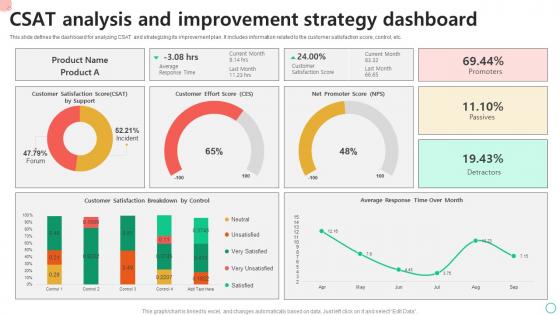
CSAT Analysis And Improvement Strategy Dashboard




Try Before you Buy Download Free Sample Product
 Impress Your
 Audience
 100%
100% Editable
 Save Hours
 of Time


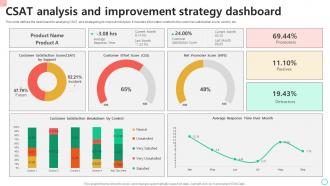
This slide defines the dashboard for analyzing CSAT and strategizing its improvement plan. It includes information related to the customer satisfaction score, control, etc.
People who downloaded this PowerPoint presentation also viewed the following :
CSAT Analysis And Improvement Strategy Dashboard with all 7 slides:
Use our CSAT Analysis And Improvement Strategy Dashboard to effectively help you save your valuable time. They are readymade to fit into any presentation structure.





FAQs for CSAT Analysis And
Track your main CSAT score, response rates, and how things trend over time - that's your foundation. Then break it down by segments like which product or support channel, maybe customer types too. Numbers are great but don't skip the open-ended feedback - honestly, that's where the real insights hide. Oh, and if you're doing support stuff, throw in response volume and resolution times. The whole point is having enough detail to actually fix problems, not just making dashboards that look impressive. Start simple though, you can always add more fancy stuff later once everyone's used to checking the data regularly.
So with real-time dashboards, you can actually see satisfaction trends happening right now instead of waiting forever for those monthly reports. Super helpful for catching which touchpoints are screwing things up. Different customer segments show up clearly too - like you'll notice Gen Z customers hate your phone support while boomers love it (random example but you get it). The visual stuff makes patterns way more obvious than staring at spreadsheet hell. Set up alerts when satisfaction drops below whatever threshold makes sense. That way your team can fix problems before they become disasters.
So trends are basically how you track if your CSAT is getting better or worse over time. Line charts work best for this - month-over-month or quarterly stuff. Makes patterns way easier to spot. I always throw in color coding (green up, red down) because executives eat that up, no joke. Also add comparison periods like "vs last quarter" so you can catch seasonal weirdness or see if that new feature you launched actually moved the needle. Oh, and keep it simple - nobody wants to squint at your dashboard trying to figure out what's happening.
First thing - figure out what metrics actually matter in your field. Tech support cares about response times, healthcare focuses on bedside manner scores, that sort of thing. Most dashboard tools are pretty flexible, so you can set up custom KPIs and tweak the scoring however you want. Healthcare might track empathy ratings while retail splits product vs service satisfaction. Honestly, the biggest mistake people make is not mapping their survey questions to industry standards from the start. Do some quick research on what benchmarks your competitors use, then just configure your widgets to match those same metrics. Makes comparing results way easier.
So basically you want to connect your CSAT with NPS and ticket volume to see the whole story. I always map CSAT to specific moments - like right after purchase or support calls. That way you're not flying blind. Segment by customer type too (new people vs loyal ones, big spenders vs regular folks). Honestly, trends matter way more than individual scores - those can be all over the place. Set up alerts when CSAT tanks and tickets spike at the same time. That combo? Usually means something's seriously broken and you need to jump on it fast.
Your CSAT scale totally messes with how the numbers look on your dashboard. Like, 3.5 out of 5 is really just 70% - pretty meh, right? But 7 out of 10 somehow feels way better even though it's identical math. Here's what I've noticed though - people get weird about different scales mentally. Customers see anything under 8/10 as disappointing, but 4/5 feels totally fine to them. The dashboard does auto-adjust colors and benchmarks, which helps. You've gotta set your action triggers based on how each scale actually feels to people, not just the percentages.
Honestly, don't cram everything onto one screen - it's just overwhelming. Raw CSAT scores are useless without context or trends (like, what does 4.2 even mean?). Response rates matter too - high satisfaction from only 2% of customers tells you nothing. You gotta segment by customer type or product, otherwise the data's pretty much garbage. And for the love of god, skip the complicated charts that need a manual to understand. I'd say stick to maybe 3-5 key metrics tops. Your dashboard should answer "so what" not just show numbers. Keep it simple and focused on what actually drives decisions.
So basically your CSAT dashboard shows you real-time satisfaction trends - super helpful for catching what's working and what isn't. Look for weird patterns, like scores tanking every Tuesday (probably your good people are off that day, honestly). You'll also see if certain types of calls consistently bomb. That stuff points you toward training gaps or process issues that need fixing. The trick is actually doing something about it though - don't just stare at pretty charts. Set up weekly check-ins where you dig into the data and make real changes based on what customers are telling you.
Honestly? Start with Tableau or Power BI - they're solid for CSAT stuff and your team will actually use the interactive features. Google Data Studio works too if budget's tight (it's way less clunky than it used to be). Even Excel can handle basic dashboards with some pivot tables, though that feels a bit 2015 lol. The real trick is picking whatever your team will check daily, not something fancy that sits untouched. I'd go simple first. You can always add bells and whistles once you figure out which metrics your stakeholders actually care about.
The dashboard's filtering is actually pretty solid - you can break down CSAT data by customer type, product lines, time periods, support channels, whatever you're tracking. Enterprise customers might rate you totally different than SMBs, or your mobile app could be crushing it while web support sucks. Multiple segments together? That's where you'll catch trends the overall numbers hide. I always tell people to start with maybe 3-4 segments that match your main business priorities and save those as go-to views. Makes life way easier when you're not rebuilding the same reports every week.
Honestly, if your team can't read the dashboard easily, you've already lost. Clean layouts are everything - key metrics should pop out right away. I've seen so many dashboards that are just chart vomit, you know? Nobody wants to squint at confusing graphs when they're trying to spot trends quickly. Your managers need instant insights, and frontline staff shouldn't need a PhD to understand their performance. Start simple: ask users what they actually need most. Then design around those workflows instead of cramming in every possible metric.
So check out your historical CSAT data first - it's honestly way better than just guessing what's realistic. You'll see actual improvement rates you hit before, like maybe you did 5% quarter-over-quarter last year. That's real stuff to work with. Look for seasonal dips or peaks too, and figure out what was working during your best stretches. Then try to recreate those conditions, you know? Don't just focus on where you are right now - your trajectory tells the whole story. Set goals that'll push your team but won't make everyone want to quit lol.
Dude, you definitely need permission before putting anyone's comments out there publicly. Strip out names, company info, anything that could ID someone. Don't just showcase the glowing reviews either - I get why you'd want to, but it's pretty misleading. Some people get weird about their feedback being displayed even without names, especially depending on their background. Honestly? Your best move is probably doing summary stats instead of actual quotes. Or set up a system where people can specifically opt in if they're cool with being featured. Way less headache.
So basically, dig into your CSAT data to see where things are breaking down. Are people constantly griping about slow responses? Product knowledge issues? Find those patterns - that's your training roadmap right there. Honestly, I've watched teams completely flip their numbers doing this. Pull the worst-performing interaction types first and build training around those specific problems. The comment feedback is perfect for role-playing scenarios too. You can even spot which agents need extra help versus who's already crushing it and could coach others. It's way more targeted than generic training programs.
Good CSAT means you can focus on growing - customers are happy and won't bail. Bad scores? Time to shift gears and fix what's broken before people leave. Honestly, I've watched too many companies ignore dropping scores until their churn explodes. Once your numbers consistently suck, you'll need to pull resources from getting new customers and put them into keeping existing ones happy. Maybe pause that shiny new feature and actually fix the bugs people complain about. Check your scores weekly and set up alerts when they tank below whatever baseline you've set.
-
I came across many PowerPoint presentations with excellent creatives and I believe they would be beneficial to my work.
-
Much better than the original! Thanks for the quick turnaround.