

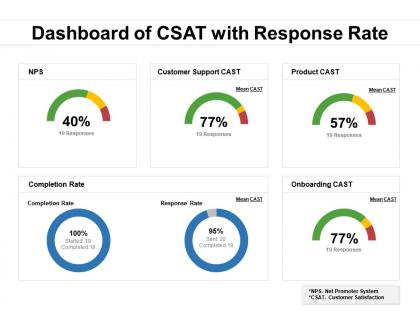
Dashboard of csat with response rate




Try Before you Buy Download Free Sample Product
 Impress Your
 Audience
 100%
100% Editable
 Save Hours
 of Time


Our Dashboard Of CSAT With Response Rate are explicit and effective. They combine clarity and concise expression.
People who downloaded this PowerPoint presentation also viewed the following :
Dashboard of csat with response rate with all 2 slides:
Give your audience a fulfilling experience. They will find our Dashboard Of CSAT With Response Rate elevating.
FAQs for Dashboard of csat
Okay so first track your CSAT trends over time and response rates - that's your baseline. The real magic happens when you segment by product or team though. Seriously, that's where patterns jump out at you. Look at score distribution and how long it takes to resolve those low ratings. What themes keep popping up in feedback? Set alerts for sudden drops because nobody wants to be blindsided. Also track escalation rates for anything below your threshold. Oh and don't go crazy adding every metric - start with these basics then build based on what your team can actually act on.
Honestly, good visual design can totally transform your CSAT dashboards. Color coding is huge - green for happy customers, red for the ones you need to worry about. Way easier than squinting at endless rows of numbers. Charts help you catch trends super fast, and icons basically tell your brain where to look first. Keep everything clean though, because cluttered dashboards are the worst. Your team should be able to glance at it and immediately know what's working and what's broken without doing mental math.
I'd go with weekly updates minimum, but daily's way better if you can swing it. Pull fresh data each time and watch for any wonky survey issues messing with your numbers. Your visualizations should focus on trends - don't jam every single metric in there or it gets messy. Set up alerts for when scores tank so you're not blindsided. Oh, and actually look at which questions give you useful insights versus the ones that are just... there. The monthly stakeholder meetings are clutch though - that's where you hash out what the data actually means and figure out next steps.
Dude, real-time data is where it's at for CSAT tracking. Instead of finding out weeks later that customers were pissed about your last update, you'll know immediately when scores tank. Then you can actually fix things while people still remember what happened - not like the usual "whoops we're just seeing this now" disaster. The alerts are clutch too. Set thresholds so your team gets pinged automatically instead of staring at dashboards all day. Honestly, once you switch from monthly reports to live data, there's no going back. Way better than playing catch-up.
So segmentation is just breaking down your CSAT scores instead of looking at them as one big blob. You can split by product, support channel, customer type, whatever makes sense for you. Your overall score might be decent at 4.2, but maybe your enterprise folks are pissed while small businesses love you. Or email support rocks but live chat sucks. Honestly, without doing this you're just guessing at what's wrong. I'd pick 3-4 ways to slice it that actually matter to your business - don't go crazy with too many segments though.
So basically, CSAT dashboards plot your satisfaction scores over time - super helpful for catching trends. You'll spot stuff like seasonal dips or when scores tank after a product launch (been there!). Month-over-month changes become obvious at a glance. The visual charts are honestly the best part because you can quickly see correlations. Break it down by customer segments or product lines for deeper insights. Oh, and definitely set up alerts when scores drop below certain thresholds - saves you from scrambling later when things get messy.
So basically, pull up your CSAT dashboard and find whatever's tanking the hardest - that's your starting point. I'd look for patterns first though, like maybe your mobile app always gets trashed or phone support is consistently awful compared to chat. Dashboards beat the hell out of Excel for actually seeing what's going on. Pick something realistic, like bumping a 3.2 rating up to 3.5 over three months. But here's the thing - don't just chase numbers. You've gotta figure out WHY people are pissed off in that area and actually fix those problems.
Honestly, the worst thing you can do is jam every metric onto one screen - total information overload. Also never show CSAT scores without context like how many people actually responded. Trust me, 95% satisfaction from 3 people is basically useless (been there!). Make sure you're segmenting by stuff that actually matters - customer types, product lines, whatever makes sense for your business. Oh and keep your time periods consistent across charts or you'll confuse everyone. I'd start simple with just CSAT trends and response volume, then add more later.
Dude, interactive dashboards are a game changer for CSAT data. Static charts are basically useless - people need to actually explore what's happening. Add filters for dates, departments, customer segments so teams can slice the data however they want. The drill-down stuff is huge though. Click on a bad score and boom, you're reading the actual customer comments. That's honestly where you find the good stuff. Hover tooltips help too, plus clickable metrics reveal patterns people miss. Oh and set up different access levels - sales doesn't need to see support data, you know?
Honestly, just go with bar charts and line graphs - they're your best bet for CSAT stuff. Line graphs are clutch for seeing trends over time (helps you figure out if you're actually getting better or just having random good weeks). Bar charts work great when you need to compare different teams or time periods side by side. Don't bother with pie charts though, they're pretty useless for this kind of data. I'd start simple - throw together a basic line graph showing your overall trend first, then maybe add some bar breakdowns by category if you need more detail.
Just filter each dashboard by what actually matters to that specific team. Support needs ticket resolution scores and response times. Sales wants post-purchase feedback and deal satisfaction. Marketing? They're obsessed with campaign data and yeah, their charts absolutely have to look perfect too. Set different access levels so teams only see their own customer segments and timeframes. The real trick is asking each department what decisions they're trying to make first. Then build views around those specific needs. Otherwise you'll end up with generic dashboards nobody uses.
You definitely need those industry benchmarks for context. Like, a 7.5 CSAT sounds okay until you realize your industry average is 8.2 - then you're behind. Dashboard comparisons show you if problems are just yours or if everyone's struggling with the same stuff. Makes setting realistic goals way easier too, and honestly, leadership loves seeing those ROI numbers. Oh, and make sure you filter by your specific vertical - generic benchmarks are pretty useless. Without this comparison, you're just guessing if your scores are actually good or not.
Add some trend widgets to track your CSAT scores over time - that's the easy part. Then throw in correlation charts so you can see which touchpoints or agents are actually moving the needle. Here's where it gets fun though: build predictive models that spot satisfaction drops before they happen. Response times, ticket volume, seasonal stuff - all good predictors. Set alerts when scores might tank below your target. Most dashboard tools let you drop these in as custom widgets. Honestly, start with basic forecasting first. You can always get fancier with the algorithms once you've got more data to work with.
Tableau and Power BI are the big names everyone talks about, plus Looker if you're feeling fancy. For something simpler, Zendesk and HubSpot work great if they already fit your setup. Google Data Studio is actually pretty solid too - and it's free, which is nice. Main thing is picking something that plays well with whatever survey tool you're using (SurveyMonkey, Typeform, whatever) and updates without you having to babysit it. I'd honestly just start with whatever connects easiest to your current stuff. You can always switch later once you figure out what you actually need.
Pull up your CSAT dashboard right when your team meeting starts - that way you can catch problems early. I'd focus on the worst-scoring interactions first, then figure out what actually went wrong. Don't just look at overall numbers though, dig into individual agent performance too. We used to waste entire meetings talking about "satisfaction issues" without any real data to back it up. Once you've identified the problems, make sure everyone knows their next steps. Oh, and definitely celebrate the good stuff too - people need to hear when they're crushing it.
No Reviews