


Cybersecurity In Education Powerpoint PPT Template Bundles




Try Before you Buy Download Free Sample Product
 Impress Your
 Audience
 100%
100% Editable
 Save Hours
 of Time


The Cybersecurity in Education presentation provides a comprehensive overview of crucial topics in safeguarding educational institutions. Covering Cybersecurity Education, the presentation delves into strategies for Data Protection, emphasizing Student Privacy and robust Network Security measures. It sheds light on the importance of raising Phishing Awareness to fortify defenses against cyber threats. This informative presentation equips educators, administrators, and IT professionals with essential knowledge to ensure a secure digital environment for students and staff, promoting a safe and resilient educational ecosystem.
People who downloaded this PowerPoint presentation also viewed the following :
Cybersecurity In Education Powerpoint PPT Template Bundles with all 29 slides:
Use our Cybersecurity In Education Powerpoint PPT Template Bundles to effectively help you save your valuable time. They are readymade to fit into any presentation structure.
-
Cybersecurity In Education Powerpoint PPT Template Bundles
-
Cybersecurity In Education Powerpoint PPT Template Bundles
-
Cybersecurity In Education Powerpoint PPT Template Bundles
-
Cybersecurity In Education Powerpoint PPT Template Bundles
-
Cybersecurity In Education Powerpoint PPT Template Bundles
-
Cybersecurity In Education Powerpoint PPT Template Bundles
-
Cybersecurity In Education Powerpoint PPT Template Bundles
-
Cybersecurity In Education Powerpoint PPT Template Bundles
-
Cybersecurity In Education Powerpoint PPT Template Bundles
-
Cybersecurity In Education Powerpoint PPT Template Bundles
-
Cybersecurity In Education Powerpoint PPT Template Bundles
-
Cybersecurity In Education Powerpoint PPT Template Bundles
-
Cybersecurity In Education Powerpoint PPT Template Bundles
-
Cybersecurity In Education Powerpoint PPT Template Bundles
-
Cybersecurity In Education Powerpoint PPT Template Bundles
-
Cybersecurity In Education Powerpoint PPT Template Bundles
-
Cybersecurity In Education Powerpoint PPT Template Bundles
-

Cybersecurity In Education Powerpoint PPT Template Bundles
-
Cybersecurity In Education Powerpoint PPT Template Bundles
-
Cybersecurity In Education Powerpoint PPT Template Bundles
-

Cybersecurity In Education Powerpoint PPT Template Bundles
-

Cybersecurity In Education Powerpoint PPT Template Bundles
-

Cybersecurity In Education Powerpoint PPT Template Bundles
-

Cybersecurity In Education Powerpoint PPT Template Bundles
-

Cybersecurity In Education Powerpoint PPT Template Bundles
-

Cybersecurity In Education Powerpoint PPT Template Bundles
-

Cybersecurity In Education Powerpoint PPT Template Bundles
-

Cybersecurity In Education Powerpoint PPT Template Bundles
-

Cybersecurity In Education Powerpoint PPT Template Bundles
FAQs for Cybersecurity In Education Powerpoint
Schools get hammered way more than other places - like 3x as much, which is nuts. Ransomware's the big scary one, plus phishing emails targeting everyone from teachers to students. Data breaches are huge too since schools collect so much personal info. Your students are probably downloading random stuff that brings in malware, and now hackers love going after remote learning platforms. Problem is most schools don't have massive IT budgets to fight this stuff. Train people to spot sketchy emails - that's honestly half the battle right there. And get your backup systems sorted first.
Honestly, you'll want to hit everyone with cybersecurity training right when they start, then keep doing quarterly refreshers. Interactive stuff works so much better than those soul-crushing slide presentations - like actual phishing simulations and hands-on password workshops. Different roles need different training though. Your IT team obviously needs way more technical depth than a literature professor, you know? Make it relevant to what they actually do daily - protecting student records, securing research data, that kind of thing. Oh, and definitely send fake phishing emails regularly to test people. Sounds sneaky but it really keeps everyone on their toes.
Honestly, passwords are like the main thing protecting all those student records from getting hacked. You've got grades, personal info, everything stored digitally now. When teachers use "password123" or whatever, hackers can basically waltz right in. I always tell people to go for at least 12 characters - mix up letters, numbers, symbols. Makes it way harder to crack. Multi-factor authentication is clutch too if your school doesn't already require it. That extra step where you get a text code? Total game changer. It's wild how many data breaches could've been avoided with just better password habits.
Oh man, cloud stuff is such a mixed bag for schools. Sure, you get way better security than most districts could ever afford building themselves - automatic updates, professional monitoring, all that good stuff. But then you're handing over student data to outside companies, which makes FERPA compliance a total pain. The whole "shared responsibility" thing trips people up constantly too. Like yeah, they handle the infrastructure side, but you still gotta manage who can access what and actually train your staff. Honestly? Start by figuring out what data you've got floating around up there and who can see it.
Start with figuring out what student data you actually have and where it lives - you'll probably find stuff in random places you forgot about. Three big things to nail down: encrypt everything (stored data and anything moving around), set up role-based access so people only see what they need, and honestly? Train your staff like crazy. Most data breaches happen because someone clicks a sketchy link or shares their password with a coworker. Regular audits help too - track who's looking at what. Oh, and don't forget FERPA compliance and clear policies on how long you keep data.
Schools have tons of sensitive data - student records, health info, financial stuff. One compromised password and you're looking at a massive breach affecting thousands of kids. MFA really cuts down that risk since attackers need more than just stolen credentials. Educational systems are especially vulnerable too because so many different people access them from random locations. I'd honestly start with your most critical systems like student databases and email, then work outward. The compliance headaches alone make it worth implementing. Trust me, angry parents calling about data breaches isn't something you want to deal with.
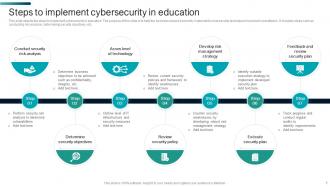
First thing - figure out what systems would actually screw you over if they died. Build a response team where everyone knows their job: decision maker, person handling comms, tech recovery guy. Different incidents need different responses - phishing emails aren't the same nightmare as ransomware destroying student records, you know? Write out every step from "oh shit we're hacked" to full recovery. Here's the kicker though - actually run practice scenarios with your team. Seriously, I've seen so many bulletproof plans completely implode when people try using them during real chaos.
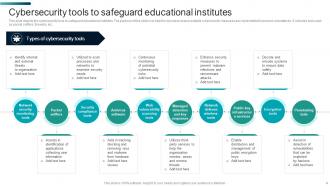
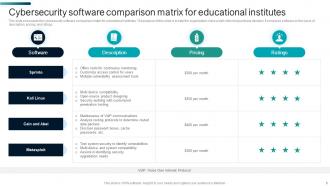
Dude, start with endpoint protection - SentinelOne or CrowdStrike are solid choices. Web filtering is huge too, check out Lightspeed or Securly for that. SIEM platforms help but Splunk costs a fortune, so maybe LogRhythm instead? Basic endpoint detection plus web filtering honestly catches most of the crap schools deal with daily. Staff training is critical though - I've seen million-dollar security setups get wrecked by someone clicking a random email link. My advice? Pick one good endpoint solution first, then expand based on what attacks you're actually seeing. Oh, and budget matters way more than anyone admits upfront.
Oh man, phishing in schools is brutal. Students and staff get hit with fake emails pretending to be from IT or financial aid - sometimes even Canvas login pages that look totally legit. Schools are sitting ducks honestly, because everyone's sharing accounts and students are way more worried about their midterms than checking if an email's sketchy. You'll want to set up email filters and definitely push for multi-factor authentication everywhere. Regular training helps too, though some people still click everything regardless. Those fake phishing tests actually work pretty well for showing people what to watch for.
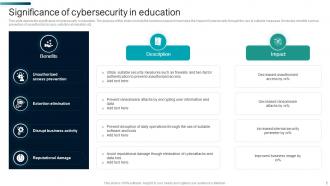
Oof, data breaches at schools are no joke. FERPA violations are the biggest headache - that's the student privacy law that'll get you in serious trouble. You're also dealing with state notification requirements and angry parents who might sue. The fines can be brutal if your security was lacking. Honestly, the aftermath is almost worse than the breach itself. Federal investigations, reporting to tons of agencies, months of monitoring. Schools I know have been stuck in compliance hell for years. Get your incident response plan sorted now and document absolutely everything - you'll thank yourself later.
Honestly, you can sneak cybersecurity into pretty much anything you're already teaching. Math class? Perfect for creating strong passwords. Social studies works great for talking about digital footprints, and language arts is ideal for breaking down those sketchy phishing emails. Just 10-15 minutes weekly does the trick - starts with basics like password tips and privacy settings. Kids are glued to their devices anyway, so make it about stuff they actually encounter online. Then you can tackle the trickier concepts like spotting scams later. It won't mess with your existing lesson plans either.
Ugh, the volume alone will kill you - tablets, smart boards, cameras, HVAC stuff everywhere. Half these devices still have "admin123" as the password because nobody's got time to change 200+ default logins. Your IT team's already swamped just keeping the network running, right? Budgets are tight, and here's what really gets me - most vendors selling to schools don't even bother with regular security patches. Seriously frustrating. First thing though, just figure out what's actually connected to your network. I bet you'll find random stuff you totally forgot about plugged in somewhere.
Honestly, start with your video platforms - make sure you're using something legit with proper encryption. Multi-factor authentication is a lifesaver wherever you can set it up. Strong passwords for meetings too, because wow, the number of Zoom-bombs from crappy passwords is insane. Your network needs updated firewalls obviously. But here's what people forget - train everyone on phishing scams. Remote learning makes students and staff sitting ducks for that stuff. I'd audit what you're currently using first, then tackle the worst security holes. Some of this feels like overkill until something actually happens, you know?
Honestly, pairing IT with teachers is like the perfect combo for school cybersecurity. Your IT team knows all the tech stuff, but teachers? They're in the trenches seeing what kids actually do online - and trust me, kids find ways to break things you'd never think of. Teachers are also way better at getting students to actually listen about digital safety (kids tune out IT lectures). The trick is making policies that don't fall apart the second they hit a real classroom. Monthly check-ins work great - teachers flag weird stuff they notice, IT shares what new scams are going around. It's collaboration that actually makes sense.
Honestly, just stay on top of your software updates - they're literally what keeps hackers out. Schools get targeted constantly because we store so much personal data. Those annoying update notifications that pop up at the worst times? They're usually fixing security holes that just got discovered. I get it, nobody wants to restart their computer in the middle of lesson planning, but it's worth it. Try setting up automatic updates for most stuff, then manually check your critical systems monthly. Trust me, it's way easier than dealing with a data breach later.
-
Innovative and attractive designs.
-
Their designing team is so expert in making tailored templates. They craft the exact thing I have in my mind…..really happy.