


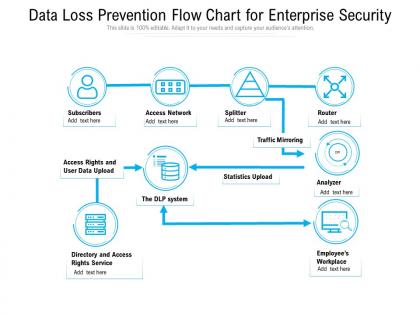
Data loss prevention flow chart for enterprise security




Try Before you Buy Download Free Sample Product
 Impress Your
 Audience
 100%
100% Editable
 Save Hours
 of Time


Our Data Loss Prevention Flow Chart For Enterprise Security are explicit and effective. They combine clarity and concise expression.
People who downloaded this PowerPoint presentation also viewed the following :
Data loss prevention flow chart for enterprise security with all 2 slides:
Give your audience a fulfilling experience. They will find our Data Loss Prevention Flow Chart For Enterprise Security elevating.
FAQs for Data loss prevention flow chart
So you need three main things for DLP: data classification (figuring out what sensitive stuff you actually have), monitoring tools to track data movement, and policies with automated rules. Honestly, the monitoring alerts can be a total nightmare - I've seen teams just ignore them after a while. Train your users too since they're usually how breaches happen anyway. Oh, and have a solid incident response plan ready. My advice? Start by classifying your most critical data first, then build everything else around protecting those specific things. Way less overwhelming that way.
Honestly, I'd start by figuring out where all your sensitive stuff actually lives - databases, cloud storage, those random Excel files people save everywhere. Check your current security setup next. What's encrypted? Who has access to what? Are your backups solid? Run some vulnerability scans and maybe get a pen test done if you can swing it. Social engineering attacks are still super common, so don't ignore the people side of things. Create a risk matrix focusing on your most critical data first - that's usually the financial stuff or customer info. Work outward from there.
So encryption is basically your backup plan for DLP stuff. Data gets protected whether it's just sitting there or moving around between systems. If hackers somehow break through and steal files, they can't do anything with encrypted data since they don't have the keys. It's like having a safe only you know the combo to. Your DLP tools will spot unencrypted sensitive info and either block it or encrypt it automatically before sending. Databases and file shares need encryption for sure - cloud stuff especially, that's where people get sloppy.
Honestly, training your employees is like turning them into extra security guards - way smarter than just hoping your tech catches everything. People who actually know what sensitive data looks like will make better calls when weird situations pop up. Way cheaper than dealing with a breach later too! Interactive stuff works way better than those boring videos nobody pays attention to. Try running fake phishing tests or scenarios where they have to decide what's safe to share. Makes people actually remember the training instead of just clicking through it. Plus your DLP tools will miss things that trained humans won't.
So DLP basically catches three main things that'll mess you up: accidental leaks (wrong email recipient, reply-all disasters), insider threats from employees going rogue or being careless, and hackers trying to steal your stuff. Honestly, the accidental ones happen constantly - way more than anyone admits. Your policies should watch for data sneaking out through personal Dropbox, USB drives, sketchy file transfers, all that. Oh, and monitor email attachments religiously because that's where most oops moments happen. Set it up right and you'll stop most breaches before they blow up.
Honestly, most DLP tools play nice with what you've already got. They hook into your SIEM, email systems, cloud stuff - all through APIs and standard connections. Cloud-based ones are definitely the path of least resistance since they just drop in between users and your apps. If you go on-prem, expect more setup work, but they'll still talk to Active Directory and your security tools just fine. Oh, and here's something that'll save you headaches later - map out how your data actually moves around first. Then find a vendor that already has connectors for your main systems. Trust me on that one.
Okay so start with the heavy hitters - GDPR for EU stuff, HIPAA if you're dealing with health data, PCI DSS for credit card processing. SOX matters if you're public. Don't forget CCPA in California either, that one's been catching people off guard. Then you've got industry-specific ones like FERPA for schools or GLBA for banks. The whole regulatory thing is honestly such a moving target these days. But look, your DLP policy has to line up with whatever actually applies to you. I'd say audit your data first - figure out what you're actually storing, then work backwards to see which regs hit you.
Start slow with DLP - monitor first, then block stuff later. That way you can see how people actually work without breaking everything. Focus your strict rules on the really sensitive data, not everything under the sun. Trust me, if you block everything people will just find sketchy workarounds that are way worse. Give users proper training so they get why these controls exist (makes a huge difference). Also make sure they have legit alternatives for their daily tasks. Oh and definitely review your policies regularly - what looks good on paper doesn't always work in practice.
Ugh, remote work totally screws with DLP - suddenly all your sensitive stuff is floating around on home WiFi and random coffee shop networks instead of staying put behind your corporate firewall. Those old network controls? Pretty much worthless now. Everyone's hitting cloud apps from their couch, and honestly, it's kind of a security mess. You've gotta flip the script and focus on protecting the actual data and users instead of just the network perimeter. Endpoint security becomes huge. Also investing in solid cloud security tools - that's where your money needs to go now.
Track incident reduction rates and false positive percentages first - those are your bread and butter. Time to detect breaches matters too, obviously. Look at policy violations you're catching vs what gets through, that gap is where the real problems hide. User compliance rates tell you if people are actually following the rules or just ignoring everything. How fast your team resolves alerts is huge because nobody wants to drown in useless notifications all day. Oh, and don't skip the feedback from your security and business teams - they'll tell you what's actually working. Start with maybe 3-5 metrics that fit your setup, then expand later.
So definitely focus on PII and financial stuff like credit card numbers first. HIPAA, PCI-DSS, GDPR data - all that regulated stuff is crucial. Your intellectual property is probably the biggest target though - source code, trade secrets, strategic plans. Health records too if you deal with those. Really depends on your industry, but think about what would absolutely destroy you if it leaked. That's your starting point. I'd map out whatever data would create the biggest nightmare scenario, then build your DLP around protecting those specific types. The rest can wait honestly.
So data classification is what makes DLP actually useful - without it, you're basically flying blind. You label stuff by sensitivity (public, internal, confidential, whatever) and that tells your DLP system how paranoid to be about each file. It's like... putting warning stickers on everything, honestly. When someone tries emailing a "confidential" doc outside the company, DLP knows to freak out and block it. But if there's no classification? Good luck - it'll probably block random PowerPoints while letting actual secrets walk out the door. Start with your most critical data first, that's what I'd do.
Dude, the DLP space is moving fast right now. AI and ML are crushing it at spotting context and weird data patterns that old rule-based stuff totally missed. Zero-trust is flipping the script too - assumes you're already compromised, which honestly makes way more sense. Cloud-native solutions are everywhere since we're all doing this hybrid thing now. The behavioral analytics piece is sick though - catches users acting sketchy before they actually leak anything. Oh, and those keyword-blocking systems? Pretty much dead already. You should probably start looking at AI-powered tools soon if you haven't.
First things first - fire up that incident response plan. Contain the breach and figure out what data got out. DLP systems aren't perfect (honestly, none of them are), so don't beat yourself up that this happened. Document absolutely everything while it's fresh in your mind. You'll need it for the post-incident analysis later. Notify stakeholders and regulators within whatever timeframes you're legally bound to - transparency is key here. The silver lining? This gives you real-world intel on where your DLP controls have gaps so you can actually fix them.
Honestly, the biggest pain is gonna be cost - DLP stuff gets pricey fast, especially ongoing fees. Most tools are built for big companies with actual IT departments, not small teams juggling everything. Without dedicated security people, you'll struggle to set it up right or monitor it properly. False positives will drive you nuts (learned that the hard way at my last job). Plus you don't have time to constantly tweak policies. I'd say skip the fancy enterprise solutions for now. Start simple - good file encryption and solid email security. You can always upgrade later when you've got more budget and headcount.
No Reviews