

Data migration roadmap powerpoint template





Try Before you Buy Download Free Sample Product
 Impress Your
 Audience
 100%
100% Editable
 Save Hours
 of Time


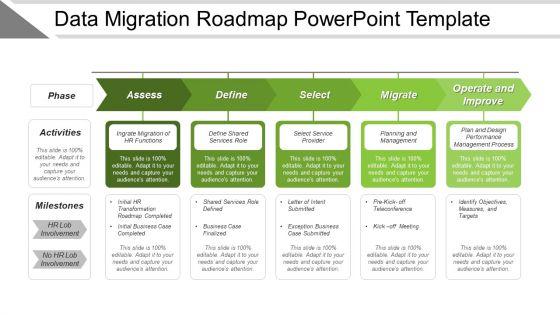
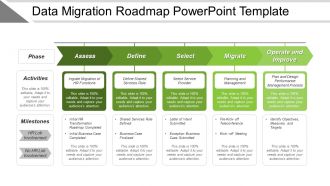
Managing business data in the effective manner is very important to ensures smooth functioning of the process. Considering this, we have designed this Data Migration Roadmap PowerPoint template. There are many steps involved in the migration process which needs to be carefully taken care of such as selecting, preparing, extracting and transforming data etc. Besides this, there are different categories available of data migration which is storage migration, database migration, application migration and business process migration. This presentation slide has been designed for the use of corporate people as they are required to create presentations on this concept. The five aspects of data migration shown in this PPT design are assess, define, select, migrate and operate and improve which can be used as available or you can make amendments according to your requirement. Our PowerPoint template allows you to do this in the most efficient manner. So let this PPT layout be the part of your next presentation where you have to show the migration process. All you have to do is just download the slide, insert it in your presentation, make changes as required and then present it. Address the problem with our Data Migration Roadmap Powerpoint Template. Convince your team of the viability of your solution.
People who downloaded this PowerPoint presentation also viewed the following :
Data migration roadmap powerpoint template with all 5 slides:
Our Data Migration Roadmap Powerpoint Template will get your business to bloom. They act like an excellent fertilizer.

FAQs for Data migration
So basically you've got four main steps: assessment/planning, data mapping, actually doing the migration, then testing everything. First thing - inventory all your stuff and figure out where it's going. This part ALWAYS drags on forever, fair warning. Map out how your data connects and what needs to change before you touch anything. Then run your migration scripts or whatever tools you're using. Honestly the testing phase is where people mess up most - they rush it. Give yourself like twice as much time as you think for validation. Better to be bored waiting than scrambling to fix broken data later.
Start with data profiling - check for missing stuff, duplicates, and format weirdness across all your systems. Automated tools are great for the bulk scanning, but honestly don't skip the manual checks because they'll catch bizarre edge cases that tools totally miss. Look at referential integrity between tables too. I learned this the hard way on my last project! Create some kind of scorecard with quality metrics for each dataset. That way you can figure out what needs fixing before the migration versus what you can clean up after. Also document the anomalies you find - future you will thank you.
Talend and Informatica PowerCenter are pretty solid for data migration - though they can get pricey. AWS has their Data Migration Service which works well if you're already in their ecosystem. Azure and Google have decent options too. Honestly? I've seen teams do amazing things with Apache NiFi or even just Python scripts, especially if your data isn't super complex. Really depends on what you're moving and where it's going. My advice - map out your source and target systems first. That'll help you figure out if you need the fancy enterprise stuff or if something simpler will work. Scale and budget matter way more than people think.
Run your migration in phases - seriously saves your sanity. Set up the new system alongside your current one, then move data in chunks during off-peak times (weekends work great if your users actually log off). Real-time sync tools keep both systems current during the switch. Here's the thing though - your rollback plan better be bulletproof. Test everything in staging first, obviously. I'd do a soft launch where both systems run together for like a week or two. Catches problems before you fully commit. Oh, and parallel systems aren't just backup - they're your lifeline.
Data migrations are honestly a pain - you'll hit data quality issues, downtime scares, and systems that just don't want to play nice together. Schema mismatches happen constantly. Performance can tank unexpectedly too. Here's what actually works: clean your data first (boring but crucial). Test with small chunks before going all-in. Map everything out super clearly - trust me on this one. Run both systems side by side if you can swing it. But seriously, have a backup plan ready. I've seen too many late nights because someone thought they wouldn't need to roll back.
So here's the thing - data governance basically controls your whole migration game plan. You can't just start moving stuff around without knowing what data you're allowed to touch, where it can actually go, and what hoops you'll need to jump through. Quality standards, compliance rules, who gets access to what - it all matters way more than you'd think. Honestly, most people try to figure out governance after they've already planned everything else, which is backwards. Map out all those requirements first, then build your migration around them. Trust me, it'll save you tons of headaches later.
Start with a simple matrix - business value vs how painful the migration will be. Your tier-1 stuff is anything touching revenue or compliance. That ancient mainframe everyone's scared of? Skip it for now, trust me. Go for the high-value, easy wins first to show some quick ROI. Map out which systems talk to each other too, because migrating something that breaks three other processes is a nightmare. Build momentum with the simple stuff, then tackle the scary legacy systems once you've got leadership bought in. The politics matter as much as the tech here.
First thing - make a list of all your source fields and what format they're in. Map each one to where it needs to go. Document any changes you'll need, like switching date formats or combining fields. Here's something that bit me once: similar field names don't always mean the same data! Set up validation rules to catch problems early. Always plan for null values too. Make a mapping doc that your business folks can actually understand, not just the tech team. Oh, and test everything on a small batch first. Way easier to fix issues before you process everything.
Honestly, start with encryption for everything - data moving around and data sitting still. Before you touch any actual migration stuff, figure out what compliance rules you're dealing with (GDPR, HIPAA, whatever). Doing that backwards later is such a pain. Test your security setup in staging first if you can. Run audits as you go, not just when you're done. Log everything because auditors love their paper trails. Oh, and loop your security team in early. They get cranky when you surprise them with "hey we moved everything to the cloud, can you check if it's secure?"
Think of stakeholders as your navigation system for this whole migration mess. Business users tell you what data actually matters and when they need it. IT gives you the real talk on technical limits. Executives set your budget reality check. Getting everyone's input early saves you from nasty surprises down the road - trust me on this one. They help you figure out which systems to move first based on business impact and how everything connects. Don't just send them status emails though. Set up actual check-ins where they can speak up about changing priorities before those changes completely wreck your timeline.
First thing - run data validation tests to compare your source and target systems record by record. Nothing worse than losing data in the move. Test all your key business processes with the migrated data, plus performance testing since the new environment might act weird. Honestly, this part always makes me sweat a bit, but it's totally doable if you stay organized. Set up automated regression tests for ongoing checks. Plan on 2-3 weeks running both systems in parallel - yeah it's annoying but worth it. Document every single discrepancy right away. Trust me, you'll need those notes later when people start asking what happened.
You gotta track both the tech stuff and business impact. Technical metrics: data completeness, quality scores, migration speed, system downtime. Business side covers user adoption and performance gains. Downtime is what executives freak out about most, so definitely watch that one closely. Oh, and set up automated alerts for data validation failures - trust me on this one. The key is defining your benchmarks upfront instead of just winging it later. Otherwise you'll be scrambling to figure out if things actually went well or not.
Ugh, legacy systems are the worst when you're trying to migrate data. They'll mess up your whole timeline because the formats are ancient, there's no decent APIs, and the data quality is probably garbage - you just don't know it yet. Documentation? What documentation lol. Data mapping becomes this whole nightmare since old systems hate talking to new ones. You'll spend forever on transformation and testing. Honestly, I learned this the hard way - start looking at your legacy stuff way earlier than you think, and whatever time you budgeted for extraction and cleanup? Add like 30% more. Trust me on this one.
Honestly, just talk to everyone constantly during this thing. Weekly check-ins are a must, plus set up some shared dashboards so people can see what's actually happening. Create dedicated Slack channels too - trust me, you'll need them when people start panicking about random stuff. Over-communicate instead of leaving people in the dark, because migrations make everyone weird and anxious. Document every decision right away or you'll forget why you did something dumb later. Oh, and assign someone to own communications for each part of the project. Otherwise important updates just disappear into the void.
Honestly, cloud-native stuff and real-time data processing are must-haves now. AI/ML integration too, obviously. Edge computing is exploding - data gets processed right where it's created instead of bouncing around. Data mesh is interesting, lets teams actually own their domain data rather than some giant centralized mess. Oh, and privacy regs just keep getting tighter, so bake compliance in from day one. Don't try fixing it later, trust me. I'd do quarterly roadmap check-ins to catch new trends before they blindside you.
-
Use of icon with content is very relateable, informative and appealing.
-
Nice and innovative design.