

Esquema de datos en DBMS Diapositivas de presentación de Powerpoint




Try Before you Buy Download Free Sample Product
 Impress Your
 Audience
 100%
100% Editable
 Save Hours
 of Time


Nuestro completo modelo de datos en DBMS abarca los elementos esenciales necesarios para un análisis de datos eficaz. La plantilla del modelo de datos sirve como el trabajo fundamental central, proporcionando un marco estructurado para almacenar datos en bases de datos. Además, nuestro DBMS PPT diseñado profesionalmente ofrece una descripción general concisa del modelo de datos, destacando sus herramientas conceptuales y ayudando a explicar la arquitectura de la base de datos. Además, la presentación del esquema de datos también incluye tablas, claves externas, claves primarias, vistas, columnas, tipos de datos, procedimientos almacenados y más, mostrando el esquema de la base de datos. Además, nuestro PPT de técnicas de modelado de datos describe el proceso paso a paso de crear un modelo de datos utilizando diferentes técnicas y herramientas. Además, la plataforma de diseño de base de datos cubre las fases, características y ventajas del modelo de datos conceptual, lógico y físico. Por último, nuestro módulo Arquitectura de modelo de datos presenta modelos de datos específicos de la industria para los sectores de salud, BFSI, manufactura y venta minorista. Puede descargar cómodamente nuestra plantilla 100% editable y personalizable, compatible con Google Slides, para diseñar y optimizar de manera eficiente su arquitectura de datos.
People who downloaded this PowerPoint presentation also viewed the following :
Contenido de esta presentación de Powerpoint
Diapositiva 1 : esta diapositiva presenta el esquema de datos en DBMS.
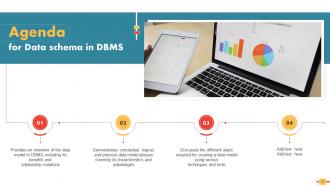
Diapositiva 2 : Esta diapositiva muestra la agenda de la presentación.
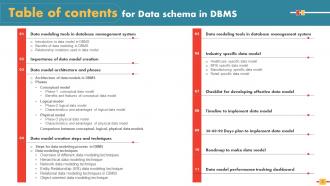
Diapositiva 3 : Esta diapositiva incorpora la Tabla de contenido.
Diapositiva 4 : esta diapositiva resalta el título de los temas que se discutirán a continuación.
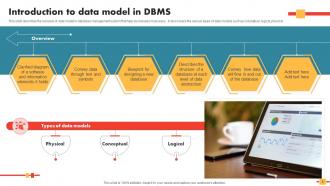
Diapositiva 5 : Esta diapositiva describe la descripción general del modelo de datos en el sistema de administración de bases de datos que ayuda a las empresas de muchas maneras.
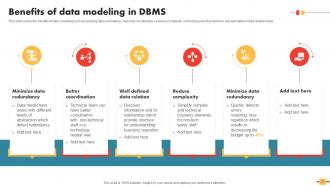
Diapositiva 6 : esta diapositiva cubre los beneficios del modelado de datos, como la reducción de la redundancia de datos, la mejora de la coordinación, etc.
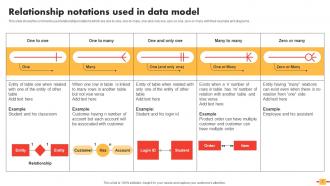
Diapositiva 7 : Esta diapositiva muestra las notaciones de relaciones comúnmente utilizadas.
Diapositiva 8 : esta diapositiva incluye el encabezado de los componentes que se tratarán más adelante.
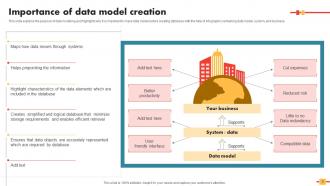
Diapositiva 9 : Esta diapositiva explica la importancia de la creación de modelos de datos.
Diapositiva 10 : esta diapositiva revela el título de las ideas que se cubrirán en la siguiente plantilla.
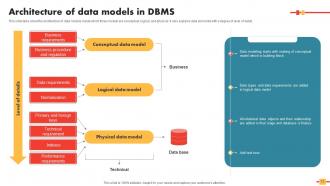
Diapositiva 11 : esta diapositiva habla sobre la arquitectura de los modelos de datos dentro de los cuales tres modelos son conceptuales, lógicos y físicos.
Diapositiva 12 : esta diapositiva muestra el encabezado de las ideas que se discutirán a continuación.
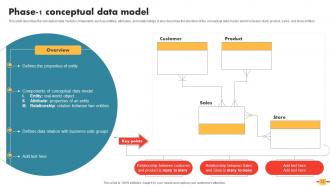
Diapositiva 13 : Esta diapositiva describe los componentes del modelo de datos conceptuales, como entidades, atributos, etc.
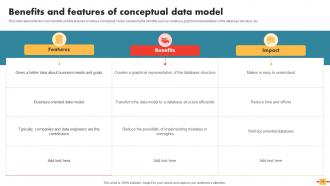
Diapositiva 14 : Esta diapositiva representa los principales beneficios y las características de usar un modelo conceptual.
Diapositiva 15 : esta diapositiva menciona el título de los temas que se tratarán más adelante.
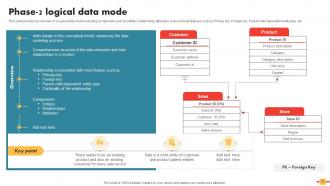
Diapositiva 16 : Esta diapositiva proporciona una descripción general de un modelo de datos lógicos.
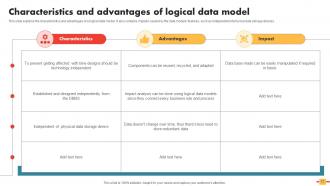
Diapositiva 17 : Esta diapositiva explica las características y ventajas de un modelo de datos lógicos.
Diapositiva 18 : Esta diapositiva aclara el encabezado de los contenidos que se discutirán en la siguiente plantilla.
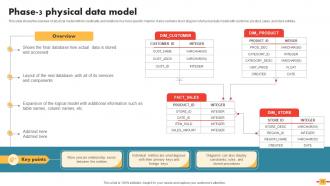
Diapositiva 19 : Esta diapositiva muestra la descripción general del modelo físico con su cardinalidad y relaciones de una manera más específica.
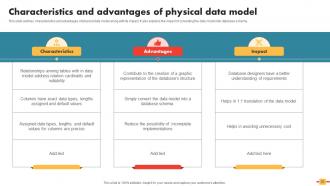
Diapositiva 20 : Esta diapositiva describe las características y ventajas del modelo de datos físicos junto con su impacto.
Diapositiva 21 : esta diapositiva indica el título de las ideas que se tratarán más adelante.
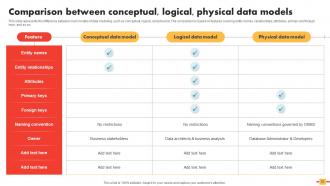
Diapositiva 22 : Esta diapositiva representa la diferencia entre los principales modelos de modelado de datos.
Diapositiva 23 : Esta diapositiva muestra el encabezado de las ideas que se discutirán en la siguiente plantilla.
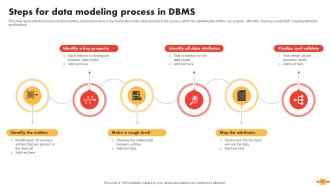
Diapositiva 24 : Esta diapositiva explica el proceso de modelado de datos y cómo se lleva a cabo.
Diapositiva 25 : esta diapositiva muestra el título de los contenidos que se tratarán más a fondo.
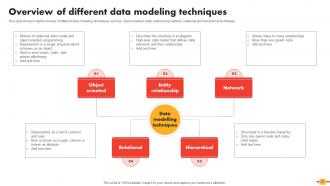
Diapositiva 26 : Esta diapositiva muestra una descripción detallada de las diferentes técnicas de modelado de datos.
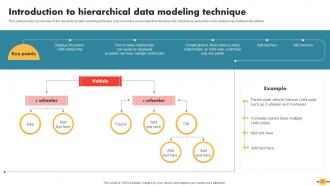
Diapositiva 27 : Esta diapositiva proporciona una descripción general de la técnica de modelado de datos jerárquicos.
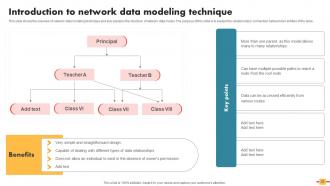
Diapositiva 28 : Esta diapositiva muestra la descripción general de la técnica de modelado de datos de red y también explica la estructura del modelo de datos de red.
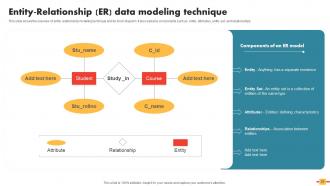
Diapositiva 29 : Esta diapositiva presenta la descripción general de la técnica de modelado entidad-relación y su diagrama de bloques.
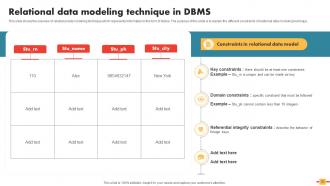
Diapositiva 30 : Esta diapositiva muestra la técnica de modelado de datos relacionales en DBMS.
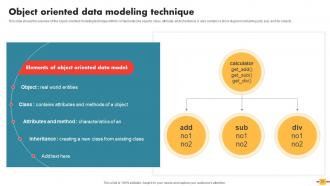
Diapositiva 31 : Esta diapositiva muestra la descripción general de la técnica de modelado orientado a objetos con sus componentes.
Diapositiva 32 : Esta diapositiva revela el encabezado de los temas que se discutirán a continuación.
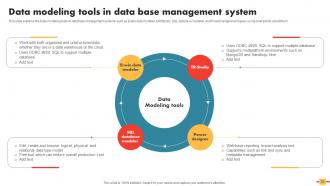
Diapositiva 33 : Esta diapositiva explica las herramientas de modelado de datos en los sistemas de administración de bases de datos.
Diapositiva 34 : esta diapositiva muestra el título de las ideas que se tratarán más adelante.
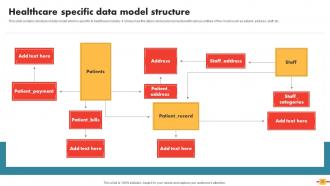
Diapositiva 35 : Esta diapositiva contiene la estructura del modelo de datos que es específico para la industria de la salud.
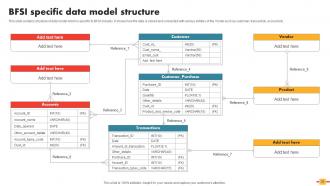
Diapositiva 36 : esta diapositiva trata sobre la estructura del modelo de datos específico de BFSI.
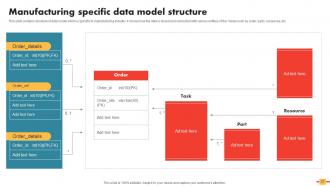
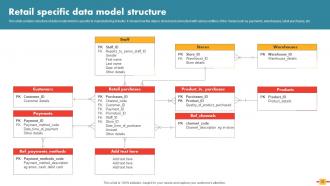
Diapositiva 37 : Esta diapositiva incluye la estructura del modelo de datos que es específico para la industria manufacturera.
Diapositiva 38 : Esta diapositiva muestra la estructura del modelo de datos que es específico para la industria manufacturera.
Diapositiva 39 : esta diapositiva muestra el encabezado de las ideas que se discutirán en la próxima plantilla.
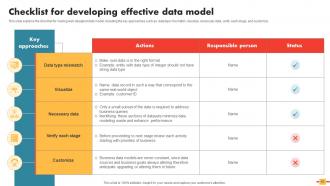
Diapositiva 40 : esta diapositiva explica la lista de verificación para crear un modelo de datos bien diseñado.
Diapositiva 41 : esta diapositiva muestra el título de los temas que se tratarán más adelante.
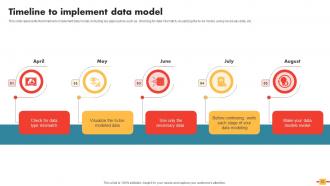
Diapositiva 42 : Esta diapositiva representa la línea de tiempo para implementar el modelo de datos.
Diapositiva 43 : Esta diapositiva aclara el encabezado de los componentes que se discutirán en la siguiente plantilla.
Diapositiva 44 : Esta diapositiva representa el plan de 30-60-90 días para implementar el modelo de datos.
Diapositiva 45 : esta diapositiva revela el título de las ideas que se tratarán más adelante.
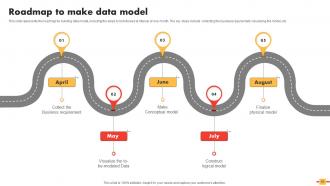
Diapositiva 46 : Esta diapositiva representa la hoja de ruta para construir el modelo de datos.
Diapositiva 47 : esta diapositiva muestra el encabezado de las ideas que se cubrirán en la siguiente plantilla.
Diapositiva 48 : esta diapositiva muestra el panel de seguimiento del rendimiento del modelo de datos.
Diapositiva 49 : esta es la diapositiva de iconos que contiene todos los iconos utilizados en el plan.
Diapositiva 50 : Esta diapositiva muestra información adicional.
Diapositiva 51 : Esta diapositiva aclara la misión, la visión y la meta de la organización.
Diapositiva 52 : Esta diapositiva muestra información relacionada con el tema financiero.
Diapositiva 53 : Esta es la diapositiva del diagrama de Venn con imágenes relacionadas.
Diapositiva 54 : Esta es la diapositiva de generación de ideas para fomentar ideas innovadoras.
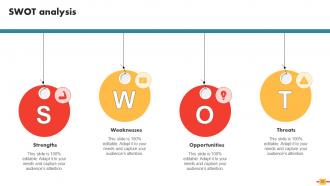
Diapositiva 55 : Esta diapositiva muestra el análisis FODA.
Diapositiva 56 : Esta es la diapositiva Conoce a nuestro equipo. Indique aquí la información relacionada con su equipo.
Diapositiva 57 : esta es la diapositiva del rompecabezas con imágenes relacionadas.
Diapositiva 58 : Esta es la diapositiva de agradecimiento por reconocimiento.
Esquema de datos en DBMS Diapositivas de presentación de Powerpoint con las 63 diapositivas:
Utilice nuestro esquema de datos en las diapositivas de presentación de Powerpoint de DBMS para ayudarlo de manera efectiva a ahorrar su valioso tiempo. Están listos para encajar en cualquier estructura de presentación.











FAQs for Data Schema In DBMS
So basically, relational databases are super structured - you've got tables with fixed columns and everything has to fit those rules perfectly. Non-relational is way more chill about it. You can throw in documents, key-value stuff, whatever. Relational's awesome when you need complex queries and rock-solid consistency. But honestly? Non-relational scales like crazy and doesn't care if your data structure changes every week (which, let's be real, it probably will). Go relational if you're doing banking or something that can't afford mess-ups. Otherwise, non-relational's probably your friend.
Okay so basically you're splitting up your data into smaller, focused tables instead of shoving everything into one giant mess. Yeah it's more work upfront, but you avoid all that duplicate data and weird inconsistencies. Your queries will need more joins - kinda annoying but worth it for cleaner data. Most people go for 3rd normal form since it hits that sweet spot between removing redundancy and not tanking your performance. Oh and start by figuring out your functional dependencies first, then you can split things up logically from there. Trust me, future you will thank you.
Dude, foreign keys are like your safety net for keeping database relationships intact. You can't reference a customer ID that doesn't actually exist - it'll throw an error before letting you create orphaned records. That cascading delete feature is pretty clutch too; delete a parent record and all the related child records get cleaned up automatically. Honestly, the debugging headaches you'll avoid are worth setting these up from day one. I learned this the hard way on my last project - spent way too much time tracking down broken references that could've been prevented. Short version: they stop your data from turning into a hot mess.
Start with normalization and indexing - that's your biggest bang for buck. Sometimes denormalizing tables that get joined constantly actually helps performance, even though it feels dirty. Index the columns you're always filtering on, but don't go crazy since too many will slow your writes down. Big tables? Partition them by date or whatever makes sense. I learned this one the hard way - pick smaller data types when you can. Saves memory and storage. But honestly, profile your actual queries first instead of guessing what's slow. Way more useful than shooting in the dark.
Ugh, data type mismatches will drive you crazy - seriously, every system handles things differently. Performance gets wonky when queries don't translate cleanly between databases. Edge cases? Yeah, you'll be debugging those forever. Your team's gonna hate learning new syntax, plus there's all the application code updates. Downtime during the switch is always a nightmare too. Oh, and constraint handling varies way more than you'd think between systems. Do yourself a favor though - map out your schema properly from day one. Test with actual data volumes, not some tiny sample that makes everything look easy.
Dude, NoSQL is so much more chill about data structure than regular SQL databases. With SQL you're stuck defining every column and data type before you even start - super rigid. But NoSQL? You can throw different document formats into the same collection and it won't care at all. Need to add a field randomly? Go for it. Some records totally different from others? No problem. You basically decide how to structure things when you're pulling the data out, not putting it in. Really clutch when your project's still figuring itself out or you've got messy, inconsistent data. Though obviously don't go completely nuts with zero planning.
So a star schema is this central fact table with dimension tables around it - picture a star shape, right? The fact table has your actual numbers (sales, quantities, whatever you're measuring). Dimension tables are all the descriptive stuff like customers, products, dates. Honestly it's popular because it just works - queries run fast since the joins are pretty straightforward. Business users love it too since it makes sense to them. Oh, and definitely figure out your main business metrics first, then build everything else around those. That's probably the best way to approach it without overthinking the whole thing.
Definitely start thinking about horizontal scaling right away - partition big tables early because distributed systems hate complex joins. I learned this the hard way on my last project! Cloud-native data types are your friend here. Set up solid indexing and don't forget backup/disaster recovery since your data's living somewhere else now. Auto-scaling is great but watch those costs like a hawk or you'll get a nasty surprise. Keep it simple at first, document what you're doing, and test with realistic loads before launch. Trust me on the testing part.
Oof, schema changes can totally wreck your database if you mess up. I learned this the hard way once - not fun. Blue-green deployments are clutch since you keep two identical environments running. Backward-compatible changes won't break your existing code right away either. Online migration tools help but honestly they're terrifying at first. Test everything in staging, obviously. Plan your rollbacks beforehand and try to do migrations when traffic's low. Start with safe, non-breaking stuff to get comfortable. The scary changes can wait until you're confident.
For schema stuff, I'd go with **dbdiagram.io** first - super clean and your team can actually see what you're talking about. **MySQL Workbench** or **DBeaver** are solid if you want to mess around with existing databases directly. **Lucidchart** works too but honestly feels overkill sometimes. Oh, and **Vertabelo** is decent for web-based work. I spent way too long fighting with some fancy enterprise tool last month when something simple would've done the trick. Just sketch out your current setup first - you'll catch weird relationships and duplicate stuff you totally missed.
Database schema is everything for query speed, honestly. Well-designed indexes and smart table relationships make your queries lightning fast. Miss those indexes though? You're screwed - I've literally watched 30-second queries drop to milliseconds just from adding one index. Normalization matters too, but don't go crazy with it. The trick is thinking about your most common queries upfront when you're designing everything. Way easier than trying to fix performance issues later when your boss is breathing down your neck about slow reports.
So schema-less stuff is pretty flexible - you can throw different document structures at it without planning everything upfront. Development goes way faster and changing data models later doesn't make you want to cry. But here's the thing: you lose those nice consistency guarantees, and query optimization gets weird since the database has no clue what your data looks like. Your app ends up doing all the validation work too. Honestly though, if your requirements change constantly (and whose don't?), it might be worth it. Just don't skip the testing.
Treat your database changes exactly like code - migration scripts in version control that move your schema forward step by step. Each one gets a timestamp or sequence number. Tools like Flyway handle the heavy lifting here, and honestly they're worth it. Run migrations in order during deployment. Try to keep them backward-compatible when you can, though that's not always realistic. Never edit a migration once it's deployed - always create a new file for changes. Oh, and test your rollbacks! I learned that one the hard way. Keep each migration focused on one thing.
Your schema is literally the foundation that determines if your database can handle growth or crumbles under pressure. Get your primary keys and foreign keys right from day one - trust me, fixing a broken schema while traffic is hitting your servers is a nightmare I wouldn't wish on anyone. Proper normalization makes queries faster and saves storage space. Indexing actually works when your structure makes sense. Clean relationships mean you won't hate yourself when adding features later. Oh, and good design makes horizontal scaling way less painful since you can partition data properly across servers.
Start with figuring out what data is actually sensitive - like SSNs, payment stuff, the obvious targets. Then lock down who can access it with proper controls. Encrypt those critical columns and use fake data for your dev environments (seriously, why do developers always think they need real customer info?). Audit logging is huge too - you need to know who touched what and when. Oh, and set up retention policies now before compliance starts breathing down your neck. Map out your sensitive fields first, then build your security around that. Way less painful than trying to bolt everything on later.
-
I discovered this website through a google search, the services matched my needs perfectly and the pricing was very reasonable. I was thrilled with the product and the customer service. I will definitely use their slides again for my presentations and recommend them to other colleagues.
-
“Detailed and great to save your time.”