

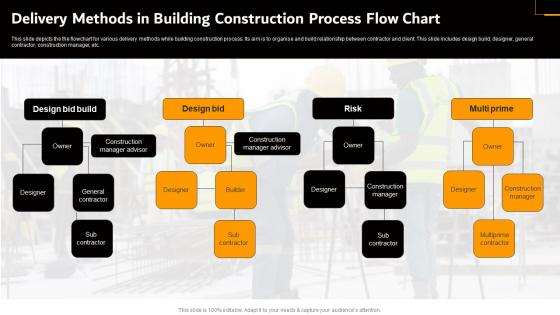
Delivery Methods In Building Construction Process Flow Chart




Try Before you Buy Download Free Sample Product
 Impress Your
 Audience
 100%
100% Editable
 Save Hours
 of Time


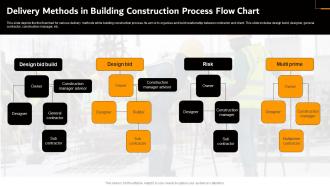
This slide depicts the the flowchart for various delivery methods while building construction process. Its aim is to organise and build relationship between contractor and client. This slide includes design build, designer, general contractor, construction manager, etc.
People who downloaded this PowerPoint presentation also viewed the following :
Delivery Methods In Building Construction Process Flow Chart with all 9 slides:
Use our Delivery Methods In Building Construction Process Flow Chart to effectively help you save your valuable time. They are readymade to fit into any presentation structure.








FAQs for Delivery Methods In Building Construction
So there's three main things everyone's using these days. LMS platforms like Moodle or Canvas are pretty much the standard - super handy for tracking progress and keeping courses organized. Mobile apps are everywhere now since people can just do training on their phones during lunch breaks or whatever. Virtual classrooms through Zoom, Teams, or Adobe Connect handle the live stuff when you need that face-to-face interaction. Oh, and mixing these together usually works way better than just picking one. Nobody wants to be stuck with just webinars all the time, you know?
Honestly, your delivery method can totally make or break the whole thing. Visual learners will completely check out if you're just doing audio stuff. Meanwhile, hands-on people need something they can actually interact with or they're done. I've noticed simulations and group activities work way better than just lecturing at people - retention rates are so much higher. Oh, and those marathon training sessions? Forget it. Breaking things into smaller chunks or spacing them out actually helps people remember later. Mix up your approach based on who you're teaching and definitely throw in interactive stuff so people don't just sit there like zombies.
Real-time delivery is awesome for complicated stuff and getting instant feedback. Plus people actually connect better. Scheduling everyone though? Total pain. With async, learners go at their own speed and can rewatch things - way easier to scale up too. But you miss out on those random great discussions that just happen naturally. Also harder to tell if someone's actually following along or just zoning out. I'd mix both honestly. Do live sessions for launches and Q&A stuff, then let people digest the meaty content on their own time. Works pretty well in my experience.
Oh man, cultural differences can totally make or break your delivery approach. Like, Japanese teams usually want super detailed docs and formal presentations, but Germans? They're all about getting straight to the point. I actually bombed once with our Tokyo office - sent them these casual Slack updates that went over like a lead balloon. Some cultures need that whole relationship-building phase first too. Power dynamics matter as well - certain places expect everything to go through the hierarchy, others are cool with peer-to-peer stuff. My advice? Just ask your audience upfront how they prefer to receive info. Saves so much awkwardness later.
Dude, delivery tech is getting wild right now. Drones and autonomous vehicles are crushing it for last-mile stuff, especially in cities. Route optimization AI can cut your delivery times like crazy - that's probably where I'd start since you'll see results fast. Smart lockers are finally solving that annoying "no one's home" issue (seriously took long enough). Real-time IoT tracking keeps customers happy too. Oh, and pickup points are everywhere now which is pretty convenient. The route software gives you the best bang for your buck if you're just getting started with upgrades.
Honestly, blended learning is pretty brilliant once you get the hang of it. Match your format to what you're actually teaching - online stuff works great for knowledge dumps and letting people go at their own pace. Save the in-person time for practice, discussions, real problem-solving. Don't just throw everything online because it's easier (I see this mistake constantly). Your LMS data will show you where people get stuck in the digital parts, then you can tackle those tricky spots when you're all in the same room. Try starting with one course first, maybe 70% online and 30% face-to-face.
Honestly, audience analysis is everything when you're figuring out delivery methods. Busy executives? They want quick email summaries, not hour-long presentations. Frontline workers need hands-on stuff - visual aids, demos, whatever gets them learning while they're actually doing the job. I learned this the hard way once with a terrible PowerPoint that bombed completely. You've got to think about their tech skills too. Some people love digital tools, others still prefer printed handouts. Cultural differences matter as well. The whole point is matching how THEY actually learn, not what's convenient for you to put together.
Honestly, visuals are total lifesavers when you're trying to explain complicated delivery stuff. People's brains just shut down when you throw too much info at them at once. But show them a flowchart or timeline? Suddenly they get it. I've watched entire rooms go from confused to nodding along once someone actually draws out the process. Templates help too - you won't forget important details when you're rushing through everything. Plus your audience can reference it later instead of trying to remember what you rambled about for twenty minutes.
Track both the numbers and the actual learner experience - completion rates, time spent, test scores, feedback. Survey people about what they actually prefer because honestly, their answers might shock you. I'd also compare costs and how easy each method is to roll out. Oh and definitely get your baseline data first before changing anything! Run A/B tests if you can swing it. Set up quarterly reviews to dig into the results and tweak things. Sometimes what looks good on paper totally flops in real life.
Dude, corporate training is all about flexibility - online modules, virtual sessions, microlearning stuff because everyone's swamped. Schools are still mostly classroom-based (pandemic changed things but slowly). Kids need way more structure and immediate feedback, so lots of synchronous learning. Corporate people just want quick, job-relevant info they can use right away. Meanwhile K-12 follows these long curriculum plans over months. Honestly, the biggest difference is attention spans - adults want efficiency, kids need constant engagement and hand-holding. Just think about who you're teaching and their actual constraints when picking your format.
Honestly, mixing up how you deliver stuff makes such a difference. Visual learners need slides or charts, while others learn better through discussions and talking things out. Don't forget the hands-on people - they need activities to actually do something. I always include written materials too since some folks just prefer reading quietly (I'm totally one of those people). Survey your audience first to see what they like. Then for each big concept, try hitting it 2-3 different ways. Way better than just lecturing at everyone the whole time.
Honestly, delivery method makes or breaks your whole scaling strategy. In-person training? You're stuck with room limits and trying to coordinate everyone's schedules - total nightmare. Digital stuff like e-learning or apps though? Game changer. You can hit thousands of people at once without worrying about physical space. Record something once and boom, you can use it forever (which your budget will thank you for). I learned this the hard way at my last job. The trick is choosing methods that don't force you to double your resources every time you add more people.
So colleges are trying out micro-credentials and digital badges for quick skill-building. VR/AR is getting big too - like you can literally walk through ancient Rome instead of just reading about it, which is honestly pretty sick. AI adapts lessons to how fast you learn. Competency-based programs let you move ahead once you've nailed the skills, not after X weeks of sitting there. Most places are doing hybrid online/in-person now anyway. But here's the thing - half this stuff might just be shiny tech that doesn't actually help you learn better. I'd test one thing first before going crazy with changes.
Honestly, just make whatever you're doing more interactive instead of one-way. Live sessions? Throw in polls or quick discussions every 10-15 minutes. Videos and modules work better with quizzes or reflection stuff that actually makes people respond - not those pointless "click to continue" things. Even peer feedback does wonders. The trick is keeping feedback immediate and tied to what they just absorbed. Oh, and don't overthink it - grab one method you're already using and add a single feedback moment to test it out first.
Okay so first things first - make sure you're actually allowed to share whatever you're about to share. Use encrypted stuff for personal data, don't blast confidential things in public spaces, you know? Think about whether they're in the right headspace to hear it too. Timing matters way more than people realize. I definitely screwed this up before by dropping heavy news on someone at the worst possible moment. Have support resources ready if it's really bad news. Oh, and write down why you decided to handle it however you did - covers your ass later. When in doubt, be more careful than less.
-
“I always have a wonderful experience with SlideTeam. It's my ""go to"" when I need a template.”
-
Great work on designing the presentation. I just loved it!