

Deployments powerpoint presentation slides




Try Before you Buy Download Free Sample Product
 Impress Your
 Audience
 100%
100% Editable
 Save Hours
 of Time


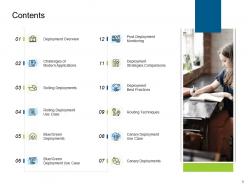
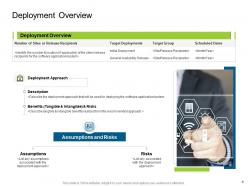
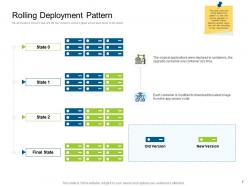
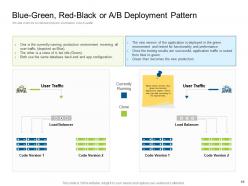
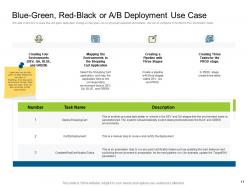
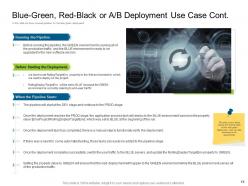
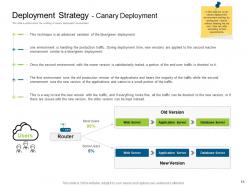
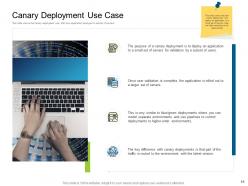
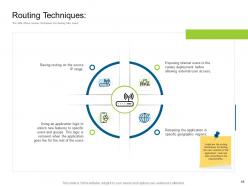
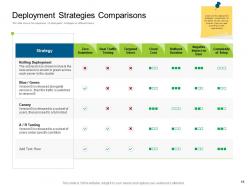
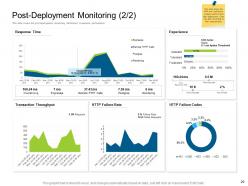
Give an overview of deployment by employing our professionally designed Deployment Strategies PowerPoint Presentation Slides. Showcase the deployment approaches along with assumptions and risks with the help of the system management PPT slideshow. Take the assistance of deployment strategy PPT theme to describe the architecture of the rolling deployment. Explain the blue-green deployment strategies with examples with the help of this PPT slide deck. Our content-ready presentation also showcases how to create blue-green deployment strategies. As this slideshow is fully adaptable to your needs, the insertion of new facts is effortless. Take advantage of strategic deployment PPT templates to explain the working of the canary deployment environment. Showcase canary deployment pattern by using ready-to-use PPT layouts. Depict the technique for testing the new version of the application through this attention-grabbing PPT slideshow. You can also showcase the comparison of deployment strategies on different bases with the help of readily available PPT themes. Showcase the KPI metrics to measure performance after the deployment by downloading this effective software management strategy PPT presentation.
People who downloaded this PowerPoint presentation also viewed the following :
Deployments powerpoint presentation slides with all 31 slides:
Use our Deployments Powerpoint Presentation Slides to effectively help you save your valuable time. They are readymade to fit into any presentation structure.







FAQs for Deployments
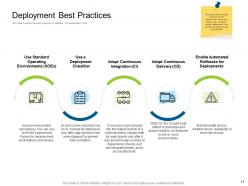
Best practices for successful deployment include automated testing, staged rollouts, comprehensive monitoring, clear rollback procedures, and thorough documentation. These practices streamline operations by minimizing downtime, reducing human error, and enabling rapid issue resolution, with many organizations finding that systematic deployment strategies ultimately deliver faster product releases and enhanced system reliability.
Deployment pipeline automation is achieved through CI/CD tools like Jenkins, GitLab CI, Azure DevOps, automated testing frameworks, and infrastructure-as-code practices that trigger builds, run tests, and deploy applications seamlessly. These technologies streamline development workflows by eliminating manual interventions, reducing deployment errors, and accelerating release cycles, with many organizations finding that automated pipelines deliver faster time-to-market and enhanced operational efficiency.
Essential deployment tools include Docker for containerization, Kubernetes for orchestration, Jenkins for CI/CD pipelines, Ansible for configuration management, and cloud platforms like AWS, Azure, or Google Cloud. These technologies streamline deployment processes by automating builds, managing infrastructure, and enabling scalable deployments, with many organizations finding that this strategic combination reduces deployment times, minimizes errors, and ultimately delivers faster time-to-market and enhanced operational efficiency.
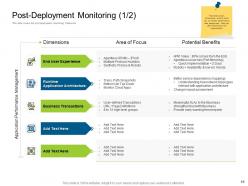
Deployment success can be measured through performance metrics, user adoption rates, system uptime, error frequency, and business outcomes alignment. These indicators help organizations track operational efficiency, customer satisfaction, and ROI, with many companies finding that comprehensive monitoring across technical and business dimensions ultimately delivers clearer insights and faster optimization cycles.
Version control enables deployment teams to track code changes, manage release versions, coordinate team contributions, and maintain deployment history throughout the development lifecycle. Through integrated systems like Git, organizations streamline rollback procedures, automate deployment pipelines, and ensure consistent releases across environments, while minimizing conflicts and ultimately delivering faster, more reliable software updates with complete traceability.
Rollback procedures typically involve automated monitoring systems, version control restoration, database rollbacks, and traffic redirection strategies. Organizations implement blue-green deployments, canary releases, and feature flags to minimize downtime, with many financial services and e-commerce companies finding that comprehensive rollback plans reduce recovery time significantly while maintaining customer trust.
Common deployment challenges include configuration errors, environment inconsistencies, inadequate testing, rollback complexities, and downtime risks. These issues can be mitigated through automated deployment pipelines, comprehensive staging environments, gradual rollout strategies, and robust monitoring systems, with many organizations finding that implementing CI/CD practices and infrastructure-as-code ultimately delivers faster, more reliable releases.
Cross-team collaboration during deployment can be ensured through shared communication channels, unified deployment pipelines, clear role definitions, and regular sync meetings throughout the process. Organizations increasingly implement collaborative tools like Slack integrations, joint war rooms, and cross-functional deployment teams, with many finding that structured handoffs between development, operations, and QA teams significantly reduce errors while accelerating release cycles.
Security considerations during deployment include access controls, encryption protocols, vulnerability scanning, secure configuration management, and authentication mechanisms. These safeguards streamline risk mitigation by protecting sensitive data, preventing unauthorized access, and ensuring compliance standards, with many organizations finding that proactive security measures ultimately deliver enhanced operational resilience and customer trust.
Managing dependencies during complex application deployments involves using dependency management tools, containerization technologies like Docker, infrastructure as code, automated testing pipelines, and version control systems. These approaches streamline deployment processes by ensuring consistent environments, automating dependency resolution, and minimizing conflicts, with many organizations finding that strategic dependency management ultimately delivers faster deployments, reduced downtime, and enhanced operational reliability.
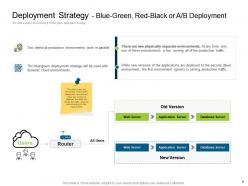
Blue-green deployments involve running two identical production environments, switching traffic completely between them, while canary deployments gradually route small percentages of traffic to new versions alongside existing ones. Blue-green provides instant rollbacks and zero downtime but requires double infrastructure costs, whereas canary deployments enable risk mitigation through gradual testing, ultimately delivering safer releases with lower resource requirements.
Cloud services streamline deployment through automated provisioning, scalable infrastructure management, continuous integration pipelines, containerization support, and real-time monitoring capabilities. These technologies enable organizations to reduce deployment times from hours to minutes, minimize human errors, and achieve consistent environments across development stages, with many enterprises finding that cloud-native approaches ultimately deliver faster time-to-market and enhanced operational efficiency.
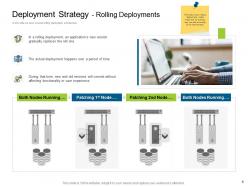
Strategies to minimize downtime include blue-green deployments, rolling updates, canary releases, feature toggles, and automated rollback mechanisms. These approaches enable organizations to maintain service availability by gradually shifting traffic, testing changes with limited user groups, and quickly reverting problematic releases, with many enterprises finding that strategic deployment automation delivers seamless updates and enhanced customer experiences.
Documentation is crucial during deployment as it ensures consistency, reduces errors, and enables faster troubleshooting when issues arise. Comprehensive deployment documentation helps teams maintain operational efficiency, facilitates knowledge transfer between developers and operations staff, and streamlines future updates, with many organizations finding that well-documented processes significantly reduce deployment time and minimize costly rollback scenarios.
Incorporating user feedback into deployment cycles involves establishing systematic collection channels, implementing continuous monitoring tools, creating feedback analysis workflows, and integrating insights into development sprints. Organizations streamline this process through automated feedback systems, regular user surveys, and analytics platforms, with many teams finding that structured feedback loops significantly enhance product quality, reduce deployment issues, and ultimately deliver superior user experiences while maintaining competitive advantage.
-
Very unique, user-friendly presentation interface.
-
Excellent template with unique design.
-
Informative presentations that are easily editable.
-
Very unique and reliable designs.
-
Good research work and creative work done on every template.
-
Graphics are very appealing to eyes.