

Devops powerpoint presentation slides





Try Before you Buy Download Free Sample Product
 Impress Your
 Audience
 100%
100% Editable
 Save Hours
 of Time


Showcase development processes and methods with our content ready Devops PowerPoint Presentation Slide. Focus on rapid application delivery using our visually appealing development and operations PPT visuals. The operating system PowerPoint complete deck comprises self-explanatory and editable PowerPoint templates such as need for DevOps, best practices, criteria for choosing a pilot project, DevOps goals, timeline for DevOps transformation, current state future state, 30-60-90 day plan, roadmap for DevOps, transformation post successful DevOps Implementation, RACI matrix, dashboard to name a few. Users can easily customize all the templates as per their specific project needs. Furthermore, you can also use this IT operations management presentation deck to encourage your team to adopt DevOps culture practices and tools. Demonstrate DevOps goals like Increase automation and standardize the process, reduce cost effort & time to market and so on. Download our system development lifecycle PowerPoint templates to present ways to make improved products faster for greater client satisfaction. Handle deficiencies with our DevOps Powerpoint Presentation Slides. Initiate action to acquire desired assets.
People who downloaded this PowerPoint presentation also viewed the following :
Content of this Powerpoint Presentation
Slide 1: This slide introduces DevOps. State Your Company Name and begin.
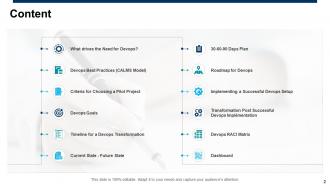
Slide 2: This slide shows Content of the presentation.
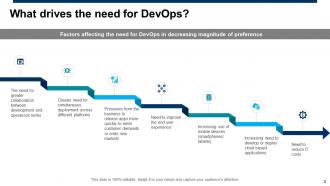
Slide 3: This slide displays What Drives the Need for Devops?
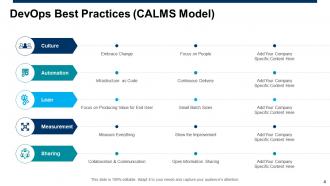
Slide 4: This slide presents Devops Best Practices (CALMS Model) as- Culture, Automation, Lean, Measurement, Sharing.
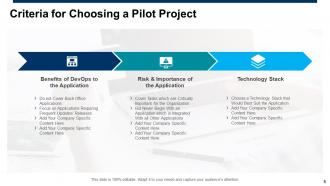
Slide 5: This slide showcases Criteria for Choosing a Pilot Project.
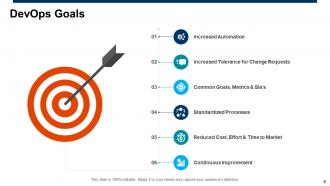
Slide 6: This slide shows DevOps Goals including- Continuous Improvement, Reduced Cost, Effort & Time to Market, Standardized Processes, Increased Automation, Increased Tolerance For Change Requests, Common Goals, Metrics & Sla’s.
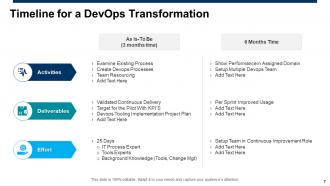
Slide 7: This slide presents Timeline for a Devops Transformation.
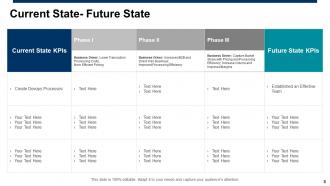
Slide 8: This slide displays Current State- Future State in tabular form.
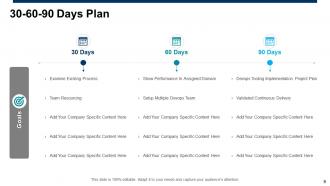
Slide 9: This slide represents 30-60-90 Days Plan with related imagery.
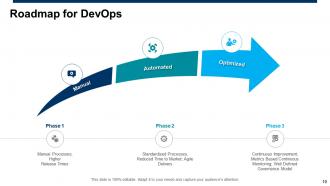
Slide 10: This slide showcases Roadmap for Devops with phases as- Manual, Automated, Optimized.
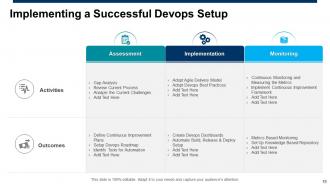
Slide 11: This slide shows Implementing a Successful Devops Setup including- Assessment, Implementation, Monitoring.
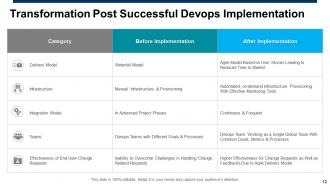
Slide 12: This slide presents Transformation Post Successful Devops Implementation.
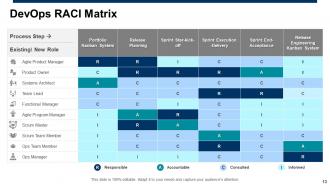
Slide 13: This slide displays Devops RACI Matrix.
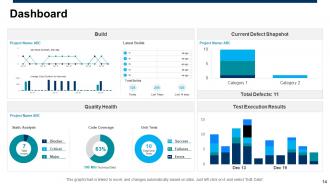
Slide 14: This is a Dashboard slide showing data in graphical form. You can change data as per needs.
Slide 15: This slide displays icons for DevOps.
Slide 16: This slide is titled as Additional Slides for moving forward.
Slide 17: This is About Us slide to show company specifications etc.
Slide 18: This is Our Team slide with names and designations.
Slide 19: This is a Puzzle slide with additional text boxes.
Slide 20: This is a Financial slide. Show your finance related stuff here.
Slide 21: This is a Thank You slide with address, contact numbers and email address.
Devops powerpoint presentation slides with all 21 slides:
Use our Devops Powerpoint Presentation Slides to effectively help you save your valuable time. They are readymade to fit into any presentation structure.






FAQs for Devops
So the main thing with DevOps is it stops that whole "dev builds it, ops deals with it" mess. Teams actually work together now - crazy concept, right? You'll be automating tons of stuff like testing and deployments, which is a pain to set up but saves your sanity later. Everything becomes about getting code out faster with better feedback. Oh, and here's the kicker - your team owns what happens in production, not just whether the code works on your laptop. Honestly, just pick one thing you do manually and automate it first.
So CI/CD automates everything from when you commit code to getting it live in production. No more manual testing and deploying every single change - the pipeline just does it when you push. You'll catch bugs super early when they're actually cheap to fix, and honestly? Shipping features becomes way faster since you're not waiting around for those dreaded deployment windows. I used to waste entire Friday afternoons on releases. Now it just happens automatically. My advice: start with automated testing first, then slowly add the deployment stuff once everyone's cool with it.
So automation is pretty much what makes DevOps actually work - no more manual handoffs slowing everything down. I'd start with CI/CD stuff like Jenkins or GitLab CI for your builds and deployments. Then grab Terraform or Ansible for infrastructure-as-code so your environments stay consistent. Monitoring with Prometheus is solid too. Honestly though, don't get caught up in all the tool debates - they're endless and kind of annoying. Just pick things that play nice together. My advice? Start by automating whatever manual process makes you want to throw your laptop out the window first.
So basically DevOps gets dev and ops teams talking to each other instead of just tossing code over the wall at the end. Both sides share stuff like deployments and monitoring - honestly, it's pretty cool when everyone's using the same dashboards and tools because nobody's confused anymore. Cross-functional meetings help too, plus those blameless post-mortems where you don't just point fingers. Oh, and automation pipelines are huge for this. I'd say pick one deployment pipeline and have your teams work on it together first. You'll see the communication thing sort itself out naturally from there.
Focus on the DORA metrics first - deployment frequency, lead time, mean time to recovery, and change failure rate. Honestly, these four tell you way more than most other stuff you could track. Business metrics matter too though, like customer satisfaction and revenue impact. I mean, shipping fast is pointless if you're breaking everything, right? Don't try measuring everything at once. Start with just deployment frequency and lead time. Add the others later when you've got those down. Two or three metrics max initially - track them consistently and you'll actually learn something useful.
So basically, DevOps changes everything about how we handle security. Instead of dumping it all on the security team at the end, you build it right into your development pipeline from day one - that's the whole DevSecOps thing. Automated scans, vulnerability checks, compliance stuff all happens during your CI/CD process. Way better than finding out you have problems after launch, trust me. Your devs actually start caring about security because it's part of their daily routine now, not someone else's headache. Honestly just start small - throw some basic SAST tools into your build process and you'll catch the dumb mistakes before they go live.
Honestly? People hate change, so expect pushback from both dev and ops teams. That's like half the battle right there. You'll also run into toolchain headaches and realize nobody knows what they're doing yet. Don't go big initially - pilot projects are your friend. Training is huge, and you gotta get these siloed teams actually talking to each other. Start with basic tools that actually work instead of getting fancy. Leadership support makes or breaks this stuff. Celebrate the small wins because you'll need that momentum when things get messy (and they will).
Ugh, Docker basically fixes that annoying "works on my machine" thing we all hate. You wrap your app with everything it needs in a container, so it runs the same everywhere - dev, staging, wherever. Kubernetes is the orchestration layer that scales things up when you're getting hammered with traffic, rolls out updates smoothly, restarts stuff when it crashes. Honestly changed how I think about deployments. But seriously, don't go crazy at first. Just containerize one thing with Docker and mess around with it before diving into the whole K8s circus - that stuff gets complex fast.
Think of IaC like version control for your servers and cloud stuff. You write code that defines everything, then deploy identical setups across dev, staging, prod - no more random config differences screwing you over. Your team can review infrastructure changes in PRs just like regular code. Plus rollbacks are automatic when things go sideways. Honestly, it's a game changer once you get used to it. Just grab Terraform or CloudFormation and start with one simple service. Don't try to boil the ocean right away - you'll thank yourself later.
Honestly, cloud computing is what makes DevOps actually scalable these days. Instead of waiting weeks for infrastructure, you're spinning stuff up in minutes. Your teams can iterate so much faster. The auto-scaling thing is pretty sweet too - environments grow during deployments and shrink back down to save money. Managed databases and container services handle all that operational stuff that used to slow teams down (which was always such a pain). I'd say start with moving your CI/CD to the cloud first. Build times get way faster and deployments become way more reliable.
So for DevOps monitoring, you'll want to hit three main things. First, get all your logs in one place - ELK stack or Splunk work great for this. Then set up monitoring for both your infrastructure stuff (CPU, memory) and app metrics like response times. Pro tip: alerts will drive you absolutely crazy if you don't tune them right, so only monitor what actually impacts your users. I learned this the hard way lol. Set up automated alerts with escalation and attach runbooks so people know what to do. Oh, and start by mapping your critical user flows first - monitor those end-to-end before you worry about everything else.
Honestly, the trick is syncing your sprints with your deployment pipeline so they're not fighting each other. Automate testing and deployment around those sprint cycles - that way you can actually ship working stuff every iteration. I've watched teams completely shoot themselves in the foot when their "done" stories aren't even deployable yet. What's the point, right? Your definition of done needs to include passing tests and being ready to push live. Oh, and don't treat infrastructure like some separate thing - bake it right into your user stories from the start. Start with whatever manual process makes you want to cry first.
So here's what I'm seeing everywhere - AI stuff is getting baked into DevOps tools, though half of it feels like marketing BS honestly. GitLab and GitHub both have these code review assistants now that are actually pretty decent. Platform engineering is huge too - check out Backstage if you haven't already. WebAssembly's starting to pop up for lighter containers, which is cool. Oh and supply chain security tools like Sigstore are becoming a must-have after all those npm disasters. My advice? Just mess around with whatever AI features your current tools already have first. Most are free anyway and you might be surprised.
Break down those silos first thing - dev and ops gotta actually talk, not just when everything's on fire. Shared goals help tons so nobody's working against each other. Honestly? The real problem is people being weird about their turf, but that passes. Cross-functional teams work great once you get rolling. Knowledge sharing sessions are clutch too - gives everyone time to figure out each other's tools. Oh and celebrate wins together! When stuff breaks (because it will), treat it like a team learning thing instead of the usual blame game. That mindset shift changes everything.
Honestly, the technical stuff is easier than you'd think - Docker, Kubernetes, CI/CD pipelines, that whole infrastructure-as-code thing. Your team can pick those up pretty quick with some workshops. The real challenge? Getting people to actually work together. Developers and ops folks need to stop throwing stuff over the wall to each other. I'd pair them up on actual projects right away - nothing beats learning by doing. Oh, and don't sleep on monitoring and logging tools, those'll save your butt later. The whole "we're all responsible for this mess" mindset takes time but it's worth it.
-
Awesomely designed templates, Easy to understand.
-
Colors used are bright and distinctive.