

Devops process it powerpoint presentation slides




Try Before you Buy Download Free Sample Product
 Impress Your
 Audience
 100%
100% Editable
 Save Hours
 of Time


DevOps is the combination of various practices and tools that help increase the ability of organizations to deliver applications and services faster. Check out our competently designed DevOps process IT template that defines DevOps in an organization by focusing on development, operations, and quality assurance. We have outlined the core principles of DevOps culture, its goals and achievements, benefits and challenges, and more. The template presents details related to methodology with benefits, aligning principles with practices and challenges, IT organization structure, etc. You can even display developer responsibilities, process flow, steps involved in the methodology, agile process, and more. The insightful PowerPoint presentation shows details related to the maturity model adopted, the choice of the right tools for the company, the steps considered when selecting the tools, etc. the implementation delivery pipeline and ways to implement DevOps in an organization. Download this 100% editable template. Customize it according to your needs now.
People who downloaded this PowerPoint presentation also viewed the following :
Content of this Powerpoint Presentation
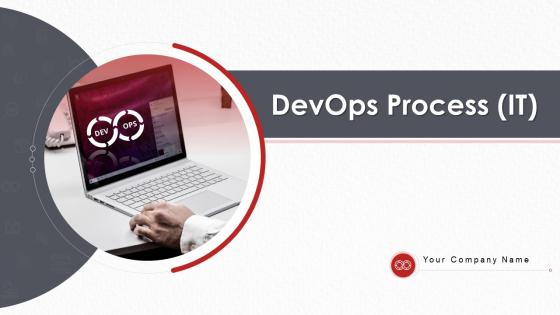
Slide 1: This slide introduces DevOps Process (IT). State Your Company Name and begin.
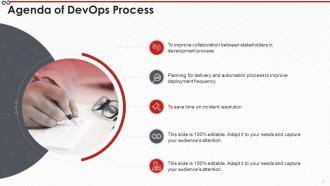
Slide 2: This is an Agenda slide. State your agendas here.
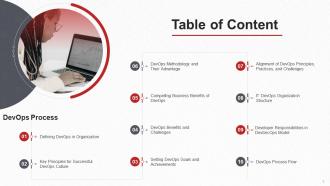
Slide 3: This slide shows Table of Content for the presentation.
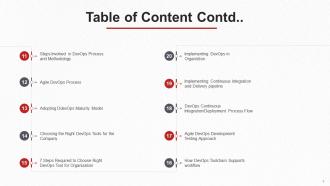
Slide 4: This slide presents Table of Content for the presentation.
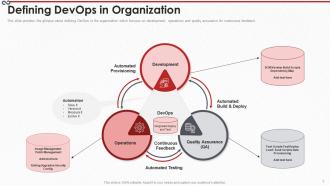
Slide 5: This slide shows DevOps in the organization which focuses on development, operations and quality assurance for continuous feedback.
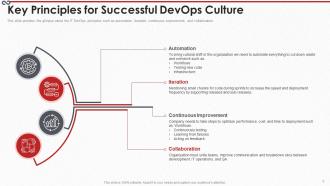
Slide 6: This slide displays Key Principles for Successful DevOps Culture.
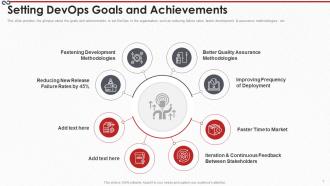
Slide 7: This slide represents goals and achievements to set DevOps in the organization such as reducing failure rates, faster development & assurance methodologies, etc.
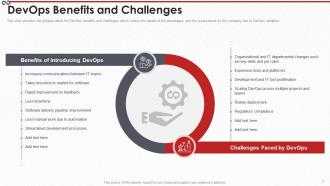
Slide 8: This slide shows DevOps benefits and challenges which covers the details of the advantages and the issues faced by the company due to DevOps adoption.
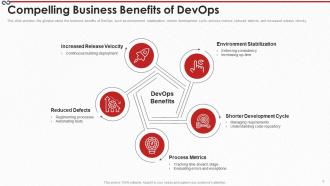
Slide 9: This slide presents business benefits of DevOps such as environment stabilization, shorter development cycle, process metrics, etc.
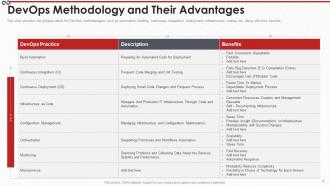
Slide 10: This slide shows DevOps Methodology and Their Advantages.
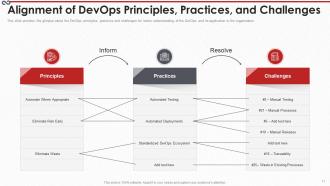
Slide 11: This slide displays Alignment of DevOps Principles, Practices, and Challenges.
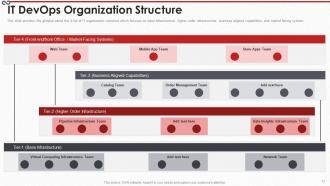
Slide 12: This slide represents 4 tier of IT organization structure which focuses on base infrastructure, higher order infrastructure, etc.
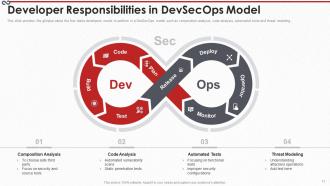
Slide 13: This slide shows Developer Responsibilities in DevSecOps Model.
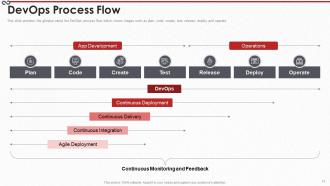
Slide 14: This slide presents DevOps process flow which covers stages such as plan, code, create, etc.
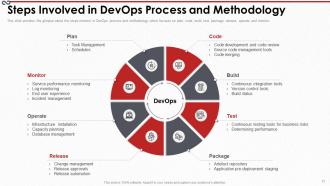
Slide 15: This slide shows Steps Involved in DevOps Process and Methodology.
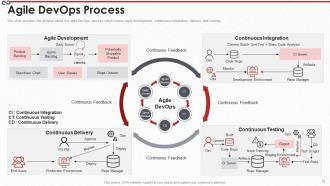
Slide 16: This slide displays agile DevOps process which covers agile development, continuous integration, delivery and testing.
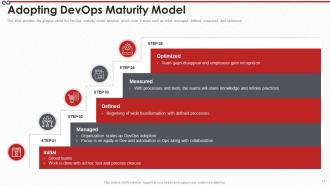
Slide 17: This slide represents DevOps maturity model adoption which cover 5 steps such as initial, managed, defined, etc.
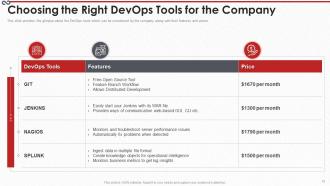
Slide 18: This slide shows Choosing the Right DevOps Tools for the Company.
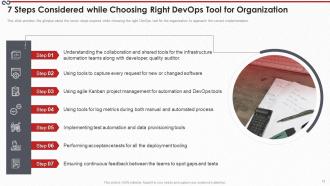
Slide 19: This slide presents 7 Steps Considered while Choosing Right DevOps Tool for Organization.
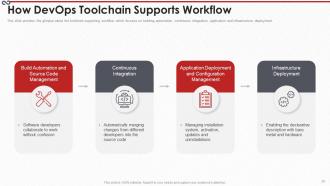
Slide 20: This slide shows toolchain supporting workflow which focuses on building automation, continuous integration, etc.
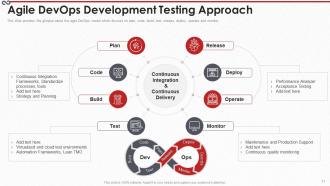
Slide 21: This slide displays Agile DevOps Development Testing Approach.
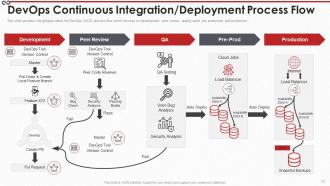
Slide 22: This slide represents DevOps Continuous Integration/Deployment Process Flow.
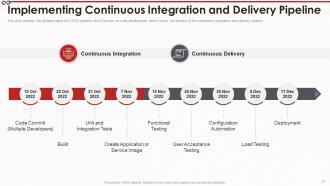
Slide 23: This slide shows Implementing Continuous Integration and Delivery Pipeline.
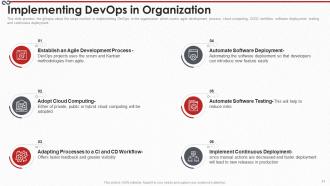
Slide 24: This slide presents steps involved in implementing DevOps in the organization.
Slide 25: This slide shows Icons for DevOps Process (IT).
Slide 26: This slide is titled as Additional Slides for moving forward.
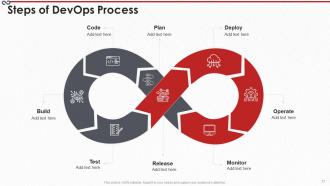
Slide 27: This slide represents Steps of DevOps Process with additional textboxes.
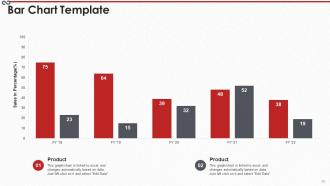
Slide 28: This slide shows Bar Chart Template with two products comparison.
Slide 29: This slide presents Venn diagram with text boxes.
Slide 30: This is an Idea Generation slide to state a new idea or highlight information, specifications etc.
Slide 31: This slide displays 30 60 90 Days Plan with text boxes.
Slide 32: This slide represents Post It Notes. Post your important notes here.
Slide 33: This slide shows Mind Map with related imagery.
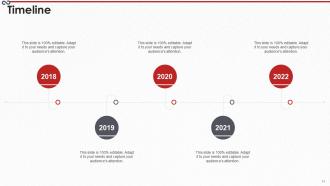
Slide 34: This is a Timeline slide. Show data related to time intervals here.
Slide 35: This is Our Goal slide. State your firm's goals here.
Slide 36: This is a Thank You slide with address, contact numbers and email address.
Devops process it powerpoint presentation slides with all 36 slides:
Use our DevOps Process IT Powerpoint Presentation Slides to effectively help you save your valuable time. They are readymade to fit into any presentation structure.

FAQs for Devops process it
So DevOps is basically about getting dev and ops teams to actually talk to each other instead of that whole "throw code over the wall" thing. Automation's your best friend here - testing, deployments, monitoring, all of it. Continuous integration is clutch too, pushing small changes constantly rather than those massive releases that make everyone sweat. Oh, and shared responsibility matters way more than people think. My advice? Pick one thing you guys do manually all the time and just automate it first. Don't try to boil the ocean.
Alright so CI is basically your code getting automatically tested every time someone pushes changes - like several times a day. Catches bugs before they become a total mess. CD goes a step further and actually deploys that tested code to staging or even production automatically. Main difference? CI is all about testing and making sure code plays nice together. CD handles getting it out the door. You could totally do CI without CD (though honestly, why would you want to deploy manually forever?). But having both running smooth makes releases way less stressful.
Honestly, automation tools are what make DevOps actually work. They handle all the boring repetitive tasks - testing, deployments, infrastructure setup - so you don't have to babysit everything manually. Jenkins and GitHub Actions are solid picks to start with. The cool part is chaining them together so code gets automatically tested and deployed when someone pushes changes. Way fewer screw-ups that way. I'd say pick whatever manual process annoys you most right now and automate that first. Don't try to do everything at once or you'll go crazy.
Honestly, metrics are a lifesaver for catching stuff before it breaks in prod. Track your deployment frequency, lead time, and how fast you recover from issues - those three will tell you everything. Good dashboards save you from those fun 2am debugging sessions (been there way too many times). Don't go overboard though - focus on what actually helps your team hit their goals. Set alerts for the critical things and maybe review trends weekly or whenever you remember to. You'll start seeing bottlenecks in your CI/CD pipeline pretty quickly once you're actually watching the right numbers.
Honestly, the cultural stuff hits hardest - people just don't want to change how they work. Dev and ops teams love their silos, and breaking those down is brutal. Then you've got the tooling nightmare (seriously, there are like 50 CI/CD options alone). Most folks don't have the cross-functional skills yet either. Legacy systems? Total headache since they weren't designed for this. Oh, and I almost forgot - management usually wants results yesterday. Start with just one team and app though. Prove it works there first, then slowly expand. Way better than trying to flip everything overnight.
So version control is what starts your whole DevOps thing rolling. Commit some code and boom - webhooks fire off your CI/CD stuff automatically. Build servers grab the changes, run tests, deploy based on whatever branch rules you set. Main goes to prod, develop hits staging, you know the drill. Takes forever to set up the first time though, not gonna lie. But once those triggers work right? Everything just flows from your commit straight to deployment. No babysitting required. Git branches basically become your deployment strategy too, which is pretty neat.
Dude, you gotta get dev and ops talking to each other from day one. No more of that "build it, ship it, good luck!" nonsense. Catching problems early saves you so much headache later - trust me on this one. Devs start thinking about how stuff actually runs in production, ops knows what's coming down the pipeline. It's honestly night and day compared to having two teams constantly at each other's throats. Just get them in the same planning meetings first. You'll wonder why you didn't do it sooner.
So basically you're moving all your testing and security stuff way earlier in development instead of waiting till the end. Catches bugs during coding rather than right before launch - saves you from those nightmare last-minute fixes. Your team will actually thank you for this one. Feedback loops get way tighter, deployments happen faster since problems don't pile up. Oh and you won't be scrambling to patch things in production as much. Start with automated tests in your CI/CD pipeline. Also do security reviews when devs commit code, not later in staging.
Honestly, don't just slap security on at the end - that's where most teams mess up. Build it into your whole pipeline from the start. Get automated scanning running in your CI/CD, scan those container images (seriously, some base images are sketchy), and never hardcode passwords anywhere. Infrastructure as code should be secure by default too. Oh, and set up proper access controls and monitoring. The earlier you catch stuff, the less it'll cost to fix later. I'd start simple - just add a basic vulnerability scanner to your builds first, then expand from there.
So containers basically fix that annoying "works fine on my laptop" issue by packaging everything together. Your app runs the same way everywhere - no more surprises when you deploy. Kubernetes handles the heavy lifting after that, automatically scaling things up or down, restarting crashed stuff, all that good work. Honestly took me forever to wrap my head around K8s at first. But yeah, once you get it set up, deployments become stupid easy. You can push updates without stress and roll back if something breaks. I'd say start with just Docker containers though - don't jump straight into Kubernetes or you'll hate your life.
So microservices are honestly a game changer for DevOps workflows. You can deploy and scale each service separately without breaking everything else - way less stressful releases. Different teams can pick their own tech stacks too, which devs love (just don't let it turn into chaos lol). Your CI/CD gets cleaner since you're working with smaller codebases. If something crashes, it won't take down your whole app. I'd start by pulling out just one or two services from your monolith first though. The orchestration stuff can get tricky fast.
Dude, culture is seriously everything for DevOps. Break down those stupid silos first - get dev and ops actually talking instead of pointing fingers. You want shared ownership where everyone cares about both building stuff AND keeping it running. Create an environment where failing fast is cool, not career suicide. Honestly, the blame game just murders any chance of innovation. Transparency helps tons too - shared dashboards, regular check-ins, that kind of thing. Oh and try getting teams to actually sit near each other if possible. Celebrate wins together instead of making it all about individual heroes.
Dude, feedback loops are what make DevOps actually work. They catch problems before they blow up into disasters. Real-time monitoring and user feedback show you what's really happening - not what you assume is happening (spoiler: you're usually wrong). Quick feedback = smaller screw-ups and faster fixes. Why wait weeks to discover something's broken when you could know in hours? Dashboards are clutch here, but only if your team actually looks at them. I've seen too many beautiful dashboards that nobody checks. The speed is everything though - catch issues early, iterate fast, win more.
Honestly, the scaling thing is a game changer - you can spin up resources instantly when traffic spikes instead of waiting weeks for hardware. Your deployment gets way more flexible too since you can code up entire environments, test them properly, then just tear everything down without spending a fortune. Global reach without dealing with data centers everywhere is pretty sweet. I mean, your team gets to actually build stuff instead of fixing servers all day. Oh and start with auto-scaling groups and infrastructure-as-code - you'll see the benefits right away.
Start with the DORA metrics - deployment frequency, lead time, recovery time, and failure rates. Those give you solid baseline data. But honestly? Skip the vanity metrics that just make dashboards look pretty. Track team happiness and customer satisfaction too. Business stuff like revenue or engagement matters way more than perfect-looking charts. Oh, and definitely measure things before you change anything - otherwise you're just guessing if it worked. Set up regular team retrospectives. Numbers don't tell the whole story, so you need actual feedback from people doing the work.
-
Innovative and Colorful designs.
-
Great designs, really helpful.
-
Innovative and attractive designs.