


Introducing devops pipeline within software development process it powerpoint presentation slides




Try Before you Buy Download Free Sample Product
 Impress Your
 Audience
 100%
100% Editable
 Save Hours
 of Time


DevOps is becoming standard for IT firms worldwide to keep up with rapidly changing customer behaviors. Organizations emphasize DevOps, which provides an excellent automated system and infrastructure to deliver a quality and reliable build. Here is an efficiently designed Introducing DevOps Pipeline within Software Development Process template that will help the business that wants to introduce DevOps pipeline within their software development process. At first, organizations can use section DevOps market overview to address information about DevOps facts, trends, and region-wise market projections. Companies can define the project bottlenecks using traditional methods with the performance analysis section. Introducing a DevOps pipeline section will assist businesses in providing in-depth detail about the DevOps pipeline covering slides related to the framework, automation tools, impact, and benefits. Companies can use the section on how we will maintain project quality after introducing the DevOps pipeline to ensure quality product delivery. At last, the performance measuring dashboards section will help the companies monitor project progress and software development status. One can even display their sales and monthly expenditures using line charts and area charts. Get access now.
People who downloaded this PowerPoint presentation also viewed the following :
Content of this Powerpoint Presentation
Slide 1: This slide introduces Introducing DevOps Pipeline within Software Development Process (IT). State Your Company Name and begin.
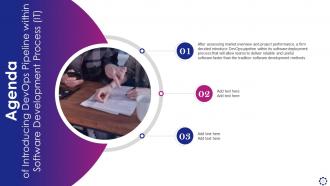
Slide 2: This is an Agenda slide. State your agendas here.
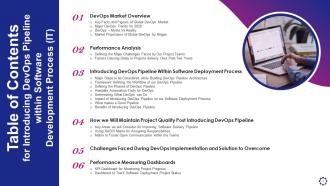
Slide 3: This slide presents Table of Content for the presentation.
Slide 4: This slide shows title for 'DevOps market overview'.
Slide 5: This slide provides key facts and figures of global DevOps market.
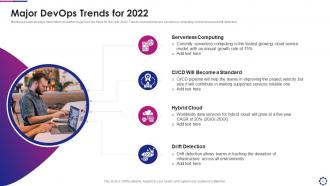
Slide 6: This slide displays information about the major DevOps trend for the year 2020.
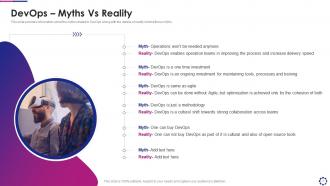
Slide 7: This slide provides information about the myths related to DevOps along with the details of reality behind these myths.
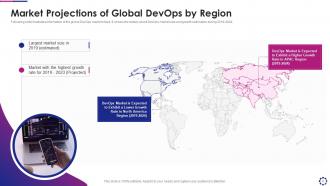
Slide 8: This slide illustrates information of the global DevOps market share.
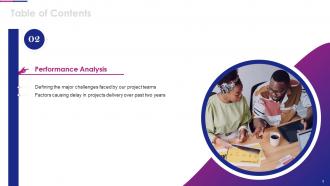
Slide 9: This slide depicts title for 'Performance analysis'.
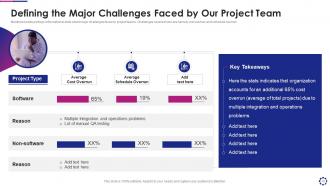
Slide 10: This slide portrays informational stats about major challenges faced by project teams.
Slide 11: This slide illustrates information about various factors that contributed to delay in project delivery.
Slide 12: This slide presents title for 'Introducing devops pipeline'.
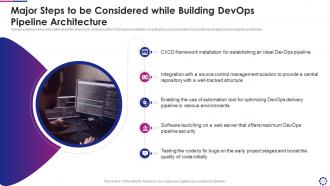
Slide 13: This slide provides information about the steps to be considered enabling the use of automation tools.
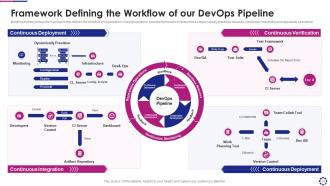
Slide 14: This slide portrays the framework that defines the workflow of organization’s DevOps pipeline.
Slide 15: This slide displays workflows of DevOps pipeline along with the details of its phases.
Slide 16: This slide shows workflows of DevOps pipeline along with the details of its phases.
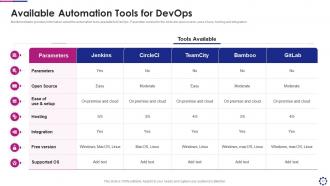
Slide 17: This slide provides information about the automation tools available for DevOps.
Slide 18: This slide presents title for 'Introducing devops pipeline'.
Slide 19: This slide provides information about DevOps practices along with the description and their benefits.
Slide 20: This slide shows information about DevOps practices along with the description and their benefits.
Slide 21: This slide provides details about the impact of introducing DevOps pipeline.
Slide 22: This slide provides information about the myths related to DevOps along with the details of reality behind these myths.
Slide 23: This slide illustrates information about the benefits of introducing DevOps pipeline.
Slide 24: This slide exhibits title for 'Maintaning project quality post introduction of devops pipeline'.
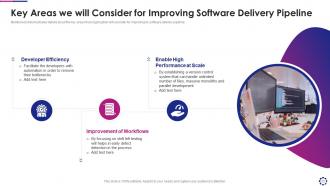
Slide 25: This slide illustrates details about the key areas that organization will consider for improving its software delivery pipeline.
Slide 26: This slide illustrates RASCI matrix that can be used for assigning responsibilities to ensure project quality.
Slide 27: This slide portrays communication plan that organization will use for effectively communicating with DevOps team members and team coordinators.
Slide 28: This slide displays title for 'Challenges faced during devops implementation'.
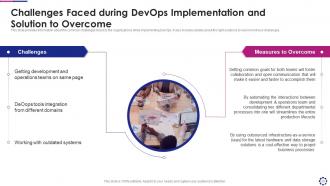
Slide 29: This slide provides information about the common challenges faced by the organizations while implementing DevOps.
Slide 30: This slide depicts title for 'Performance measuring dashboards'.
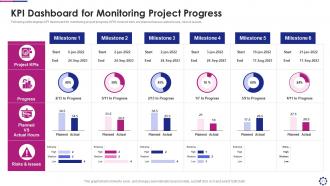
Slide 31: This slide displays KPI dashboard for monitoring project progress.
Slide 32: This slide portrays software development project management dashboard.
Slide 33: This slide displays Icons for Introducing DevOps Pipeline within Software Development Process (IT).
Slide 34: This slide is titled as Additional Slides for moving forward.
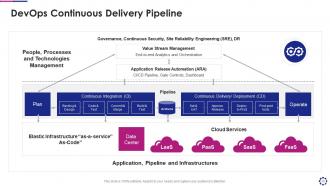
Slide 35: This slide shows DevOps Continuous Delivery Pipeline.
Slide 36: This slide depicts DevOps Deployment Pipeline.
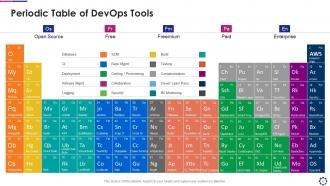
Slide 37: This slide highlights Periodic table of DevOps tools.
Slide 38: This slide represents Stacked column chart with two products comparison.
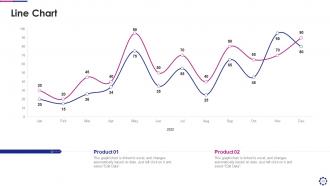
Slide 39: This slide describes Line chart with two products comparison.
Slide 40: This slide shows Post It Notes. Post your important notes here.
Slide 41: This is Our Target slide. State your targets here.
Slide 42: This slide provides 30 60 90 Days Plan with text boxes.
Slide 43: This slide contains Puzzle with related icons and text.
Slide 44: This slide shows Circular Diagram with additional textboxes.
Slide 45: This slide depicts Venn diagram with text boxes.
Slide 46: This is an Idea Generation slide to state a new idea or highlight information, specifications etc.
Slide 47: This is a Thank You slide with address, contact numbers and email address.
Introducing devops pipeline within software development process it powerpoint presentation slides with all 52 slides:
Use our Introducing DevOps Pipeline Within Software Development Process IT Powerpoint Presentation Slides to effectively help you save your valuable time. They are readymade to fit into any presentation structure.
























FAQs for Introducing devops pipeline within software development process it
So the main phases are plan, code, build, test, release, deploy, operate, and monitor. Planning comes first obviously, then devs write code and commit it. Build phase compiles everything, testing runs all the automated stuff - unit tests, integration, security checks, you name it. After that you're releasing to staging, deploying to prod, then operating and monitoring the whole thing. But here's the thing - it's all cyclical, that's what makes it a pipeline. I'd honestly just map out what your team already automates vs. does manually, then go after your biggest pain points first. Way easier than trying to fix everything at once.
Dude, automation is seriously worth it - cuts out so much tedious manual work and stops those annoying human errors. You can set up triggers that handle everything from testing to deployments automatically when you commit code. Honestly took me way too long to finally set it up, but once it's running? Total game changer. Your team gets to focus on actual coding instead of running the same repetitive tasks over and over. Plus you'll get way faster feedback and consistent deployments. I'd start with just automated testing first, then slowly add deployment stuff once you're comfortable.
So you've got Jenkins, GitHub Actions, GitLab CI/CD, and Azure DevOps as your main options. GitHub Actions is stupidly simple if you're already on GitHub - like, almost too easy. Jenkins gives you crazy flexibility but honestly, the setup can be a pain. GitLab bundles everything together nicely, which I actually prefer sometimes. Azure DevOps is solid for Microsoft shops. Really just pick whatever plays nice with your current setup. I made the mistake of overthinking this once and wasted like two weeks comparing features. Start with what matches your version control and you'll be fine.
So version control is basically what kicks off your whole DevOps pipeline. Every time you commit code, that triggers your builds, tests, deployments - the works. Git hooks and webhooks make this seamless since they automatically hand off your changes to CI/CD tools. You'll want a solid branching strategy too - I'm a big fan of having main branch commits auto-deploy to production while feature branches do their own thing. It's really your single source of truth that everything pulls from. Oh, and make sure your pipeline actually knows what to do with different commit types or you'll be debugging weird deployment issues later.
Monitoring saves your butt before things blow up. Set up alerts for build failures, deployments going sideways, and when performance tanks. You'll catch problems before angry users flood your inbox - trust me on this one. Start simple with basic pipeline health checks, then add fancier application monitoring later. Without it, you're basically guessing if stuff works. It's like having cameras around your house but for code deploys. Your team can actually react fast instead of scrambling when everything's on fire. Don't try to monitor everything day one though - that's overwhelming.
Honestly, don't wait until the end to think about security - that's where everyone screws up. Get tools like SonarQube or Snyk running in your CI/CD pipeline from day one. I was skeptical at first, figured it'd just slow us down, but catching bugs early actually saves you tons of headaches later. Use infrastructure as code with built-in security policies. Keep your access controls tight - give people only what they actually need. Scan your containers and dependencies regularly too. The whole "shift left" thing isn't just buzzword BS - it really works. Make everyone on your team think about security, not just dump it all on one person.
Honestly, automation is everything here. Deploy to staging first, run your tests, then push small batches to production. Blue-green deployments are clutch because you can flip traffic back instantly when things go sideways (and they will). Start with canary releases - maybe 5% of users first? That way if you break something, you're not taking down everyone at once. Monitor like crazy during rollouts so you catch weird stuff early. Oh, and always have your rollback ready to go. I learned that one the hard way lol.
So pipeline feedback is basically your code's way of screaming "hey, something's broken!" before users see it. Tests fail? Performance tanks? Security issues pop up? You'll know right away instead of finding out when angry customers start calling. Honestly, it's like having that one friend who points out you have food in your teeth - super annoying but you're grateful later. The whole point is catching problems early so you can fix them fast. Just make sure your alerts are actually set up right, or you'll miss the warnings entirely and defeat the purpose.
So there are four main things to watch: how often you're deploying, lead time from commit to production, recovery time when stuff breaks, and your failure rate. DORA metrics, basically. Lead time's my favorite because bottlenecks become super obvious. Pick your current numbers first, then set some targets. But honestly? Don't go crazy trying to fix everything at once - I learned that the hard way. Just focus on one metric initially. Maybe start with lead time since it usually reveals where you're getting stuck in the process.
Docker saves you from deployment hell, trust me. It bundles your app with everything it needs into containers, so you get the same environment everywhere - no more debugging why something works locally but crashes in prod. Deployments become stupid fast since you're just spinning up containers instead of setting up whole servers. Your CI/CD gets cleaner too because those containers are your build artifacts that run anywhere. Rolling back? Takes like 30 seconds. Scaling is just running more instances. I'd honestly start with containerizing just one service first - you'll see the difference immediately and wonder why you waited so long.
Cultural stuff is the worst part, trust me. People hate changing how they work - going from separate teams to actually collaborating feels weird at first. Tool integration is a nightmare too, everything breaks in random ways. Your security folks will probably panic about faster deployments (they always do). Most people don't know both dev and ops well enough, so there's this awkward learning curve. Oh, and don't try to boil the ocean right away. Pick one team, build something simple that actually works, then expand from there. Once you've got some wins under your belt, it's way easier to convince everyone else.
Think of QA in DevOps as your safety net - stops disasters before they reach users. I always tell people to automate tests throughout the whole pipeline, not just dump everything at the end. Way better feedback that way. Start with your most critical user flows first (the stuff that actually makes you money), then expand from there. Trust me, I've watched teams try to skip this step and it never ends well. You'll catch bugs early when they're dirt cheap to fix instead of scrambling later. Honestly, it's the difference between smooth deployments and weekend emergency calls.
Honestly, you've got to tear down those silos first. Get dev, ops, and QA actually chatting daily - like real conversations, not just status updates. Slack channels where everyone sees the whole pipeline work pretty well. Daily standups are fine I guess, but the real game-changer is making everything visible through dashboards. Trust me, failed deployments are way less painful when nobody's blindsided. Your docs need to make sense to actual humans, and when stuff breaks, loop in the whole team. Oh, and start small - pick one tiny project where they collaborate together. You'll see how much smoother it gets when everyone's aligned.
So GitOps is where you treat all your infrastructure stuff like regular code - everything sits in Git repos and gets deployed via pull requests. The cool part? Instead of your CI/CD pushing changes out, you've got agents in your clusters constantly pulling the desired state from Git. Way cleaner than traditional DevOps tbh. You just define what you want in Git and the system automatically syncs everything to match. Rollbacks become super easy since Git tracks every change anyway. ArgoCD's probably the most popular tool for this - I'd start there if you're curious.
So first thing - get your toolchains and processes standardized across teams. Then build out from there with shared CI/CD templates and common deployment patterns. Honestly, team leads are gonna be your biggest pain point, so focus on getting them on board first. Set up some centers of excellence to spread knowledge around. But don't go crazy trying to change everything at once - that never works. Pick a couple pilot teams, show the wins, then use those stories to sell it to other departments. Oh and make sure you've got solid governance around your pipeline standards too.
-
Qualitative and comprehensive slides.
-
Informative presentations that are easily editable.