

Deployment Strategy Powerpoint Presentation Slides




Try Before you Buy Download Free Sample Product
 Impress Your
 Audience
 100%
100% Editable
 Save Hours
 of Time


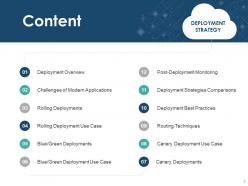
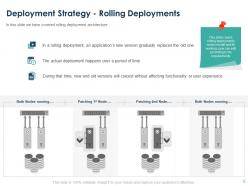
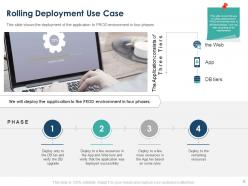
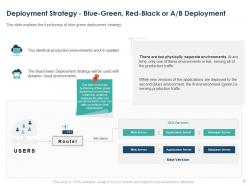
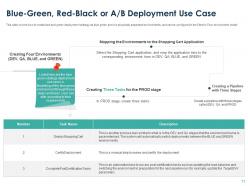
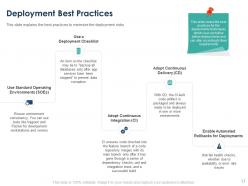
Explain the functioning of software deployment with the help of our content ready Deployment Strategy PowerPoint Presentation Slides. The professionally designed system deployment PowerPoint complete deck contains thirty-one ready to use PPT slides. Showcase four phases of the PROD environment by using the application lifecycle management PPT slideshow. Take the assistance of the visually appealing software deployment PowerPoint presentation to explain the working and phased approach of the canary deployment environment. List down the routing techniques for testing the new versions of the application with the aid of software deployment PPT graphics. Explain the best practices to minimize the deployment risk such as using standard operating environment, adopt continuous integration and enable automated rollbacks. You can also use the application performance management PowerPoint presentation to represent the post-deployment monitoring framework. Thus, download this eye-catching and informative release and deployment management PPT graphics to plan the schedule and control the movement of releases. Applaud acts of generosity with our Deployment Strategy Powerpoint Presentation Slides. Give due credit to any display of compassion.
People who downloaded this PowerPoint presentation also viewed the following :
Deployment Strategy Powerpoint Presentation Slides with all 31 slides:
Use our Deployment Strategy Powerpoint Presentation Slides to effectively help you save your valuable time. They are readymade to fit into any presentation structure.













FAQs for Deployment Strategy
Honestly, there are four things you can't mess up: environment setup, rollback plans, automated testing, and monitoring. Get your staging and prod environments matching perfectly - seriously, this will save you so much headache later. Always have a rollback ready because stuff breaks, it just does. Automated tests at every step are non-negotiable. Oh and monitoring that actually tells you when things go sideways before your users do. Blue-green deployments are pretty solid if you're starting fresh, though they're a bit overkill for smaller projects.
Quick checklist: tech prep, team knowledge, rollback plans. Everyone needs to know their exact role and walk through it step-by-step. Test your monitoring/alerts - honestly, this is where teams find holes they never knew about. At least two people should be able to handle rollbacks if everything goes to hell. Do a quick meeting where people explain their parts to each other. Anyone seem shaky? Missing backup for key stuff? Then hold off and fix those gaps first. I've seen too many deployments crash because someone assumed the monitoring was working when it wasn't.
Dude, automation is what makes modern deployments actually work. It handles all the boring repetitive tasks - testing, building, deploying code through CI/CD pipelines. Way fewer screw-ups and releases happen so much faster. Once you get it running, your deployments become super predictable since the same process runs every time. Your team won't hate you for constant manual deploys either lol. I'd start with just automating builds first, then slowly add testing and deployment steps. Honestly wish I'd done this sooner on my last project.
Look at your error rates and response times first - that's the basics. User engagement shows if people actually want what you built, but honestly some features take forever to catch on so don't panic immediately. I always check rollback frequency too, plus how long deployments are taking. Customer support tickets spiking? That's usually a red flag. Business metrics matter as much as the technical stuff. Set up your dashboards beforehand though, because trying to build them while everything's potentially on fire is the worst.
Dude, don't rush it without testing first - that's like deployment suicide. Always have a rollback plan ready because things will go wrong eventually. Avoid peak hours obviously, and never change multiple things at once or you'll be debugging forever. Communication with your team is critical too. I learned this the hard way when a database migration went sideways at 3am because we skipped staging. Dependencies bite you in the ass if you don't check them. Pick quiet windows, prep everything twice, and honestly? Those extra hours of prep beat explaining to your boss why the site's down.
Honestly, it comes down to how much risk you can handle and what your setup looks like. Blue-green is awesome if you've got the resources for duplicate environments - instant rollbacks are clutch for big releases. Canary's my go-to when you want to test with real users but keep the damage contained. Rolling deployments work fine for stuff that's not mission-critical. Think about your team size and how fast you can spot problems too. I'd probably start by figuring out what failure would actually cost you, then match your strategy to that. No point overengineering if you don't need it.
Blue-green deployments are honestly your safest bet - basically you run two identical environments and just flip traffic between them. Rolling deployments work well too, where you update servers gradually while others keep running. Feature flags changed everything for me though. You can push code without turning features on until you're actually ready. Health checks and monitoring are crucial so you catch issues before users do. Oh and definitely have a rollback plan ready. I've seen too many "foolproof" deployments go sideways at 2am when nobody wants to be debugging production.
Start with APM tools like New Relic or Datadog - they'll catch response times and errors before users start complaining. You'll also need infrastructure monitoring for CPU/memory stuff, plus log aggregation (ELK stack works great). Real user monitoring is clutch too since it shows what customers actually see. Alert fatigue will hit you hard though, so don't go crazy with notifications at first. Build dashboards for your core metrics, then add more as things inevitably break. Oh, and Splunk's solid but pricey if budget matters.
So version control is basically how you control your entire deployment game. Your branching strategy becomes your deployment map - main hits production, develop goes to staging, feature branches spin up those preview environments. When stuff breaks (and it will), you've got a clean audit trail showing exactly what changed between releases. Trust me, you'll thank yourself when you're debugging at 2am. The magic happens when you hook up CI/CD to trigger off your git workflow automatically. No more manual deployments that make everyone nervous. Everything becomes way more predictable.
Blue-green deployments are honestly your best friend here - keep the old version running while you deploy, then just flip traffic back if stuff breaks. Canary releases work well too since only a few users hit the problems. Database rollbacks though... that's where things get messy with migrations and all. Feature flags can totally save you - just turn off the broken stuff without rolling back everything. Oh, and actually test your rollback process beforehand. I've seen too many teams assume it'll work when they've never tried it. Don't be those people.
Before you deploy anything, get your communication sorted out first. Create dedicated channels in Slack or whatever you use, and make damn sure everyone knows who's responsible for what part. Regular status updates are key - even if it's just "still good here." I've watched deployments completely fall apart because people thought someone else was watching the monitoring (honestly the worst feeling). Write up a quick runbook with contact info for different issues. Oh, and do a team check-in right before you kick things off so you're all aligned on timing.
Keep your deployment docs somewhere people actually check - wikis work way better than random PDFs nobody opens. Document environments, rollback steps, and access permissions. Write instructions clear enough for 2am emergencies when your brain's half dead. Cover dependencies and any manual stuff you haven't automated yet. Here's the thing though - outdated docs are honestly worse than having none at all, so update them every single time you change processes. Oh, and test your rollback procedures occasionally because Murphy's law is real.
Yeah, each environment's got different rules depending on how much risk you can handle. Staging? Go wild - test whatever, deploy constantly since it's just your sandbox anyway. Production's obviously way more serious though. You'll need those automated rollbacks, gradual pushes, approval gates... all that fun stuff. Made the mistake of skipping some of those once - not great lol. Try to keep staging as close to production as possible so your process stays consistent. Just with different safety nets. First step is figuring out what checks each environment actually needs.
Okay so first thing - encrypt everything. Your CI/CD, servers, databases, all of it needs HTTPS/TLS. I can't believe how many places still don't do this lol. Don't hardcode passwords or API keys anywhere, use actual secrets management. Set up role-based access so random people can't push to prod (learned that one the hard way). Scan your containers for vulnerabilities before deployment too. Oh and build security into the workflow from the start - trying to add it later is such a pain. That covers the main stuff but there's obviously more depending on your setup.
So basically, just bake feedback collection right into your deployment process. Set up automatic data gathering after each release - analytics, support tickets, surveys, whatever works. Your support team will have the best dirt on what's actually busted, trust me. Schedule regular retrospectives where you actually dig into this stuff and turn it into real fixes for next time. Don't let it be a "maybe when we're not swamped" thing - make reviewing feedback mandatory. Create a simple backlog and tackle the biggest impact items first. Otherwise you'll just keep shipping the same problems over and over.
-
Topic best represented with attractive design.