

Digital marketing playbook google analytics for all web tracking





Try Before you Buy Download Free Sample Product
 Impress Your
Audience
 100%
Editable
 Save Hours
of Time


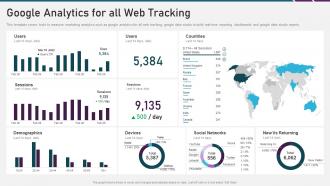
This template covers tools to measure marketing analytics such as google analytics for all web tracking, google data studio to build real time reporting dashboards and google data studio reports.
People who downloaded this PowerPoint presentation also viewed the following :
Digital marketing playbook google analytics for all web tracking with all 6 slides:
Use our Digital Marketing Playbook Google Analytics For All Web Tracking to effectively help you save your valuable time. They are readymade to fit into any presentation structure.





FAQs for Digital marketing playbook google analytics for
Okay so it totally depends what you're trying to achieve, but start with these: conversion rate, cost per acquisition, return on ad spend, and customer lifetime value. Traffic sources matter too, plus bounce rate and how long people actually stay on your pages. There's honestly like a million different things you could obsess over (I went down that rabbit hole once), but these will show you if you're actually making money or just burning cash. Once you get comfortable with the basics, then you can get into the weirdly specific stuff for each platform.
Okay so first thing - check your bounce rates and see where people are bailing on your site. Heat maps are seriously amazing for this stuff, they show you exactly what users actually click on. I'd also dig into your conversion funnels to find those annoying drop-off points. Page speed matters way more than people think - if it's slow, game over. Oh and A/B test whatever fixes you come up with. Honestly, I treat analytics like I'm solving a mystery. Each metric is basically telling you what's pissing off your users or making them happy. Start with your busiest pages that are performing the worst.
Dude, you've gotta start visualizing your marketing data - it'll save your sanity. I used to stare at endless spreadsheet rows trying to figure out which campaigns were actually working. Total nightmare. Charts make everything click instantly. You'll spot trends, see which channels are crushing it, and catch issues before they wreck your budget. Plus bosses love seeing those nice upward lines instead of boring numbers (makes meetings way smoother). Bar charts are perfect for comparing channel performance - start there. Once you get the hang of it, dashboards become addictive. Trust me on this one.
Don't just slap the winning version live and call it a day - that's what most people do and they're missing the real goldmine. A/B test results should totally reshape how you think about your audience segments and personas. Like if one headline demolished the other, dig into WHY that happened. What does it actually tell you about what clicks with people? I always build this little knowledge base of patterns - which messages work for different groups, how it changes my attribution models, all that stuff. The test result itself is just the starting point. The insights you pull from it? That's where the magic happens for future campaigns.
So I'd definitely start with the free stuff first - Facebook Insights and Twitter Analytics are actually pretty solid. Hootsuite's perfect if you're juggling multiple accounts and want everything in one spot. Sprout Social looks the nicest but it's pricey (worth it though if you have the budget). Buffer's more straightforward and won't break the bank. Honestly, just grab 2-3 free trials and mess around with your real accounts for a week. You'll know pretty quick which one doesn't make you want to tear your hair out when you're checking stats.
So predictive analytics is basically using your old campaign data to guess what'll happen next. Pretty cool stuff - you can spot which leads will actually convert and figure out when customers might bail on you. The algorithms dig through all your past performance to help you spend smarter and target better. Honestly, it beats throwing money at random audiences and hoping something sticks. I'd start with predictive lead scoring if I were you - it's super straightforward to set up and you'll see better conversion rates almost immediately. Way better than flying blind with your campaigns.
So attribution modeling basically shows you which touchpoints in your marketing actually matter for conversions. Most people just look at last-click data and think their retargeting ads are crushing it while their awareness stuff sucks - but that's misleading as hell. You'll see the whole customer journey instead of just the final step. Makes budgeting way smarter too. I'd start by comparing first-click vs last-click vs linear models in whatever analytics you're using. The differences might surprise you - some of my "worst" performing channels turned out to drive tons of early-stage awareness.
So basically you want revenue minus what you spent on the campaign, then divide that by your total spend for the ROI percentage. The tricky part is getting your attribution tracking right in Google Analytics or whatever CRM you're using - I swear this is where most people mess up. Pick one campaign first and go through the math manually to check if everything's tracking correctly. Different campaigns have different conversion timelines too, so don't just look at immediate results. Oh and track both direct sales AND assisted conversions because you'll miss a ton of value otherwise.
Honestly, the worst thing you can do is obsess over follower counts when you should be tracking stuff that actually makes you money. Don't analyze your social media in a bubble either - it's useless unless you're connecting it to website traffic and actual sales. Attribution windows are huge too (most people totally miss this). Customers almost never buy right away, so set up proper tracking periods. I've seen so many people panic over random data spikes and make dumb decisions. Give campaigns a few weeks to show real patterns. Oh, and map out your customer journey first, then pick metrics for each stage.
So sentiment analysis is pretty cool - it shows you how people actually *feel* about your brand, not just surface-level engagement stuff. You can see if mentions are positive, negative, or neutral across all your platforms. The best part? You'll catch problems early before they blow up. Plus you get to see what content actually hits with people instead of just throwing stuff at the wall. Oh and most analytics tools already have this feature built in now (didn't realize that until recently). I'd start by setting it up on whatever channels you use most. Total game-changer for timing your posts and messaging.
Dude, mobile analytics are a game changer - like seriously, most people are scrolling on their phones anyway. You'll get way better data on how users actually behave, where they're located, what devices they prefer, all that stuff desktop can't really show you. Perfect for making things more personal too. I'd start with Google Analytics 4 for mobile tracking (it's honestly not as confusing as people make it seem). Focus on those mobile conversion paths first since that's where the money is. Oh, and you can optimize ad timing way better once you see the patterns. Missing out on this data is basically shooting yourself in the foot at this point.
CRO turns your analytics into a proper testing lab. You'll stop obsessing over traffic and start tracking what actually converts people. Which button colors work? Where do users bail out? That stuff matters way more than vanity metrics. Setting up A/B tests becomes addictive honestly - you'll catch yourself testing everything from headlines to checkout flows. Your hypotheses drive what you measure, then those insights fuel your next experiments. It's like detective work but for websites. Way more engaging than just watching visitor counts go up and down all day.
Okay so customer segmentation is just breaking down your audience into different groups - like by age, buying habits, how much they engage, whatever makes sense for you. The thing is, looking at overall numbers doesn't tell you much. Sure, your conversion rate might be 3%, but that's pretty useless info honestly. When you dig deeper and see that millennials are converting at 5% while boomers only hit 1%, now you've got something to work with. You'll know exactly where to put your ad budget and how to talk to each group. It's way more helpful than just staring at generic stats all day.
Google Analytics 4 and Search Console are your best friends here - totally free and honestly do most of what you need. If you're on Facebook or Insta, their built-in analytics are solid too. Mailchimp's free version has decent email tracking. Buffer works for basic social media reporting without paying anything. Here's the thing though - don't track everything just because you can. Pick like 3-4 metrics that actually move the needle for your business. Way better than drowning in random data points that don't matter. Figure out what you want to measure first, then grab the free tools that'll track it.
Be upfront about what you're collecting and why - no burying stuff in fine print that nobody reads anyway. Make opting out actually simple, not some maze of checkboxes. Only grab data you legitimately need. I know it's tempting to collect everything "just in case" but that's sketchy and creates headaches later. Keep it secure obviously, and don't share with random third parties unless people clearly agreed to it. Honestly? Just think about how you'd want companies handling your own info. That golden rule thing actually works pretty well here.
-
Great quality product.
-
Informative presentations that are easily editable.