


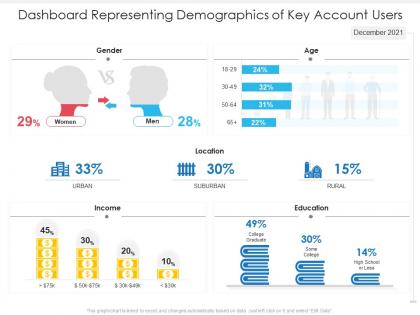
Dashboard representing demographics of key account users




Try Before you Buy Download Free Sample Product
 Impress Your
 Audience
 100%
100% Editable
 Save Hours
 of Time


Our Dashboard Representing Demographics Of Key Account Users are topically designed to provide an attractive backdrop to any subject. Use them to look like a presentation pro.
People who downloaded this PowerPoint presentation also viewed the following :
Dashboard representing demographics of key account users with all 2 slides:
Use our Dashboard Representing Demographics Of Key Account Users to effectively help you save your valuable time. They are readymade to fit into any presentation structure.

FAQs for Dashboard representing demographics of
Definitely start with the basics - population stuff like age, gender, income breakdown. Geographic data too, obviously. Then add trend analysis so you can see changes over time. Education levels and employment stats are pretty standard, plus household composition. Honestly though? There's way too much data you *could* include and it gets messy fast. Just focus on what you actually need. Make sure people can filter by region or time periods - nobody wants static charts anymore. I'd say build it simple first with your core metrics, then see what your team keeps asking for and add from there.
Look, demographic dashboards are honestly a game-changer for figuring out who's actually buying your stuff. Instead of drowning in those terrible spreadsheets (ugh), you get clean visuals showing customer age, location, income - the works. Makes spotting trends way easier. Real-time data means you can see exactly which markets are worth expanding into instead of just winging it. I'd probably start by writing down your biggest strategic questions first, then check if the dashboard can actually answer them. Sometimes the obvious stuff surprises you the most.
So census data and government stats are your baseline - age, income, education breakdowns. Your own customer/employee databases though? That's where the gold is, honestly. Way more useful than the generic stuff. You can grab social media analytics too, plus market research from places like Nielsen to round things out. Oh and definitely check how recent everything is - demographics change way faster than people realize. Survey results help fill gaps if you're missing pieces. Pretty much just mix internal data with external sources until you get the full picture you need.
So demographic trends basically tell you where your audience is going - that way you can pivot before everyone else catches on. Like if you're seeing more younger people, maybe throw more budget at TikTok instead of Facebook. Age changes your messaging vibe, income shifts mess with your pricing, and when people move around it changes where you should spend on ads. Oh, and lifestyle stuff like remote work? Totally flips what people actually want to buy. I'd check your dashboard monthly but look for patterns over like 6 months, then test small tweaks based on what you're seeing.
Bar charts are definitely your go-to for demographic stuff - age groups, education levels, that kind of thing. Population pyramids are clutch for age/gender breakdowns too. I actually think they look really cool when you nail the design. Heat maps work well if you're dealing with geographic data. Pie charts are fine for simple splits but don't go overboard with like 10+ slices - gets messy fast. Oh and keep everything digestible so people can actually spot the patterns without squinting at your screen. Start with bars and see what makes sense from there.
So dashboards are interactive - you can actually click around, filter stuff, change dates, compare different groups. Way more fun than reading another boring PDF report someone already analyzed. Traditional reports just show you what happened, but dashboards let you dig into why things happened and catch trends as they're forming. Plus you don't have to bug anyone to pull your specific data slice. Reports are like static photos, dashboards are more like... I dunno, live video? You get to explore and find your own insights instead of just consuming someone else's takeaways.
Dude, real-time data completely changes the game with demographic dashboards. You're not stuck analyzing last month's stale numbers anymore. Current insights show what's actually happening with your audience right now - which is huge when trends shift fast. Catching demographic changes as they emerge? That's where the money is. You can pivot strategies quickly instead of being behind the curve all the time. Oh, and don't track everything in real-time though - focus on metrics that actually change frequently enough to matter. That's your goldmine.
Honestly, just focus on what actually moves the needle for your business. Healthcare companies should track age groups and insurance types - that geographic health data is gold. Retail's different though. Income levels and spending habits tell the real story there. Education? Enrollment trends are your bread and butter. Here's what I'd do: write down your top 3-5 business questions first. Then figure out which demographic data answers those specific questions. Don't just dump every metric into your dashboard because you can. I've seen too many cluttered dashboards that tell you nothing useful. Map your data to your actual business problems and you'll be way ahead of most people.
Honestly, messy data is gonna be your biggest headache - sources never match up perfectly and it makes everything harder. Don't fall into the trap of shoving every metric onto one dashboard just because you can. Trust me, less is more here. Different people want completely different views of the same info, which gets annoying fast. Short sentences work better than cramming details everywhere. You'll spend forever trying to balance the big picture stuff with granular breakdowns. And ugh, don't get me started on updates breaking things randomly. My advice? Figure out your must-have KPIs first, then slowly add other pieces.
Honestly, demographic dashboards are game-changers for D&I work. Instead of guessing if your efforts are actually working, you can see real numbers - representation by department, hiring trends, all that stuff. Makes it way easier to spot where you're falling short. I love how visual they are too; leadership actually pays attention when you show them charts instead of rambling through spreadsheets. The key is figuring out what metrics actually matter for your goals first. Then build around those. You'll be able to set targets that make sense instead of just picking random percentages and hoping for the best.
Start with the basics - age, gender, location, and income. Those four will handle most questions you'll get. Education and job status are solid additions too, especially for targeting stuff. Honestly? Skip the complicated demographics at first. I've seen people get lost in the weeds trying to track everything from day one. Get your core data clean and updating smoothly first. You can always add ethnicity, household size, or whatever industry-specific stuff later when stakeholders start asking for it in meetings. Trust me, the simple approach works way better than trying to boil the ocean upfront.
Dude, focus on making your dashboard actually intuitive - clean layouts, consistent colors, filters that don't suck. I've seen way too many that look like chart vomit honestly. Map out what your users do most often first, then design around those workflows. Short sentences work. But also give them customizable views so they're not stuck with your defaults forever. Smart hierarchy matters too - people shouldn't hunt around for basic info. Oh and make sure your color coding actually means something consistent throughout. When it's done right, users get real insights instead of drowning in data chaos.
Honestly, I'd go straight to Power BI if you've got Office 365 - it's super smooth with demographic data and won't break the bank. Tableau's amazing too but costs way more (like, ouch). Both handle census stuff really well though. Google Data Studio's decent if you're totally broke, or you could mess around with Python and Plotly Dash if you're feeling ambitious. I actually built one with Plotly once and it was pretty fun. Main thing is picking something that plays nice with your data sources and makes those population trends actually look interesting instead of boring spreadsheet hell.
Start with clean data - that's half the battle right there. Set up validation checks so your HR systems and surveys sync properly, and flag weird outliers. I've literally watched dashboards implode when someone tweaks a field format without updating anything downstream, so yeah... painful lesson learned. Monthly audits are your friend - compare dashboard numbers against source systems. Also get user feedback because they'll spot stuff that doesn't add up way faster than you will. Don't forget automated alerts for anomalies, and definitely nail down who can mess with demographic categories. Trust me on this one.
You've probably seen Netflix's recommendation engine - they track viewer age, location, and what people actually watch to suggest shows, which bumped their engagement by 80%. Target got kinda creepy when they started predicting pregnancies from shopping habits (yikes). Spotify Wrapped is genius though - it's basically the same concept but makes people excited to share their data. Healthcare systems use this stuff too. Kaiser Permanente tracks demographics to figure out which populations need more resources. Your city probably does something similar for planning - honestly didn't realize how much this was happening until I looked into it.
-
Designs have enough space to add content.
-
Enough space for editing and adding your own content.