

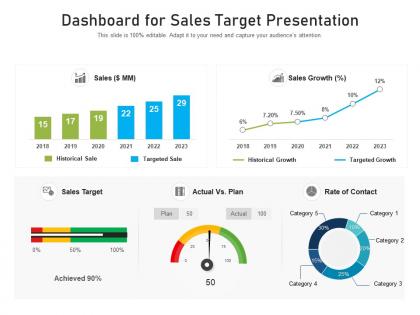
Dashboard for sales target presentation




Try Before you Buy Download Free Sample Product
 Impress Your
 Audience
 100%
100% Editable
 Save Hours
 of Time


Our Dashboard For Sales Target Presentation are topically designed to provide an attractive backdrop to any subject. Use them to look like a presentation pro.
People who downloaded this PowerPoint presentation also viewed the following :
Dashboard for sales target presentation with all 2 slides:
Use our Dashboard For Sales Target Presentation to effectively help you save your valuable time. They are readymade to fit into any presentation structure.
FAQs for Dashboard for
Start with revenue stuff - total sales, conversion rates, sales by rep. That's your foundation. Pipeline metrics matter too: lead volume, how deals move through stages, average deal size. Activity tracking like calls and meetings? Super important since that drives everything downstream. Oh and time metrics - cycle length, quota attainment, the usual suspects. Honestly though, don't go crazy with this. I've seen teams track like 25 different things and it becomes useless noise. Stick to maybe 8-10 metrics that actually help you make decisions. Less is more here.
Honestly, charts and graphs are a game changer for sales data - they turn those mind-numbing spreadsheets into something you can actually understand. Heat maps show you which regions are killing it, line charts track your progress over time, and bar charts let you compare how different teams are doing. The trick is matching the right visual to your data type (sounds obvious but you'd be surprised how many people mess this up). Instead of staring at endless rows of numbers, you'll spot trends and weird outliers instantly. It basically transforms your dashboard from a boring data dump into something that helps you make real decisions.
Put your biggest numbers top-left - revenue, conversions, whatever matters most. That's where people look first. Group similar stuff together so you're not jumping around the screen like crazy. Ugh, I hate dashboards that look like someone just randomly placed charts everywhere! Use the same colors throughout and give things room to breathe with whitespace. Your team should be able to glance at it and immediately know what's broken or needs fixing. Oh, and definitely test it with real people first - they'll spot weird stuff you totally missed. Thirty seconds max to understand everything.
Daily updates are usually enough to start with. Most teams I know do hourly refreshes during work hours - seems to hit the right balance without killing their systems. Every 5 minutes? That's just crazy unless you're selling like... I dunno, concert tickets or something super fast-moving. Match it to how quickly your deals actually move and how often people look at the thing. If your sales cycle takes weeks, why stress about real-time data? Start daily, then bump it up if your team's actually using it more. Don't overthink it.
Look, KPIs are basically what make your sales dashboard actually useful instead of just fancy eye candy. Pick maybe 5-7 metrics that your team actually cares about - conversion rates, pipeline stuff, revenue per rep, whatever drives real decisions. The dashboard should show exactly what you need to hit your numbers. I'd start by figuring out what questions your sales people bug you about most - that's usually where your best KPIs are hiding. Don't go overboard though. Too many metrics and nobody pays attention to any of them.
Honestly, dashboards are pretty adaptable - you can tweak everything to match what different teams actually need. Sales reps want lead conversion and pipeline stuff right up front. Leadership cares more about revenue forecasts and how territories are performing. Marketing? They're obsessed with lead quality and tracking where everything comes from (which makes sense, I guess). Most platforms let you set up role-specific views or even personal preferences, so people aren't drowning in irrelevant data. Best approach is asking each team what they're deciding on daily, then build something that actually helps those calls.
Honestly, Tableau and Power BI are amazing but they're kind of a pain to learn at first. HubSpot's dashboards are surprisingly clean if you're already using their stuff. Google Data Studio is solid too and won't cost you anything - plus it plays nice with most CRMs. Salesforce Analytics is another good one but can get pricey fast. My advice? Don't go for the flashiest option your team won't touch. Grab free trials of like 2-3 different ones and see what actually makes sense for how you work. Sometimes the simpler tool wins just because people will use it.
Line charts are perfect for your sales data over time - way easier to spot trends that way. I'd definitely add year-over-year comparisons so patterns jump out right away. Bar charts work well too when you're comparing different product lines or time periods. Color-coding saves lives here, just keep it consistent so people don't get lost. Oh, and make sure users can switch between weekly, monthly, quarterly views. Trend lines help smooth out all the random noise. Don't cram everything into one dashboard though - that's a nightmare. Start with your biggest KPIs first.
Honestly, the worst thing you can do is cram everything onto one screen - nobody wants to stare at 20 different charts. Focus on maybe 5-7 metrics that actually matter to your sales team. I've watched people build these gorgeous dashboards that are completely useless because they're full of vanity metrics instead of stuff like pipeline health. Your sales reps shouldn't have to dig around for basic deal info either. Oh, and definitely test it with actual users first - can't tell you how many "perfect" dashboards I've seen that nobody ever touches. Make sure your data's clean and updating properly too.
Honestly, dashboards are a game-changer for finding where to focus your energy. Track stuff like win rates by region and which customer segments convert best - you'll start seeing patterns jump out. Maybe enterprise deals are suddenly hot in the northeast, or that new feature you built is crushing it with manufacturers (even though you never really targeted them). Way better than drowning in Excel hell. I'd focus more on momentum metrics than just total revenue numbers. Set up weekly reviews with your team to actually talk through what you're seeing. Those conversations usually spark the best ideas for doubling down on what's working.
Dude, CRM integration is seriously worth it. You get everything in one spot - lead sources, deal stages, customer stuff, forecasts. No more clicking around between apps like a maniac. The real-time data makes your forecasting way more accurate since it pulls straight from where your sales team actually works. Honestly, once you see those trends and bottlenecks pop up instantly, you won't go back. Start simple though - connect deal values, stages, and close dates first. Then add more fields as you go.
Honestly, sales dashboards are game-changers for forecasting. You'll spot seasonal patterns and growth trends way faster than scrolling through endless spreadsheets (which is soul-crushing). Track stuff like pipeline velocity and conversion rates - those are your best predictors for what's coming. Most dashboards let you throw in external factors too, like how your latest campaign performed. I'd start by looking at your most consistent patterns from the last year or two. That gives you a solid baseline to work from. The visual charts just make everything click faster than raw numbers ever will.
So basically you want responsive design that actually works on phones - charts need to resize automatically and stack vertically. Make buttons big enough that people can actually tap them without wanting to throw their phone (learned that one the hard way). Put your most important metrics right up front since there's barely any screen space. Oh, and add swipe-to-refresh for updates - feels more natural on mobile. Simplified layouts are your friend here. Don't just test in browser dev tools either, grab some real devices because they'll show you stuff you'd never catch otherwise.
Honestly? Just ask your sales team what they actually want. I know it sounds obvious, but most people skip this step completely. They'll tell you if the dashboard is cluttered or missing stuff they need to close deals. Monthly check-ins work great - and actually listen to what they say instead of defending your design choices. The prettiest dashboard is useless if nobody can find what they're looking for. Real user feedback beats guessing every time. Your team knows better than anyone what data helps them hit their numbers.
Dude, you NEED real-time data. Static reports? That's like checking yesterday's weather forecast when you're already soaking wet. When leads start dropping off or your team's having an off day, you'll know instantly instead of finding out next week when it's game over. I'm telling you, being able to jump on hot prospects right away or switch up your strategy mid-month has saved my ass so many times. Set up alerts for the big stuff so you're not glued to your screen 24/7. Trust me on this one.
-
Content of slide is easy to understand and edit.
-
Great experience, I would definitely use your services further.