


Template for sales revenue and target




Try Before you Buy Download Free Sample Product
 Impress Your
 Audience
 100%
100% Editable
 Save Hours
 of Time


Our Template For Sales Revenue And Target are topically designed to provide an attractive backdrop to any subject. Use them to look like a presentation pro.
People who downloaded this PowerPoint presentation also viewed the following :
Content of this Powerpoint Presentation
Description:
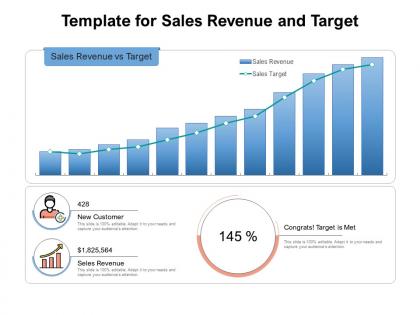
This image is a PowerPoint slide template designed to present a comparison between sales revenue and sales targets. The slide is divided into three key sections:
1. The top section displays a bar chart titled "Sales Revenue vs Target", where each bar represents sales revenue for a certain period, and the overlaid line graph indicates the sales target for the same periods. This visual comparison makes it easy to see at a glance how the actual sales compared to the targets.
2. The bottom-left section contains a circular icon with a figure and headphone that denotes new customers, the number 428, which probably represents the number of new customers acquired, and a note mentioning that the slide is 100% editable.
3. The bottom-center section features an upward trend icon next to a large dollar value of $1,825,564, which likely represents the total sales revenue achieved. Underneath is the same note about the slide's editability.
4. The bottom-right section presents a gauge-like circle with the number 145% inside, indicating that the sales target has been exceeded by 45%. The caption "Congrats! Target is Met" is a motivational note confirming the achievement.
Use Cases:
Now, let's explore seven industries where this slide template could be utilized effectively:
1. Retail:
Use: Tracking and presenting sales performance against company targets during a sales meeting.
Presenter: Sales Manager.
Audience: Sales Team.
2. Finance:
Use: Showcasing quarterly revenue achievements in contrast to financial goals.
Presenter: Chief Financial Officer (CFO).
Audience: Stakeholders or Board of Directors.
3. Manufacturing:
Use: Review of product sales against forecast targets during an operations meeting.
Presenter: Operations Manager.
Audience: Operations Team.
4. Technology:
Use: Illustrating software or service subscription sales achievements in a company-wide town hall.
Presenter: Chief Executive Officer (CEO).
Audience: All Employees.
5. Healthcare:
Use: Presenting pharmaceutical sales or patient acquisitions during a strategic planning session.
Presenter: Marketing Director.
Audience: Marketing Department.
6. Automotive:
Use: Depicting vehicle sales progress against annual sales objectives in a regional sales meeting.
Presenter: Regional Sales Director.
Audience: Sales Representatives.
7. Real Estate:
Use: Demonstrating property sales and new client acquisition in an annual review meeting.
Presenter: Head of Sales.
Audience: Sales Agents and Brokers.
Template for sales revenue and target with all 2 slides:
Use our Template For Sales Revenue And Target to effectively help you save your valuable time. They are readymade to fit into any presentation structure.
FAQs for Template for sales
So you'll need time periods first - monthly, quarterly, yearly stuff. Break down revenue goals by product lines and give each rep individual targets. Territory assignments are clutch here, seriously saves so much headache down the road. Track your pipeline health, conversion rates, basic activity stuff like calls and demos. Oh and customer segments too - almost forgot that one. The trick is finding that sweet spot where it's detailed enough to actually help but not so crazy complex that everyone ignores it. Start basic, then build from there once your team gets the hang of it.
You definitely need one. Having a sales target template means nobody's wasting time figuring out goal-setting from scratch each quarter - just fill in your numbers and you're done. Everyone follows the same format for revenue targets, activities, deadlines, all that stuff. Makes tracking so much simpler when you're not dealing with five different spreadsheet styles (learned that the hard way). Your whole team stays aligned with company goals without the usual chaos. Start basic - quotas, key activities, timelines. You can always tweak it once you see what clicks with your people.
Okay so data analysis is literally what makes your sales template actually work instead of just being random numbers. You need at least 12 months of past sales data to start with - that's your foundation right there. Pull everything: historical performance, market trends, how customers behave. Then your template can break targets down by territory, product lines, whatever makes sense for your team. Honestly, without this stuff you're just guessing and hoping for the best. The whole point is turning all that data into realistic targets that'll actually push your people but won't crush their souls, you know?
Honestly? Check your sales targets monthly if you can swing it, quarterly at the bare minimum. I've watched so many teams get stuck with targets that made zero sense anymore - either way too easy or totally impossible. Market stuff changes constantly, right? So does your team's bandwidth. Don't wait for some formal review if your numbers are obviously off. Just fix them. Oh, and actually put reminders in your calendar because you'll definitely forget otherwise. Trust me on that one.
Honestly, start with the obvious stuff - revenue vs target and conversion rates at each funnel stage. Deal velocity matters too (how fast things actually close). Track your activity numbers like calls and meetings since those feed everything else. Definitely figure out which lead sources work best - saves you tons of time later. Win/loss ratios broken down by deal size help you see patterns. I'd probably do weekly check-ins on all this. Sounds like overkill but you catch problems way earlier than waiting for month-end surprises. Way better to pivot mid-month than scramble at quarter-end.
Dude, trust me on this - throw some visuals into that sales template. Nobody wants to stare at endless spreadsheet rows during a presentation. I mean, I've literally watched people zone out when you hit them with too many numbers. Charts and progress bars? Game changer. People actually get what you're showing them. Color-code your performance levels so it's obvious what's working and what isn't. Honestly, your audience will remember that big red "danger zone" bar way better than some percentage. Simple bar charts work great for actual vs target stuff, or just go with a dashboard layout that hits the key metrics right up front.
Honestly, stop trying to force the same metrics on every team - it never works. Enterprise sales? They need quarterly targets since their deals take forever. Inside sales moves way faster, so monthly or even weekly makes more sense. Don't just recycle last year's numbers either, that's lazy and sets everyone up to fail. Actually talk to your team leads first - ask what metrics they think drive results. Team size matters too, obviously. Territory differences, new products launching... all that stuff changes the game. Build your template around what each team actually does, not some generic framework you found online.
Check the template regularly to see who's missing their targets - that's your best hint about skill gaps. Don't just look at one bad month though, we all bomb sometimes. Track patterns over a few months instead. Say someone nails their cold calls but tanks at closing deals? They obviously need help with sales techniques, not prospecting. Compare people in similar roles too - helps you figure out if it's just one person struggling or if your whole team needs training. Honestly, targeted coaching based on actual data beats those boring generic workshops every time.
Honestly, the worst thing you can do is set targets that are either way too vague or completely unrealistic. Your team will either check out or burn out trying to hit impossible numbers. Look at seasonality and what each rep can actually handle - not everyone's gonna crush the same goals. Also, don't build some crazy complicated system that sounds good in theory but nobody touches after week one. Been there! Track revenue obviously, but activity stuff matters too - calls, demos, whatever moves the needle. Keep it straightforward and something you'd actually want to use when you're managing day-to-day chaos.
So you can totally import your sales template straight into your CRM as custom fields. Most of them - Salesforce, HubSpot, Pipedrive - they've all got goal-setting modules that'll pull your actual numbers against targets automatically. Pretty sweet because you don't have to update anything manually. The tricky part is mapping your template columns to the right CRM fields when you set it up. If you mess that up, your data gets all wonky. I'd start by exporting some of your current sales data first - just to see how it lines up with your template. Then you can use their dashboard features to visualize everything, which honestly looks way better than spreadsheets.
Honestly, just keep it stupid simple. Clear labels, dropdown menus - none of that confusing code nonsense. Progress bars should make sense instantly. Let it do the math automatically because nobody wants to calculate commission splits at 6pm on a Friday. Mobile-friendly is non-negotiable since your team's probably checking numbers from their car between meetings. Throw in some visual charts so they can see if they're killing it or totally behind. The whole point is removing friction - if they're wrestling with the template instead of actually selling, you've already lost. Oh, and make the dashboard actually useful for daily tracking.
Ask your sales team what they actually want before building anything - seriously, I've watched so many templates die because nobody bothered getting input first. Find out how often they want to track stuff, which metrics actually matter to them, and what format won't make them groan when it's update time. They'll tell you if they need daily check-ins or prefer weekly summaries. Also ask about realistic goal breakdowns and what's currently driving them crazy with whatever system they're using now. Then build it, test it with them, and tweak based on how they're actually using it.
Oh man, cultural stuff will absolutely wreck your sales numbers if you ignore it. Some places need like 6 months just to trust you enough to buy anything, while others close deals super quick. Plus holidays are everywhere - I got burned so bad missing Ramadan timing once, ugh. Different regions have totally different ideas about what's "realistic" vs "pushing too hard" for targets too. Communication styles vary like crazy. Honestly, just build flexibility into whatever template you're using and definitely run your numbers by local team members first. They'll catch things you'd never think of.
Oh man, you'll definitely need more than just the template. CRM dashboards are clutch for tracking your numbers in real time. Competitor analysis tools help you see what's working in your market - honestly wish I'd started using those sooner. Sales forecasting software is pretty solid for spotting trends before they hit. Customer feedback platforms are huge too since they show you exactly why deals tank or succeed. Don't forget training materials and playbooks to keep everyone sharp. When you stack all this stuff with your template, that's when things actually start clicking.
Honestly, start with whatever's eating up most of your time right now and automate that first. CRM systems are great for pulling historical data automatically - way better than doing it manually. I'm obsessed with dashboards because you can actually see what's happening instead of guessing. Analytics tools help with spotting trends and forecasting too. Set up alerts for when you're crushing targets or falling behind. The trick is making sure everything talks to each other in your sales stack. Otherwise you're just creating more work for yourself, which defeats the whole point.
No Reviews