

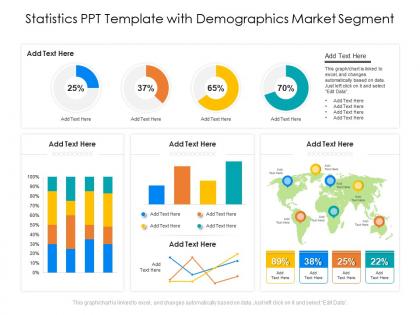
Statistics ppt template with demographics market segment




Try Before you Buy Download Free Sample Product
 Impress Your
 Audience
 100%
100% Editable
 Save Hours
 of Time


Our Statistics PPT Template With Demographics Market Segment are topically designed to provide an attractive backdrop to any subject. Use them to look like a presentation pro.
People who downloaded this PowerPoint presentation also viewed the following :
Statistics ppt template with demographics market segment with all 2 slides:
Use our Statistics PPT Template With Demographics Market Segment to effectively help you save your valuable time. They are readymade to fit into any presentation structure.

FAQs for Statistics ppt template with
Start with the basics - age, gender, race/ethnicity, education, and income levels. Geographic breakdown matters too (state, county, whatever fits your project). Household stuff like marital status and family size are pretty standard. Income data is honestly where you'll find the most interesting patterns though. Employment status is key if you're looking at economic trends. Oh, and grab population growth over time if you're doing any future projections. You can always add more niche stuff later like languages spoken at home or disability stats, but these core demographics will get you started.
Honestly, visuals are a game-changer for demographic stuff. Nobody wants to stare at endless spreadsheets, right? Charts and graphs turn those boring numbers into something people actually care about. I'm a huge fan of color coding - it makes differences between groups pop instantly. Maps are perfect for showing geographic trends that you'd totally miss in paragraph form. Oh, and those little people icons for population data? Simple but so effective. Just match your style to whoever's looking at it and make sure the design actually tells your story instead of just looking fancy.
Age distribution shows you how different generations in your audience think and spend money. Break down your data by age groups - you'll notice major differences in behavior. Gen Z doesn't engage with Facebook ads like Boomers do, obviously. Each group prefers different platforms and messaging styles. Timing matters too since younger audiences are active at weird hours. Start by looking at your current audience segments. I'd focus on finding patterns between age brackets first - that's where the real insights are. It totally changes how you approach campaigns once you see those differences.
Honestly, demographic data is a game-changer for targeting your ads. Pull your current customer info first and look for patterns - age, location, income, interests, all that stuff. Then build buyer personas around what you find. This way you're not just throwing money at random audiences hoping something works. Focus your spend on where these people actually spend their time online and speak their language. One company I know literally cut their ad costs by 50% doing exactly this. Way better than the spray-and-pray approach most people use.
Don't make your categories too vague - you'll just get useless data that won't tell you anything about your audience. Skip leading questions that steer people toward specific answers. Always throw in "prefer not to answer" options because honestly, people hate being forced into personal boxes. Make sure your age ranges don't overlap - like seriously, what's someone supposed to pick between "18-25" and "25-35" if they're 25? That's just sloppy. Oh, and test it with a few people first. You'd be surprised how confusing something sounds when you thought it was crystal clear.
Break it down by geographic levels - regions first, then cities, zip codes, whatever makes sense for your audience. Separate tabs are a lifesaver because this stuff gets chaotic quick. Honestly, maps or color-coding help way more than you'd think since people's brains just work better with visual geo data. One thing that'll trip you up - don't mix different boundary types like census tracts with your marketing zones. Pick whatever geographic level your stakeholders actually care about and start there. You can always add more detail later if they want to dig deeper.
Honestly, just start with Excel or Google Sheets for basic demographic stuff - they handle standard charts fine. Canva's actually pretty decent if you want something that doesn't look like total garbage (my Excel skills are questionable at best lol). Need something fancier? R with ggplot2 gives you crazy control, or Python if that's more your thing. Tableau's nice too but costs money. Most demographic templates don't need anything super complicated though. Clean data beats fancy tools every time.
Honestly, visual timelines are clutch for this stuff. Bar charts work well when you're comparing specific years, but line graphs are better for showing gradual changes over time. Population pyramids are actually pretty cool for age distribution - way more interesting than they sound! Here's what really matters though: add little notes explaining WHY big shifts happened. Like policy changes or economic stuff. People get it so much faster when you point out those moments. Oh, and if you can do interactive dashboards, definitely try that.
Dude, cultural stuff totally messes with demographic data interpretation. Like household size stats? They're meaningless if you don't know whether that culture does multi-generational living or just nuclear families. Age calculations can be weird too - some places count differently or have different life stage expectations. Employment rates are tricky since attitudes toward women working vary so much, plus retirement ages and seasonal work patterns. Oh, and I always forget how much context matters until I'm staring at numbers that make zero sense. You really can't draw conclusions without understanding the local cultural backdrop first.
Dude, you HAVE to include sources in your demographics template - seriously can't stress this enough. Your data becomes worthless without them. I've watched presentations completely bomb because people couldn't back up their stats. Show where each number came from and when it was collected. Link to the original source if you can. This covers you legally and makes it super easy for others to verify your work. Plus updating everything later becomes way less of a headache. Trust me on this one - cite everything upfront or you'll regret it.
Honestly, there's so much cooler stuff than just regular tables! Bar charts are perfect when you're comparing things like age groups or income levels. For ethnic/gender breakdowns, pie charts work great. Population pyramids sound intimidating but they're actually pretty easy to make and look super professional for age/gender data. Heat maps are clutch for geographic stuff - way better than boring spreadsheets. Oh, and infographics are where it's at when you want to actually tell a story instead of just throwing numbers at people. Start with figuring out what you're trying to say, then pick whatever makes it clearest.
Just add income brackets, education levels, and employment status right into your template - they're honestly more revealing than basic demographics sometimes. Put them in separate columns next to age, gender, location stuff. Income ranges and education level (high school, college, whatever) are the big ones to start with. Make sure they cross-reference with your other data though, that's where you'll spot the interesting patterns. I always forget how much richer the insights get when you can see how income correlates with other behaviors. Those two fields alone will change your whole analysis.
Just tailor everything to what each industry actually cares about. Healthcare? Age groups, insurance types, health conditions matter most. Retail looks at income, spending patterns, location clusters. Tech companies want education levels and how people use devices. Honestly, those generic demographic templates are trash - nobody uses them effectively. Better approach is researching what KPIs each industry tracks, then build around that. Oh and definitely ask stakeholders what demographic info would actually make them change course. That conversation alone saves you tons of time guessing what they need.
Hey! So color contrast is your biggest thing - skip red/green combos since colorblind people can't tell them apart. Honestly, I learned this the hard way once. Bump your font size to at least 12pt and stick with sans-serif. Screen readers need alt text on everything visual, plus proper headings. You'll want high contrast ratios too. Tables should have clear headers and make sense when read top to bottom. Oh, and throw in patterns or textures on charts instead of just colors. Give people options - like both the pretty chart AND a boring data table. Test it with accessibility tools first!
Honestly, just ask your users what they think. They'll tell you which data points actually matter and which ones are just cluttering everything up. People are brutal about pointing out when your categories don't match their reality or when you're missing stuff they need. They also catch accessibility problems you'd never notice - like those charts that are impossible for colorblind people to read (learned that one the hard way). Throw a quick feedback form on there and actually read what they send you. Short sentences work. But sometimes you need the longer explanations too.
-
Great designs, Easily Editable.
-
Excellent products for quick understanding.
-
Good research work and creative work done on every template.