

 0 Comment
 Customer Reviews

Ernst & Young (EY) is a global company that manages many companies' accounting worldwide. However, when they started receiving projects in bulk, they were overwhelmed by the pressure.
The tasks involved comprise processing invoices, vendor contracts, and client settlements. With EY becoming internationally recognized, the company started receiving double the work the next year compared to previous years, and the pressure multiplied manifold.
The accounting experts at EY were overwhelmed with the task of filing taxes for global companies, which required them to explain every aspect of the file to their clients meticulously. This activity took the majority of their time.
As a solution, the brilliant minds devised standard templates to reduce time and streamline the accounting process. All they needed to do was insert the report data and key takeaways into content-ready, fully editable, pre-designed presentation themes.
Now they didn't have to take one-on-one calls and send personalized emails to clients describing everything, and accounting became a breeze!
Additionally, they could transform complex data into powerful visual presentations, a preference among clients who no longer had to sift through extensive reports.
Brilliant, right? While the EY had to go on a treasure hunt for the perfect dashboard layouts, we’ve saved you the time and effort by collating expert-approved presentation templates in this blog. Presenting our Account Management Dashboard Templates, the products of extensive research and hours, developed by our expert designers to help you keep accounting at your fingertips.
Each presentation theme mentioned in this category is 100% customizable and contains powerful diagrams to present your financial data.
Now, easily swap colors, edit KPIs, and share interactive charts in minutes with everyone, whether internal teams or external clients.
Let's explore each PowerPoint Framework and see which fits your situation better.
Template 1: Accounts Receivable Management PowerPoint Deck
Account management software meets boardroom-ready storytelling with our powerful PowerPoint deck that can turbocharge your receivables workflow.
Multiple easy-to-use presentation themes combine practical guidance with professional graphics so that everyone in the room can understand the meeting context.
Furthermore, there are dedicated presentation themes through which you can illustrate proven strategies. One contains a triangular process cycle that focuses on continuous improvement, and another concentrates on the seven Cs framework that sharpens communication, consistency, and collaboration.
Download this PowerPoint Bundle below to explore the genuine client dashboard deck.
[product_image id=207374]
Template 2: 3-Step Process of Account Receivable Management PowerPoint Theme
Our PowerPoint Theme provides a three-step visual enabling your finance team to collect client accounts receivable.
You can begin by spotlighting accurate invoicing and then move into automated follow-ups that surface due-date reminders.
Lastly, you can finish with a clear framework for recording payments and closing the loop.
This is an easy-to-use presentation theme that makes the flow unforgettable in various meetings.
As each step sits side by side, it becomes easy for stakeholders to grasp how the financial team's actions feed the next phase.
Download this PowerPoint Template from the link below to sync your decisions with performance metrics.

Template 3: 5-Step Accounts Receivable Management Process PowerPoint Theme
Our PowerPoint Preset provides a platform to streamline your collections workflow.
This presentation theme helps you show a five-step roadmap for rapid decision-making in finance meetings.
There is a bold central icon that anchors the narrative, then branches into sequential circles that take your entire audience through data.
In fact, you can fill each numbered node with the necessary data. Additionally, the horizontal design presented on this tool helps you highlight cause-and-effect relationships.
Download this PowerPoint Theme from the link below to integrate this slide with customer relationship management.

Template 4: 7 Cs of Accounts Receivable Management PowerPoint Layout
Our PowerPoint Preset is here so that you can provide an actual image to your stakeholders regarding the credit control strategies.
You can mention several points with a bold central circle that anchors seven surrounding icons: Clarity, Confidence, Collaboration, Customer Service, Consistency, Communication, and Context.
Furthermore, there is the radial layout that mirrors a continuous cycle, which reminds your teams about accounts receivable.
Download this PowerPoint Framework from the link below to power your presentations with "data visualization tools" and win investors' confidence.

Template 5: Account Receivable Management Process Cycle PowerPoint Theme
Turn complex receivables into a professional story for your audience with our PowerPoint Theme.
You can leverage the triangular cycle, which illustrates the entire journey consisting of Invoice, Track, and Get Paid in three numbered segments.
Additionally, you can describe every point with descriptive text.
Using this professional tool, you can pay attention to the complete cash flow cycle with a sharp focus, spark action, and shorten the path between revenue recognition and bank balance.
Download this PowerPoint Layout from the link below and sync it with the analytics dashboard.

Template 6: Determine B2B Account Management Dashboard PowerPoint Layouts
Our PowerPoint Theme is a powerhouse of presentation slides that pulls pipeline health, campaign ROI, onboarding success, and retention risk onto a single platform.
You can leverage the marketing pipeline panel to provide details on live deal counts, revenue, and days to close.
Additionally, use the power of donut charts to segment earnings by source for faster decisions.
With this tool, you can open the discussion on user engagement tracking metrics, such as email sends, form submissions, and landing page completions.
Below this section, you can reveal touchpoints that keep prospects moving.
Download this PowerPoint Layout from the link below to use this KPI dashboard.

Template 7: Account Management Dashboard for New Ventures PowerPoint Preset
Track your venture’s financial runway with our PowerPoint Framework. Explore this tool to consolidate seven funding-stage KPIs: cash in the bank, burn rate, monthly expenses, solvency months, total and recent investments, debt aging, and live FX rates.
All these financial attributes can be depicted with proper charts and diagrams.
In fact, you can leverage the compact bar, line, and column charts to turn complex data into an understandable format for your audience.
Download this PowerPoint Theme from the link below to pair it with business intelligence tools.

Template 8: Account Receivable Management Dashboard with Various KPIs
Give your stakeholders a 360-degree image of your receivables health with our PowerPoint Theme.
There are four headline tiles to mention total receivables, overdue balance, delinquency ratio, and available cash to show the current numbers to your audience.
Below this section, you can turn the discussion toward a year-over-year column chart to visualize revenue momentum.
Additionally, there is a pie chart that helps you illustrate outstanding amounts in on-time payments, overdue items, and bad debt.
Towards the end, there is a tachometer that has the capacity to measure average outstanding days and is complemented by a horizontal bar chart that depicts 30-day increments.
Download this PowerPoint Preset from the link below to explore this reporting tool.

Make budget reviews faster with interactive charts using our Accounting Dashboard Templates.
Template 9: Addressing B2B Account-Based Marketing Management Dashboard PowerPoint Slide
Power your account-based marketing reviews with our PowerPoint Layout.
This tool will work as a dashboard that converts raw CRM exports into unforgettable visuals for your audience.
You can leverage the horizontal bar chart, which helps you rank pipeline value by account.
Additionally, a color-coded panel shows total pipeline dollars, opportunity count, engaged contacts, average engagement score, and logged sales activities.
After this section, a gradient heat strip helps you measure engagement quality by account.
Download this PowerPoint Theme from the link below to show customer insights to everyone in the meeting.

Transform spreadsheets into powerful stories with our Management Dashboard Templates.
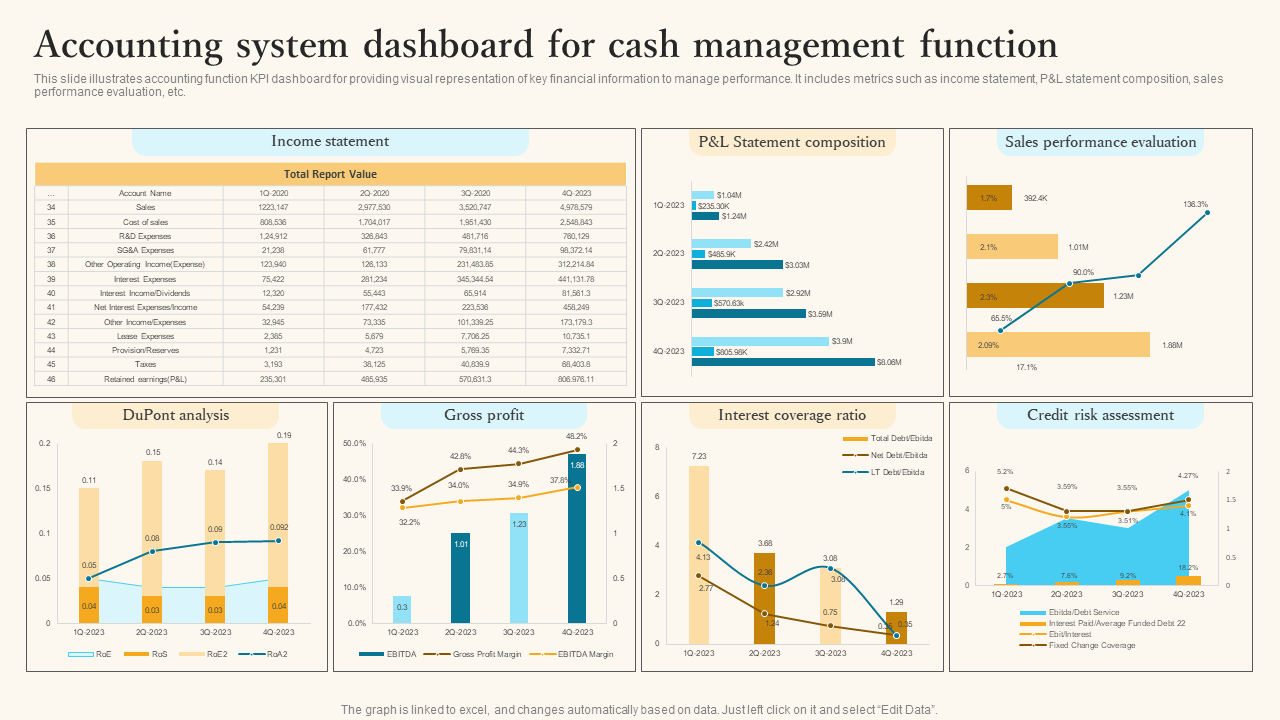
Template 10: Accounting System Dashboard for Cash Management Function PowerPoint Slide
Master cash performance quickly with our PowerPoint Template. Use this professional dashboard to turn raw ledgers into seven board-ready visuals.
In the first section, describe the data for an income statement with proper sections.
You can use charts to discuss P&L composition in the box next to it.
Similarly, this presentation theme will provide a platform to show various financial analyses and discuss them with stakeholders.
Download this PowerPoint Preset from the link below to leverage this template with project management dashboard solutions.
Show Financial Numbers Gracefully
In conclusion, every company needs to illustrate its financial numbers, such as profit and loss accounts, cash flows, accounts receivable, etc, to their stakeholders.
So, why not show them a proper pattern that your clients will prefer? You can leverage SlideTeam’s Account Management Dashboard Templates at this time.
These 100% customizable presentation themes will help you convert transactional data into a powerful narrative.
FAQs
1. What are the five key account management processes?
Successful account management contains client discovery and onboarding, account planning mapping objectives to KPIs, coordinated value delivery, proactive relationships, and continuous performance review.
2. What is the account summary dashboard?
An account summary dashboard is a consolidated hub. It captures each key client’s commercial status in a single view and can include contract value, opportunities, service tickets, usage trends, billing history, and health scores.
3. How important is account management?
Effective account management transforms one-time transactions into long-term partnerships. Furthermore, you can enhance retention, generate cash flow, and fuel innovation through this.