

Executive Summary Powerpoint Presentation Slides






Try Before you Buy Download Free Sample Product
 Impress Your
 Audience
 100%
100% Editable
 Save Hours
 of Time


If you are a keynote speaker and want to present business oriented speech to your audience, download our executive summary PowerPoint presentation slides which offers you complete solution. This executive summary PPT slide has been designed by our team which has different pictures and shapes to address your business summary in an impeccable way. This presentation slideshow allows you to summarize many aspects of your business such as unique partnerships, customers and tractions, new technology plans and up gradations, and your investment proposals. With the help of this executive summary presentation, you can sum up what do you do, what are they key differentiators, what are different problems areas which are addressed by your business, your target market, business plans and your business goals for next 3 to 5 years. So, if you are trying to draw attention of banks, venture capitalist or angel investors this presentation template is perfect design to intrigue your readers or listeners. Gourmets delight in gastronomic ability. Entrepreneurs delight in the excellence of our Executive summary ppt.
People who downloaded this PowerPoint presentation also viewed the following :
Content of this Powerpoint Presentation
Slide 1: This is an introductory slide for EXECUTIVE SUMMARY. State Your Company Name and begin.
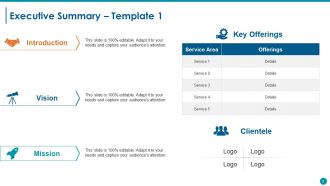
Slide 2: This is the first template on Executive Summary with- Introduction, Vision, Mission, Key Offerings (Service, Detail), Clientele (Logo).
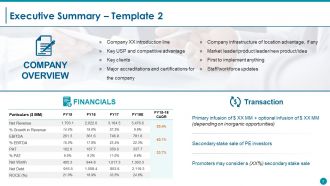
Slide 3: This is the second Executive Summary slide with- Company Overview: (Company XX introduction line, Key USP and competitive advantage, Key clients, Major accreditations and certifications for the company, Company infrastructure of location advantage, if any, Market leader/product leader/new product/idea, First to implement anything, Staff/workforce updates), Transaction: {(Promoters may consider a (XX%) secondary stake sale, Primary infusion + optional infusion (depending on inorganic opportunities), Secondary stake sale of PE investors). and Financials (Revenue, EBITDA etc.)}
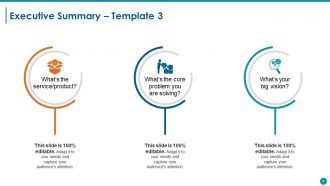
Slide 4: This is the third slide showcasing Executive Summary with the following headings- a: What’s the service/product? b: What’s the core problem you are solving? c: What’s your big vision? Use these headings to answer your queries.
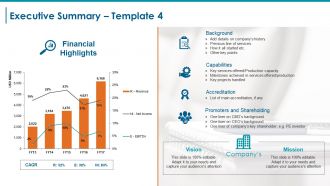
Slide 5: This is the fourth slide showcases Executive Summary with Company’s Vision & Mission. It also displays Financial highlights graph with- CAGR ( Revenue, EBITDA, Net income). Other subheadings include- Background (Add details on company’s history, Previous line of services, How it all started etc. Other key points). Accreditation (List of main accreditation, if any Capabilities (Key services offered/Production capacity Milestones achieved in services offered/production Key projects handled) (Promoters and Shareholding One liner on CMD’s background One liner on CEO’s background One liner of company’s key shareholder; e.g. PE investor).
Slide 6: This slide showcases Our Vision And Mission. State your vision and mission here.
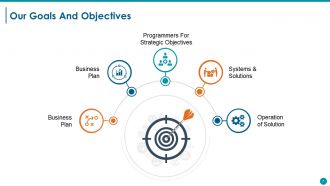
Slide 7: This slide presents Our Goals And Objectives. It can be displayed by the following headings- Systems & Solutions, Operation Of The Solution, Programmers For Strategic Objectives, Business Plan, Business Plan. State them by the help of these sub headings.
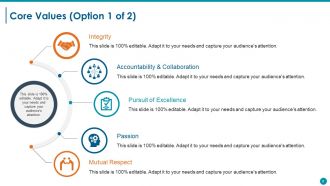
Slide 8: This slide presents Core Values of the company/organization. Some examples given are - Integrity, Pursuit of Excellence, Accountability & Collaboration, Passion, Mutual Respect.
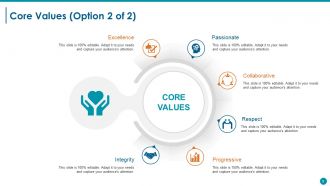
Slide 9: This is another slide on Core Values with examples, such as Collaborative, Passionate, Excellence, Integrity, Progressive, Respect.
Slide 10: This is a Coffee Break slide to halt. You may alter/modify the content as per need.
Slide 11: This slide is titled Charts & Graphs to proceed forward.
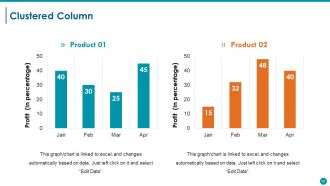
Slide 12: This slide presents a Clustered Column Chart to show two products in comparison.
Slide 13: This slide presents a Radar Chart for two products/entities to be compared.
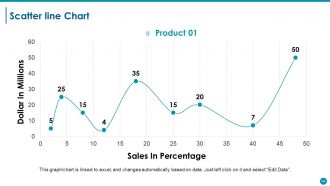
Slide 14: This is a Scatter Line Chart slide to show product/entity comparison, specifications etc.
Slide 15: This slide is titled Additional Slides to move forward. You may alter/modify the content as per need.
Slide 16: This slide showcases Our Mission. State it here.
Slide 17: This slide presents Our Team with text boxes and imagery to go with. State about your team here.
Slide 18: This slide presents Our Goal with icon imagery. State your goals here.
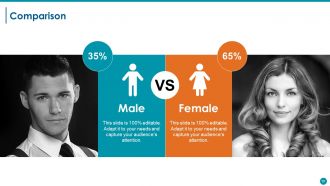
Slide 19: This slide shows Comparison in terms of- Male and Female.
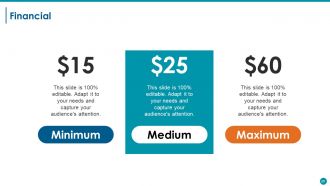
Slide 20: This slide shows Financial scores aspect with text boxes. State them here.
Slide 21: This is a Quotes slide. State highlights, specification, message, beliefs etc. by Quote here. You may alter/modify the content as per need.
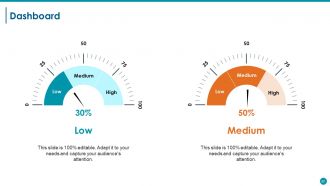
Slide 22: This slide shows Dashboard with dashboard image and text boxes to state kpis, metrics etc.
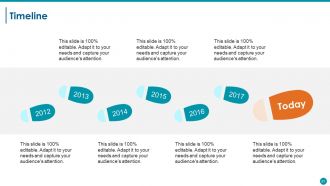
Slide 23: This is a Timeline slide to show evolution, growth, milestones etc.
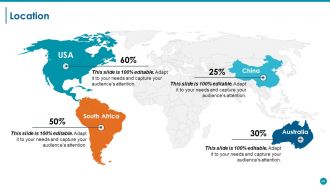
Slide 24: This is a Location slide of world map image to show global presence, growth etc.
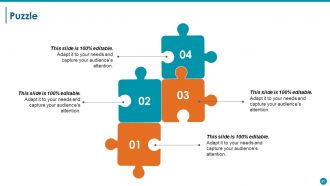
Slide 25: This is a Puzzle image slide to show information, specifications etc.
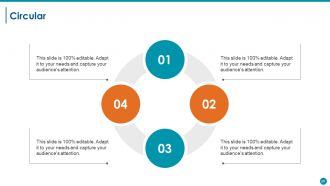
Slide 26: This is a Circular image slide to show information, specifications etc. 3
Slide 27: This is an Our Target slide. State your goals, aspirations, targets here.
Slide 28: This is a Venn diagram image slide to show information, specifications etc.
Slide 29: This is a Mind map image slide to show information, specifications etc.
Slide 30: This is a Bulb Or Idea slide. Present any new information, data here.
Slide 31: This is a Thank You slide with Address # street number, city, state, Contact Numbers, Email Address to be put and displayed.
Executive Summary Powerpoint Presentation Slides with all 31 slides:
Encourage the continuous generation of ideas with our Executive Summary Powerpoint Presentation Slides. It will add to the inflow.












FAQs for Executive Summary
So for your exec summary slide, lead with the problem, your solution, and what it means for the business. Honestly, I'd put the biggest win right at the top - these meetings are brutal and people zone out fast. Also throw in next steps or whatever decisions they need to make. Bullet points are your friend here, not paragraphs. I always do this test: if someone walked in late and only caught this slide, would they still get it? Oh, and don't overthink the design - just make sure it's not a wall of text.
Honestly, charts and graphs are your best friend here - way better than drowning executives in paragraphs of numbers. They're already swamped, so make it visual. Throw in some icons for your key recommendations, maybe use color to highlight the big wins. But don't go overboard with it (I've seen presentations that looked like a rainbow exploded). The trick is doing a quick "glance test" - can someone walking by your laptop screen get the gist in like 10 seconds? If not, you need fewer elements. Short sentences work. So do slightly longer ones that actually flow together naturally.
Okay so biggest thing - don't dump everything into your exec summary slides. Hit the main points only. Skip the boring "Executive Summary" title too, nobody cares. Make sure someone could forward just those slides and they'd actually make sense on their own. Lead with your big recommendation right away instead of burying it somewhere random. Short bullet points work best since execs skim everything anyway. Honestly, I've seen so many people mess this up by overthinking it. Quick test: would this slide deck make sense to someone who wasn't even in the room? If not, you're probably missing something important.
Honestly, it all comes down to speaking their language. When I'm talking to executives, I start with revenue impact and big picture strategy stuff. Board members? They're obsessed with risk and staying ahead of competitors. But here's the thing - you've gotta do your research first. Like, actually know who you're talking to before you walk in there. Same facts, totally different angle depending on the room. Tech teams want all the nitty-gritty details while investors just care about market size. Always open with whatever keeps them up at night, then back it up with numbers.
Dude, you've got to tell a story with your exec summary. Nobody wants to read a boring data dump. Start with the problem you're facing, then walk them through what you figured out, and boom - here's where we go next. It's like explaining drama to a friend, except your job depends on it lol. The story structure helps those crazy busy execs actually remember your points later. Makes your recommendations feel obvious instead of random. Trust me, they'll follow along way better when there's an actual narrative instead of just bullet points and charts.
Honestly, charts and graphs are game-changers for exec summaries. Nobody wants to dig through walls of text to find the important stuff. A quick bar chart showing quarterly growth? Way more powerful than burying that info in some random paragraph. Plus visuals naturally draw the eye to what actually matters on your slides. I always pick my top three data points first, then figure out the cleanest way to show them - sometimes I overthink it and go too fancy when simple works better. The goal is letting executives spot patterns and comparisons instantly instead of making them work for it.
One page max for your exec summary - treat it like your elevator pitch but in slide form. Hit them with 3-5 bullet points covering your main findings or recommendations. Each bullet = one sentence, not a novel. The whole slide should take 30-60 seconds to read because execs are busy as hell. Save the deep dive stuff for appendix slides. Here's the thing - if someone only saw this one slide, would they actually get why your work matters? That's your test. Give them the "so what" right up front, and honestly, most of the time that's all they'll remember anyway.
Go for like 70% visuals, 30% text on those exec summary slides. Charts and graphs should carry most of the weight - not paragraphs of bullet points. I swear, half the presentations I see look like someone copy-pasted from a Word doc and slapped a random chart on there. Keep your text super tight. Just key phrases, not full sentences. Your visuals and words need to work as a team, not fight each other for space. Here's my test: can someone get your main point in 10 seconds? If not, you've got too much text and not enough visual punch.
Dude, go with boring fonts like Arial or Calibri - trust me on this. Make your text huge, like 24pt minimum, because half these people are squinting from the back of the room. Headers? Go even bigger, 36pt easy. I once watched a whole room struggle to read tiny text and it was painful. High contrast is clutch - dark text, light background. Don't get cute with it. Oh, and here's the thing everyone screws up: cramming everything on one slide. White space isn't wasted space, it's what makes people actually want to read your stuff instead of zoning out.
Keep your executive summary looking exactly like the rest of your deck - same fonts, colors, all that visual stuff. Don't switch up your tone either. If you've been data-focused and analytical throughout, don't randomly get all flowery in the summary (honestly, this drives me crazy when I see it). Pull the same key phrases from your main slides. Structure it following your presentation's flow too. Oh, and do the summary dead last after everything else is done - way easier to match everything when it's already finalized. Trust me on this one.
Honestly, just stick with PowerPoint for exec stuff - those C-suite people expect it and it won't randomly break in corporate settings. Google Slides is clutch for team projects since everyone can jump in and edit together. Oh, and Canva? Total game changer if you suck at design like I do. Keynote looks amazing but good luck opening it on a PC (learned that the hard way). Don't get obsessed with animations though. Focus on your actual message first, then make it pretty. Grab a clean template and nail your story - the fancy stuff can wait.
Okay so feedback is literally your lifeline for exec summary slides. Don't just ask "thoughts?" though - that gets you nowhere. Be specific: "Is my main point clear?" or "What part feels cluttered?" Way better responses that way. Fix clarity issues first, then worry about how it looks. If three people say the same thing is confusing, listen to them! Oh and here's a trick I learned - test your updated slide with someone fresh who didn't see the original. They'll catch stuff you missed. Short sentences work. But mix them up with longer ones so it doesn't sound robotic.
Honestly, keep it simple - hit the problem, your solution, and actual numbers for business impact. Don't just regurgitate your whole presentation (I see this mistake constantly). You want someone to finish reading and think "okay, I need to hear more about this." Lead with your most surprising stat or biggest win. Visuals over text every time. Also super important - always end with clear next steps. The whole thing should tell a story in like 30 seconds max. Think of it as a teaser trailer, not the full movie. Your exec summary should create curiosity, not satisfy it completely.
Oh totally, culture makes a huge difference with exec slides. Japanese audiences want way more context and softer messaging - they don't love the direct approach. Germans? Complete opposite - hit them with data and get straight to the point. Colors are weirdly important too (red = bad luck in some places, good fortune in others). Americans usually want those quick bullet points they can scan fast. But honestly, other cultures expect you to actually explain things properly. I always stalk the audience beforehand - sounds creepy but you've gotta know their style before you build anything.
Honestly, just break everything into bullet points or lists - way easier to scan. Put your big conclusion right at the top too. Use bigger fonts for the important stuff, smaller for details. Ditch the corporate speak for normal words people actually use. White space is clutch here, don't pack everything together like you're running out of room. Maybe throw in some simple icons if it makes sense? Oh and definitely test it on someone who wasn't involved - if they look confused, you've got more work to do.
-
amazing
-
Really like the color and design of the presentation.
-
Really like the color and design of the presentation.