

Executive summary ppt presentation examples




Try Before you Buy Download Free Sample Product
 Impress Your
 Audience
 100%
100% Editable
 Save Hours
 of Time


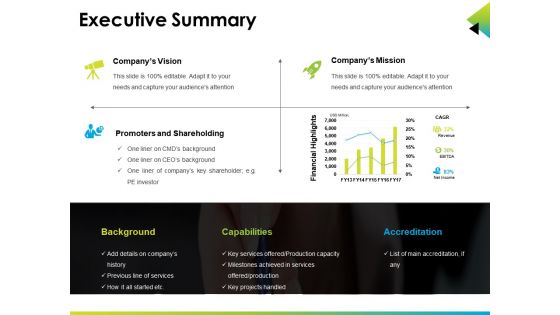
Do you need professional executive summary PPT design for your next business meeting? Well if your answer is in yes then we have the design available for you. Our executive summary PowerPoint slide has been designed for the corporate professionals who are required to create a detailed management summary about the business purposes. You can present some key aspects of the executive summary using this presentation template such as company vision statement, mission statement, financial highlights, business promoters and shareholders. Usually an executive summary is a short document of a long report that anyone can understand in the easy manner. Our PowerPoint diagram has been designed keeping this aspect in mind by our designing experts. The purpose is to save valuable time which is quite important in today’s time. Any business professional should get essence of the information after reading the executive summary. So just check out and download this impressive executive summary PPT slide in your presentation. We also have complete decks on similar topic which you can access when you visit our website. Establish eligibility with our Executive Summary Ppt Presentation Examples. Convince folks you have the acumen.
People who downloaded this PowerPoint presentation also viewed the following :
Content of this Powerpoint Presentation
Are you a business owner or an entrepreneur trying to convince financial institutions and investors for funding? Then, an executive summary can be of great help. A concise, clear, and engaging summary of the project plan is an essential part of the business. An executive summary is the primary section of a business proposal or plan depicting a brief overview of the document along with its significant points. It helps to get critical information quickly to decide on an action and also attracts stakeholders and potential investors.
Since executive summaries are one of the most crucial parts of a business plan, they can be a little tricky to write. They need to be compelling and straightforward, making it easy for someone to read and understand the entire thing. If you wish to write a perfect one, you need to keep in mind some important information: the purpose of the project, goals, timelines, key findings, budgets, schedules, and more.
Take a sneak peek of our well-written and professionally designed, high-resolution “Executive Summary PPT Templates” to write the best executive summary for your business. SlideTeam has introduced these PowerPoint templates with outstanding visuals for corporate professionals who need to draft a detailed management summary about business purposes.
Are you new to business or want to open a startup company? Click here to find out the best executive summary for your startup company.
Executive Summary Templates
SlideTeam’s executive summary templates are 100% editable and easily amendable to cater to your requirements without any hassle. The superior quality of graphical representation has made it easier to portray and share with your audience. Provide your presentation in a business meeting with a professional and creative approach.
Click here to Access the premium executive summary of a project report and get a deeper insight into the matter.
Template 1: Executive Summary

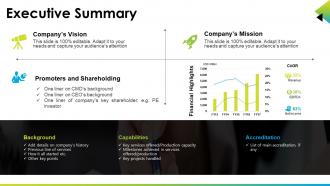
Do you require a well-designed executive summary PPT layout for your next business meeting? If yes, then SlideTeam has come up with the top design available for you. Our experts have designed the slides with suitable graphics, icons, and informative content to serve all the requirements of corporate professionals. Elucidate a few critical aspects of the executive summary like the company’s vision statement, mission statement, promoters and shareholders, and financial highlights deploying our professionally-crafted PPT preset. Time is a valuable and critical thing in this era. To save this valuable time, our designing experts have crafted this slide in such a way that a professional gets the essence of the information soon after reading the summary. This presentation shows a separate box to highlight specific points like background, capabilities, and accreditation.
Convince your Folks with an Outstanding Executive Summary
An executive summary is a precious document for a business, as it can either break or make your business plan depending on how it is written. It must be crafted precisely and quickly to simplify all the essential information of the business plan. Our executive summary PPT template helps you prepare an engaging presentation to convince the investors and influence their decision-making, thereby supporting the project plan. Highlight your business in the competitive market with this impressive executive summary PPT slides and establish your eligibility to your audience.
Also, To explore the best investment pitch executive summary report templates, Click here.
Executive summary ppt presentation examples with all 5 slides:
Discourage indulgence in excess with our Executive Summary Ppt Presentation Examples. Highlight the advantage of balanced consumption.
FAQs for Executive summary
Ok so hit these five things: problem, solution, benefits with actual numbers, timeline, and what you need from them. Make the problem super clear first - why should they care? Then your solution, but keep it simple. Executives eat up ROI data, so throw in real numbers if you've got them. Show a timeline with major milestones (honestly this part always feels like guesswork but they want it). End with your ask - money, people, whatever. Each section should be max 2 slides because their attention spans are terrible. If you can't pitch it in 10 minutes, you're overthinking it.
Dude, visuals are a game-changer for exec summaries. Nobody wants to stare at a wall of text when they're trying to understand your data quickly. Charts show trends instantly. Graphs make comparisons obvious. Your boss can scan an infographic in seconds instead of hunting through paragraphs for the good stuff. I always use the 5-second test - if someone can't get your main point that fast, your visual is too complicated. Dashboards work great for showing key metrics at a glance. Honestly, I've seen people completely ignore reports without visuals, but they'll actually engage when you make the info easy to digest.
Honestly, stick to 5-7 minutes max. Executives are crazy busy and their minds wander fast - I've watched people lose rooms in like 3 minutes flat. If you can't hit your main points in under 10 minutes, you're probably trying to cram too much in there. Keep it to 3-5 slides tops: problem, solution, impact. That's it. Oh, and definitely practice timing yourself beforehand because nothing's worse than rushing through your ending or going way over. I learned that one the hard way lol. Trust me, shorter is always better with these presentations.
Yeah, each industry has its own obsessions when it comes to exec summaries. Tech bros want all the metrics - user growth, engagement rates, product timelines. Healthcare? They're paranoid about compliance and patient outcomes (rightfully so). Finance people live and breathe ROI projections and risk analysis. Retail focuses on customer demos and seasonal patterns. Honestly, pharma execs only care if you're hitting FDA deadlines, while startup founders just want engagement numbers. The trick is figuring out what your specific audience loses sleep over, then give them exactly that data.
Honestly, storytelling makes all the difference in exec presentations. Nobody wants another data dump - they'll zone out completely. Structure it like you're telling a friend about something that happened: "We had this problem, discovered some crazy stuff, here's what we're doing about it." That progression keeps them hooked way better than just throwing random insights at them. Build some tension around the challenge first, then your solution feels like the obvious next step instead of just another recommendation they might ignore. Makes the whole thing stick in their heads too.
Your charts need to actually tell the story, not just look pretty on slides. Pick 2-3 visuals max that back up your main points - revenue trends, market share, whatever matters most. Bar charts and line graphs are your friends here. Pie charts? Skip them - nobody wants to decode tiny slices during a presentation. Keep everything clean with simple labels and don't go crazy with colors. Here's the test: can someone get your point in 5 seconds? If not, simplify it. Oh, and save those detailed data tables for the appendix. Always lead with your insight first, then show the chart.
Honestly, the worst thing you can do is cram everything in there like you're writing a novel. Executives hate dense walls of text - they'll just skip right over your main points. Start with your big recommendation right up front, not some boring background stuff. And please don't make it 15 slides long! I've seen people do this and call it an "executive summary" which is just... no. Keep it under 6 slides max. Also ditch the corporate speak - nobody wants to decode your jargon when they're already pressed for time. You've basically got 3 minutes to sell your idea, so make every word count.
Figure out who's actually making the decisions first - could be executives, department heads, whoever has final say on your topic. Then think about what keeps them up at night: usually money, risk, or big picture strategy stuff. Don't ignore the people who whisper in their ear though! Those influencers matter more than you'd think. Once you know the crowd, match your presentation to their world. Executives want high-level impact, while technical folks need the nitty-gritty details. Oh, and definitely get that attendee list ahead of time - nothing's worse than realizing you prepped for the wrong audience when you're already standing there.
Honestly, just do a clean one-pager. Hit the basics: problem, solution, market size, business model, traction, team, and your funding ask. Two to three bullet points per section – investors have zero attention span these days, it's wild. Skip the fancy graphics unless you have killer numbers that actually matter. Make it scannable, not some dense report nobody wants to read. Most startups that get funded use either a simple slide deck or just a well-structured doc. Oh, and lead with your traction and metrics if they're solid – that stuff needs to jump out immediately.
Start with your big "aha" moment and what they should do about it. Nobody cares about your process - they want the headline first. Pick your top three findings, give one solid piece of proof for each, then boom - next steps. Honestly, I've seen too many presentations die because people think more slides = more impressive. Wrong. Cut anything that doesn't directly prove your point. It's like breaking news to a friend - you don't start with "so I was walking to the store..." You lead with "guess what happened!" Then wrap up with actions they can actually take tomorrow.
Mix up how you deliver stuff and get them involved. Throw in rhetorical questions, use that rule of three thing for main points, and share quick stories - executives eat that up honestly. Don't just read off slides like a robot. Pause for effect, make eye contact. I throw in "show of hands" moments or quick polls to break things up when it gets heavy. Stay energetic even if you're freaking out inside. Watch their faces - if they're checking phones, you're losing them. Oh, and always have a shorter version ready because meetings never go as planned.
Honestly, anonymous surveys work best - ask specific stuff like pacing and clarity, not just "how was it?" Right after presenting, do quick verbal check-ins while it's fresh. Here's what I've learned though: asking "what would you cut?" gets you way better feedback than generic questions. Super useful. Follow up with a few people individually within the week to dig deeper. Don't make some crazy long evaluation form - just 3-4 targeted questions so people will actually fill it out. The easier you make it for them to be honest, the better insights you'll get.
Honestly, just go with PowerPoint. Yeah it's boring but execs are used to it and it handles charts/graphs without being weird about it. Google Slides is solid if your team needs to jump in and edit stuff together. Oh and Canva - don't sleep on it, their templates actually look professional even if you have zero design skills. Sometimes I wonder how I survived presentations before finding it lol. Prezi's cool for fancy storytelling but only if you want to stand out. My take? Use whatever software they're already comfortable with. Last thing you want is technical difficulties when you're presenting Q3 numbers.
So basically you're taking your full report and cramming it into like 5-10 slides. Skip all the methodology stuff and detailed analysis - executives honestly don't have time for that anyway. Just hit your main findings, what you concluded, and what they should do about it. Think elevator pitch version of your research. Same basic structure as the full thing, but you're cutting maybe 80% of the detail? I learned this the hard way after watching people's eyes glaze over during a 35-slide presentation once. Focus on decisions that need to happen and next steps. That's really what they care about.
Look at Airbnb's Series A deck - they jumped straight into market size and traction numbers. Smart move. Healthcare pitches hit different though; 23andMe nails it by opening with patient stories instead of boring stats. Finance is trickier (regulatory stuff is painful but investors need it). Retail? Lead with unit economics and customer acquisition costs every time. Honestly, format doesn't matter as much as solving whatever problem keeps your audience awake at 3am. Find a deck from someone in your space and just steal their opening slide structure. Works way better than overthinking it.
-
Excellent
-
Nice and innovative design.
-
Out of the box and creative design.
-
to work