


E Mail Security Proposal Powerpoint Presentation Slides




Try Before you Buy Download Free Sample Product
 Impress Your
 Audience
 100%
100% Editable
 Save Hours
 of Time


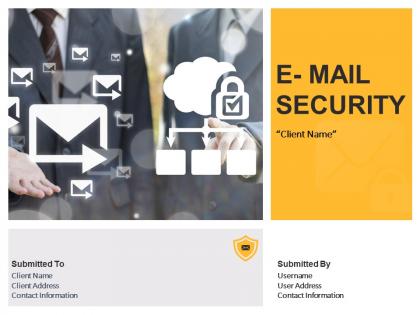
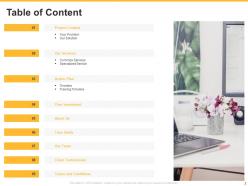
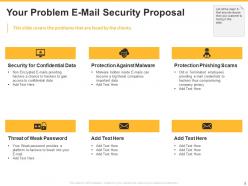
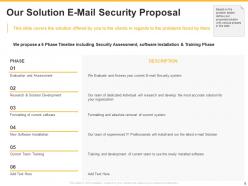
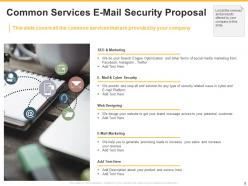
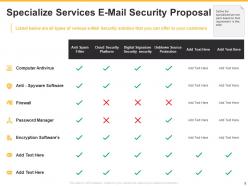
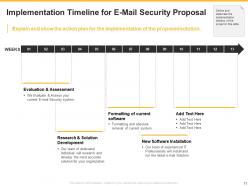
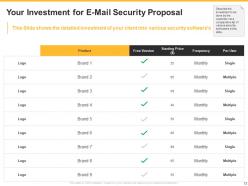
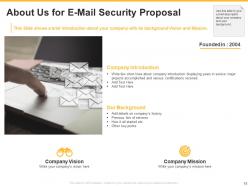
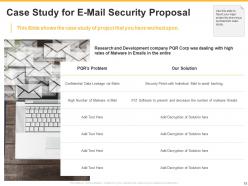
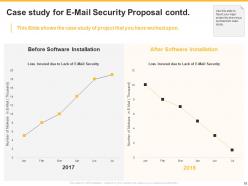
As we all know that email is used to send or receive messages through an electronic device. So, it is necessary to secure the mails from various threats that somehow deteriorate the data privacy. Email security services are used by many organizations to safeguard their business from any viruses or errors. Phishing and malware increase the risk to compromise the most confidential data. That is the reason email security is important for any business or large organization. Offer a one-stop solution to your clients for every security-related issue by using our topic-specific E Mail Security Proposal PowerPoint Presentation Slides. With the aid of this visually-attractive email security proposal PPT layout, you can showcase the various problems faced by your clients. The issues include the security for confidential data, protection against malware, protection phishing scams, and the threat of weak passwords. In this slide, you can highlight the solutions your company offers to the clients like evaluation & assessment, research & solution development, formatting of current software, new software installation, and current team training. Use our eye-catching security proposal presentation template to outline your common services that would be beneficial for there prospective clients. You can also mention the specialized services you provide to clients like computer antivirus, anti-spyware software, firewall, password manager, and encryption software. With the help of this well-informative email security proposal PowerPoint theme, you can explain and show the action plan for the implementation of the proposed solution you provide to the clients. Use the security proposal PPT slide to describe the overall investment your client needs to do for various security software. Give a short description of your company and its background to gain the trust of your client with ease. Decrease the number of malware threats from your client’s device by downloading our ready-to-use email security proposal PowerPoint presentation template.
People who downloaded this PowerPoint presentation also viewed the following :
E Mail Security Proposal Powerpoint Presentation Slides with all 28 slides:
Use our E Mail Security Proposal Powerpoint Presentation Slides to effectively help you save your valuable time. They are readymade to fit into any presentation structure.

FAQs for E Mail Security Proposal
Honestly, phishing is still the worst one - people fall for fake emails that look legit and end up handing over passwords or clicking sketchy links. Malware attachments are huge too, especially ransomware that'll totally wreck your day. Business email compromise is pretty scary actually, where scammers pretend to be your CEO asking for wire transfers. Spam and spoofing happen constantly but they're more annoying than dangerous. You really need layered protection though - good email filters, train your people to spot fakes, and set up authentication stuff like DMARC. Multi-pronged approach is key.
Okay so first thing - watch out for those dramatic subject lines like "Your account will be closed!" Real companies don't usually freak you out like that. Also check if they actually use your name or just say "Dear customer." Before you click any links, hover over them first - the URL will probably be some weird domain that has nothing to do with the actual company. Grammar used to be a dead giveaway but honestly scammers are getting way better at that now. Oh and never give out passwords or SSN through email, legit businesses won't ask for that stuff. If something feels off, just go to their real website and contact them directly instead.
Honestly, get a password manager ASAP. Most of us (myself included) use the same password everywhere, which is terrible when sites get hacked. Your email becomes vulnerable too. With a password manager, you'll create crazy strong passwords without memorizing anything. They also watch for data breaches and tell you if your stuff gets leaked online. I probably should've started using one years ago. Change your email password first thing once you set it up - that's like your master key to everything else.
Dude, seriously get MFA set up - it stops like 99.9% of automated attacks. Your password gets stolen? Doesn't matter, they still can't get in without your phone. I know SMS codes are easier but honestly the app-based ones like Google Authenticator are way more secure since they can't be intercepted. It's literally the best thing you can do for your email security. Takes maybe 5 minutes to set up and you'll thank yourself later when you're not dealing with a hacked account. Trust me on this one.
Definitely go for at least 12 characters with a good mix - uppercase, lowercase, numbers, and symbols. Don't use obvious stuff like your birthday or dog's name because hackers eat that up. Your email password should be totally unique since it's basically the key to everything else. I honestly can't live without my password manager anymore, it's such a lifesaver. Something like "Sunrise
-
Out of the box and creative design.
-
Out of the box and creative design.
-
Amazing product with appealing content and design.
-
Great quality product.
-
Great quality slides in rapid time.
-
Appreciate the research and its presentable format.