


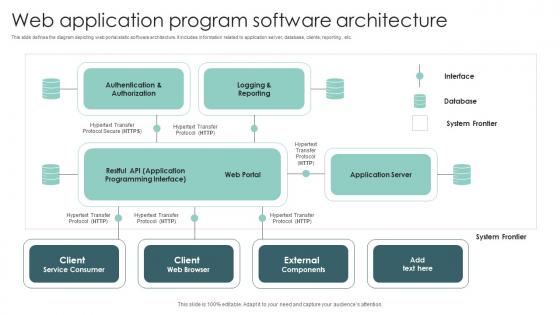
Web Application Program Software Architecture




Try Before you Buy Download Free Sample Product
 Impress Your
 Audience
 100%
100% Editable
 Save Hours
 of Time


This slide defines the diagram depicting web portal static software architecture. It includes information related to application server, database, clients, reporting , etc.
People who downloaded this PowerPoint presentation also viewed the following :
Web Application Program Software Architecture with all 6 slides:
Use our Web Application Program Software Architecture to effectively help you save your valuable time. They are readymade to fit into any presentation structure.





FAQs for Web Application
So basically you've got three main parts to worry about. Frontend is your user interface stuff - React, Vue, or just regular HTML/CSS/JS. Backend handles all the logic and processing (Node.js, Django, whatever). Database stores everything. You'll probably want Nginx as your web server too, honestly it just makes things smoother. APIs tie it all together obviously. I'd literally just grab a piece of paper first and map out what each piece does for your specific app. Makes everything click way faster than trying to figure it out in your head.
So basically, monoliths are one giant app you deploy all at once. Pretty straightforward when you're getting started. Microservices split everything into tiny independent pieces that talk through APIs. You can scale just the parts that need it and use whatever tech makes sense for each service. But honestly? The complexity gets wild fast - now you're dealing with network issues, service calls failing, all that fun distributed systems stuff. I'd probably start with a monolith if it's a new project. Way easier to reason about. Then break it apart later when you actually need to.
So the front-end is basically what users actually see and click on in your web app. It handles all the visual stuff, form validation, and calls your backend APIs. Think of it like a translator between users and your server logic - which honestly is a pretty important job. You're also managing things like page routing, client-side state, and performance tricks like caching. Oh, and lazy loading too (that one's huge for user experience). Just make sure you're clear about what logic belongs in the front-end vs what should live in your backend APIs.
So RESTful APIs are pretty much just a way to make your web components talk using standard HTTP stuff - GET, POST, PUT, DELETE. You get predictable endpoints that spit out JSON instead of dealing with random custom protocols (which honestly can be a nightmare). Each request is self-contained, so you don't have weird session dependencies breaking everything. It's like having that universal translator between your frontend, backend, and whatever third-party services you're using. My advice? Map out your actual resources first, then build endpoints around those. Makes the whole thing way more intuitive to work with later.
Honestly? The money savings alone make it worth it. You're only paying when code actually runs, which is pretty sweet. Scaling just happens automatically too - no more 2am panic calls about traffic spikes (ugh, those were the worst). Deployment gets way faster since there's zero infrastructure setup. Plus you get that built-in redundancy across regions without thinking about it. Really though, the best part is just writing code instead of babysitting servers all day. There's some vendor lock-in stuff and cold starts can be annoying, but for most apps? Totally worth the trade-off.
So caching is basically like keeping stuff you use all the time within arm's reach instead of going to fetch it every single time. Makes your app way faster. You can do it at different levels - browser cache for static files, CDNs to serve content globally, Redis for sessions (this one's honestly a game changer), and database query caching. I'd start simple with browser caching and maybe throw Redis in there. Read-heavy apps especially see huge improvements. Oh, and your users will actually notice the difference in response times, which is always nice.
Build your security in layers - authentication, authorization, input validation, encrypted transmission. HTTPS isn't optional anymore (like, even random blogs have it). SQL injection and XSS protection are must-haves. Session management matters too. Rate limiting stops people from hammering your API to death. Security headers in responses help a ton. Honestly, no single thing will protect you completely - that's why the layered approach works. OWASP's top 10 list is basically your security bible. Go through it methodically and you'll catch most of the big vulnerabilities.
Your database design literally makes or breaks everything. Seriously, I've watched apps completely melt down during busy periods just because someone didn't think through their table relationships properly. Query speeds, how many users you can handle at once - it all comes back to the database structure. Connection pooling helps a ton, and don't sleep on read replicas if you're getting decent traffic. Oh, and caching strategy matters way more than people think. Start with your most common queries though - optimize those and you'll actually notice the difference right away.
Honestly, just look at what your team already knows first. No point going with some shiny new framework if everyone's gonna struggle with it. Budget matters too - hosting costs can get crazy depending on what you pick. Yeah, Node.js + React is everywhere for a reason, but don't just follow the hype. Think about whether you'll actually find devs who know that random framework two years from now. How fast do you need to ship? Some stacks are way more complex to deploy than others. My take: go with something your team can actually pull off well. Perfect on paper doesn't mean much if execution sucks.
So basically, Git hooks up to your web stuff through CI/CD pipelines. When you push code, webhooks trigger your build servers to automatically test and deploy everything. GitHub Actions or GitLab CI are great starting points - don't overthink it at first. The whole setup feels like magic once it's working (took me forever to get my first one right though). You can also tag your releases and link them to specific commits for better tracking. Honestly, the automation saves so much time compared to manual deployments.
Dude, responsive design is a total game-changer. Your site automatically adjusts to whatever screen people are using - phones, tablets, whatever. No need to build separate versions for mobile and desktop, which honestly saves you so much time and sanity. Everyone's browsing on different devices these days anyway. Plus Google actually ranks mobile-friendly sites higher, so there's that bonus. Oh, and definitely go mobile-first when you're designing - trust me, trying to make a desktop site responsive later is such a pain. One codebase, way less maintenance, happy users across all devices.
Dude, cloud computing is a game changer for scaling web apps. No more buying servers or freaking out when traffic explodes - you just auto-scale through AWS or Google Cloud. Horizontal scaling adds more servers, vertical makes them stronger. The whole thing happens in minutes instead of waiting weeks for hardware. I mean, we used to literally panic during traffic spikes back in the day. Now you pay for what you use and start small with auto-scaling turned on. Let the cloud do the heavy lifting while you focus on other stuff.
React's pretty much dominating frontend right now, though Angular and Vue are still solid picks. Backend wise - Node.js, Django, Rails, Spring Boot are all good bets. Honestly feels like every developer and their mom is launching a new JS framework these days lol. Next.js and Nuxt are killing it since they do both frontend and backend. PostgreSQL or MongoDB for databases - can't really go wrong there. My take? Just pick one stack and actually master it. Way better than being mediocre at five different things, you know?
Honestly, build testing into your app from day one - don't try adding it later like I did (huge mistake). Split things up cleanly so you've got a service layer that's actually mockable for unit tests. Also make sure you can swap dependencies easily when testing. Oh and definitely add proper logging/monitoring so you know what's breaking in production. Your CI/CD should run tests at every level - unit, integration, end-to-end stuff. I'd start with just a few solid tests though, then build from there. Way less overwhelming that way.
Don't overengineer right away - that's probably the biggest trap. Keep your components loosely coupled and think about scaling before you're forced to. Business logic belongs nowhere near your presentation layer, trust me on that one. I've debugged way too many codebases where someone mixed those up. Poor error handling will absolutely wreck your day when production breaks at 2am. Oh, and build in security from the start, not later when you remember it exists. Start simple with clean separation, then refactor when you actually need to rather than guessing what might happen.
-
I’m not a design person, so I couldn’t make a presentation to save my life. Thankfully, they have all kinds of templates that I regularly use for my work.
-
Eye-catching PPT designs, outstanding team, and best customer service. I’m a super satisfied customer here!