


Email Client Server System Architecture




Try Before you Buy Download Free Sample Product
 Impress Your
 Audience
 100%
100% Editable
 Save Hours
 of Time


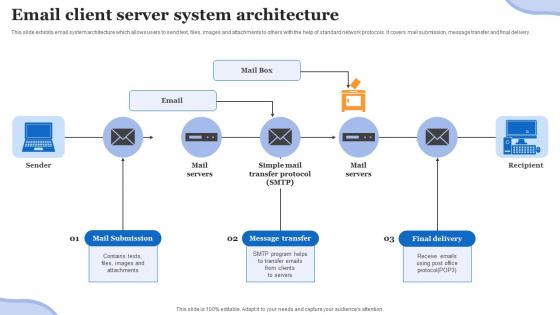
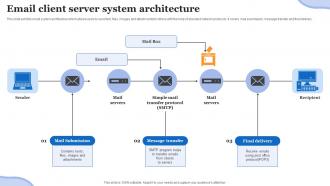
This slide exhibits email system architecture which allows users to send text, files, images and attachments to others with the help of standard network protocols. It covers mail submission, message transfer and final delivery.
People who downloaded this PowerPoint presentation also viewed the following :
Email Client Server System Architecture with all 6 slides:
Use our Email Client Server System Architecture to effectively help you save your valuable time. They are readymade to fit into any presentation structure.





FAQs for Email Client
So you're gonna need an SMTP server for sending emails and IMAP/POP3 for receiving them. Database too for user accounts and all that metadata stuff. The DNS setup is honestly the trickiest part - MX records, SPF, DKIM, DMARC. Without those configured right, everything just gets flagged as spam (trust me on this one). Security's obviously huge - TLS encryption, anti-spam filters, backups. Oh and pro tip: sketch out your user flow first before diving into the technical setup. Way easier than trying to retrofit everything later when you realize you missed something obvious.
So email authentication is basically like showing ID - it proves to Gmail, Outlook, etc. that your emails actually came from you. SPF, DKIM, and DMARC are the main ones you need. Without them? Your emails look sketchy even if they're totally normal, and spam filters will trash them. It's one of those boring technical things that actually moves the needle though. I learned this the hard way when half my emails were getting buried. Set these up first before you worry about subject lines or whatever - think of it like getting your credentials sorted before anything else matters.
SMTP handles sending your emails out - it's what pushes messages from your email app to servers and then to whoever you're emailing. For getting emails, you've got IMAP and POP3. IMAP's way better honestly because it keeps everything on the server, so your emails sync across your phone, laptop, whatever. POP3 just downloads stuff locally and usually wipes it from the server after. Nobody really uses POP3 anymore unless they're stuck in 2005 or something. When you set up an email client, you'll need SMTP for outgoing mail and IMAP for incoming.
So email encryption scrambles your messages so only the person you're sending to can actually read them. Without it? Your emails are just floating around the internet as plain text - anyone can peek at them if they want to. ISPs, hackers, whoever. Which is honestly terrifying when you think about what we all send over email these days. But with encryption turned on, intercepted messages just look like random gibberish. I'd start by seeing what encryption options your email provider already has built in.
Ugh, where do I even start? Scalability will kill you - everything breaks the second everyone sends huge files simultaneously. Security's a constant battle against spam and phishing attempts. Then there's compliance stuff like GDPR that'll give you migraines. Storage costs get crazy expensive when people never delete anything (seriously, who needs emails from 2015?). Integration's another headache when your email has to work with a dozen other systems. My advice? Figure out what's actually costing you money or keeping you awake at night, then tackle those issues first.
So basically, microservices let you scale just the parts that actually need it. Email volume going crazy? Spin up more sending instances without touching anything else. Way smarter than scaling your whole monolithic server, honestly. Each piece can be optimized differently too - like your attachment processor might need more CPU while the queue stuff needs RAM. You're not throwing resources at components that are doing fine. Oh and definitely start with whatever's causing your biggest headaches first, then break those out.
Set up webhooks from your email provider to handle bounces automatically - it'll sort hard bounces from soft ones for you. Hard bounces (dead emails) go straight to your suppression list. Soft bounces? Retry them maybe 2-3 times before giving up. Most people totally sleep on this stuff until their sender reputation goes to hell, which is honestly wild to me. Monitor your bounce rates like a hawk and validate emails when people sign up. Oh, and process bounces in real-time if you can swing it. Your deliverability won't be trash and ISPs won't blacklist you.
So APIs basically broke email out of those huge, clunky systems we used to deal with. Now you can pick different services for different jobs - like Sendgrid handles your transactional stuff, Mailchimp does marketing campaigns, whatever works. Way more flexible than before. You just plug email functions straight into your apps and automate tons of workflows. Each piece can scale on its own too, which is honestly a game changer once you've dealt with monolithic nightmares. I'd say look at what parts of your email setup are giving you headaches and see if there's a specialized API that does it better.
Mobile emails are tricky but here's what works: Start with single-column layouts and make buttons at least 44px - fat finger accidents are the worst. Keep subject lines under 30 characters because mobile previews cut everything off. Font size should be 14px minimum or people will squint and delete. Space your CTAs apart so users don't tap wrong buttons. Here's the thing - actually test on real phones, not just shrinking your browser window. The rendering looks completely different. Don't forget preheader text either, it shows right under your subject line on mobile. Design for mobile first, then worry about desktop later.
Yeah, privacy laws are a total nightmare if you don't plan ahead. GDPR's the worst offender - suddenly you need deletion workflows, data export tools, consent tracking, all that jazz. I'd start by figuring out what personal data actually moves through your email system first. Then build your encryption, audit logs, and retention policies around that map. Don't make my mistake of trying to retrofit compliance later - it's way messier. You want those data purging processes designed in from day one, not hacked together when lawyers start breathing down your neck.
Definitely focus on delivery rates first - that's your bread and butter right there. Bounce rates matter too (hard bounces are dead ends, soft ones are just temporary hiccups). Response time is huge since nobody wants to wait around for emails that should've arrived instantly. I'd also watch throughput numbers, spam complaints, and how much your server's sweating with CPU/memory usage. Oh, and set up alerts before things go sideways - trust me on that one. These metrics will catch bottlenecks way before they actually bite you.
Honestly, just bake A/B testing into your email setup from day one - you'll thank yourself later. Most platforms handle the audience splitting automatically now, which is nice. Test one thing at a time though (subject lines, send times, whatever) or you won't know what actually worked. I'd start with subject lines since they're super easy and directly impact your open rates. The real challenge isn't running the tests - it's actually doing something with the results afterward. Focus on meaningful stuff like clicks and conversions, not just opens. Oh, and don't get sucked into testing everything at once. That way lies madness.
So for email segmentation, I'd start with the obvious stuff - new subscribers versus your regulars, plus basic demographics and purchase history. Engagement frequency is huge too. Don't blast your daily readers the same way you'd hit someone who opens maybe once a month, you know? People get obsessed with creating like 47 different micro-segments but honestly? Five to eight solid ones usually crush it better. Focus on where they are in your funnel and test different content for each group. Oh, and location matters more than most people think. Once you find what actually gets results, just double down on that approach.
UX design matters a ton for email architecture - you've gotta think about how people actually use emails on their phones, laptops, whatever. Build your structure with flexible pieces that won't break when they hit different email clients (and oh man, they WILL break in the weirdest ways). Focus on responsive design and keeping your content hierarchy clean. Honestly, I've seen too many beautiful emails turn into complete disasters in someone's Gmail. Start by mapping out your main email types first. Then create templates that put the user experience before fancy design stuff. Modular components are your friend here.
The AI stuff is seriously impressive now - smart compose, auto-categorization, and responses that don't sound like robots wrote them. Real-time collaboration is finally built into email threads too. Spam filtering has gotten weirdly good (though sometimes it eats important emails, which is annoying). Most clients now connect with your other apps through APIs, so you can trigger workflows straight from messages. My honest take? Find an email client with AI assistance. It'll handle routine replies and keep you organized without the tedious manual sorting. The time savings are actually pretty significant once you get used to it.
-
The best collection of PPT templates!! Totally worth the money.
-
Well-designed and informative templates. Absolutely brilliant!