

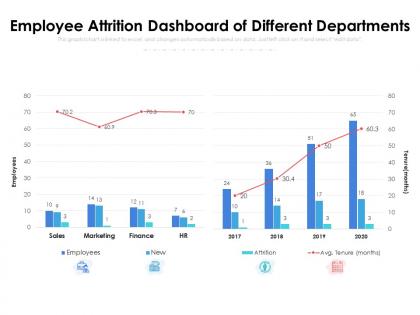
Employee attrition dashboard of different departments




Try Before you Buy Download Free Sample Product
 Impress Your
 Audience
 100%
100% Editable
 Save Hours
 of Time


Our Employee Attrition Dashboard Of Different Departments are topically designed to provide an attractive backdrop to any subject. Use them to look like a presentation pro.
People who downloaded this PowerPoint presentation also viewed the following :
Employee attrition dashboard of different departments with all 2 slides:
Use our Employee Attrition Dashboard Of Different Departments to effectively help you save your valuable time. They are readymade to fit into any presentation structure.

FAQs for Employee attrition dashboard
Start with overall attrition, then slice it by department and tenure - that's where the real insights live. Voluntary vs involuntary is huge because it tells completely different stories. Time-to-fill matters too since open roles crush your existing team. Oh, and exit interview themes are gold if people actually tell you the truth. I'd throw in some early warning signals like engagement scores or recent performance dips. The whole point is catching problems early. Most dashboards just tell you what you already know happened last month, which honestly isn't that helpful.
Honestly, visualizing your attrition data is a total game-changer. Raw spreadsheets? Forget it - you'll go cross-eyed trying to spot patterns. Charts instantly show you what's actually happening. Heat maps are perfect for finding trouble spots fast. Bar charts work great for department comparisons, trend lines for tracking changes over time. I swear, once you see correlations between things like manager performance and turnover rates laid out visually, it clicks immediately. Way better than hunting through endless rows of numbers. Start basic though - don't overcomplicate it right away.
Think of employee feedback as your crystal ball for turnover - it tells you WHY people bail before they actually do. Survey responses, exit interviews, those quick pulse checks? Gold mines. Combine that stuff with your hard numbers and boom - patterns emerge. Your Q3 turnover might look like a pay issue on paper, but feedback could reveal it's actually about crazy workloads during busy season. Pretty huge difference, right? The trick is collecting this feedback consistently (not just when someone's already walking out the door) and actually using those insights. Otherwise you're just counting bodies instead of preventing the exodus.
Weekly updates are probably your best bet to start with. Monthly could work too, but weekly gives you better visibility without going overboard. Daily is just way too much - attrition patterns don't shift that fast anyway. Crisis mode or layoffs happening? Then yeah, weekly for sure. The trick is keeping your data recent enough to actually do something with it, but not so frequent that you're wasting time on updates nobody's gonna act on. Honestly, I'd just go weekly and see how fast your leadership actually responds to the insights - you can always dial it back if they're slower to react.
Hey! So for predicting who's gonna quit, I'd definitely start with logistic regression - it's simple but you can actually understand what's driving people to leave. Random forests are solid too, especially since HR data is usually pretty messy and they handle that well. Neural networks can pick up crazy complex patterns but honestly? Most teams don't need that level of complexity. Oh, and if you want to predict *when* someone might bail (not just if they will), survival analysis is really helpful for that. Start basic with logistic regression, then maybe try random forests if you want better accuracy.
Demographic data lets you dig way deeper than just "we lost 20% of people this year." You can break it down by age, department, how long they've been here - that's where the real story is. Like maybe you'll find out it's mostly new hires under 25 bailing, or remote workers in specific teams are jumping ship way more. Honestly, once you see those patterns, you can actually do something about it instead of just throwing generic retention stuff at everyone. Way more effective than the shotgun approach most companies try.
Start with the big picture stuff - overall turnover and headcount trends up top. Then let people dig into departments or why folks are leaving. Color coding is clutch here - red for bad trends, green for the good stuff. Don't dump every filter on them at once, that's just confusing. Interactive charts beat boring tables every time. Oh and definitely include benchmarks - otherwise how do they know if 15% turnover is actually terrible or pretty decent for your industry? I've seen too many dashboards that just show numbers without any context.
Honestly, the best thing about attrition dashboards is you can finally see the actual patterns instead of just guessing. Check which departments are bleeding people and how long folks typically stick around before bouncing. Time-based trends are clutch too - you'll know if your retention stuff is working or just expensive theater. I'd hit the biggest problem areas first since that's where you'll see real movement. Oh, and don't sleep on tracking which roles stay empty forever - that data tells you a lot about what's broken in your hiring process.
Honestly, I'd go with Power BI or Tableau for attrition dashboards. Power BI's great if you're already using Microsoft stuff - the integration is chef's kiss. Tableau's got prettier visuals though, if that matters to your team. Google Data Studio could work on a tight budget but it's kinda basic. Oh, and check your HRIS first! Might already have dashboard features you didn't know about. I always forget to look there first lol. Figure out what data you need to pull in, then just pick whichever tool connects easiest.
Honestly, ML is a game-changer for predicting who's gonna quit. It spots weird patterns that you'd never catch with basic analytics - like someone's performance score combined with their manager switching plus a salary freeze equals flight risk. Pretty wild stuff. You can throw tons of variables at it simultaneously and it actually learns from new data over time. Way better than those old "star employees never leave" assumptions we used to make. Just make sure your data's clean first (learned that the hard way), then try random forests or gradient boosting algorithms.
Don't cram everything onto one screen - I learned this the hard way when my first dashboard looked like a NASA control panel. Ask your stakeholders what decisions they're actually trying to make, then work backwards. Skip the vanity metrics that just look pretty. Focus on stuff that matters: exit interview patterns, which managers are struggling, red flags before people quit. Oh, and clean your data first or you'll get weird questions about why Engineering's turnover is 200% (spoiler: bad data entry). I've seen dashboards with 20+ charts that literally no one opens. Start simple, then add more if they ask.
So basically you'll want to build a dashboard tracking all the obvious stuff - recruitment costs, onboarding, training time. Don't forget the sneaky expenses though, like overtime for everyone else picking up slack and temp contractors. The knowledge loss part is honestly just educated guessing (I've never seen anyone nail that calculation perfectly). Track cost per person leaving, then multiply by your turnover numbers. Oh, and set up alerts when costs jump - that's usually when something's seriously broken in your culture or management.
Exit interviews are your best friend here - plus any employee surveys or manager notes about departures. Numbers show what's happening, but you really need the "why" behind it all. I'd dig into recurring themes from those conversations, satisfaction scores, stay interviews if you do them. Career development stuff is huge too since that's honestly where most people get frustrated. Oh and set up some basic tags for common issues - makes spotting patterns way easier. The qualitative feedback is where you'll find the real gold, not just the headcount data.
Honestly, you're missing out on so much context when you work alone on this stuff. Getting other departments involved changes everything - suddenly you're not just staring at numbers wondering what went wrong. Finance might tell you that IT people aren't actually leaving over money, it's because their laptops are ancient and requests keep getting denied. Operations sees the workflow disasters that never make it into exit interviews. Burnout patterns become way more obvious. I'd start doing monthly check-ins with department heads - they'll help you decode what's really happening behind those dashboard spikes.
So for attrition dashboards, bar charts are your best friend - super clean for comparing turnover between departments or over time. Line graphs are perfect for monthly/quarterly trends. Heat maps will help you spot weird patterns by location or role (honestly saved my butt once when we had a rogue manager). Funnel charts are amazing for that hire-to-exit journey visualization. Don't forget simple KPI cards showing overall attrition percentage and headcount changes. Start basic and add fancier stuff later once people actually use the dashboard.
-
Best way of representation of the topic.
-
Unique and attractive product design.
-
Nice and innovative design.