

Escalation Matrix Incident Information Technology Maintenance Communication





Try Before you Buy Download Free Sample Product
 Impress Your
 Audience
 100%
100% Editable
 Save Hours
 of Time


Our Escalation Matrix Incident Information Technology Maintenance Communication are topically designed to provide an attractive backdrop to any subject. Use them to look like a presentation pro.
People who downloaded this PowerPoint presentation also viewed the following :
Escalation Matrix Incident Information Technology Maintenance Communication with all 12 slides:
Use our Escalation Matrix Incident Information Technology Maintenance Communication to effectively help you save your valuable time. They are readymade to fit into any presentation structure.







FAQs for Escalation Matrix Incident Information
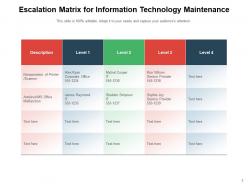
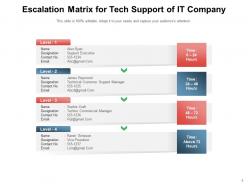
An escalation matrix is your go-to plan for when projects hit problems. Maps out exactly who you call based on how bad things get - like team lead for small stuff, then project manager, then director for the really messy situations. Honestly, most people skip this step and regret it later. You don't want to be scrambling around trying to figure out the chain of command when deadlines are breathing down your neck. Different severity levels get different people involved - budget issues might skip straight to finance while technical problems stay with engineering first. Set it up early before you're actually drowning in crisis mode!
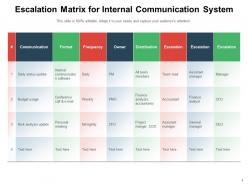
You know how everyone always goes in circles trying to figure out who handles what when stuff breaks? That's where escalation matrices actually shine. Basically you map out exactly who owns different types of problems - so when something urgent pops up, people aren't wasting time bouncing it around to random managers. No more "is this a tech issue or operations thing?" confusion. Honestly, most teams don't realize how much time they waste on this until they fix it. Just start by listing your biggest headaches and who should realistically handle each one.
So basically you need clear trigger points for when to escalate, plus severity levels with actual contact info for each tier. Map out realistic timeframes - trust me, you don't want to be that person blowing up the VP's phone at 2am over something minor lol. Include preferred communication methods too (email, Slack, phone, whatever). Always have backup contacts because people go on vacation or get sick. Oh and write out what each severity level actually means so nobody's guessing. Honestly though? Test it with a few fake scenarios first. I've seen so many of these look great on paper but completely fall apart when you actually need them.
Yeah, escalation paths totally depend on your industry's risk level. Healthcare and finance are crazy strict - like 5 approval layers because one screwup could kill someone or lose millions. Tech companies flip that around, going flat and fast since they'd rather move quick than get bogged down in process. Manufacturing's kind of in between, though safety is still massive there. Higher stakes = more checkpoints, basically. I'd peek at what other companies in your space are doing for compliance stuff - saves you from reinventing the wheel.
So an escalation matrix is just your game plan for who gets called when stuff goes sideways on a project. Different risk levels = different people involved. Minor bug? Maybe just your team lead. Major security breach that could wreck everything? Yeah, that's CEO territory. The whole point is avoiding two disasters: people shrugging off serious problems OR panicking over tiny issues. Oh, and test your contact list beforehand - I've seen too many teams scramble because their main guy was on vacation when everything hit the fan. Trust me on that one.
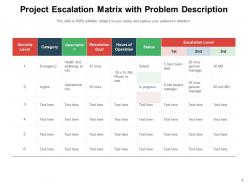
So basically, you want to create buckets based on impact and urgency - like how many people are screwed and how fast you need to fix it. Critical stuff goes straight to leadership or whoever's on-call. Medium issues can wait for normal business hours. The trick is getting everyone on the same page about what counts as "critical" because trust me, some people think a typo is worth waking up the CEO at 3am. Write down response times for each level. Then test it out with real examples to see if your system actually works or if you need to tweak it.
Oh man, the biggest mistake is overcomplicating it - people are already stressed and won't follow some crazy flowchart. You need solid timeframes too because my "urgent" is probably way different from yours, you know? And honestly, half the matrices I see are garbage like "escalate when bad stuff happens" which tells you nothing. Don't create a million levels either. Three or four max, otherwise it just becomes this bureaucratic nightmare. Actually test it out with some fake scenarios first - I learned that one the hard way when our first version made zero sense in practice.
Check it quarterly for sure, but also whenever big stuff changes - new managers, people leaving, team reshuffles. Trust me, nothing's more awkward than escalating to someone who quit months ago lol. I'd set a calendar reminder to go through contact info and make sure the decision-making chain still makes sense. Get your team leads involved too since they're actually the ones using this thing daily. Oh and double-check those escalation triggers while you're at it - what seemed urgent last year might not be anymore. Takes like 20 minutes but saves you from looking clueless later.
For escalation matrices, JIRA and ServiceNow are pretty much the gold standard if you're in IT - they handle automated routing really well. Slack's great too, you can set up channels with bot alerts when things get crazy. PagerDuty's what I'd go with for anything mission-critical that needs instant attention. Look, even a decent spreadsheet works when you're starting out, though it'll become a nightmare pretty quick. Microsoft Teams does similar stuff to Slack if that's more your vibe. My advice? Just use whatever your team's already comfortable with and expand from there.
So basically it's like having a game plan for when customer stuff hits the fan. Your team knows exactly who to call based on how bad things are - no more awkward "uh, let me find someone" moments. Customers get help way faster since everyone's clear on their role. Nothing slips through the cracks or gets ping-ponged between departments either. Honestly, those situations are so frustrating for everyone involved. Just map out clear triggers and who to contact when, and you'll see your customer satisfaction numbers go up. It's one of those simple fixes that actually works.
Track your resolution times first - that's the big indicator. How fast are issues getting fixed at each level? Also watch escalation frequency because nobody wants to get swamped with stuff that shouldn't even be escalated. Customer satisfaction scores after resolution tell you a lot too. First-call resolution is honestly my favorite metric - if everything's immediately getting pushed up the chain, your front line needs work. Oh, and see which escalation paths get hit most often. Monthly tracking works well, you'll catch patterns fast enough to actually do something about them.
Honestly, the only thing that actually works is getting your team to practice real scenarios together. Role-play the tricky situations - like when something's urgent but not really high-impact, you know? Quiz them on who to call and when. I'd make some reference cards too since people always forget the contact hierarchy when they're stressed. Oh, and definitely do refresher training every few months. People's brains are terrible at retaining this stuff long-term. Start running those practice sessions ASAP though - reading procedures doesn't teach anyone how to actually make those split-second decisions.
Start with figuring out who needs to be on your escalation list and grab their contact info. Map out severity levels that actually fit your project - I always forget someone crucial the first round, it's so annoying. Define what triggers each level, like client complaints versus full system crashes. Set timeframes that work with your team's real schedule, not some fantasy version. Oh, and if you're dealing with different time zones that's a whole other headache to factor in. Make sure everyone knows where to find this thing and definitely run through a fake scenario first. Trust me on that one.
You absolutely have to get stakeholder input on this - they're the ones actually using it when stuff hits the fan. Find out what's tripping them up: which problems they can't solve alone, response times they need, who they actually trust to make calls. Honestly, I've watched so many "perfect" matrices completely bomb because nobody thought about how teams really function day-to-day. Ask them about escalations that went wrong before. What would've saved them? Their feedback helps you nail down realistic timelines and figure out the right people to loop in. Plus they'll tell you what warning signs actually matter in the real world.
Honestly, automation is a game-changer for this stuff. Set up your system to trigger alerts when things go sideways - like satisfaction scores tanking or deadlines creeping up. Mobile notifications are clutch so people actually see the escalation right away. Dashboards help you catch patterns you'd totally miss otherwise (I love seeing where things consistently get stuck). Response times get tracked automatically too. My advice? Work with whatever ticketing system you've got and just build the escalation rules directly in there. Way easier than trying to franken-system something together.
-
Easily Understandable slides.
-
Amazing product with appealing content and design.
-
Excellent Designs.
-
Best way of representation of the topic.
-
Innovative and Colorful designs.
-
Use of icon with content is very relateable, informative and appealing.
-
Great quality slides in rapid time.
-
Great designs, Easily Editable.
-
Topic best represented with attractive design.