F549 Software Implementation Project Portfolio Timeline Software Implementation Project Plan

Rating:
90%
F549 Software Implementation Project Portfolio Timeline Software Implementation Project Plan
Slide 1 of 6
Favourites Favourites

Try Before you Buy Download Free Sample Product

Audience Impress Your
Audience
Editable 100%
Editable
Time Save Hours
of Time
The Biggest Sale is ending soon in
0
0
:
0
0
:
0
0
Rating:
90%
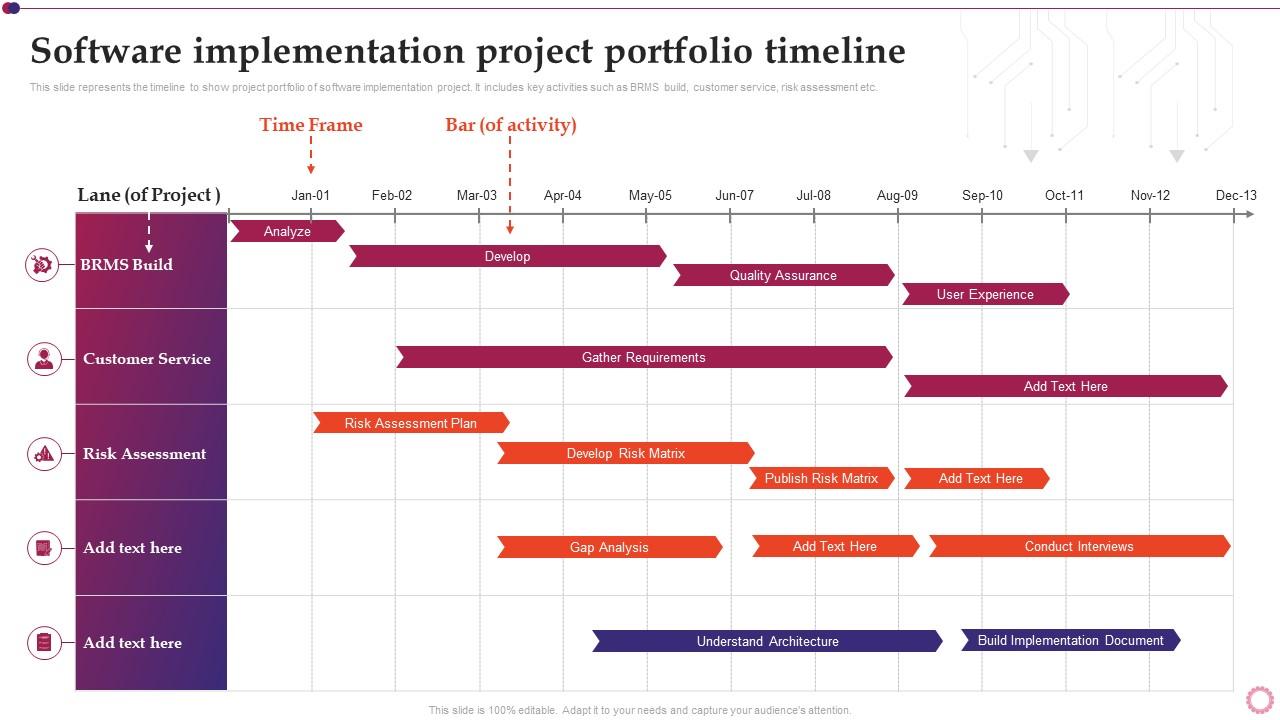
This slide represents the timeline to show project portfolio of software implementation project. It includes key activities such as BRMS build, customer service, risk assessment etc. Deliver an outstanding presentation on the topic using this F549 Software Implementation Project Portfolio Timeline Software Implementation Project Plan. Dispense information and present a thorough explanation of Software, Implementation, Portfolio using the slides given. This template can be altered and personalized to fit your needs. It is also available for immediate download. So grab it now.
FAQs for F549 Software Implementation Project Portfolio Timeline Software

Okay so there are five main phases you gotta hit: planning, design, development/testing, deployment, and support after launch. Honestly, planning is where everything falls apart if you screw it up - get your requirements nailed down first or you'll hate yourself later with all the scope creep. When you're coding, test as you go instead of leaving it all for the end. Have a rollback plan ready for deployment because something always breaks (learned that one the hard way). Oh and don't forget the post-launch stuff - users need training and there'll definitely be bugs you missed. Get everyone on the same page about requirements before touching any code.

Okay so you'll want to check three main things before jumping in. First, map out your current tech setup - can it actually talk to the new software? Trust me, compatibility headaches later are the worst. Also look at your team's bandwidth because honestly, most people are already drowning in work. How realistic is training right now? Then document your workflows so you know what's gotta change. I always make a simple red/yellow/green scorecard for each area. Fix the red stuff first or you'll regret it.

Honestly, scope creep is the worst - users always want "just one more thing." Poor requirements gathering will bite you too, plus integration nightmares with whatever legacy systems you're stuck with. People hate change, period. Get stakeholders involved from day one and nail down requirements before you write a single line of code. Test everything in staging that actually looks like production (learned that one the hard way). Keep everyone updated constantly or they'll freak out. Oh, and triple your timeline estimates. Trust me on this.

Honestly, don't just send updates - actually get them involved in the process. Schedule regular check-ins where they can see what you're building and give feedback. Trust me, going radio silent is the fastest way to kill a project (learned that one the hard way lol). Be upfront about any issues or delays as they come up. Let them make decisions about stuff that affects their daily work. Oh, and celebrate the small wins together! Sounds cheesy but it really does keep everyone motivated and bought into the whole thing. People care way more when they feel like they're part of it.

Honestly, data migration can make or break your whole project. Map out what you've got first and figure out where it all needs to land in the new system. Always do a test run with just a small chunk of data - trust me on this one. Clean up the messy stuff beforehand because migrating junk is pointless. Back everything up obviously, then validate it all once you've moved it over. Oh and definitely plan for some downtime. Run through the whole process a few times before you actually flip the switch. Better safe than sorry when you're dealing with people's data.

Dude, communication literally makes or breaks these projects. Set up regular check-ins with stakeholders first thing. Document everything too - yeah it sucks but you'll thank yourself later. Make sure timelines are crystal clear upfront. When stuff goes sideways (and it will), don't wait around hoping it fixes itself. Tell people immediately. Oh, and create some kind of group chat where your team can ask dumb questions without feeling embarrassed. The biggest thing though? Stop using tech speak with business people. They don't care about your API endpoints. Just explain what it means for them. Start simple - basic communication plan with regular meetings.

Track both the techy stuff and business impact. Response times, uptime, how many people actually use it - the usual suspects. But honestly, user satisfaction matters way more than most people realize. Also check if you're hitting those original goals that got this whole thing approved in the first place. Cost savings, productivity, whatever it was. Training completion rates are good too. Oh, and support tickets - if those spike, something's wrong. Set up dashboards before launch so you can catch problems early. Makes proving ROI to the bosses much easier later.

Dude, training is seriously everything when it comes to getting people to actually use new software. Skip it and your employees will find every possible way to avoid the system - trust me, I've seen it happen. You want hands-on, role-specific stuff, not some boring generic walkthrough that puts everyone to sleep. People need to feel confident right away or they'll just stick with whatever they were doing before. And don't think one training session cuts it either. You'll need follow-up support when they hit real problems later on. It's honestly the difference between success and total adoption failure.

Honestly, work with what the system already gives you instead of fighting it. Try the built-in stuff first - config files, plugins, whatever APIs they have. I've watched so many people dive straight into hacking source code and then hate themselves later lol. Test everything in staging that actually looks like your production setup. Document your changes too, because trust me, you won't remember why you did something six months from now. Oh and keep it modular so you can undo things easily when stuff inevitably breaks.

Honestly, the methodology you pick makes a huge difference in how you build software. Agile breaks everything into short sprints - you're constantly getting feedback and can change direction fast when clients inevitably want something different. Waterfall is the opposite - you plan everything upfront then execute that plan. More predictable, sure, but good luck changing course halfway through. I've seen Waterfall projects blow up spectacularly at the end because nobody tested until it was too late. With Agile you catch problems early since you're always testing. Really depends on how stable your requirements are.

Break up your app into smaller pieces that can scale independently - microservices work great for this. Caching is your best friend here. Pick databases that scale horizontally, not just vertically. Load testing is absolutely crucial (seriously, don't skip this like everyone does). Set up auto-scaling infrastructure and monitor everything religiously so you spot bottlenecks before they bite you. Database indexing makes a huge difference too. Oh, and document your scaling choices as you go - you'll be so grateful when traffic explodes at 2am and you can't remember why you made certain decisions.

Oh man, post-implementation support is huge - seriously can't skip it. I've watched "successful" projects turn into total nightmares within months because teams thought they were done after launch. Bugs pop up, user needs change, stuff breaks. It's like buying a car honestly - you don't just buy it and forget about it, right? Budget for ongoing support from the start. Set up clear processes for when things go sideways. Plan regular updates too. Without proper maintenance, even amazing software will fall apart over time.

Honestly, the best thing you can do is bake feedback into your whole process instead of treating it like an afterthought. Get real users testing stuff during prototyping - way cheaper than fixing things later. Set up code reviews, automated testing for instant quality checks, and those short sprint retros. Once you deploy, definitely add monitoring so you can see how people actually behave with your app (spoiler: it's never what you expect). Make collecting feedback automatic and frequent. Oh, and don't forget stakeholder check-ins throughout - keeps everyone aligned without those awful surprise meetings where everything's wrong.

Honestly? It comes down to money vs control. Cloud stuff is way faster to set up and cheaper upfront, but you're stuck with those monthly bills forever. Plus there's always that nagging worry about where your data actually lives. On-premise means you own everything outright - no vendor lock-in, total control. But damn, the setup is brutal and you'll need actual IT people on staff. I always tell people to crunch the numbers for like 3 years out first. Cloud wins for speed and flexibility, but if you've got compliance headaches or want predictable costs long-term, on-premise might be worth the pain.

Honestly, culture beats tech every single time when you're rolling out new software. Bad communication or change-resistant teams? Your implementation's probably doomed even with amazing tools. Companies that already collaborate well have way smoother launches - it's kinda obvious when you think about it. Also figure out how decisions get made there. Top-down places need totally different approaches than the more democratic ones. Do a quick culture check before you even start planning. Then shape your whole strategy around that, especially training. Trust me on this one.

Ratings and Reviews

90% of 100
Review Form
Write a review
Most Relevant Reviews
  1. 100%

    by Rhys Moore

    “Love it! I was able to grab an exciting proposal because of SlideTeam.”
  2. 80%

    by David Wright

    SlideTeam’s readymade presentations have landed my unique images with my bosses in the past and it continues to reward me.

2 Item(s)

per page: