

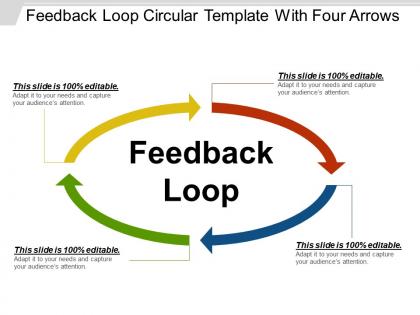
Feedback loop circular template with four arrows




Try Before you Buy Download Free Sample Product
 Impress Your
 Audience
 100%
100% Editable
 Save Hours
 of Time


Our Feedback Loop Circular Template With Four Arrows get everyone on their feet and clapping away. They generate enormous approval.
People who downloaded this PowerPoint presentation also viewed the following :
Feedback loop circular template with four arrows with all 5 slides:
Our Feedback Loop Circular Template With Four Arrows deliver bigger benefits. They also do it at a lesser cost.

FAQs for Feedback loop circular template
So you need clear objectives first - like what exactly are you measuring? Then figure out how you're collecting data and who's analyzing it. Timeline expectations are huge too, plus someone needs to own the follow-up or it just dies. Honestly, the feedback channels part is where most people mess up - they forget to actually let people respond to changes. Build in some accountability measures from the start because without those, the whole thing crumbles pretty fast. Oh and make sure there's designated owners for each phase. You can always tweak the template later based on your team's weird quirks.
So basically, just swap out the language and metrics depending on your field. Education? Focus on student grades and teacher feedback instead of sales numbers. Marketing teams track campaigns and conversion rates. The framework stays the same though - gather data, analyze it, make changes, see what happens. Honestly, figuring out what to actually measure is where most people get stuck. I'd start by listing your industry's main KPIs, then just customize those template questions around whatever matters most. Like, don't overthink it - if you're in healthcare you're obviously not gonna care about website clicks, right? Short sentences work better than long ones for this stuff anyway.
Honestly, tech just handles all the tedious stuff for you. Set up automated triggers so you're collecting feedback at perfect moments instead of remembering to bug people later. Analytics dashboards catch patterns you'd totally miss otherwise - way better than digging through endless email chains like you're on some archaeological dig. Real-time insights are a game changer. Everything syncs with your current tools so data actually flows where it needs to go. Digital templates let you track changes over time without wanting to scream. Just don't pick software that'll make your team hate life.
Honestly, build your tracking right into the template from day one. Measure response rates, how fast you actually act on feedback, and whether changes stick around long-term. I'd also track participation numbers and how satisfied people are with the whole process - that part's huge but gets overlooked. The real test? Are you making genuine improvements or just going through the motions? I've watched so many teams collect feedback then basically ignore it. Set up quarterly check-ins to review your metrics and tweak things based on what's working. Short feedback loops are everything.
Honestly, the worst thing you can do is overcomplicate it - teams just get stuck in endless process instead of actually improving anything. Make sure someone's actually responsible for acting on the feedback too. I've seen so many good insights just vanish because nobody owned them. Monthly beats quarterly every time, trust me on that. And don't cherry-pick only the nice comments! The brutal honest stuff usually helps most. Keep it stupid simple at first - maybe 2-3 questions max and one person who promises to report back on changes. That's it.
So basically, the template gives everyone the same playbook for handling feedback - doesn't matter if you're in marketing or engineering or whatever. Each team speaks their own language usually, right? But with this structure, your customer success people can actually talk to product dev without everything getting lost in translation. Everyone knows what they're supposed to do and when. Plus it breaks down those annoying department walls because you're all using the same format. I'd probably start small though - grab one person from each team and test it on something minor first. Way easier than trying to roll it out everywhere at once.
Ask specific, open-ended questions - yes/no answers are pretty useless. Timing matters a lot though! Don't bug people when they're drowning in work or stressed out. I actually bombed this last quarter, whoops. Make sure you're targeting folks who actually dealt with whatever you're trying to fix. Be upfront about how their feedback gets used and if it's anonymous or not. Here's the thing - you HAVE to circle back and show what changed because of their input. Otherwise people just won't bother next time, and honestly I don't blame them.
Honestly, quarterly works pretty well for this stuff. That's often enough to catch when things aren't working but not so much that you're constantly messing with it (which gets annoying fast). Short bursts work better anyway. If your team changes or you start different projects, that's when I'd also take another look. The main thing is checking if those questions still make sense for what you actually need to improve on. Oh, and definitely set a calendar reminder - I always forget this kind of maintenance otherwise. You'll thank yourself later when it doesn't fall off your radar completely.
Honestly, feedback loops are game-changers because people finally feel like someone's actually listening to them. Your team stops wondering if their concerns just disappeared into the void (which is the worst feeling). When they see you take action on what they've said, trust builds fast. Regular check-ins help you spot issues before they blow up into bigger problems too. I'd start with something super basic - maybe monthly feedback sessions where you actually follow through and circle back. Even that small effort shows you're not just going through the motions, and people notice that stuff.
Honestly, visual elements are just brain shortcuts that make feedback loops way easier to understand. Arrows and color coding create this mental map where cause-and-effect stuff becomes super obvious - way better than dense text paragraphs. Think GPS directions vs written ones, you know? Your eye naturally follows the visual flow from input to output to whatever adjustments happen next. I'd stick with consistent shapes for similar ideas across templates (helps your team pick up patterns faster). Oh, and icons work great too - though sometimes I overthink which ones to use. Short version: visuals make complex loops feel simple.
So formal feedback is like your quarterly reviews - scheduled, documented, all official. Informal stuff? That's the random hallway chats and quick check-ins that honestly end up being way more useful than anyone wants to admit. Your template should handle both - maybe weekly/monthly options plus an "as needed" setting. Mix structured rating scales with open comment boxes so people can actually say what they're thinking. Oh, and definitely include a quick version for those spontaneous moments. You don't want to miss capturing good insights just because your form's too long or rigid.
Honestly, a good feedback template is a game-changer for UX. Users won't struggle with confusing forms anymore, so you'll get way more responses. Your team can actually spot trends when everything comes through the same format instead of digging through random emails (ugh, the worst). Keep it super simple though - one place to submit, consistent questions, and show users you're listening by following up visibly. I'd start by looking at all the messy feedback channels you have now, then create one template that replaces the whole mess. It's crazy how much cleaner everything gets.
Okay so first thing - people need to feel safe being honest without getting burned later. I always start by admitting upfront that giving real feedback feels sketchy, but I actually want to hear it. Ask specific stuff like "what's one thing that isn't working?" instead of those useless broad questions. Here's what really works though: share your own screwups first. Like, call out your blind spots before asking for theirs. It's crazy how much that opens people up. Anonymous feedback helps too for the really sensitive stuff. Just be vulnerable yourself and others will match that energy.
Oh man, this is so tricky! Different cultures handle feedback completely differently. Like, some want everything super diplomatic and indirect, others just want you to be brutally honest. Timing's weird too - I've noticed some teams need to chat and build rapport first before any criticism, which honestly feels inefficient but whatever works. The hierarchy thing is massive though. Our APAC teams struggled with peer feedback because they're used to top-down structures. You'll probably need separate templates for different regions. Maybe give people options within the same system? And definitely prep your managers on this stuff before going global - learned that one the hard way!
Yeah, definitely! Most of those templates work fine with whatever you're already using - Asana, Trello, Monday, all that stuff. You can set them up as custom fields or just make recurring task templates. Notion's probably the easiest for this honestly. What I'd do is map out your feedback steps (collect, analyze, implement, follow-up) to match your current workflow. Start simple though - just create some basic recurring tasks first. Don't go crazy with automations right away or you'll overwhelm your team. Once everyone gets comfortable with the process, then you can add the fancy automated stuff.
-
Use of different colors is good. It's simple and attractive.
-
Professional and unique presentations.