


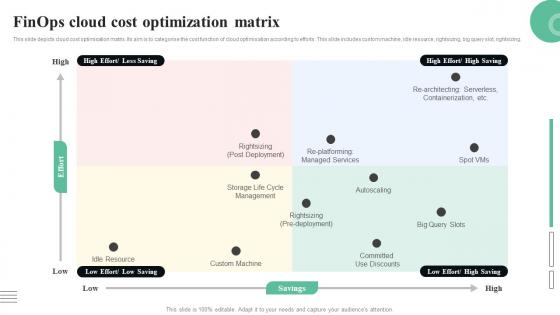
Finops Cloud Cost Optimization Matrix




Try Before you Buy Download Free Sample Product
 Impress Your
 Audience
 100%
100% Editable
 Save Hours
 of Time


This slide depicts cloud cost optimisation matrix. Its aim is to categorise the cost function of cloud optimisation according to efforts. This slide includes custom machine, idle resource, rightsizing, big query slot, rightsizing.
People who downloaded this PowerPoint presentation also viewed the following :
Finops Cloud Cost Optimization Matrix with all 9 slides:
Use our Finops Cloud Cost Optimization Matrix to effectively help you save your valuable time. They are readymade to fit into any presentation structure.








FAQs for Finops Cloud
So FinOps basically has three main things: teams own their cloud spending, you make decisions based on actual business value instead of just cutting costs, and everyone can see the centralized cost data. It's way different from old-school finance where IT was just this expense you'd check quarterly. Now your engineers see what stuff costs while they're building it, product managers think about usage when planning features, and finance actually knows what's coming. Honestly beats the whole "finance department says no to everything" vibe. Start by showing cloud costs to the people who can actually do something about them.
Okay so first thing - get finance, engineering, and ops actually talking to each other about costs. Most companies skip this part and wonder why nothing works. Auto-tag everything in your cloud so you can see where the money's bleeding out. I've seen teams burn through budgets because they literally had no clue what was costing what. Build some dashboards for real-time spending alerts. Make it everyone's job, not just finance being the budget police all the time. Honestly, just pick one team to test this with first. Get a few wins, then roll it out wider once you've got proof it actually works.
Honestly, start with cost per unit and budget variance - those two will tell you if you're actually making progress. Reserved instance utilization is massive too, I've watched companies blow stupid money on poor RI planning. Track your cloud spend ratios and how fast teams react to cost spikes. Cost allocation accuracy matters, plus showback adoption rates if you're doing that. But here's the thing - don't go crazy tracking everything. Pick maybe 3-5 metrics that'll actually make your teams change how they work. Unit economics alone gives you tons of insight into whether this whole FinOps thing is worth it.
FinOps really only works when you get different teams talking to each other. Finance people know budgets but don't always get the tech stuff. Engineers understand the systems but might not think about costs when they're spinning things up - honestly, who has time for that when you're trying to ship features? Operations teams can actually make changes happen fast. When these groups work together, everyone starts speaking the same language about cloud spending. You avoid those awkward moments where finance wants to cut costs by 30% and engineering's like "uh, that'll break everything." It's all about shared responsibility for keeping both performance and costs in check.
Honestly, the hardest part is getting engineers on board - they're not used to caring about costs and frankly, why should they be? That's never been their thing. You've also got these weird silos where finance, ops, and dev teams barely talk to each other. Cloud cost data is scattered everywhere too, which makes everything messier. Finance people don't get the technical stuff enough to give useful advice. Oh, and devs will definitely push back on anything that feels like extra work. My advice? Pick one small team first. Prove it works there before trying to change the whole company. Way less painful that way.
Honestly, automation saves you so much time with FinOps stuff. Set up auto-scaling and rightsizing so your instances adjust themselves based on actual usage. Scheduled shutdowns are clutch too - dev environments automatically turn off after hours instead of you babysitting them. Automated tagging is probably underrated though, makes tracking spending by team way easier. I'd say start with whatever repetitive task annoys you most. Maybe it's manually resizing instances or constantly reminding people to label their resources. Pick one thing and automate that first, then build from there.
Start with something like CloudHealth or AWS Cost Explorer - you need that visibility first because honestly, most people have no clue where their cloud money goes. It's pretty eye-opening. From there, grab budgeting tools and set up some automated policies so you don't get hit with surprise bills (learned that one the hard way). Dashboards are crucial too, but make them simple enough that your whole team can actually read them. Don't go crazy with a bunch of random tools though. Pick one solid platform and build around it instead of creating a mess of disconnected stuff.
So basically, FinOps makes teams actually care about spending by showing them exactly what their stuff costs. Tag everything first - sounds boring but it's crucial. Then set up showback reports so teams can see their burn rate. We do monthly reviews now (honestly, they're way more interesting than I expected). Set budget alerts too, otherwise people just ignore the numbers. The trick is making it feel collaborative, not like you're the spending police. Once teams start seeing those costs tied to their projects, they'll naturally start optimizing. It's pretty wild how fast behavior changes when there's visibility.
Start by digging into your last 12-18 months of usage data - that's your goldmine. Most people totally blow it on seasonal spikes, so definitely pad those forecasts. Set up some automated tools that can handle seasonality and growth projections. Tag everything by team or project so you can actually see where money's going. Oh, and don't forget about any big infrastructure changes coming up. The real trick is reviewing monthly instead of just setting it once. I learned that the hard way when our Q4 costs went absolutely nuts last year.
So FinOps is basically your safety net for staying compliant while managing cloud costs. It tracks who's spending what and where all the money's going - auditors eat that stuff up. You can enforce spending limits and tagging requirements without being the bad guy. The automated alerts are clutch because they stop people from accidentally going over compliance limits. Honestly, flying blind on this stuff is just asking for trouble. I'd start with cost allocation tags and basic spending policies - covers most of what you'll need right off the bat.
Honestly, you can't just throw people into FinOps and expect them to figure it out. Engineers need to get how their code choices affect the bill - and trust me, some of those AWS pricing pages are nightmares even for tech people. Finance teams are equally lost trying to decode cloud costs. Leadership training matters too since they're approving budgets. But here's the thing - skip the generic training sessions. Figure out what each team actually uses day-to-day, then build something that connects to their real work. Way more effective than boring everyone with stuff they'll never touch.
Honestly, FinOps is a game-changer because it stops the whole IT vs finance blame game. Your finance people finally see what's actually driving those crazy AWS bills instead of just panicking every month. Meanwhile, IT gets to make smart trade-offs based on real numbers - like cost per customer or which features are burning cash. You'll want to set up monthly check-ins where both teams review the data together and adjust. Pro tip: don't try to tackle everything at once. Pick one big service or project and track it for a month first. Way less overwhelming that way.
Netflix is a solid example - they cut cloud costs 30% while scaling up like crazy. Spotify found tons of unused resources just sitting around different teams. Airbnb built some dashboard thing to track spending patterns and saved millions. The pattern's always the same though: get visibility into what you're spending, make teams accountable, then optimize. What really matters is getting finance and business people involved early, not just leaving it to IT folks. Honestly, I'd dig into how they structured their FinOps teams first - that's usually where things fall apart if you don't get it right.
Just bake it into what you're already doing instead of making it this big separate thing. We set up alerts for weird cost spikes and do quick optimization check-ins during our weekly team meetings. Monthly "optimization sprints" have been a game changer - honestly wish we'd started those sooner. Build cost reviews right into sprint planning or wherever you already gather. Start with one automated tool that flags savings opportunities, then grow from there. The trick is creating those feedback loops where recommendations actually make it back into your planning instead of just sitting in some report nobody reads.
Honestly, AI-driven cost optimization is everywhere now - you can't avoid it. Real-time spend analytics too. Multi-cloud management tools are getting pretty slick, which is nice when you're juggling different environments. But here's what's really happening: everyone's moving from just cutting costs after the fact to actually predicting what'll happen next. Your finance people need to understand cloud stuff themselves instead of dumping it all on FinOps folks. Oh, and carbon accounting is blowing up fast with all the sustainability requirements. I'd start building those predictive tools now. Get finance comfortable with cloud metrics before they're forced to learn.
-
Great designs, Easily Editable.
-
Spacious slides, just right to include text. SlideTeam has also helped us focus on the most important points that need to be highlighted for our clients.