

Flowchart Of E Learning Management System For Corporate Education





Try Before you Buy Download Free Sample Product
 Impress Your
 Audience
 100%
100% Editable
 Save Hours
 of Time


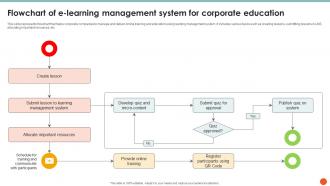
This slide represents flowchart that helps corporate companies to manage and deliver online training and education using learning management system. It includes various tasks such as creating lessons, submitting lessons in LMS, allocating important resources, etc.
People who downloaded this PowerPoint presentation also viewed the following :
Flowchart Of E Learning Management System For Corporate Education with all 9 slides:
Use our Flowchart Of E Learning Management System For Corporate Education to effectively help you save your valuable time. They are readymade to fit into any presentation structure.








FAQs for Flowchart Of E Learning Management System
Make sure it's mobile-friendly first - literally everyone learns on their phone now. Good analytics matter too so you can see who's actually doing the work. The course builder should be dead simple, otherwise you'll waste forever training people on it. Definitely test 3-4 platforms with your real content before picking one. Marketing demos always look perfect but reality hits different. Integration with your current systems is key, plus you want solid support because tech always breaks at the worst times. Oh and don't forget assessment tools and certificates - people love those little digital badges.
Honestly, gamification works wonders - badges, leaderboards, that whole progress bar thing makes people weirdly competitive about learning. Personalized paths are huge too since everyone moves at different speeds. Interactive stuff breaks things up nicely... quizzes, forums, videos instead of just walls of text (which, let's be real, nobody enjoys). Oh, and definitely check your analytics to see where people bail out. That's usually where your content gets boring or too hard. The trick is making small tweaks based on what the data tells you.
Look, analytics basically tell you if your LMS is worth the money or just burning cash. Track completion rates and quiz scores first - that's the easy stuff. But here's where it gets interesting: figure out exactly where people quit. Like if everyone's dropping off at module 3, there's your problem right there. Time spent per section is huge too because you can spot who's actually learning vs just clicking through to get it over with. Compare how different teams perform and you'll see which programs actually work. Honestly, start simple with basic tracking then get into the weirdly specific behavioral stuff later.
Honestly, start with checking who has access to what - I bet half your team still has permissions they don't actually need anymore. Three big things to nail down: encrypt everything (data moving around AND stored), set up role-based access so people only see their stuff, and make sure you're hitting compliance requirements like GDPR or FERPA. Trust me, most breaches happen because someone had admin rights when they basically just needed to view reports. Oh, and don't skip security audits. Your vendor should already be SOC 2 compliant if they're worth anything.
Oh man, definitely compress your videos first and use MP4/WebP formats. Load times need to stay under 3 seconds or people bail immediately. Don't forget captions and alt text - accessibility matters! I'd break longer videos into like 5-10 minute chunks because honestly, nobody watches hour-long training videos anymore. Mobile responsive is huge since everyone's learning on their phones now. CDN helps if you can swing it. Test everything across different browsers before you launch - Chrome users and Safari users live in totally different worlds sometimes. Also, make a basic style guide so your stuff doesn't look like a hot mess.
Honestly, mobile compatibility can make or break your whole e-learning thing. Your LMS needs to work smoothly when students jump between their laptop and phone - and trust me, tons of people are studying on their phones during lunch breaks or whatever. Poor mobile design basically shuts out anyone using assistive tech on mobile devices, plus students who don't have reliable computer access. The responsive stuff automatically resizes everything - content, buttons, navigation - so it actually works on different screens. Oh, and definitely test your courses on a bunch of devices before you go live. I'd go mobile-first when you're picking an LMS too.
Honestly, breakout rooms during live sessions are a game-changer. Set up discussion forums where students can debate topics - they get surprisingly into it. Group projects work great if you give them shared digital workspaces to collaborate. Oh, and peer reviews are clutch - students learn way more critiquing each other's stuff (bonus: less grading for you). Google Docs or similar tools let teams work together in real-time which is pretty seamless. Just don't force it though. Pick one or two methods that fit your teaching style first, then add more once they're comfortable with the tech.
Most LMS platforms let you customize workflows, branding, and content modules pretty easily. You can tweak user roles, change up assessment types, and adjust reporting dashboards - works whether you're doing healthcare compliance training or just teaching kids basic math. The super flexible ones like Moodle or Canvas? They're honestly overkill for most people, but you can basically rebuild everything from scratch. Industry tool integrations, custom certification paths, UI changes to match your brand - all doable. My advice: write down exactly what you need first, then demo a few platforms that actually advertise flexibility in your space.
Ugh, brace yourself for user pushback - people HATE changing how they learn. Your servers will probably crash when everyone logs on at once (fun times). Content migration? Double whatever timeline you're thinking. Maybe triple it. Staff training becomes this weird mix of helping tech wizards and people who still can't figure out Zoom. Oh, and your existing systems will fight the new platform like sworn enemies. Start small though - grab a few willing guinea pigs, get them hooked, then they'll do the convincing for you. Way easier than trying to sell everyone yourself.
Dude, gamification works so well - studies show 20-30% better engagement and completion rates. Your brain gets addicted to those little dopamine hits from earning points or badges. I'm embarrassingly competitive about Duolingo streaks, so I totally get it. Progress bars are huge too since people hate leaving things unfinished. Just don't go overboard throwing points at everything. Pick game elements that actually match what you're trying to teach. Start simple - maybe just a progress tracker or basic achievement system. The retention improvements are legit worth it though.
Mix it up with different types of assessments - quizzes, projects, discussion posts, peer reviews. Multiple choice tests are way too easy to cheat on online, so skip those mostly. Case studies and portfolios work better because students actually have to show they get it. I love using automated quizzes for quick knowledge checks, but pair them with reflective stuff and group work. Oh, and real-world problem-solving tasks are gold. You'll want several different ways to track progress since everyone learns differently. It's basically about creating multiple touchpoints instead of banking everything on one big test.
Look at the obvious stuff first - training costs, how fast people get onboarded, instructor fees. Those are easy wins. Performance metrics matter too: completion rates, test scores, how quickly new hires actually get up to speed. Engagement and retention are harder to pin down but honestly just as important. Don't get sucked into those fancy analytics dashboards unless you're huge - total overkill for most companies. Pick 3-4 things that actually align with what your business cares about. Track them religiously for at least 6 months, then compare to your pre-LMS numbers. That's your real ROI picture right there.
Honestly, AI is changing LMS platforms in some pretty cool ways. Learning paths now adapt to how fast you pick things up, which is nice. The content recommendations actually work - they figure out your learning style. Chatbots can handle most questions around the clock, though sometimes they're still a bit clunky. What's really helpful is how AI spots struggling students early by tracking patterns. Instructors love this part. Automated assessments give you instant feedback too. When you're shopping for platforms, definitely look for solid AI features. They'll cut down on so much busy work it's not even funny.
Honestly, just embed surveys right after each module - people are way more likely to respond when it's fresh. Your LMS probably has rating systems and analytics built in already, so use them to see where students bail out. That dropout data is seriously valuable for fixing your content. I'd set up automatic feedback collection because manual stuff never happens consistently (learned that the hard way). But here's the thing - you've gotta actually read the responses and update your courses based on what people say. Then track if your changes actually helped. Most places collect feedback but never close the loop.
Honestly, cloud-based systems are a game changer for e-learning. Access from anywhere with wifi is clutch. No more buying expensive servers either - you just scale up when you need more users. Updates happen automatically so your IT people can actually focus on other stuff. The cost savings alone make it worth it. Plus everyone's on their phones anyway, so mobile access isn't really optional anymore. Your course data gets backed up without you thinking about it. Oh, and no more panicking about server crashes killing everyone's progress. Just budget for migration costs upfront - that part can sting a bit.
-
Keep doing the good work guys. Surpass the needs and expectations always!!
-
Very well designed and informative templates.