

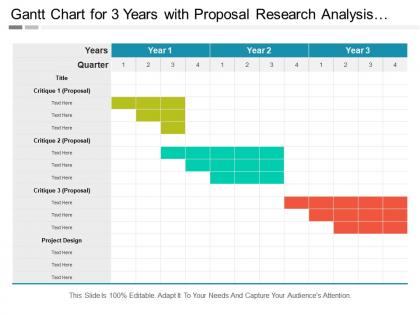
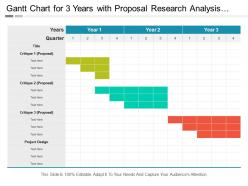
Gantt chart for 3 years with proposal research analysis and project design




Try Before you Buy Download Free Sample Product
 Impress Your
 Audience
 100%
100% Editable
 Save Hours
 of Time


Put it out of their heads with our Gantt Chart For 3 Years With Proposal Research Analysis And Project Design.Get them to discard all falsehood.
People who downloaded this PowerPoint presentation also viewed the following :
Gantt chart for 3 years with proposal research analysis and project design with all 5 slides:
Go full ahead with our Gantt Chart For 3 Years With Proposal Research Analysis And Project Design. They ensure you go fast forward.
FAQs for Gantt chart for 3 years with proposal research analysis
So you need the basic stuff first - tasks, timeline across the top, and those bars showing how long each thing takes. Dependencies are huge though, that's where you see the domino effect when stuff gets delayed. Add who's doing what and maybe track progress if you want. Honestly, I've seen way too many charts that are just overwhelming chaos - nobody reads those. Keep it clean at first. Your team can handle more detail once they're used to actually looking at the thing. Without dependencies it's basically a glorified calendar, which isn't super helpful for project management.
Okay so Gantt charts are basically visual timelines that show who's doing what and when. Super helpful for seeing how tasks connect to each other. Like, if Sarah's late on design work, you'll immediately know it affects the dev timeline. No more awkward check-in messages either - just look at the chart to see where things stand. Honestly, they're kind of addictive once you start using them. Your team actually gets why their piece matters to the whole project, which is huge for morale. And when your boss asks about deadlines? You've got real data instead of just guessing. Just pick something simple to start with.
Honestly, most people just overcomplicate the hell out of them. Don't cram every tiny task in there - it gets messy quick. Build in buffer time because stuff always takes longer than you think. Dependencies are huge too. I've seen gorgeous charts that make zero sense because someone forgot Task B can't start until Task A is done. Keep descriptions short and sweet. Update it regularly or it becomes pointless - like, I'm talking weekly updates minimum. The ones that work best? They start simple. You can always add more detail later, but begin with just the major milestones and key deadlines.
Honestly, just pick whatever fits your project size and team. Excel or Google Sheets are totally fine for simple stuff - everyone already knows them anyway. Multiple projects with dependencies though? That's when you need the real tools like Microsoft Project or Asana. Monday.com is pretty solid too. Budget matters since some of these get expensive fast. Also think about whether your team will actually use fancy features or just ignore them (happens more than you'd think). My advice? Try 2-3 free trials with an actual project and see what feels right.
Yeah totally doable! Make your Gantt charts way more flexible - show sprint boundaries and big milestones instead of getting bogged down in detailed dependencies. Don't worry about making them pretty at first, just focus on what actually works. Update them after every sprint because priorities shift constantly in agile. Treat them like rough estimates, not hard deadlines that'll bite you later. Oh and try swimlanes for different epics - makes it easier when you're explaining stuff to stakeholders who love their visual charts.
So dependencies are basically what make your Gantt chart actually work instead of just looking pretty. You're telling the system "hey, this task can't start until that one's finished" - whatever makes sense for your project. The cool part? When something gets delayed (and it always does), everything else shifts automatically. No more manually dragging stuff around for hours. Plus those little arrows show your team how everything connects, which is honestly super helpful during meetings. Trust me, set these up from the start. Your future self will thank you when deadlines start moving around.
Gantt charts are honestly a game-changer for this stuff. Map out your tasks against everyone's schedules and you'll spot conflicts right away - like when Sarah's got three deadlines on the same Tuesday (been there). The visual timeline makes it super obvious when people are swamped vs. twiddling their thumbs. I always color-code by person or team since it gives you that instant "oh crap" moment when someone's overloaded. You can also track who has what skills available, which is clutch when you need your SQL expert but they're buried in other projects. Honestly beats spreadsheets by miles.
Group related stuff into phases first - that alone helps tons. Color code by team or priority so people can scan quickly. Most folks honestly just care about the big milestones anyway, so hide the nitty-gritty details unless someone specifically needs them. Rollup bars are your friend here - they show the overview while keeping subtasks tucked away. Oh, and create different views for different people. Your exec wants the 30,000-foot view, but you'll need the detailed version for actual planning. Just think about what decisions each person needs to make, then strip out everything else.
Honestly, Gantt charts are clutch for this stuff. They show your whole project timeline with all the task dependencies mapped out visually - makes it super easy to catch bottlenecks before they screw you over. When one task gets delayed, you'll see exactly how it messes with your end date. Perfect for keeping stakeholders in the loop with realistic updates. Those diamond milestone markers? Game changer. You can tell instantly if you're behind schedule. I usually update mine weekly and highlight anything running late - gives you time to manage expectations instead of scrambling later.
Oh dude, Gantt charts aren't just for big corporate projects! I use them for literally everything - content calendars, tracking my team's regular workload, even mapping out recurring stuff that never seems to end. The timeline view is clutch because you can actually see when someone's about to get slammed before it happens. Your boss will love how clean everything looks compared to those messy email chains we all hate. Honestly, just throw your next quarter's routine tasks into one and watch how much sense your priorities suddenly make. Game changer for spotting who's drowning vs who can take on more work.
Honestly, Gantt charts are pretty flexible - you can slap them on top of whatever you're already doing. With Agile, just map your sprints and track stuff against deadlines (yeah, some Agile people hate this but whatever works, right?). Waterfall basically needs them since everything's so sequential. Even Kanban can benefit if you add time constraints to your boards. Don't overthink it though. They're just another way to view your timeline, not a whole new system. I'd stick with what you know and just add the Gantt view on top.
Okay so basically, old-school Gantt charts on paper or whiteboards are such a headache when things change - which they always do. Digital ones let you update everything super quick. Your team can see changes right away too, which is honestly a game changer. I mean, you could stick with traditional for really basic stuff, but why would you? Once I switched to digital I never looked back. Oh and if you need a tool rec, Asana's pretty solid. Monday.com works great too.
Gantt charts are perfect for this! Color code everything - green for done, yellow for current work, red for anything behind schedule. Weekly updates work best in my experience. Show the actual progress bars against what you originally planned so people can instantly see where things stand. Honestly, stakeholders eat this stuff up way more than boring bullet-point emails. Drop in quick notes about delays or changes. The visual storytelling aspect is huge - people just get it faster when they can see the timeline laid out like that.
Don't overcrowd your Gantt chart with every little detail - stakeholders just need the main stuff. Color-code different phases or teams so it's easy to follow. That critical path? Make it obvious so they can spot what'll mess up your timeline. I once showed a chart that looked like someone threw up a box of crayons, so trust me on this one. Milestones should jump out at you, and definitely show how tasks connect to each other. But here's the thing - you've gotta actually walk them through it. Just slapping it on screen and hoping they get it never works.
Honestly, Gantt charts make spotting trouble super obvious. Those tasks crammed together with zero breathing room? Major red flag - one delay kills everything downstream. I always hunt for bottlenecks too, like when five different tasks all need the same person. Critical path sections are the worst offenders here. Once you've found these problem areas, throw in some buffer time or shuffle resources around. Way better than trying to make sense of endless spreadsheet rows, trust me. Also check for unrealistic deadlines - sometimes they're hiding in plain sight.
-
Informative design.
-
Great experience, I would definitely use your services further.