

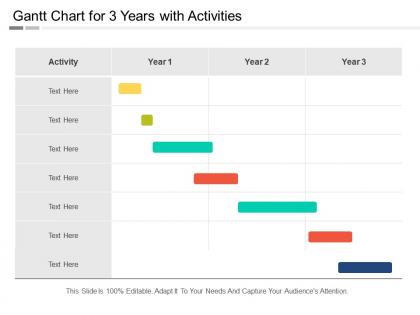
Gantt chart for 3 years with activities




Try Before you Buy Download Free Sample Product
 Impress Your
 Audience
 100%
100% Editable
 Save Hours
 of Time


Increase the availability of jobs with our Gantt Chart For 3 Years With Activities. Argue for creating infrastructure.
People who downloaded this PowerPoint presentation also viewed the following :
Gantt chart for 3 years with activities with all 5 slides:
Convince folks that they are as good as anybody with our Gantt Chart For 3 Years With Activities. Dismiss any feelings of inferiority.
FAQs for Gantt chart for 3
Honestly, three-year Gantt charts are beasts - stick to major phases instead of daily tasks or you'll lose your mind. Focus on big deliverables, critical milestones, and who's doing what. Dependencies matter too since tasks build on each other. Always pad in buffer time because projects never go smoothly (learned that the hard way). Mark your budget reviews and any external deadlines you can't move. Keep it high-level enough that you won't hate updating it. Trust me, detailed charts look impressive but become impossible to maintain after month six.
Honestly, Gantt charts are lifesavers for those massive projects. You get this overview of everything and can actually see when stuff's gonna crash into each other timeline-wise. Super helpful for catching problems before they snowball. The visual thing is huge too - way easier than explaining delays with spreadsheets or whatever. I'd break yours into quarterly milestones first. Then chunk those down monthly so you're not drowning in details but still tracking progress. Stakeholders love them since they don't have to decode project manager speak to understand what's happening.
Honestly, weekly updates work best if you can swing it, but monthly is the bare minimum. Break everything into quarterly chunks - seriously, a 3-year timeline without milestones will make you want to cry. Track your progress on tasks, watch those dependencies like a hawk, and catch scope creep early since it'll mess with everything downstream. Oh, and review who's actually available each quarter because people move around, take leave, whatever. Set those calendar reminders right now or you'll forget and end up with a gorgeous chart that's completely wrong six months later.
Oh man, 3-year projects are brutal for dependencies. I'd go with solid arrows for critical path stuff, dashed for soft dependencies. Colors help a ton too - red for blockers, blue for normal finish-to-start things. Honestly though? It turns into a nightmare pretty quick. Group your tasks into phases first, then you can collapse sections when needed. Way easier to read. One thing I learned the hard way - clean up those dependency lines regularly. I once had a Gantt that looked like spaghetti and had to explain it to executives. Not fun.
Honestly, resource allocation is what separates a real plan from total fantasy. Map out your team, budget, and equipment first - like, actually check if Sarah's taking maternity leave or if budgets freeze in Q4. I've watched so many projects crash because someone built this gorgeous timeline without checking if the same three people were supposed to handle five different tasks simultaneously. Pretty charts don't mean much when you're fighting over resources. Start with what you've actually got each quarter, then work backwards. Trust me on this one - the constraints should drive your dates, not the other way around.
Honestly, use rolling detail for a three-year Gantt. Start with quarters or months for the distant stuff, then get specific with weeks/milestones for the next 6-12 months. I made the mistake once of doing daily tasks for three whole years - what a pain to update constantly. Focus on milestones and deliverables instead of tiny tasks. You want enough detail to actually track things but not so much that you're tweaking it every week. My rule: stay broad initially, then drill down as deadlines approach. Way more manageable that way.
Honestly, for something that long you need either Microsoft Project or Smartsheet. Both handle massive timelines without choking on all the tasks and dependencies. Asana's pretty good too if your team likes the collaboration stuff - same with Monday.com. I made the mistake once of trying to run a big project in Excel and wow, what a disaster that turned out to be. Everything just falls apart after a few months when you've got hundreds of moving pieces. Don't even think about Google Sheets for this. Grab the free trials first and test them with your actual project before you buy anything.
Honestly, Gantt charts are lifesavers for long projects. Your whole team can see exactly how their stuff connects to everyone else's work. No more guessing games about dependencies or hunting through random spreadsheets when your boss asks for updates. The visual timeline really helps people get why Task A has to happen before Task B - and how one delay messes everything up downstream. I'm probably biased because I love charts, but they're way better than those painful weekly status meetings. Just keep it updated and actually show it to people regularly so everyone knows where they fit in.
Build in flexibility from day one - seriously, you'll thank yourself later. I'd set quarterly checkpoints to reassess everything and shift milestones around. Three years is forever in project time, so things will definitely change. Keep buffer time between your critical stuff and treat that Gantt chart like it's alive, not some sacred document. Monthly updates are probably the sweet spot, though sometimes you'll need to completely restructure phases when priorities flip. Oh, and document why you made each change - future you will be confused otherwise. Baseline comparisons help track how much you've drifted too.
Figure out your critical path stuff first - the things that'll tank everything if they get delayed. After that, I'd layer in the big milestones that actually matter to leadership or funding deadlines. Color-coding helps me stay sane (yeah, I'm one of those people). Put your scariest tasks upfront so you've got wiggle room when stuff inevitably breaks. Don't schedule overlapping sprints if your best people can't be in two places at once - learned that one the hard way! Set up quarterly check-ins where you can actually pivot based on what's working.
Honestly, the worst mistake is going crazy detailed right from the start - you'll be stuck updating every little task forever. Keep early stuff granular but use big milestones for later years. Buffer time is your best friend because let's face it, nothing ever goes to plan anyway! Skip showing every dependency too. It just looks messy and becomes a pain to maintain. Stick to your critical path and major deliverables instead. I'd say start with quarterly blocks, then only get into weekly detail for the next few months. Trust me on this one.
Honestly, Gantt charts are clutch for this stuff. You can see all your dependencies laid out and catch bottlenecks way before they blow up your timeline. Look for critical path activities - those are where delays will wreck everything. Build buffer time around the sketchy tasks. On a 3-year project, stuff's gonna go wrong, that's just how it is. The visual makes it easy to see what you can shift around when (not if) things get messy. I'd check yours monthly and tweak those risk buffers as you learn what's actually problematic vs what you thought would be.
Honestly, there's a bunch of stuff you can track but some metrics are way more useful than others. Schedule variance shows if you're ahead or behind. Milestone completion rates are solid too. Critical path analysis is probably the most important though - tells you which delays actually matter for your end date. Resource utilization helps with staffing decisions. I'm obsessed with comparing percent complete vs. time elapsed because it's painfully honest about where you really stand. Also track scope creep through new tasks and budget burn if costs matter. Oh, and definitely set up automated progress updates so you're not doing math every damn week.
Yeah, totally doable! Use the Gantt as your big-picture roadmap for those massive 3-year projects. Map out major epics and milestones there, but keep doing your regular 2-4 week sprints underneath for the actual work. It's honestly like having GPS for the whole trip while you can still take side roads when needed. I'd update the Gantt every quarter based on what you learn from retros and requirement changes - trust me, there will be plenty. Start with your key deliverables first, then work backwards to figure out your epic timeline. Works way better than people think it will.
Okay so for a three-year Gantt chart, definitely use color coding for different phases or departments. Makes everything way easier to scan. Monthly or quarterly timeline views work best - daily gets too cluttered. Add milestone markers and use different bar styles for critical path stuff versus regular tasks. Swimlanes help group related activities too. Progress indicators are clutch so you can actually see what's done vs what's planned. Visual hierarchy matters big time here, otherwise stakeholders will hate you. Oh and make sure dependencies are super clear - that's where most people mess up.
-
Best Representation of topics, really appreciable.
-
Innovative and attractive designs.