

GRC Powerpoint Ppt Template Bundles





Try Before you Buy Download Free Sample Product
 Impress Your
 Audience
 100%
100% Editable
 Save Hours
 of Time


Our GRC Powerpoint Ppt Template Bundles are topically designed to provide an attractive backdrop to any subject. Use them to look like a presentation pro.
People who downloaded this PowerPoint presentation also viewed the following :
GRC Powerpoint Ppt Template Bundles with all 18 slides:
Use our GRC Powerpoint Ppt Template Bundles to effectively help you save your valuable time. They are readymade to fit into any presentation structure.
-
Grc
-
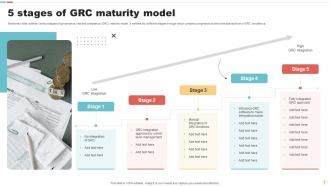
5 stages of GRC maturity model
-
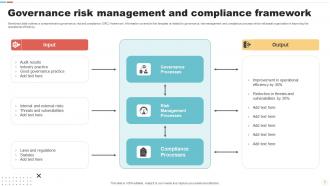
Governance risk management and compliance framework
-
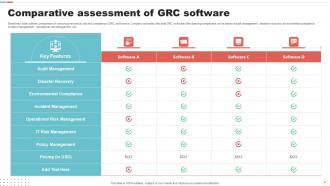
Comparative assessment of GRC software
-
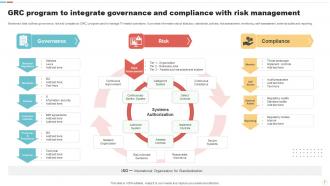
GRC program to integrate governance and compliance with risk management
-
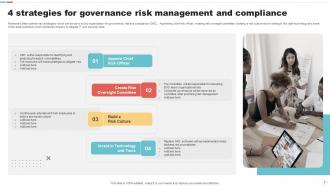
4 strategies for governance risk management and compliance
-
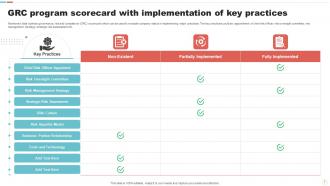
GRC program scorecard with implementation of key practices
-
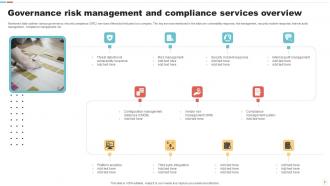
Governance risk management and compliance services overview
-
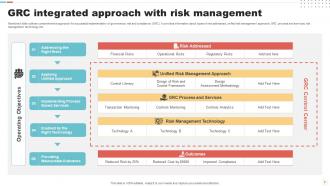
GRC integrated approach with risk management
-
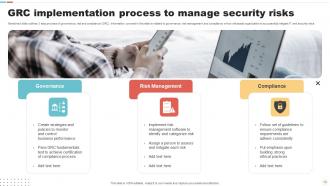
GRC implementation process to manage security risks
-
GRC icon to meet compliance requirements
-
GRC icon to manage IT and security risk
-

Grc
-

-

-

-

-

FAQs for GRC Powerpoint
For GRC templates, grab ones with the big three: governance frameworks, risk matrices, and compliance tracking. Risk heatmaps and audit findings slides are must-haves. Board presentation dashboards work great for executives, plus you'll want detailed templates for working meetings. Process flows and remediation timelines are clutch too - honestly saved my butt more times than I can count. Look for consistent colors and icons so everything matches. The policy hierarchy slides might seem boring but they're actually super useful for mapping out who's responsible for what.
Honestly, these GRC templates are game-changers for stakeholder meetings. You know how executives' eyes glaze over when you start talking compliance? These turn all that messy risk data into actual visuals people can digest - heat maps, dashboards, stuff that makes sense at a glance. No more death-by-spreadsheet presentations. They keep everyone on the same page too, which is clutch when you're dealing with different departments. Oh, and the executive summary ones? Perfect for those "I've got five minutes" board situations. Trust me on this one.
Dude, heavily regulated industries get the most value from specialized GRC templates, no question. Financial services, healthcare, pharma, energy - basically anywhere compliance failure means you're screwed. They're already dealing with SOX, HIPAA, ISO standards constantly, so templates that actually understand those frameworks will save massive time upfront. Manufacturing and tech are jumping on this too as they grow. Oh, and government contractors - forgot about them but they're probably the most template-hungry of all. Start by figuring out which regulations you actually report on. Then hunt for template bundles built around those specific frameworks instead of generic ones.
Honestly, visuals can totally save your GRC presentations from being a snooze-fest. Clean charts and consistent color coding help people actually process the data instead of drowning in boring text blocks. I swear, half the compliance decks I see look ancient! Good visuals help stakeholders catch trends and remember stuff after they leave the room. Try swapping those bullet-heavy slides for some infographics - you'll be surprised how much more engaged people get. Plus it makes complex risk relationships way easier to follow.
Obviously update the colors and logos first - that's the easy part. The real work is customizing those risk categories to match what your company actually calls things. I've sat through way too many presentations where someone's talking about "business continuity" when we all say "operational resilience" or whatever. Honestly, half the battle is just speaking the same language as your audience. Test a few slides with your team beforehand too - templates never quite fit perfectly and you don't want to be explaining why the structure feels weird during your actual presentation. Oh, and ditch any generic examples that obviously came with the template.
Oh man, these templates are honestly a game changer. You get all the slides already built with proper branding and compliance stuff, so no more staring at blank PowerPoint wondering where to start. Just swap in your company's policies and examples - boom, you're done. They cover all the boring but necessary stuff like risk scenarios and governance processes. I was skeptical at first, but when you're rushing to throw together training for different departments, having that consistent framework is clutch. Plus everything looks professional without the extra work. Start with their basic compliance one and see how it goes.
Look, GRC stuff is boring as hell - risk matrices and compliance frameworks will put anyone to sleep. But here's the thing: good design actually saves you. Clean visuals and consistent colors turn those abstract concepts into something people can understand. When stakeholders can quickly spot risk levels or follow process flows, your presentations become decision-making tools instead of snoozefests. I've seen too many brilliant GRC strategies die because they looked like garbage on slides. Design isn't just pretty decoration - it's what makes complex governance structures click in people's brains.
GRC templates are basically pre-made frameworks for compliance stuff - you just fill in your company's details instead of building everything from scratch. Way better than recreating the same risk matrices every single time. During audit season (which is always chaos), templates keep you consistent across reports and auditors actually appreciate the logical structure. Plus you can customize them to fit your org's quirks. Honestly saves me so much time - probably cuts reporting work in half. My manager loves how clean everything looks now too.
Honestly, just grab templates that already have the boring stuff built in - risk matrices, compliance charts, all that GRC nonsense we deal with. Drag-and-drop is your friend here since most of us aren't graphic designers. Professional colors only though (learned that one the hard way with a bright purple risk assessment). The icons should come included so you're not scrambling around Google Images at 10pm. Oh, and double-check it'll actually work with your PowerPoint version. Nothing worse than spending hours on formatting only to have everything break when you open it.
Dude, case studies are absolute gold for GRC presentations. You know how everyone's eyes glaze over when you start talking compliance theory? Well, actual stories fix that instantly. Show them how Company X cut their audit findings by 40% or prevented a real data breach - suddenly people are paying attention. Executives eat this stuff up because they want concrete ROI, not abstract frameworks. Though honestly, I've seen too many presentations bury the good stuff. Lead with business impact first, then get into the weeds. It's way more credible than just rattling off policies.
Don't cram everything onto one slide - GRC stuff is dense enough already. I've watched people grab these fancy templates that look amazing but then their actual data doesn't fit the preset charts at all. Honestly, stick with something simple that matches your company's style. Keep your colors consistent (red = high risk, yellow = medium, you know the drill). Oh, and definitely test it on the actual projector first - I learned that one the hard way when my beautiful slides turned into an unreadable mess in the conference room. Your laptop screen lies to you sometimes.
Honestly, keep it visual and simple. Charts, dashboards, heat maps - that stuff works way better than cramming spreadsheet data onto slides. Nobody's got time to decipher tiny numbers during presentations. Focus on the big stuff like compliance percentages and risk scores. Here's what I'd do: pick consistent colors for different risk levels so everything flows together. Most GRC template packs already have decent chart layouts that don't look like a mess. The whole point is making it executive-friendly - they should get your main points in about 10 seconds, maybe less if you're lucky. Skip anything cluttered and you'll be golden.
So GRC templates are basically pre-made frameworks that save you from building risk assessments from nothing. They've got risk matrices, heat maps, all that stuff to help visualize threats and impact. Super clutch when execs want the overview yesterday, you know? Your team can stay consistent with how they document risks across projects too. Most let you tweak them for whatever industry requirements you're dealing with. I'd start with a basic risk register template – honestly makes such a difference in keeping risk conversations actually productive instead of all over the place.
So here's what I'd track - audience engagement stuff like how many questions you get, follow-up emails asking for more info, and the big one: do people actually DO anything with your recommendations afterward? Attendance rates matter too if it's regular training. Honestly, I've sat through way too many slick GRC presentations that looked great but changed absolutely nothing. The real question is whether you're moving the needle on actual behavior. Oh, and figure out what "winning" looks like before you even start presenting - saves you from guessing later whether it worked.
Interactive GRC templates are taking over big time. Automated dashboards pull live data now instead of those dead static charts we used to deal with. AI handles compliance tracking visuals too, which honestly saves so much headache. Real-time updates happen automatically when regulations shift - pretty cool actually. Mobile designs are everywhere since people review compliance stuff on tablets constantly. Oh, and everything connects to your actual GRC tools now rather than just being standalone PowerPoint files. Don't bother with templates that can't integrate with your existing software stack. Total waste of time.
-
I am a big fan of their newsletters because that is how I found my perfect requirement at the time of urgency. Thank God, I kept opening those.
-
SlideTeam is the best in the business. Their templates are engaging and customizable. You can rely on them.