


Hiring Candidates Using Internal And External Sources Of Recruitment Powerpoint Presentation Slides




Try Before you Buy Download Free Sample Product
 Impress Your
 Audience
 100%
100% Editable
 Save Hours
 of Time


A recruitment action plan can help organizations select suitable employees from prominent candidates. A streamlined hiring process can help HR managers reduce the organizations attrition rate. Grab our professionally designed Hiring Candidates Using Internal and External Sources of Recruitment template that provides an overview of current recruitment, the organizations onboarding process, and the organizations problems in recruiting candidates. It also provides a timeline for the new recruitment action plan and identifies positions currently vacant in the organization. It also shows a detailed overview of internal and external sources of employee recruitment. The PowerPoint offers an ideal candidate persona and screening criteria for the candidate shortlisting. It also showcases rounds of interviews and schedules to conduct them promptly. Furthermore, the PPT includes employees responsibilities for recruiting candidates and the budget allocated for the hiring process. The complete deck also impacts HR KPIs after formulating and executing a new recruitment action plan. Get access now.
People who downloaded this PowerPoint presentation also viewed the following :
Content of this Powerpoint Presentation
Slide 1: This slide displays the title Hiring Candidates Using Internal and External Sources of Recruitment.
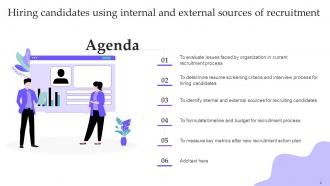
Slide 2: This slide displays the title Agenda for the topic.
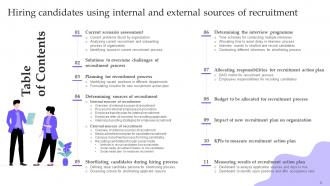
Slide 3: This slide exhibit table of content.
Slide 4: This slide exhibit table of content- Current scenario assessment.
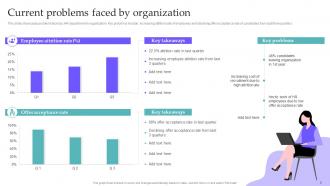
Slide 5: This slide showcases problems faced by HR department in organization.
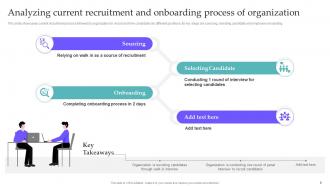
Slide 6: This slide showcases current recruitment process followed by organization to recruit and hire candidates for different positions.
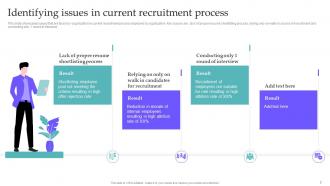
Slide 7: This slide showcases issues that are faced by organization in current recruitment process deployed by organization.
Slide 8: This slide exhibit table of content- Solutions to overcome challenges of recruitment process.
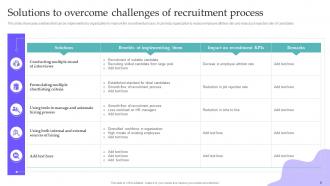
Slide 9: This slide showcases solutions that can be implemented by organization to improve the recruitment process.
Slide 10: This slide exhibit table of content- Planning for recruitment process.
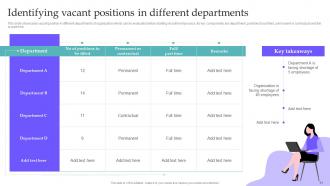
Slide 11: This slide showcases vacant position in different departments of organization which can be evaluated before starting recruitment process.
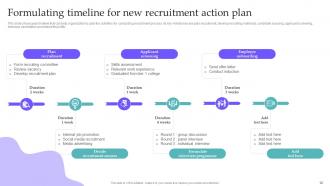
Slide 12: This slide showcases timeline that can help organization to plan the activities for conducting recruitment process.
Slide 13: This slide exhibit table of content- Determining sources of recruitment.
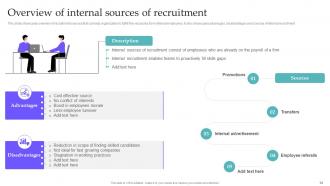
Slide 14: This slide showcases overview of recruitment sources that can help organization to fulfill the vacancies from internal employees.
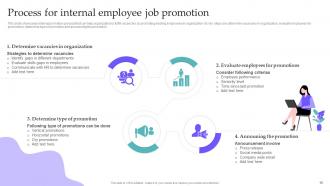
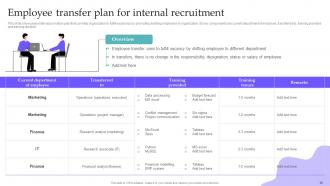
Slide 15: This slide showcases internal promotion process that can help organization to fulfill vacancies by promoting existing employees in organization.
Slide 16: This slide showcases internal promotion plan that can help organization to fulfill vacancies by promoting existing employees in organization.
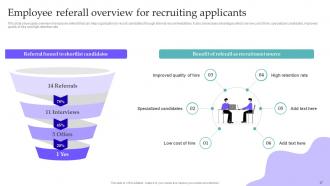
Slide 17: This slide showcases overview of employee referall that can help organization to recruit candidates through internal recommendations.
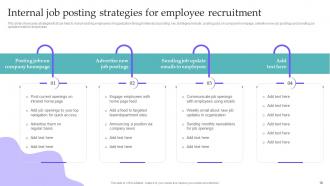
Slide 18: This slide showcases strategies that can help to recruit existing employees of organization through internal job posting.
Slide 19: This slide exhibit table of content- External sources of recruitment.
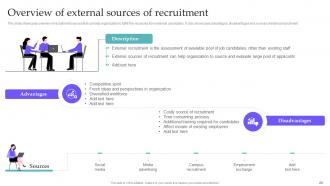
Slide 20: This slide showcases overview of recruitment sources that can help organization to fulfill the vacancies from external candidates.
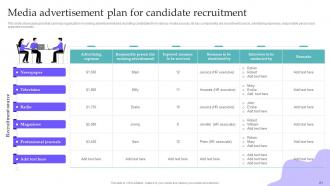
Slide 21: This slide showcases plan that can help organization in running advertisement and recruiting candidates from various media sources.
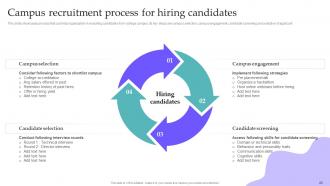
Slide 22: This slide showcases process that can help organization in recruiting candidates from college campus.
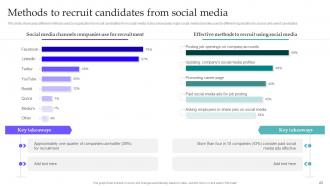
Slide 23: This slide showcases different methods used by organization to recruit candidates from social media.
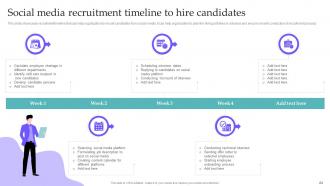
Slide 24: This slide showcases recruitment timeline that can help organization to recruit candidates from social media.
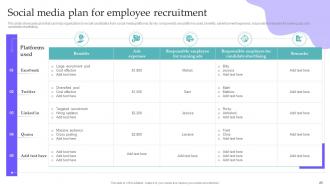
Slide 25: This slide showcases plan that can help organization to recruit candidates from social media platforms.
Slide 26: This slide exhibit table of content- Shortlisting candidates during hiring process.
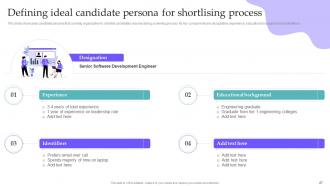
Slide 27: This slide showcases candidate persona that can help organization to shortlist candidates resume during screening process.
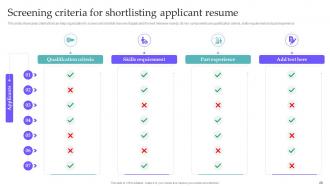
Slide 28: This slide showcases criteria that can help organization to screen and shortlist resume of applicants for next interview rounds.
Slide 29: This slide exhibit table of content- Determining the interview programme.
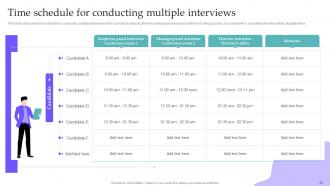
Slide 30: This slide showcases time schedule for conducting multiple interviews which can help in reducing the time wastage and ensure smooth flow of hiring process.
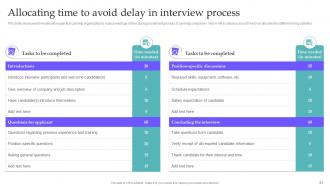
Slide 31: This slide showcases time allocation plan that can help organization to reduce wastage of time during recruitment process.
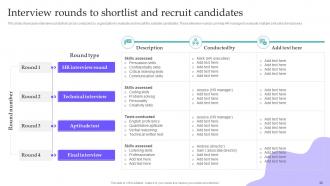
Slide 32: This slide showcases interview rounds that can be conducted by organization to evaluate and recruit the suitable candidates.
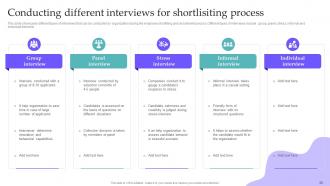
Slide 33: This slide showcases different types of interviews that can be conducted by organization during the employee shortliting and recruitment process.
Slide 34: This slide exhibit table of content- Allocating responsibilities for recruitment action plan.
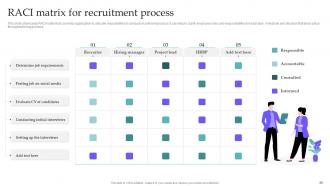
Slide 35: This slide showcases RACI matrix that can help organization to allocate resposibilites to conduct recruitment process.
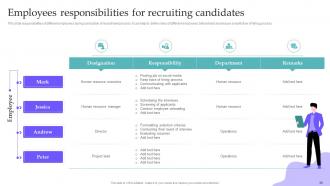
Slide 36: This slide responsibilities of different employees during conduction of recruitment process.
Slide 37: This slide exhibit table of content- Budget to be allocated for recruitment process.
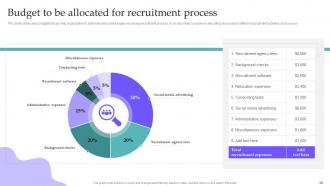
Slide 38: This slide showcases budget that can help organization to estimate and control expenses during recruitment process.
Slide 39: This slide exhibit table of content- Impact of new recruitment plan on organization.
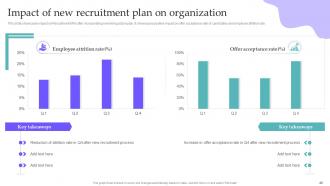
Slide 40: This slide showcases impact on Recruitment KPIs after incorporating new hiring action plan.
Slide 41: This slide exhibit table of content- KPIs to measure recruitment action plan.
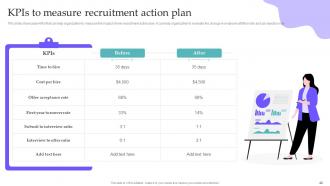
Slide 42: This slide showcases KPIs that can help organization to measure the impact of new recruitment action plan.
Slide 43: This slide exhibit table of content- Measuring results of recruitment action plan.
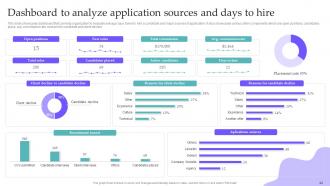
Slide 44: This slide showcases dashboard that can help organization to evaluate average days taken to hire a candidate and major sources of application.
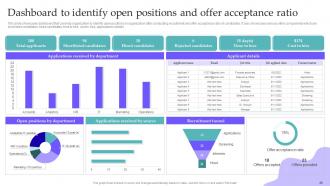
Slide 45: This slide showcases dashboard that can help organization to identify open positions and offer acceptance ratio of candidates.
Slide 46: This is the icons slide.
Slide 47: This slide presents title for additional slides.
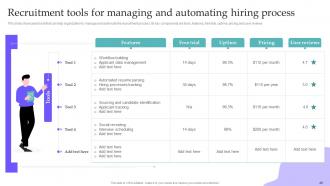
Slide 48: This slide showcases tools that can help organization to manage and automate the recruitment process.
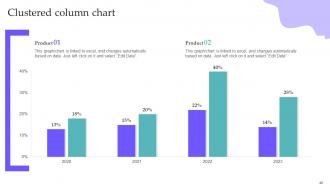
Slide 49: This slide exhibits Clustered column charts for different products.
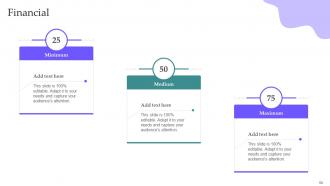
Slide 50: This slide exhibits Financial.
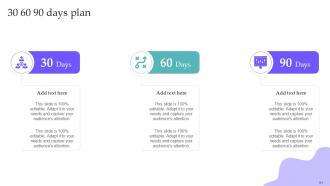
Slide 51: This slide depicts 30-60-90 days plan for projects.
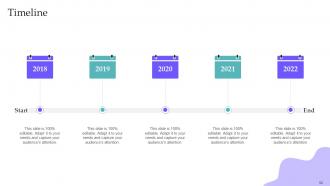
Slide 52: This slide exhibit Timeline.
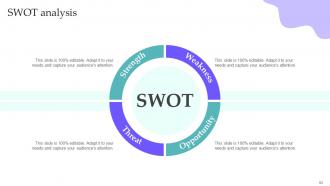
Slide 53: This slide presents SWOT analysis.
Slide 54: This slide presents Our goal.
Slide 55: This slide depicts posts for past experiences of clients.
Slide 56: This slide shows puzzle for displaying elements of company.
Slide 57: This is thank you slide & contains contact details of company like office address, phone no., etc.
Hiring Candidates Using Internal And External Sources Of Recruitment Powerpoint Presentation Slides with all 62 slides:
Use our Hiring Candidates Using Internal And External Sources Of Recruitment Powerpoint Presentation Slides to effectively help you save your valuable time. They are readymade to fit into any presentation structure.






FAQs for Hiring Candidates Using Internal And External Sources Of Recruitment
Go for something clean and professional - you don't want crazy graphics stealing attention from what you're actually offering. Most templates are honestly way too over-the-top for recruiting anyway. Find one with good structure: clear headings, bullet points, space for your logo. Should have sections for job overview, company vibe, benefits, all that stuff. Oh and make sure it works with whatever software your team's already using - learned that one the hard way once. The best ones let you customize layouts easily when you're hiring for different roles. You want it looking sharp but not flashy.
Honestly, good visual design is a game changer for recruitment presentations. Candidates actually stay engaged instead of mentally checking out halfway through. I'd go with clean layouts and real photos of your team/office - those generic handshake stock photos are so overdone at this point. Minimal text works better too, plus lots of white space so it doesn't feel cluttered. Consistent branding shows you've got your act together, which candidates notice. Oh, and definitely check how your slides look on different screens since everyone's remote these days. It's one of those small details that actually makes a big difference in how professional you come across.
Dude, stories are everything in recruitment talks. Nobody wants to sit through another boring rundown of benefits and job duties. Share real stuff - like how Sarah from engineering tackled that impossible deadline, or when the company actually had everyone's back during layoffs. Makes it feel genuine instead of corporate BS. Honestly, candidates can smell fake "we're family" energy from miles away. But tell them about actual people doing cool work? Now they're picturing themselves there. Next time, throw in 2-3 specific examples and you'll see people actually lean forward instead of checking their phones.
Dude, you gotta show them the data instead of just talking about it. Nobody wants to stare at endless bullet points - that's just torture. When you throw up a chart showing career paths or team growth, candidates can actually picture themselves there. Visual stuff keeps people awake too. I swear, the moment you switch to an infographic or org chart, you'll see them perk up and start asking way better questions. Replace like half your text slides with visuals and watch how much more engaged everyone gets. It's honestly night and day.
So you'll want to cover the basics first - company overview, culture, what the role actually entails day-to-day. Don't forget compensation and benefits (obviously). Growth opportunities are huge too. If you can get some employee testimonials or behind-the-scenes content, that's gold - people eat that up way more than corporate fluff. Be upfront about timeline and what happens after interviews. Here's the thing though - don't just sell the glamorous parts. Talk about real challenges too. Candidates appreciate honesty, and it saves everyone time later. End with clear next steps for following up.
Honestly, just match your templates to however your company actually talks. Startups can get away with super casual stuff and talking up growth ops. Corporate places? More buttoned-up language works better. I've watched companies totally whiff this by sending out these weird robotic templates that sound like nobody. Pick your top 3-4 values first, then work those into everything. Your job posts should actually reflect what you care about - maybe that's flexibility, maybe it's innovation. Don't forget interview questions too. You'll want ones that figure out if someone fits, not just if they're skilled enough.
Ditch those cheesy stock photos with the fake handshakes - nobody's buying that anymore. Go with real pics of your actual office and team instead. Your graphics should show the diversity you actually want to attract, and don't accidentally make anyone feel left out. Text on images? Less is more, especially if you're presenting over Zoom where everything looks pixelated anyway. Oh, and add captions for accessibility - it's just good practice. Also have a backup ready because tech always fails at the worst possible moment.
Skip the stock photos - nobody's buying that. Get real employees to share their actual stories about growing at your company. Photos, testimonials, whatever feels authentic. The ERGs and mentorship stuff? Definitely mention those, but be specific about what they actually do. I've seen too many presentations that just say "we value diversity" and call it a day. Oh, and make sure your presentation team isn't all the same demographic. That's like... the easiest win ever. Let people from different backgrounds talk about bias training, flexible work, career development - the concrete stuff candidates actually care about. Way more powerful than generic slides.
Track engagement first - how many questions you get, people sticking around after. Then measure conversion rates from your presentations vs other sources. Quality of hires matters too, obviously. Honestly, I get pumped when someone asks good follow-up questions because it usually means they're actually interested, not just being polite. If you're collecting feedback scores, use those. Oh, and time-to-hire - presentation candidates often move way faster through the pipeline. The magic happens when you see both higher conversion AND better candidates. Don't go crazy with metrics though - pick two to start.
Honestly, I'd put testimonial slides right after your company overview or scatter them around when you're talking up specific perks. Get quotes from your current team about loving their job, career growth, whatever makes your culture cool. Photos are clutch - faces just hit different than text blocks. Be smart about placement though. Like if you're covering work-life balance, boom - drop in someone talking about flexible hours. Keep quotes snappy, maybe two sentences tops. Oh and definitely hit up your top performers for these, just make sure they're cool with using their names.
Polls and Q&A sessions are game-changers for recruitment presentations. Also try breakout rooms where people can discuss case studies in smaller groups - way less intimidating than the big room. Interactive demos work really well too, like letting them actually use your software or walk through a project. Some companies I know do mini problem-solving challenges that show what the job's really like (and honestly, you get to see how they think). For virtual stuff, whiteboards and breakout rooms are clutch. The whole point is making it feel like a conversation instead of you just talking at them. I'd throw in at least two interactive things per 30 minutes.
Okay so here's the thing - you've gotta completely switch gears based on your audience. When I'm talking to candidates, I'm all about culture and growth opportunities, plus what their actual day looks like. They need to picture themselves working there, you know? But hiring managers? They want hard numbers - metrics, time-to-fill data, candidate quality stats. I swear, so many recruiters just use the same presentation for everyone and then act shocked when nobody's engaged. Candidates are thinking "will I actually enjoy this job?" while managers just want their staffing headaches solved fast. Oh, and definitely customize your examples too.
Dude, biggest thing is don't go into hardcore sales mode right away. Research who you're talking to first! Generic company perks are so obvious - candidates see right through that stuff. Talk about actual growth opportunities that fit what they want. Make it a conversation, not a presentation where you just talk at them. Oh and seriously, check your screen sharing works beforehand - I've seen so many people fumble around with tech for like 10 minutes. It's painful. Let them ask questions and go deeper on whatever they seem interested in. Way better than following some rigid script.
Dude, templates will save your life here. I used to spend forever reformatting the same stuff - such a waste of time. Build like 3-4 core slides you can mix and match: company overview, role details, benefits, team intros. Keep your brand colors and fonts consistent whether you're talking to a junior dev or some VP. Honestly, the consistency makes you look way more professional than you'd think. Just don't go overboard with the templates or everything starts feeling cookie-cutter, you know?
Yeah, colors totally matter when you're presenting to candidates! Blue's the safe bet - builds trust and screams "we're stable." Red can work for urgency but might come off too intense. Green says growth, purple works great for creative/tech roles. Honestly, most companies just copy each other and go full blue though. You'll want to match your colors to what you're actually about and the role itself. Keep it simple - maybe 2-3 colors tops. Neutral backgrounds are your friend, and test everything beforehand because colors look different on every screen. Nothing worse than your presentation looking wonky during an important interview.
-
Been using SlideTeam for some time now…can’t imagine why I wasted all that time in front of the screen trying to make the perfect presentation.
-
Based on my personal experience, I would recommend other people to subscribe to SlideTeam. No one can be disappointed here!