

How Does Google Document AI Works How To Use Google AI For Your Business AI SS




Try Before you Buy Download Free Sample Product
 Impress Your
 Audience
 100%
100% Editable
 Save Hours
 of Time


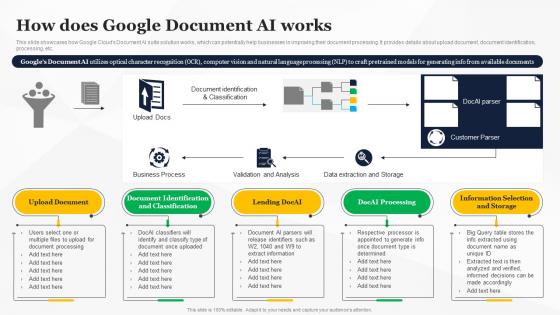
This slide showcases how Google Clouds Document AI suite solution works, which can potentially help businesses in improving their document processing. It provides details about upload document, document identification, processing, etc.
People who downloaded this PowerPoint presentation also viewed the following :
How Does Google Document AI Works How To Use Google AI For Your Business AI SS with all 7 slides:
Use our How Does Google Document AI Works How To Use Google AI For Your Business AI SS to effectively help you save your valuable time. They are readymade to fit into any presentation structure.






FAQs for How Does Google Document AI Works How To Use Google AI For Your
Google Document AI features include pre-trained machine learning models, optical character recognition, entity extraction, document classification, and form parsing capabilities. These technologies streamline document workflows by automatically identifying key information, processing unstructured data, and integrating seamlessly with existing systems, ultimately delivering faster processing times and improved accuracy compared to manual methods.
Google Document AI leverages machine learning through advanced optical character recognition, natural language processing, form parsing algorithms, and continuous model training on diverse document types. These technologies enhance accuracy by automatically identifying document structures, extracting key data points, and learning from user corrections, with many financial institutions and healthcare organizations finding significantly improved processing speed and reduced manual errors.
Businesses can integrate Google Document AI through APIs connecting to existing systems, cloud-based platforms for seamless data processing, and workflow automation tools that trigger document analysis. Many organizations in banking, healthcare, and logistics find that these integrations streamline invoice processing, contract analysis, and compliance documentation, ultimately reducing manual effort while enhancing accuracy and operational efficiency.
Google Document AI processes invoices, contracts, forms, receipts, identity documents, and specialized formats like handwritten notes and multi-language content. Through machine learning models, organizations streamline document workflows by automatically extracting data from PDFs, images, and scanned files, while handling various layouts and formats, ultimately delivering faster processing times and reduced manual data entry across industries like finance, healthcare, and legal services.
Google Document AI enhances document security through automated data classification, sensitive information detection, access control enforcement, and compliance monitoring capabilities. By implementing intelligent redaction, audit trails, and real-time threat identification, organizations in banking, healthcare, and legal sectors can significantly reduce human error risks, ensure regulatory compliance, and maintain comprehensive document governance frameworks.
Healthcare, finance, insurance, legal, and logistics industries benefit most from Google Document AI due to their heavy reliance on document processing and regulatory compliance requirements. These sectors streamline operations by automating claims processing, patient record management, and contract analysis, while reducing manual errors and processing times, ultimately delivering faster customer services and significant cost savings in an increasingly digital business environment.
Google Document AI handles multi-language documents through advanced optical character recognition and natural language processing capabilities that automatically detect, extract, and process text across dozens of languages within single documents. This multilingual functionality enables global businesses to streamline international operations, automate cross-border compliance documentation, and enhance customer experiences across diverse markets, ultimately delivering operational efficiency and competitive advantage in increasingly interconnected business environments.
Common implementation challenges include data quality issues, integration complexity, model training requirements, cost management concerns, and accuracy optimization across diverse document types. Organizations overcome these through strategic data preprocessing, phased rollouts starting with high-volume use cases, leveraging Google's pre-trained models, and establishing clear ROI metrics, with many enterprises finding that pilot programs in specific departments like finance or HR demonstrate value before full-scale deployment.
Google Document AI distinguishes itself through seamless Google Cloud integration, pre-trained industry models, and robust OCR capabilities, while competitors like AWS Textract and Azure Form Recognizer offer similar functionality with different pricing structures. Many enterprises find that Google's solution delivers faster deployment and better accuracy for complex documents, though the choice ultimately depends on existing cloud infrastructure, specific use cases, and budget considerations.
Cloud technology serves as the foundational infrastructure for Google Document AI, enabling scalable processing, real-time data access, seamless integration with existing systems, and automatic updates across global networks. Through cloud-based deployment, organizations can process thousands of documents simultaneously while reducing infrastructure costs, with many enterprises finding that this approach delivers faster document workflows and enhanced operational efficiency.
Google Document AI ensures compliance through encrypted data processing, access controls, audit logging, and data residency options that meet GDPR requirements. The platform enables organizations to maintain regulatory compliance while processing sensitive documents, with many financial institutions and healthcare providers finding that these built-in privacy safeguards streamline their document workflows without compromising data protection standards.
Best practices for training custom models using Google Document AI include providing high-quality, diverse training datasets, ensuring consistent document formatting, labeling data accurately, and implementing iterative testing cycles. Through strategic data preparation and validation processes, organizations in finance, healthcare, and legal sectors enhance model accuracy, reduce processing errors, and ultimately deliver faster document automation with improved extraction precision.
Small businesses can leverage Google Document AI to automate invoice processing, contract analysis, and customer document verification, reducing manual labor costs and processing times significantly. This technology enables smaller companies to deliver faster customer service, minimize human errors, and allocate resources more strategically, ultimately competing with larger corporations through enhanced operational efficiency rather than workforce size.
Notable success stories include Lending Club automating loan document processing, reducing approval times by 75%, while financial institutions like banks streamline mortgage applications and insurance companies accelerate claims processing. These implementations deliver significant cost reductions, faster customer service, and enhanced operational efficiency, with many organizations finding that automated document workflows ultimately provide substantial competitive advantages in increasingly digital markets.
Google Document AI enhances accessibility by converting printed documents into screen-reader compatible formats, extracting text from images and scanned files, and enabling voice-activated document searches. Through optical character recognition and natural language processing, organizations like healthcare providers and financial institutions streamline document access for visually impaired users, ultimately delivering more inclusive services and broader customer reach.
-
Spacious slides, just right to include text. SlideTeam has also helped us focus on the most important points that need to be highlighted for our clients.
-
Crisp and neat slides. Makes it fun and easier to curate presentations.