


How To Use Google AI For Business Powerpoint Presentation Slides AI CD




Try Before you Buy Download Free Sample Product
 Impress Your
 Audience
 100%
100% Editable
 Save Hours
 of Time


Google AI is a suite of multiple artificial intelligence tools, apps, technologies developed by Google LLC. Grab our professionally curated How to Use Google AI for Business template. It provides wide range of AI-powered projects namely machine leaning, computer vision, robotics, natural language processing, etc. Our Googles lamda decks purpose is to make peoples life easier by leveraging AI to create innovative services and products along with fostering innovation, training and research in the field of AI. It showcases key principles, usage, major milestones, adoption framework and major projects of Google AI suite. For transforming business operations with Google AI tools, this AI Presentation can serve as a guide for companies helping them to use tools such as Google AI Cloud, Contact Center AI, Document AI, Intelligent Products, Discovery AI, Vision AI, Google Workspace AI and Vertex AI to name a few. Our Google imagen ai PPT provides applications use cases of their tools in certain industries such as consumer packaged goods, manufacturing, supply chain, healthcare, gaming, media and entertainment. It also contains slides which can help companies utilize the power of Google Assistant, Google LaMDA and Google Bard. These can assist them in exploring how-tos and use cases relating to Googles generative AI. Lastly our Google cloud ai module includes use case scenarios of Google AI, where case studies of Kao, Marks and Spencer and Dominos have been showcased and analyzed. Moreover, PPT contains Google AIs future projects such as Text-To-Image, Magi and Vaani. Get instant access to our fully editable and customizable artificial intelligence ppt now.
People who downloaded this PowerPoint presentation also viewed the following :
Content of this Powerpoint Presentation
Slide 1: This slide introduces How to Use Google AI for Business. Commence by stating Your Company Name.
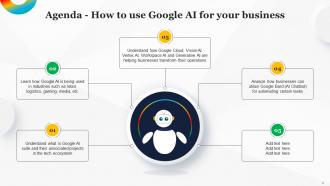
Slide 2: This slide depicts the Agenda of the presentation.
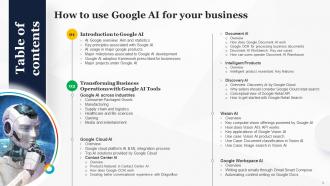
Slide 3: This slide includes the Table of contents.
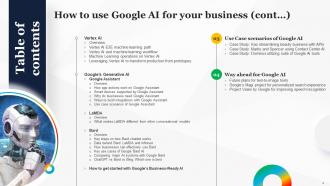
Slide 4: This slide continues the Table of contents.
Slide 5: This slide highlights the Title for the Topics to be covered further.
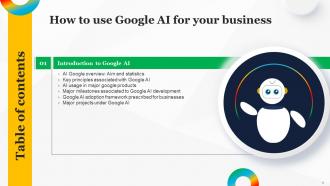
Slide 6: This slide showcases basic introduction about Google AI which can help businesses and users build basic idea about its purpose and statistics.
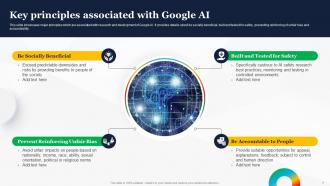
Slide 7: This slide exhibits the Key principles associated with Google AI.
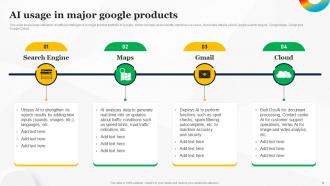
Slide 8: This slide reveals utilization of artificial intelligence in major product portfolio of Google, which can help users identify identical use cases.
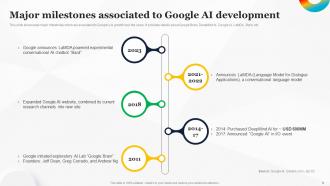
Slide 9: This slide portrays the Major milestones associated to Google AI development.
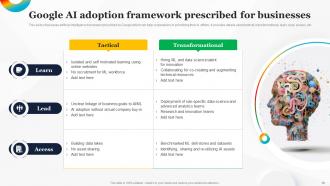
Slide 10: This slide showcases artificial intelligence framework prescribed by Google which can help corporations in prioritizing their AI efforts.
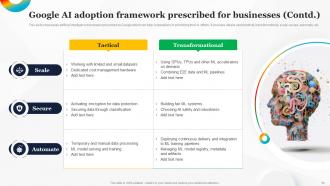
Slide 11: This slide continues Google AI adoption framework prescribed for businesses.
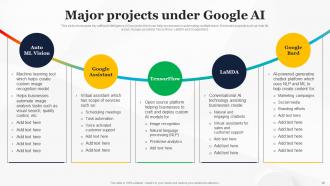
Slide 12: This slide exhibits the Major projects under Google AI.
Slide 13: This slide presents the Heading for the Contents to be discussed next.
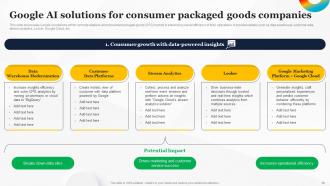
Slide 14: This slide displays the Google AI solutions for consumer packaged goods companies.
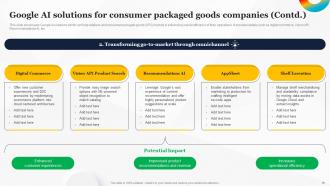
Slide 15: This slide continues the Google AI solutions for consumer packaged goods companies.
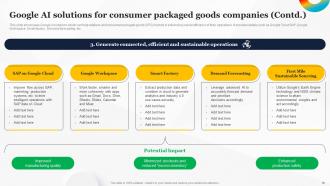
Slide 16: This slide further continues Google AI solutions for consumer packaged goods companies.
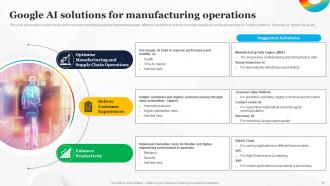
Slide 17: This slide showcases Google AI tools which can help manufacturing plants improve their quality, efficiency and time-to-market.
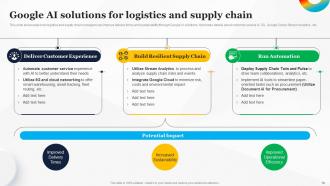
Slide 18: This slide portrays the Google AI solutions for logistics and supply chain.
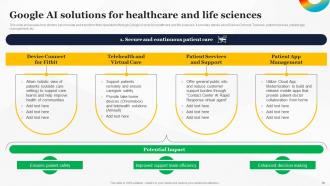
Slide 19: This slide states Google AI solutions for healthcare and life sciences.
Slide 20: This slide continues the Google AI solutions for healthcare and life sciences.
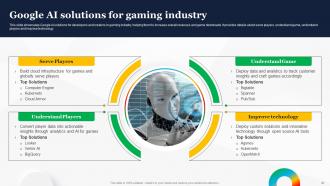
Slide 21: This slide showcases Google AI solutions for developers and creators in gaming industry.
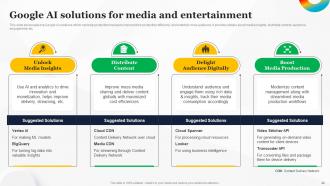
Slide 22: This slide depicts the Google AI solutions for media and entertainment.
Slide 23: This slide highlights the Title for the Ideas to be covered further.
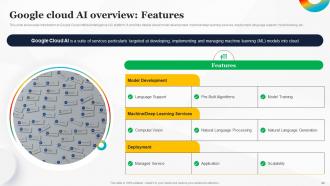
Slide 24: This slide represents introduction to Google Cloud Artificial Intelligence (AI) platform.
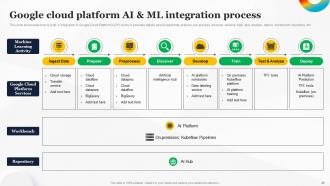
Slide 25: This slide talks about Google cloud platform AI & ML integration process.
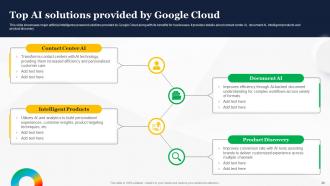
Slide 26: This slide mentions about the Top AI solutions provided by Google Cloud.
Slide 27: This slide includes the Heading for the Contents to be discussed next.
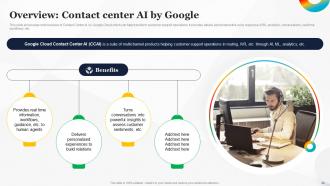
Slide 28: This slide showcases brief overview of Contact Center AI by Google Cloud which can help transform customer support operations.
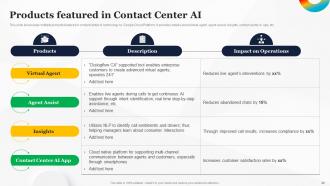
Slide 29: This slide displays the Products featured in Contact Center AI.
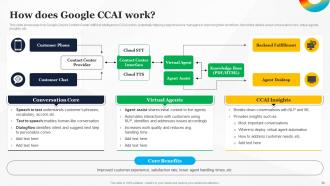
Slide 30: This slide showcases how Google Cloud’s Contact Center Artificial Intelligence (CCAI) works.
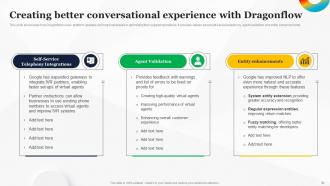
Slide 31: This slide deals with Creating better conversational experience with Dragonflow.
Slide 32: This slide depicts the Title for the Ideas to be covered further.
Slide 33: This slide presents the introduction to Document AI by Google Cloud which can be referred by businesses in streamlining their document databases.
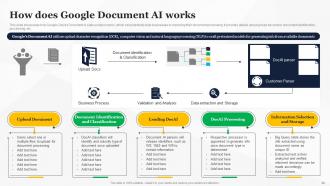
Slide 34: This slide portrays how Google Cloud’s Document AI suite solution works.
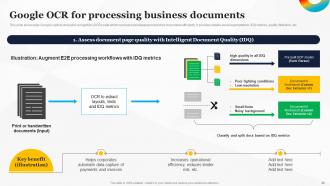
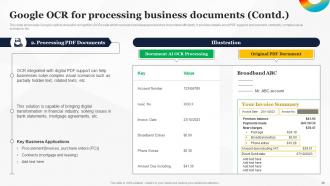
Slide 35: This slide indicates the Google OCR for processing business documents.
Slide 36: This slide continues the Google OCR for processing business documents.
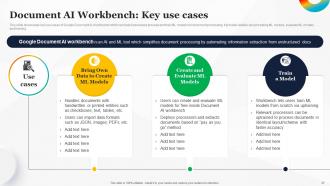
Slide 37: This slide showcases key use cases of Google Document AI Workbench.
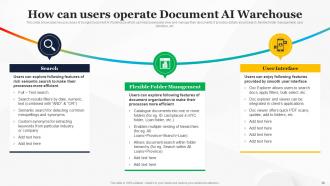
Slide 38: This slide displays how can users operate Document AI Warehouse.
Slide 39: This slide portrays the Heading for the Ideas to be discussed next.
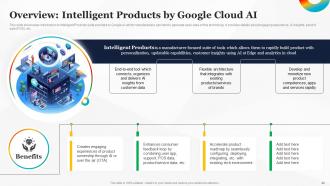
Slide 40: This slide reveals the introduction to Intelligent Products suite provided by Google AI.
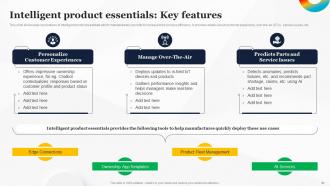
Slide 41: This slide talks about the Key features of Intelligent product essentials.
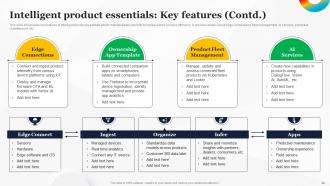
Slide 42: This slide continues key features of intelligent product essentials which manufacturers can refer to increase their process efficiency.
Slide 43: This slide presents the TItle for the Contents to be covered in the upcoming template.
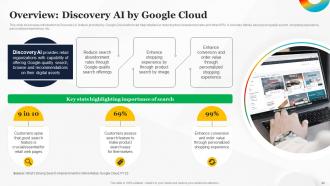
Slide 44: This slide showcases introduction to Discovery AI feature provided by Google Cloud.
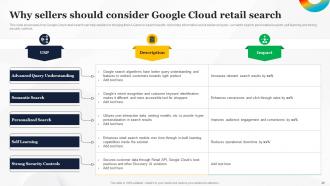
Slide 45: This slide states how Google Cloud retail search can help retailers in bringing their A-Game in search results.
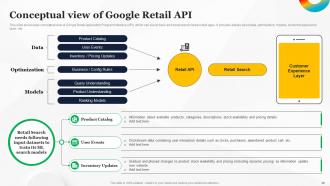
Slide 46: This slide reveals the Conceptual view of Google Retail API.
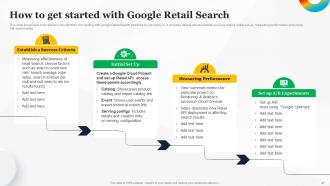
Slide 47: This slide showcases how retailers can start their onboarding with Google Retail Search powered by Discovery AI.
Slide 48: This slide indicates the Heading for the Topics to be discussed further.
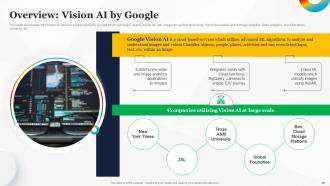
Slide 49: This slide showcases introduction to Vision Ai suite powered by Google which can help IT teams deploy ML into image recognition technology.
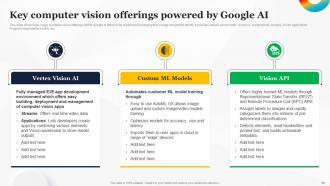
Slide 50: This slide displays the Key computer vision offerings powered by Google AI.
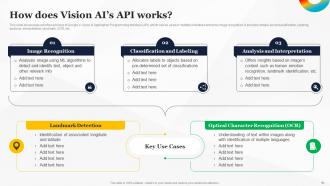
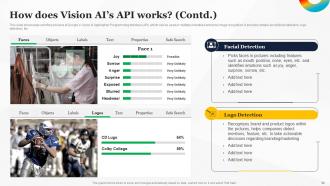
Slide 51: This slide presents workflow process of Google’s Vision AI Application Programming Interface (API).
Slide 52: This slide showcases workflow process of Google’s Vision AI Application Programming Interface (API).
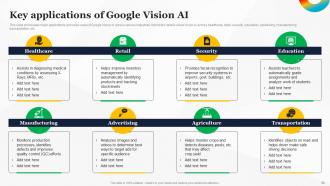
Slide 53: This slide highlights the Key applications of Google Vision AI.
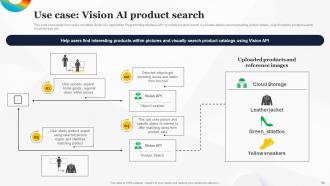
Slide 54: This slide portrays how users can utilize Vision AI’s Application Programming Interface (API) to initiate product search.
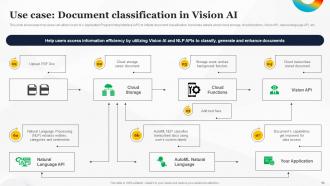
Slide 55: This slide showcases how users can utilize Vision AI’s Application Programming Interface (API) to initiate document classification.
Slide 56: This slide mentions how users can utilize Vision AI’s Application Programming Interface (API) to initiate product search.
Slide 57: This slide outlines the Title for the Topics to be discussed further.
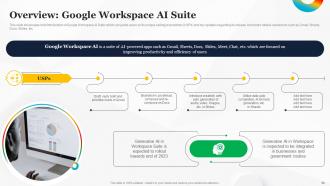
Slide 58: This slide showcases brief introduction of Google Workspace AI Suite.
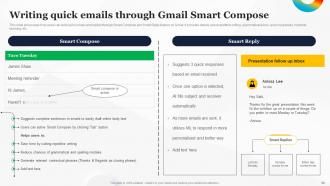
Slide 59: This slide states how users can write quick emails and replies through Smart Compose and Smart Reply feature on Gmail.
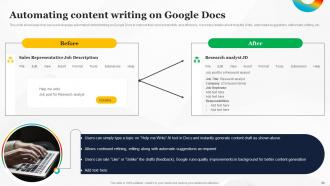
Slide 60: This slide presents how can users leverage automated content writing on Google Docs to improve their work productivity and efficiency.
Slide 61: This slide depicts the Heading for the Contents to be covered next.
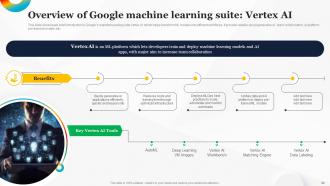
Slide 62: This slide portrays brief introduction to Google’s machine learning suite Vertex AI which helps transform ML models into efficient workflows.
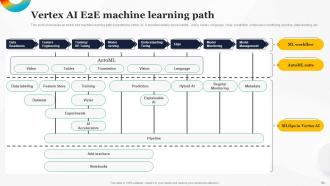
Slide 63: This slide reveals the Vertex AI E2E machine learning path.
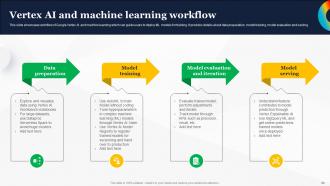
Slide 64: This slide showcases workflow of Google Vertex AI and machine learning which can guide users to deploy ML models for training.
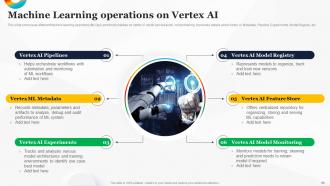
Slide 65: This slide talks about Machine Learning operations on Vertex AI.
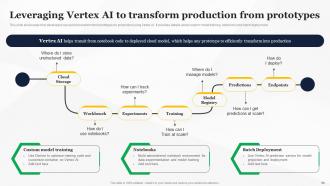
Slide 66: This slide deals with Leveraging Vertex AI to transform production from prototypes.
Slide 67: This slide includes the Title for the Ideas to be discussed further.
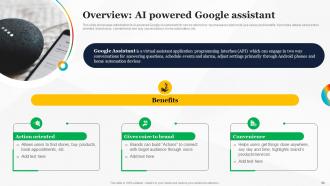
Slide 68: This slide showcases introduction to AI-powered Google Assistant which can be referred by businesses to explore its use cases and benefits.
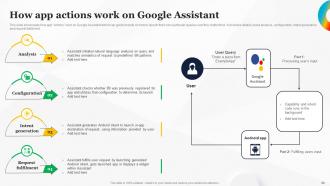
Slide 69: This slide presents how app “Actions” work on Google Assistant.
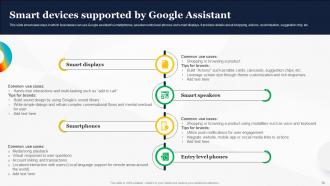
Slide 70: This slide includes Smart devices supported by Google Assistant.
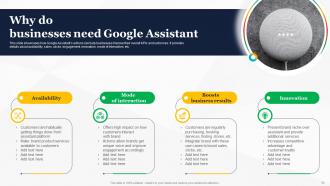
Slide 71: This slide showcases how Google Assistant’s actions can help businesses improve their overall KPIs and outcomes.
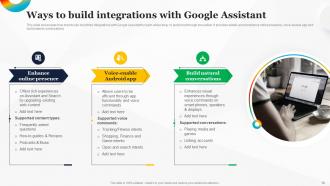
Slide 72: This slide exhibits the Ways to build integrations with Google Assistant.
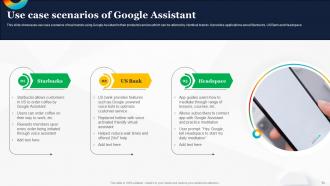
Slide 73: This slide displays the Use case scenarios of Google Assistant.
Slide 74: This slide contains the Heading for the Ideas to be covered next.
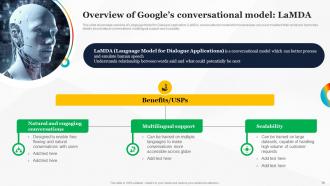
Slide 75: This slide reveals the overview of Language Model for Dialogue Application (LaMDA) conversational model.
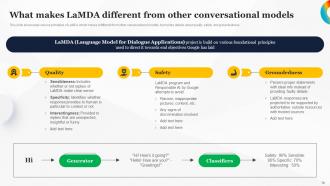
Slide 76: This slide showcases various principles of LaMDA which makes it different from other conversational models.
Slide 77: This slide presents the Title for the Contents to be discussed further.
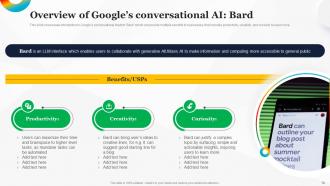
Slide 78: This slide portrays the Overview of Google’s conversational AI.
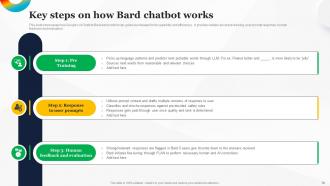
Slide 79: This slide highlights the Key steps on how Bard chatbot works.
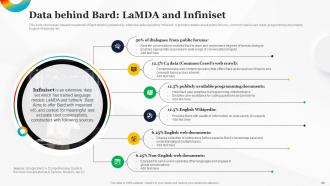
Slide 80: This slide illustrates dataset breakdown of Bard.
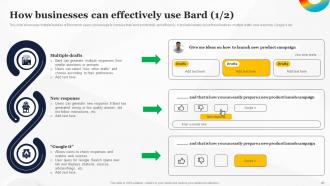
Slide 81: This slide showcases multiple features of Bard which users can leverage to increase their work productivity and efficiency.
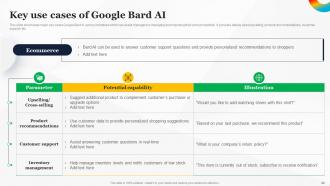
Slide 82: This slide exhibits the Key use cases of Google Bard AI.
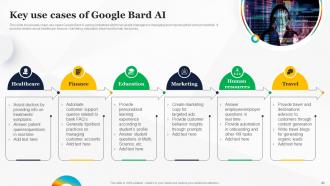
Slide 83: This slide portrays the Key use cases of Google Bard AI.
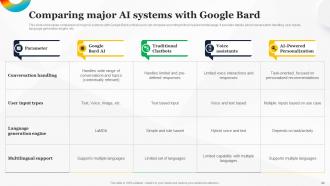
Slide 84: This slide reveals comparison of major AI systems with Google Bard so that users can compare according to their requirements/usage.
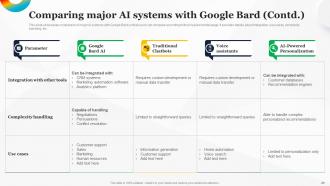
Slide 85: This slide continues Comparing major AI systems with Google Bard.
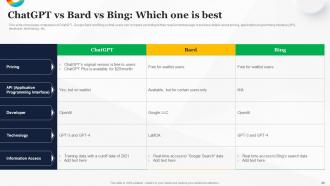
Slide 86: This slide showcases comparison of ChatGPT, Google Bard and Bing so that users can compare according to their requirements/usage.
Slide 87: This slide states the Heading for the Topics to be covered further.
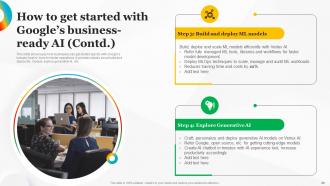
Slide 88: This slide presents how businesses can get started quickly with Google’s industry best AI tools for faster operations.
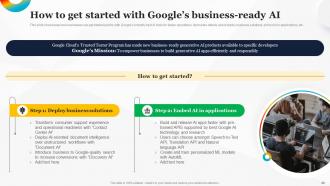
Slide 89: This slide continues How to get started with Google’s business-ready AI.
Slide 90: This slide depicts the Title for the Contents to be discussed in the upcoming template.
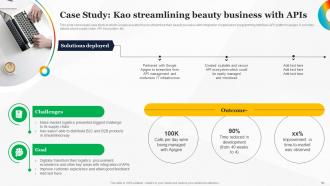
Slide 91: This slide showcases case study in which Google assisted Kao to streamline their beauty business.
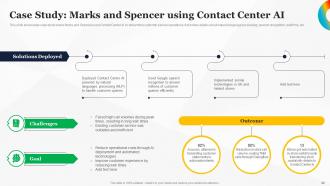
Slide 92: This slide illustrates case study where Marks and Spencer used Contact Center AI to streamline customer service operations.
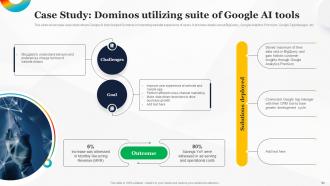
Slide 93: This slide reevals case study where Google AI tools helped Dominos in improving website experience of users.
Slide 94: This slide incorporates the Heading for the Contents to be covered next.
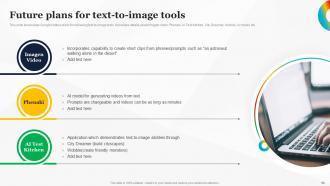
Slide 95: This slide displays the Future plans for text-to-image tools.
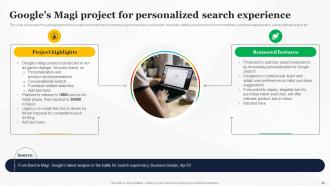
Slide 96: This slide showcases Project Magi planned by Google which will help in improving search experience and results.
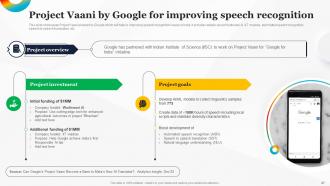
Slide 97: This slide illustrates the Project Vaani by Google for improving speech recognition.
Slide 98: This is the Icons slide containing all the Icons used in the pan.
Slide 99: This slide is used for revealing some Additional information.
Slide 100: This is Meet our team slide. State your team-related ifnormation here.
Slide 101: This is the Venn diagram slide.
Slide 102: This is the Idea generation slide for encouraging fresh ideas.
Slide 103: This is the Puzzle slide with related imagery.
Slide 104: This is the 30 60 90 Days plan slide for effective planning.
Slide 105: This slide states the organizational targets.
Slide 106: This is the Quotes slide for motivation.
Slide 107: This is the Thank You slide for acknowledgement.
How To Use Google AI For Business Powerpoint Presentation Slides AI CD with all 112 slides:
Use our How To Use Google AI For Business Powerpoint Presentation Slides AI CD to effectively help you save your valuable time. They are readymade to fit into any presentation structure.












FAQs for How To Use Google AI For Business Powerpoint Presentation
Honestly, start small with one thing instead of going crazy with everything at once. Google's AI is actually solid now - their language stuff can dig through tons of customer feedback and catch patterns you'd miss. You'll save the most time on automated workflows and repetitive junk like email sorting. The predictive stuff helps with demand forecasting and figuring out which leads might actually buy. Your team gets freed up for bigger picture work while the AI handles inventory predictions and whatnot. Oh, and the personalized customer experiences you can build are pretty wild these days.
Honestly, just start with what Google already gives you - Smart Compose and auto-translate are built into Workspace plans you probably have anyway. Google Analytics Intelligence is clutch for getting insights without paying some expensive data person. Their AutoML stuff lets you build custom models even if you're not super technical, and Google Ads will optimize your campaigns on autopilot. Oh, and Cloud Vision API is pretty cheap for image recognition. I'd test the free tiers first, see what actually helps your business, then gradually spend more on what's working. No point going crazy right off the bat.
So for customer service stuff, Dialogflow is probably where I'd start - it's pretty user-friendly for building chatbots without needing to be super technical. Contact Center AI is solid if you're drowning in phone calls since it transcribes everything live and can suggest what agents should say back. Natural Language API does sentiment analysis, which is clutch for catching pissed off customers early. Honestly though, I'd just mess around with Dialogflow first and see how it goes before throwing more tools at the problem. Way easier than trying to set up everything at once.
Honestly, Google's AI stuff is pretty solid for making sense of your business data. BigQuery ML and Vertex AI can catch patterns way faster than you ever could manually - like predicting what customers will do next or finding where your operations are getting stuck. The AutoML thing is clutch because you don't need to be some data science genius to use it. Oh, and definitely don't try to automate everything right away. Pick one annoying problem first and tackle that. You'll actually see results instead of just drowning in fancy dashboards that nobody looks at.
Honestly, Google's AI stuff is pretty solid for marketing. Their machine learning can dig through customer data and figure out who's likely to buy what - super useful for targeting. The ad optimization is where it gets interesting though, automatically adjusts your spending and cuts out so much waste. Oh, and there's this sentiment analysis thing that reads through social media posts and reviews to tell you what people actually think about your brand. Kind of creepy but helpful? I'd start with Google Analytics Intelligence first, it's the easiest way to get your feet wet without diving too deep.
Start with solid policies about what AI can and can't do - get an oversight committee going too. Your team needs training on spotting bias because honestly, most people miss it completely. Regular audits are crucial for catching problems before they blow up. Always be upfront with customers about your AI use. Google already has great responsible AI tools, so just use those instead of building from scratch. Oh, and create a safe way for employees to report concerns. That's where you'll find the real issues hiding.
So Google's AI stuff is actually pretty solid for supply chain optimization. Start with their Cloud AI platform - just pick one problem area first, don't try to boil the ocean. It'll do predictive analytics to catch bottlenecks before they screw you over, plus demand forecasting so you know when to restock. The route optimization feature is honestly a game-changer for deliveries. Computer vision helps with quality control too, which beats having humans stare at products all day. Oh, and it gets smarter as it learns from your data history. Supplier risk assessment is another big win.
Honestly, data integration is gonna be your biggest pain point. Getting all your existing systems to play nice with Google's AI tools? Yeah, that setup always drags on way longer than planned. Your team will need training time too - nobody picks this stuff up overnight. Oh, and depending what industry you're in, privacy compliance might bite you. I'd say test it out with just one small project first though. Way better than going all-in and discovering problems when half your company's already using it.
Honestly, you should start with something basic like Gmail's Smart Reply - it's pretty solid. The AI handles a ton of repetitive stuff automatically, plus it pulls useful insights from your data that you'd probably miss otherwise. Meeting prep gets way faster (seriously, some teams I know cut it in half), and the real-time captions in Meet are actually helpful. Your team can use it to scan through reports and grab the important bits quickly. Oh, and the chatbots deal with basic customer questions so your people aren't stuck doing the same responses all day. Don't go crazy initially though - pick one thing and build from there.
Honestly, Google's AI stuff is pretty solid for targeting. Instead of spending hours digging through customer data yourself, their machine learning does the heavy lifting - segments people by behavior, what they've bought, preferences, all that. Way better than those spray-and-pray campaigns everyone hates. The predictive side is where it gets interesting though. Google Analytics Intelligence will tell you who's about to bounce or convert. Customer AI does similar things. Oh, and definitely check out Customer Match first - it's probably the easiest way to dip your toes in without getting overwhelmed by all their tools.
Honestly, you gotta track both cost savings and revenue - that's where the real money shows up. Most companies look at stuff like faster processing, fewer operational costs, better customer satisfaction, higher conversion rates. The hard part? Figuring out what's actually from the AI vs everything else changing at once. I'd say get your baseline numbers locked down before you flip the switch. Then check the same metrics after 3-6 months. Start simple - time saved, errors cut down - before you try getting fancy with revenue attribution. That complex stuff can wait until your system's actually running smooth.
So Google AI processes your business data, which means you gotta understand how they handle it and what certifications they have. Your data might get used to improve their models unless you opt out - definitely worth checking those settings. Google's actually pretty good with security stuff like encryption and access controls, but any cloud AI service has some risk, you know? Also check their data residency options if you've got regional compliance stuff to deal with. Oh and before you go deeper with this, audit what data you're actually sending to their AI tools. Set up some data governance policies first - saves headaches later.
Honestly, Google's AI stuff has been a game-changer for our team. Smart Compose in Gmail saves me probably 10 minutes daily - sounds small but it adds up. The meeting features are solid too - it'll suggest times that work across time zones, transcribe everything automatically, and even spit out action items afterward. Real-time translation is clutch when we're working with our overseas folks. Oh, and the search function actually finds what you're looking for instead of... well, you know how search usually goes. I'd start with Smart Compose and the auto meeting summaries in Google Meet. You'll notice the difference right away.
Honestly, healthcare's crushing it with Google AI right now - hospitals are using it for medical imaging and catching stuff doctors might miss. Retail's big too, personalizing shopping and predicting what to stock. Manufacturing companies are preventing equipment breakdowns before they happen, which saves them crazy money. Oh, and banks love it for fraud detection obviously. Media's getting weird with it though - automated video editing? Wild. Bottom line: if your company's drowning in data, you'll probably see results. Customer info, operational metrics, whatever - there's likely something there worth exploring.
Google's API setup works with most business software - CRM, marketing platforms, data warehouses, you name it. Honestly the Workspace stuff is probably their best feature though. AI just shows up in Gmail and Sheets without any extra work. They've got partnerships with Salesforce, SAP, even Microsoft (weird flex but okay). Your IT people won't hate you since the integrations are pretty straightforward. I'd check their marketplace first to see what connects with your current tools. Way easier than starting from zero.
-
Excellent work done on template design and graphics.
-
I loved the hassle-free signup process. A few minutes and, I had this giant collection of beautiful designs.