

Business analytics powerpoint presentation slides






Try Before you Buy Download Free Sample Product
 Impress Your
 Audience
 100%
100% Editable
 Save Hours
 of Time


Boost organizational performance with the help of our content ready Business Analytics PowerPoint Presentation Slides. Develop new insights & understanding of business performance using artificial intelligence PPT slides. The visually appealing business analytics & intelligence PowerPoint complete deck comprises of self-explanatory templates such as agenda, artificial intelligence outline, objectives, components, key statistics, survey on adoption of emerging technologies, artificial intelligence investment by sectors, AI in various sectors, core areas of AI, value chain elements, development phases, themes, approaches of machine learning, logic & rules-based approach, machine learning description & process, etc. You can also describe machine learning use cases with the help of our AI approaches presentation deck. Incorporate techniques of business analytics PPT visuals to analyze data & increase operational efficiency. Download the innovatively designed business intelligence presentation template to create a professional presentation in minutes and catch your audience's attention. Explain your ideas visually to make your viewers understand the concept easily. Get to hook the best brains available with our Business Analytics Powerpoint Presentation Slides. It helps dangle the bait.
People who downloaded this PowerPoint presentation also viewed the following :
Content of this Powerpoint Presentation
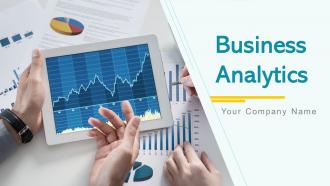
Slide 1: This slide introduces Business Analytics. State Your Company Name and begin.
Slide 2: This is an Agenda slide. State your agenda here.
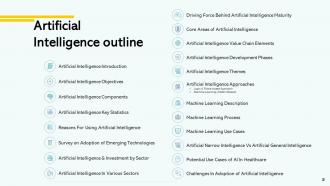
Slide 3: This slide shows Artificial Intelligence Outline.
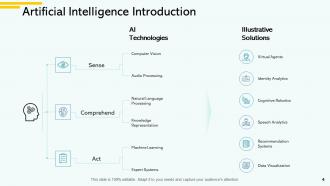
Slide 4: This slide presents Artificial Intelligence Introduction with major categories as- Sense, comprehend, and act.
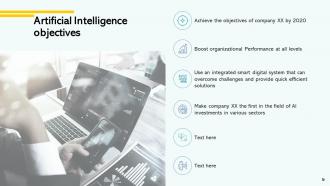
Slide 5: This slide displays Artificial Intelligence Objectives with related icons.
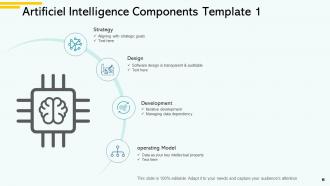
Slide 6: This slide represents Artificiel Intelligence Components Template 1 describing- Strategy, Design, Development, Operating Model.
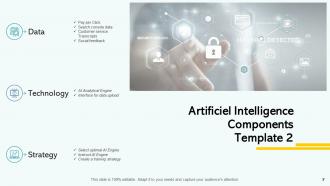
Slide 7: This slide showcases Artificiel Intelligence Components Template 2 describing- Data, Technology, Strategy.
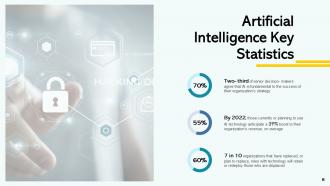
Slide 8: This slide shows Artificial Intelligence Key Statistics.
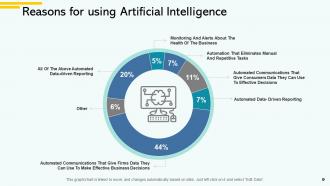
Slide 9: This slide presents Reasons for using Artificial Intelligence.
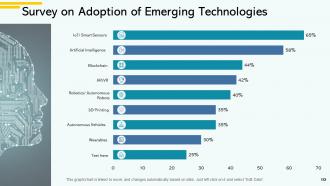
Slide 10: This slide displays Survey on Adoption of Emerging Technologies.
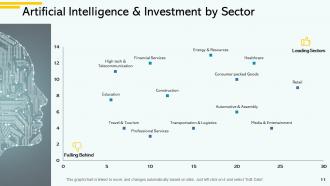
Slide 11: This slide represents Artificial Intelligence & Investment by Sector.
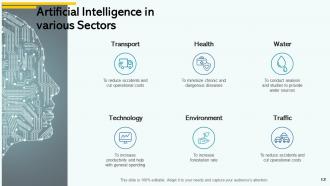
Slide 12: This slide showcases Artificial Intelligence in various Sectors including- Water, Traffic, Health, Environment, Transport, Technology.
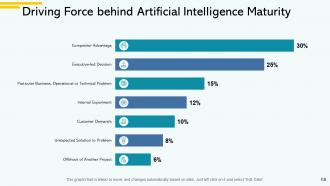
Slide 13: This slide shows Driving Force behind Artificial Intelligence Maturity.
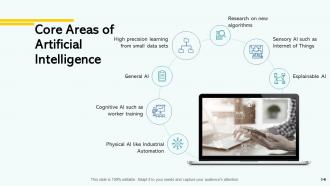
Slide 14: This slide presents Core Areas of Artificial Intelligence.
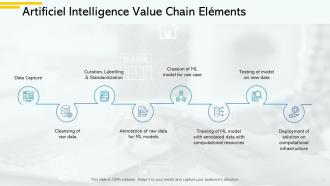
Slide 15: This slide displays Artificial Intelligence Value Chain Elements.
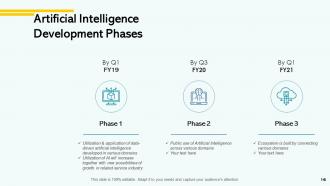
Slide 16: This slide represents Artificial Intelligence Development Phases.
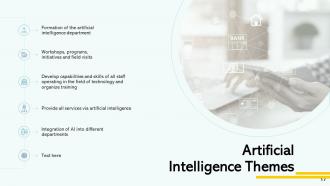
Slide 17: This slide showcases Artificial Intelligence Themes with related diagram.
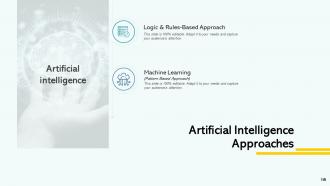
Slide 18: This slide shows Artificial Intelligence Approaches including- Machine Learning (Pattern Based Approach) and Logic & Rules-Based Approach.
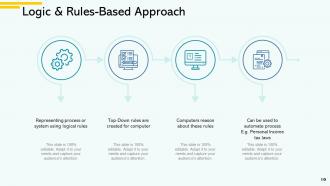
Slide 19: This slide presents Logic & Rules-Based Approach as- Can be used to automate process, Representing process or system using logical rules, Computers reason about these rules, Top-Down rules are created for computer.
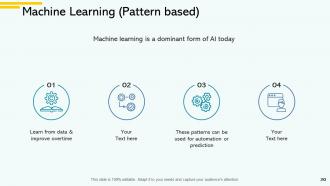
Slide 20: This slide displays Machine Learning (Pattern based) such as- Learn From Data & Improve Overtime, These Patterns Can Be Used for Automation or Prediction, etc.
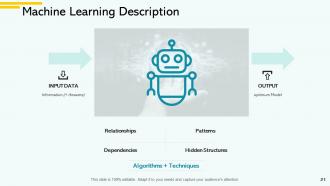
Slide 21: This slide represents Machine Learning Description with related diagram.
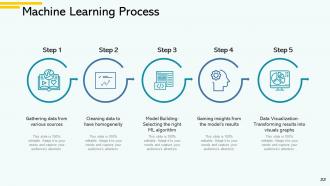
Slide 22: This slide showcases Machine Learning Process with these 5 steps- Cleaning data to have homogeneity, Gathering data from various sources, Model Building- Selecting the right ML algorithm, Gaining insights from the model’s results, Data Visualization- Transforming results into visuals graphs.
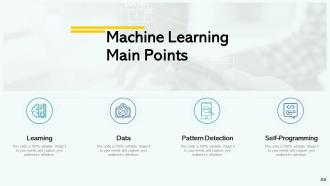
Slide 23: This slide shows Machine Learning Main Points as- Learning, Pattern Detection, Data, Self-Programming.
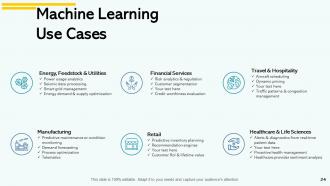
Slide 24: This slide presents Machine Learning Use Cases describing- Manufacturing, Retail, Healthcare & Life Sciences, Travel & Hospitality, Financial Services, Energy, Feedstock & Utilities.
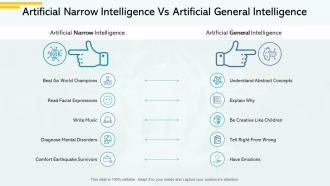
Slide 25: This slide displays Artificial Narrow Intelligence Vs Artificial General Intelligence.
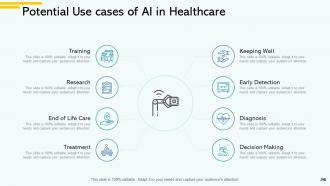
Slide 26: This slide represents Potential Use cases of AI in Healthcare describing- Keeping Well, Early Detection, Diagnosis, Decision Making, Training, Research, End of Life Care, Treatment.
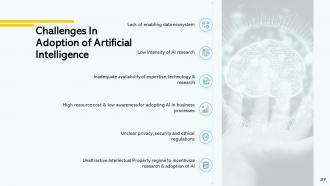
Slide 27: This slide showcases Challenges in adoption of Artificial Intelligence.
Slide 28: This slide displays icons for Business Analytics.
Slide 29: This slide is titled as Additional Slides for moving forward.
Slide 30: This is Our Mission slide with related imagery and text.
Slide 31: This is About us slide to show company specifications etc.
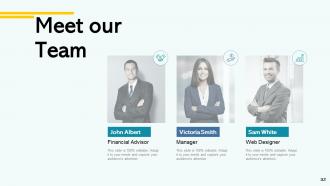
Slide 32: This is Meet our Team slide with names and designation.
Slide 33: This is Our Target slide. State your targets here.
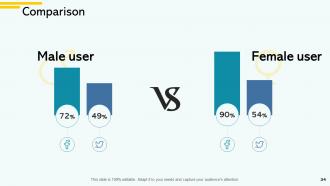
Slide 34: This is a Comparison slide to state comparison between commodities, entities etc.
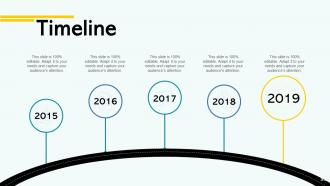
Slide 35: This is a Timeline slide to show information related with time period.
Slide 36: This is a Thank You slide with address, contact numbers and email address.
Business analytics powerpoint presentation slides with all 36 slides:
Use our Business Analytics Powerpoint Presentation Slides to effectively help you save your valuable time. They are readymade to fit into any presentation structure.


FAQs for Business analytics
Okay so basically - descriptive analytics shows what already happened, like your sales reports and stuff. Predictive takes that old data and tries to guess what's coming next (think forecasting demand or which customers might bail). Now prescriptive is where things get interesting - it actually tells you what to do about those predictions to get better results. My advice? Start with descriptive first to figure out your baseline. You can't really jump straight to the fancy predictive stuff without understanding what's already going on. Then work your way up as you get more comfortable with the whole analytics thing.
So basically, data viz turns your boring spreadsheets into something people can actually understand without wanting to cry. You know how executives' eyes glaze over when you show them rows of numbers? Charts and dashboards fix that. I've literally watched CEOs have lightbulb moments when they finally see what the data's telling them - it's pretty cool actually. Visual stuff helps you catch problems and opportunities way faster too. Oh, and start with your main KPIs first, then build dashboards that update themselves. Don't overcomplicate it at the beginning.
So ML basically finds patterns in your data that you'd never catch on your own. You can actually predict what customers will do instead of just reacting to what already happened. The real game-changer? It automates decisions that used to eat up tons of time. Plus you get instant fraud detection, personalized experiences at scale - honestly feels like cheating sometimes. I'd start with something simple like customer segmentation first, then build from there once you see how crazy accurate it gets. Way better than guessing your way through business decisions.
Honestly, just start with the free stuff you probably already have access to. Google Analytics is solid for website tracking, and you can use basic Excel or Sheets for sales data. Social media platforms give you way more analytics than you'd expect too – most small businesses don't even realize how much data they're sitting on. Pick maybe 2-3 metrics that actually move the needle on revenue, like how much it costs to get new customers or repeat purchases. Don't overcomplicate it at first. Once that feels natural, try free versions of Tableau or Power BI. I'd block out like 30 minutes each week to actually look at the numbers.
Honestly, it comes down to three main things: data privacy, consent, and bias. Be upfront about what you're collecting and why - nobody likes surprises with their personal info. Get proper consent first, obviously. The bias part is where things get messy though. Your algorithms can accidentally discriminate if you're not watching for it, which is a nightmare scenario. Don't forget about security either. Oh, and here's something leadership won't love - you've got to report findings honestly even when they contradict what everyone wants to hear. I'd suggest making a quick ethics checklist for every project.
Dude, real-time analytics is seriously worth it. Instead of finding out about problems weeks later, you catch stuff as it's happening. Spotting supply chain bottlenecks, predicting when machines need maintenance before they actually break, adjusting staffing when you see demand spike – honestly it's pretty addictive once you get the hang of it. You're making decisions based on what's going on right now instead of stale quarterly data. My advice? Start small though. Pick one process where delays really screw you over and focus there first. Don't try to monitor everything at once or you'll go crazy.
Honestly, focus on the stuff that actually moves the needle - ROI from your analytics projects, how fast you can turn data into real decisions, and whether people are actually using what you build. Don't get sucked into counting dashboard views or how much data you're processing. That's just vanity stuff that looks good on paper but means nothing. Track the real business impact - revenue you can tie back to your work, money saved, processes that got better. Set your baseline before you change anything, then check progress every quarter. Oh, and make sure you're measuring things that matter to your business goals, not just what's easy to track.
Dude, predictive analytics is seriously a game-changer for CRM stuff. Instead of just reacting when customers get mad, you can actually see problems coming. Like spotting who's about to bail on you or figuring out when someone's ready to buy again. The timing thing is huge - no more annoying people with random offers they don't want. You can get weirdly specific with campaigns based on what people will probably do next. Honestly, just start by looking at your current data for patterns. When do people usually buy? What makes them call support? That's gold right there.
Dude, healthcare and retail are absolutely killing it with analytics right now. Hospitals are predicting patient outcomes, while stores personalize literally everything you see online. Finance has always been numbers-heavy but their fraud detection is getting scary good. Oh, and manufacturing's finally catching up - they're using predictive maintenance to avoid those expensive equipment breakdowns. Honestly, if you need to pitch analytics to your boss, just steal what these guys are doing. Their strategies work across pretty much any industry, which is pretty convenient for the rest of us.
Honestly, you've got to bake privacy stuff right into your setup from the start - don't try fixing it later. Only grab data you actually need and strip out personal info when you can. Set up access controls properly (and actually check them regularly because people accumulate way too many permissions over time). Encrypt everything, whether it's sitting in storage or moving around. If you're using cloud platforms, double-check they meet GDPR or CCPA requirements. Oh, and train your team on handling data correctly - I've seen too many breaches happen because someone didn't know better.
Honestly, most companies just collect data without knowing what they're actually trying to figure out. It's like hoarding but for spreadsheets. Teams get stuck tweaking models forever instead of making real decisions. Different departments can't share info because everything's siloed - super frustrating. Bad data quality screws everything up too. You know that saying "garbage in, garbage out"? Also, people hate changing how they work, even when data shows a better way. My advice? Pick one specific business question first. Build momentum there, then expand. Way less overwhelming that way.
Oh totally, culture plays a huge role in this stuff. Germans and Scandinavians? They eat up structured data approaches. But in relationship-heavy cultures, analytics can come across as cold or like you're missing the bigger picture. Some teams just trust gut feelings and experience way more than spreadsheets - which honestly makes sense sometimes. Language is another pain point too. Complex dashboards in English aren't doing you any favors with global teams. I'd say start small with pilots that don't clash with how people already make decisions, then build from there.
So basically, analytics gives you a clear picture of what's happening with demand patterns, inventory, and how your suppliers are actually performing. You can spot demand spikes coming and catch bottlenecks before they mess everything up. The forecasting part is honestly what blows most people's minds - it's such a difference maker. Plus you get better at routing stuff efficiently, which saves money. Oh, and you can run those "what if" scenarios to test ideas without breaking anything. I'd probably start with just the demand forecasting piece first. You'll notice improvements in inventory planning pretty quickly.
Honestly, AI analytics is about to get so much easier - you won't need a data science degree just to build basic models anymore. Real-time insights are becoming standard, which makes sense since everyone wants answers instantly now. Edge computing's pretty cool too. Instead of shipping all your data to the cloud first, you can process it right where it happens. Privacy tools are blowing up with all these new regulations (finally). Oh, and natural language queries are wild - your team can literally just ask questions like they're talking to a person. Start prepping your data setup now and get people trained early. Trust me on this one.
Skip the boring stats talk - business folks want dollar signs. So instead of "correlation coefficient is 0.7," say "this saves us $50K every quarter." Way more effective. Visuals matter too. Bar charts beat scatter plots almost every time. Oh, and here's what really works: start with your recommendation first, then explain how you got there. Backwards from what feels natural, but trust me. I bombed my first few presentations doing it wrong - watching people's eyes glaze over taught me fast. Practice on someone outside your company first. If your neighbor gets it, the C-suite probably will too.
-
Helpful product design for delivering presentation.
-
Attractive design and informative presentation.
-
Wonderful templates design to use in business meetings.
-
It saves your time and decrease your efforts in half.