


How to build a strategy house powerpoint templates




Try Before you Buy Download Free Sample Product
 Impress Your
 Audience
 100%
100% Editable
 Save Hours
 of Time


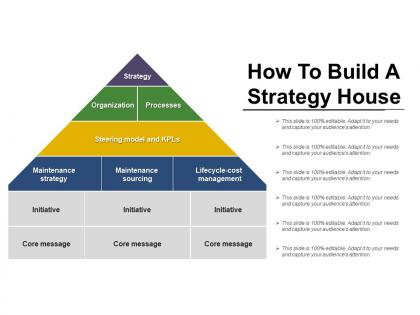
Come across as a professional in front of your audience and convey your message with our brilliant how to build a strategy house PowerPoint template example deck design. This is a six stage process which comprises of the various following components, namely: procedure house, plan house, along with strategy house. Use this PowerPoint slide to strike a balance and explain the cycle of 6 stages including strategies, organization and processes on a higher level and the significance of a strategy house as this can be incorporated in any business. As concentration is key when it comes to running a business or even in daily life, this PPT deck has been carefully designed and integrated to incorporate the attention of a professional and a varied audience during business meetings. Use this PPT to smartly process and convey the importance of a strategy house and the various levels involved using this PowerPoint in a business meeting within an organisation. This icon is smartly designed so that you can now captivate your audience with this process chart PowerPoint layout at the simple click of a button! Simply download, add your data and present it to your audience! Achieve a high grading with our How To Build A Strategy House Powerpoint Templates. Breeze through any inspection.
People who downloaded this PowerPoint presentation also viewed the following :
How to build a strategy house powerpoint templates with all 5 slides:
Increase your area of influence with our How To Build A Strategy House Powerpoint Templates. Get across to bigger audiences.
FAQs for How to build a strategy
Picture it like building a house - vision/purpose goes at the top, strategic pillars in the middle, foundational stuff at the bottom. Keep your pillars to 3-5 max because honestly, more than that and nobody remembers them anyway. Foundation layer is usually culture, capabilities, resources, governance - you know, the boring but necessary stuff. The whole thing needs to flow logically from bottom up though. Oh and here's what I learned the hard way - get your leadership team to agree on the content first. Don't waste time making it pretty until everyone's aligned on what actually goes in each section. Trust me on that one.
Honestly, these templates are game-changers for getting your team aligned. No more of those painful meetings where everyone's confused about what you're actually working toward. The visual layout shows how all your objectives and tactics connect - makes it super obvious where everyone's work fits. I've seen teams waste hours going in circles, but when you can literally point to the framework and say "this is what I mean," conversations get focused fast. Oh and pro tip - use it as your anchor point during planning sessions. Trust me on this one.
So these strategy templates really shine in consulting, manufacturing, tech, and finance - basically anywhere you've got tons of stakeholders trying to connect their daily grind to the big picture stuff. Healthcare and retail love them too since they're constantly juggling a million things at once. I mean, executives in these fields basically live for this kind of framework. Manufacturing especially gets crazy value from it. The sweet spot is industries where strategy actually flows down through multiple levels instead of just collecting dust in some C-suite meeting room, you know?
Start by mapping your business context to each template level - foundation, strategic pillars, initiatives. Those standard categories? They're pretty useless until you customize them. Replace generic stuff like "operational excellence" with what actually matters - maybe "supply chain optimization" if that's your thing. Honestly, the visual hierarchy should reflect what your stakeholders care about most. I'd definitely test it with a few key people first though. Sometimes what sounds perfect in your head falls flat when others see it. Make sure the language feels natural for your team and industry - that's what makes these templates actually work instead of just looking nice.
Honestly, the biggest thing is making sure your foundation level anchors everything visually - I always go darker at the bottom, then lighter as you move up. White space is your friend here. Don't cram everything together or people's eyes will glaze over immediately. Icons help break up text sections (nobody wants to read a wall of words). Stick to 2-3 colors max and keep fonts readable. The whole thing should flow bottom to top naturally. I'd start simple first - you can always add graphics later, but only if they actually serve a purpose instead of just looking pretty.
Oh totally! Most project management tools like Asana or Monday let you build custom templates - I actually think this is where they shine. Break your strategy house down into tasks or boards that match how your tool works. Map out which parts fit your current setup first, then create it as a template you can reuse. Trello's pretty good for this too, though I'm biased since I use it constantly. Some newer tools even have built-in strategy features now. Honestly, people sleep on the template功能 but it'll save you tons of time once you set it up right.
Honestly, the worst thing you can do is overcomplicate it. Nobody's gonna remember some 47-point framework, trust me. Keep it simple and actually relevant to your business - don't just steal someone else's template because it looks fancy. Biggest trap? Treating it like homework you finish once. This stuff needs to evolve or it dies. Skip the corporate buzzword bingo too - if you can't explain it to someone at a coffee shop, it's probably garbage. Test it with your team first. They'll tell you real quick if something doesn't make sense.
Honestly, these strategy house templates are lifesavers because they stop those awful meetings where everyone's talking in circles. Picture this: instead of confusion, you've got this visual roadmap that actually makes sense to everyone - from the CEO down to your team leads. It forces you to map out your vision and goals in a way that clicks. People get way more excited about their work when they can see how it fits the bigger picture. Oh, and pro tip - use it as your meeting agenda next time. Keeps things on track and you'll actually get stuff done.
So strategy house templates are like your visual game plan for getting everyone on the same page. You take your big-picture vision and break it down into actual priorities that teams can work with. What I love about them is how they show people how their day-to-day stuff actually matters in the grand scheme. It's basically a blueprint everyone can follow instead of just winging it. The cool part? You can use them to push goals down through different parts of your company. I'd start by throwing your current priorities into a template - you'll probably spot some weird gaps or places where teams are doubling up on work.
Look at those KPIs you set up in your strategy house from day one - that's your measuring stick. Revenue targets, customer satisfaction, market share, whatever you put in that "measures of success" section. Honestly, this is why I love templates - they force you to think about benchmarks upfront instead of panicking later about what success even means. Track both the quick wins (customer acquisition) and the slower stuff (actual revenue growth). I'd say review quarterly and tweak things if needed. Your strategy house shouldn't be some unchangeable document anyway.
Don't overwhelm them with every tiny detail - execs just want the foundation and main pillars. Lead with your vision, then break down each pillar with real metrics they can track. Honestly, I've watched so many of these turn into meaningless word salad that executives tune out immediately. Connect everything to what actually matters to them - revenue, costs, market position, whatever keeps them up at night. Short sentences work. Give each pillar a clear owner so nobody's pointing fingers later about who dropped the ball.
Honestly, digital tools turn those strategy templates into something way more useful. Instead of static slides, you get interactive stuff where sections connect and data updates itself. Your whole team can work on it at once - no more emailing PowerPoint files back and forth (thank god). Version control keeps everything organized, plus you can add comments and dive into details without making the main view messy. The cool part? It actually grows with your business instead of sitting in some forgotten folder from 2019. Makes strategy planning feel less painful, which is saying something.
Oh totally, those strategy house templates are perfect for agile work! Your epics and user stories can connect right back to the main pillars, so nobody gets lost. Teams get super focused on their sprints and forget why they're building stuff in the first place - happens all the time. The template stays your constant while everything else shifts around every sprint. Keep your big strategy locked down but maybe refresh the tactical stuff monthly? Works way better than changing direction constantly. Your backlog will thank you later lol.
Build quarterly check-ins right from the start - seriously, I can't tell you how many gorgeous strategy houses I've watched collect digital dust. Someone needs to own keeping it fresh, not just whoever drew the short straw. Watch for signals that scream "time to update" - customer behavior shifts, new competitors, or when your team suddenly can't do what the strategy demands. Test big changes with stakeholders first (learned that one the hard way). The whole thing falls apart if you treat it like a poster you hang once and ignore. Short version: make it live and breathe, or it dies.
Honestly, LinkedIn is where I'd start - so many consultants dump their templates there for free and some are actually really good. McKinsey and BCG sometimes post frameworks on their sites too. If you're willing to spend money, SlideModel and TemplateMonster have decent stuff. Strategy Tools has some basic freebies, same with the Balanced Scorecard Institute, though nothing too fancy. I'd browse LinkedIn first since you can see what's working for people in similar situations, then maybe invest in premium ones if you need something more polished. Way better than starting with the expensive stuff right off the bat.
-
Unique design & color.
-
Great product with highly impressive and engaging designs.