


Hyper converged infrastructure hci data center it ppt powerpoint presentation inspiration




Try Before you Buy Download Free Sample Product
 Impress Your
 Audience
 100%
100% Editable
 Save Hours
 of Time


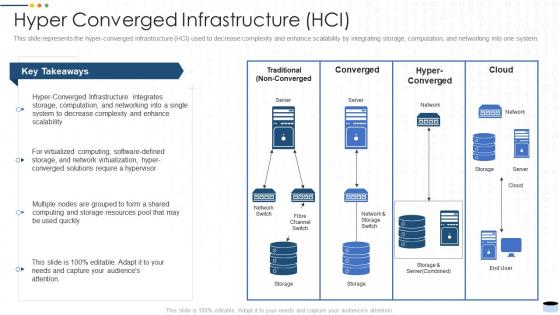
This slide represents the hyper converged infrastructure HCI used to decrease complexity and enhance scalability by integrating storage, computation, and networking into one system.
People who downloaded this PowerPoint presentation also viewed the following :
Hyper converged infrastructure hci data center it ppt powerpoint presentation inspiration with all 6 slides:
Use our Hyper Converged Infrastructure HCI Data Center It Ppt Powerpoint Presentation Inspiration to effectively help you save your valuable time. They are readymade to fit into any presentation structure.





FAQs for Hyper converged infrastructure hci data center it ppt
So HCI bundles compute, storage, and networking into these software-defined nodes you control from one interface. Pretty slick setup honestly. Your hypervisors run the VMs while distributed storage spreads everything across the cluster. Software-defined networking handles connectivity. Think of it like your whole data center crammed into a box – though that might be overselling it a bit. The management layer connects everything so you're not switching between different tools constantly. When you're shopping around, really test how smooth that unified management feels because that'll make or break your experience.
So basically HCI throws compute, storage, and networking all into these pre-built boxes you just plug in. Way faster than buying separate servers and SANs then spending forever making them play nice together. Traditional stuff means dealing with different vendors who love to blame each other when shit breaks. HCI lets you manage everything from one interface and scale just by adding more boxes. Honestly saved my sanity - no more being the storage expert AND network guru. Worth checking out if you're sick of juggling ten different systems.
dude, HCI is honestly a game-changer for scaling. Instead of dropping huge cash on massive storage arrays upfront, you just add nodes when you need them. Start with like 3-4 boxes, then plug in more as you grow - compute, storage, networking all expand together. Everything's software-defined so you can tweak resources whenever. I watched one team jump from 10TB to 100TB+ without any drama (their CFO wasn't as happy about the budget though lol). If you're looking at data center expansion, seriously check it out. Beats those nightmare forklift upgrades every time.
So basically HCI puts everything in one dashboard - compute, storage, networking, all of it. No more switching between a million different tools (which honestly was such a pain). You can move workloads around between nodes pretty easily and scale stuff up or down when you need to. The software-defined setup means you're not stuck with whatever hardware limitations you had before. Oh, and you can set up automated policies for resource allocation too. I'd start by figuring out which apps are eating up the most resources, then use HCI's analytics to find better spots for them across your infrastructure.
So virtualization is what makes HCI actually work - it pools all your compute, storage, and networking into one system you can manage easily. Without it you'd just have separate servers doing random stuff, which is pointless honestly. The hypervisor abstracts everything so VMs can grab shared storage across the cluster. You get cool stuff like live migration and failover too. Oh and definitely check that whatever HCI solution you're looking at plays nice with your current workloads - learned that one the hard way at my last job.
Oh dude, HCI is a game changer for this stuff. Data protection gets built right into the infrastructure - snapshots, replication, backups, all there by default. No more dealing with separate storage arrays (thank god). Recovery testing actually makes sense now instead of being a total headache. You can spin up isolated copies of production for testing without breaking anything. The software-defined approach means replicating entire workloads to another cluster takes like three clicks. Set up automated replication between your sites and you're golden. Honestly changed how I think about DR planning.
HCI works great for most business stuff, especially if you're running VMs. Resources get used way better since everything's bundled together, and you can scale up piece by piece instead of buying huge chunks of hardware. But here's the thing - if you've got crazy demanding databases or apps that hammer storage constantly, you might miss having dedicated SANs. Your network better be solid too since it's doing all the heavy lifting now. Honestly though, just spin up a test environment with your real workloads first. Way better than guessing how it'll perform.
So HCI basically turns everything into one platform instead of managing storage, compute, and networking separately - which is honestly a game changer. You can extend your cluster to AWS or Azure pretty seamlessly, and the data replication between on-prem and cloud just works. The cool thing is you get the same management interface whether stuff's running locally or in the cloud. Most vendors throw in cloud connectors too, which saves you headaches. I'd start by picking your easiest workloads to move first, then set up those replication policies. Way less painful than traditional setups.
Honestly, start with a pilot before you commit to anything big - learned that the hard way. Check if their scaling claims are actually legit because some vendors straight up exaggerate what they can handle. Support quality matters way more than you'd think since you're basically stuck with them once you're in. Don't just look at upfront costs either, do the math for like 3-5 years out. Oh and make sure you can actually get your data out if things go south - vendor lock-in sucks. Performance testing during the pilot will tell you everything you need to know.
So HCI cuts your IT costs by bundling everything together - no more buying separate storage, servers, and networking stuff. The real win? Way less complexity to manage. Your team won't need as many specialists since it's all integrated. Honestly, the predictable scaling is pretty sweet too - just pop in another node when you need more juice. Makes budgeting actually doable for once. Oh and fewer moving parts means less stuff breaking down the road, which your future self will thank you for.
So HCI is clutch for a bunch of stuff. VDI deployments love it, plus remote offices that don't want to babysit complex IT setups. Test environments benefit big time since dev teams can spin things up super fast. Healthcare uses it tons for imaging systems - oh, and retail chains deploy it everywhere too. The whole "infrastructure in a box" thing just makes sense when you don't want to juggle multiple vendors for storage, compute, and networking. Finance and education sectors use it mainly for disaster recovery. Small teams especially - if you need infrastructure deployed yesterday without the headache, that's where HCI shines.
Dude, HCI is actually great for microservices. The compute and storage scale together automatically, which is clutch when you're spinning up containers left and right. No more provisioning separate storage - everything's software-defined so it just works. Managing traditional three-tier stuff for this? Total pain in the ass, honestly. You get consistent performance and can scale individual services without hitting infrastructure walls. The built-in management tools handle all those distributed services way better too. My advice? Start small and grow your application portfolio from there. Way less headache than the old approach.
Definitely focus on encryption - both at rest and in transit. Role-based access is key too, so random people can't mess with stuff they shouldn't. Micro-segmentation is honestly a game-changer because it keeps breaches contained. I'd also look for built-in backup and disaster recovery - trust me, you don't want to deal with multiple vendors when everything's on fire. MFA should come standard, not cost extra (which is annoying but whatever). Oh, and audit your current gaps first before you start shopping around. That way you'll actually know what to ask vendors about instead of just nodding along to their sales pitch.
Dude, HCI is so much easier to manage than traditional stuff. Instead of switching between like 5 different consoles for servers, storage, networking (ugh, the worst), you get one dashboard for everything. No more vendor compatibility nightmares either. You can provision resources and monitor everything from the same place. Honestly, it's kind of a game-changer - your IT folks can actually work on cool projects instead of just keeping the lights on. Figure out what management tasks are killing you right now. That's where you'll notice the biggest difference once you make the switch.
So HCI's changing fast right now. Edge computing is everywhere - companies are putting these systems in crazy remote spots where you'd never build traditional data centers. The AI boom is pushing everyone toward GPU-heavy setups, and the performance jump is honestly nuts. Most platforms now do hybrid cloud stuff automatically, so you can stretch your on-premises gear into AWS or whatever without thinking about it. Oh, and if it doesn't run Kubernetes smoothly, don't bother - that's just expected now. Worth checking how this fits your roadmap, especially if you're doing edge stuff soon.
-
Awesome presentation, really professional and easy to edit.
-
Excellent template with unique design.