

Image Recognition Using Machine Learning Training Ppt




Try Before you Buy Download Free Sample Product
 Impress Your
 Audience
 100%
100% Editable
 Save Hours
 of Time


This set of slides provides information about Image recognition using Machine Learning. It discusses how it works and tells us about its models Support Vector Machines, Bag of Feature Models, Viola-Jones algorithm.
People who downloaded this PowerPoint presentation also viewed the following :
Content of this Powerpoint Presentation
Slide 1
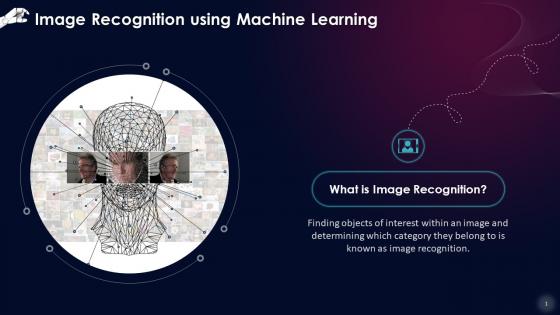
This slide introduces Image Recognition. Finding objects of interest within an image and determining which category they belong to is known as image recognition.
Instructor’s Notes: Image recognition is a computer vision application that entails tasks such as object detection, image identification, and image categorization.
Slide 2
This slide discusses the working of Image recognition using Machine Learning. Machine Learning techniques are used to glean out hidden knowledge from a dataset of good and bad samples to recognize images.
Instructor’s Notes: When combined with robust AI technology and GPUs, Deep Learning allows for significant advancements in the field of image recognition. Image classification and facial recognition algorithms using Deep Learning reach human-level performance in real-time object detection.
Slide 3
This slide illustrates Machine Learning Image Recognition Models such as Support Vector Machines, Bag of Features Models, and Viola Jones Algorithm.
Instructor’s Notes:
- Support Vector Machines: SVMs function by creating histograms of images that may or may not contain the target items. Next, the program compares the trained histogram values to those of portions of the test picture to see if there are any matches
- Bags of Features Models: Bag of Features models like Scale Invariant Feature Transformation (SIFT) and Maximally Stable Extremal Regions (MSER) function by scanning an image and comparing it to a reference photo of the object to be discovered. The model then pixel matches the features from the sample photo to regions of the target image to see if there are any matches
- Viola Jones Algorithm: Viola-Jones scans people's faces and extracts features, which are then fed into a boosting classifier. As a result, boosted classifiers are created and used to check test photos. A test image must yield a positive outcome from each classifier to find a successful match
Slide 4
This slide depicts the Image Recognition Application for Face Analysis. The video feed of any digital camera or webcam can be used with modern Machine Learning technologies to do simultaneous face detection, face posture estimation, face alignment, gender recognition, smile detection, age estimation,and face recognition.
Instructor’s Notes: Computer vision allows computers to determine identity, intentions, emotional and health status, age, and ethnicity via facial analysis. Some photo recognition software even attempts to use a score to define levels of perceived attractiveness.
Slide 5
This slide discusses the Image identification systems powered by Machine Learning that are used in the agriculture sector. These systems employ cutting-edge tools that have been trained to recognize the type of animal and its behavior.
Image Recognition Using Machine Learning Training Ppt with all 21 slides:
Use our Image Recognition Using Machine Learning Training Ppt to effectively help you save your valuable time. They are readymade to fit into any presentation structure.







FAQs for Image Recognition Using Machine
So CNNs are still the go-to for image stuff - ResNet and EfficientNet work great for basic classification. YOLO's solid for object detection too. Vision Transformers are the new shiny thing but honestly they're kind of overkill unless you have massive datasets. My advice? Just grab a pre-trained ResNet or EfficientNet model and fine-tune it on your data. Way faster than training from scratch and the results are usually pretty decent. R-CNN is another option if you need more precise object detection, but it's slower.
So deep learning is honestly a game changer for image recognition - it finds patterns in pictures that old-school methods just can't catch. The crazy part? You don't have to tell it what to look for. Neural networks figure out edges, shapes, all that stuff on their own through multiple processing layers. Feed them more data and they keep getting smarter at spotting objects, faces, text, you name it. We're talking accuracy jumping from like 70-80% with traditional methods to 95%+ with deep learning. Try pre-trained models like ResNet or YOLO first - you'll see results right away.
Honestly, training data is everything for image recognition models. Your model learns patterns from it, so you need tons of diverse, labeled images that match what it'll actually see. It's like teaching a kid about dogs - show them only golden retrievers and they'll be lost when they meet a poodle, you know? More variety = better performance on new stuff. Oh, and definitely audit your data regularly for bias and weird gaps. Trust me, catching those issues early saves you so much pain down the road.
Dude, image recognition is actually pretty sick for retail. Your customers can snap pics of stuff they want and boom - your app shows similar products. No more "I saw this cute top somewhere" frustration. Stock management gets way easier too since it tracks inventory automatically instead of you doing manual counts (which honestly sucks). Oh, and you can spy on shoppers - not creepily, but like see which displays they're drawn to most. Some stores use it to catch shoplifters too. Best part? Visual search supposedly bumps conversion rates by 30% because people find their stuff faster. Pretty solid ROI if you ask me.
Honestly, the biggest pain is trying to balance speed with accuracy - your model has to keep up with live video without completely butchering the detection quality. High-res images plus complex neural networks = computational nightmare. Memory bandwidth kills you too since you're constantly shoving massive amounts of pixel data around. GPU bottlenecks are absolutely real, trust me. Data transfer between components adds annoying latency on top of everything else. Best bet is optimizing your architecture and maybe doing some frame skipping or preprocessing at lower resolution. You'll take a small accuracy hit but it's way better than having everything crawl.
Dude, those apps are sketchy as hell with your data. They're scanning your face, tracking where you are, plus everything in your photos gets analyzed and stored on their servers. Most people don't realize how much info these things actually grab. If their database gets hacked? Your face data is out there permanently - can't exactly change your face like a password, you know? I'd dig into those privacy settings and turn off whatever permissions you can. Maybe skip the face filters for a bit too.
Honestly, privacy's the biggest headache - people usually don't even know they're being tracked. Consent gets tricky too. The bias thing is scary though; these systems mess up way more with minorities, which creates real problems. Oh, and nobody wants to live in some creepy surveillance nightmare, right? Always get explicit permission if you can. Audit your models regularly to catch bias issues. Be upfront about what you're doing with the data. But seriously, first figure out if you actually need facial recognition at all - there might be easier solutions.
Dude, medical imaging AI is seriously game-changing right now. Doctors are catching tumors, fractures, and other nasty stuff way earlier by using it on X-rays, MRIs, CT scans - basically any scan you can think of. The speed is crazy fast compared to manual reviews, plus it doesn't get tired like radiologists do after staring at screens all day. They're also using it for diabetic eye screening and spotting skin cancer. Honestly, the accuracy rates are kind of scary good. If you're working in healthcare, definitely look into pilot programs with imaging companies - the ROI potential is huge.
Healthcare's massive - AI can spot diseases in scans way before doctors notice anything. Also retail/e-commerce for visual search and that "find similar products" thing everyone uses now. Self-driving cars obviously need computer vision to see everything around them. Manufacturing uses it to catch defects super fast instead of manual checking. Security/surveillance too, though honestly that whole area kinda freaks me out. I'd probably start with whatever connects to stuff you're already working on. Way easier than jumping into something completely random, you know?
So transfer learning is where you grab a model that's already been trained on tons of images (like ImageNet) and just tweak it for your stuff. The model already knows basic visual patterns - edges, textures, all that foundational stuff. You don't have to start from zero which honestly saves so much time and data. Like instead of needing millions of examples, you can get decent results with way less. I always go with ResNet or EfficientNet as starting points - they're solid. Fine-tuning beats training from scratch every time, trust me.
Honestly, start with Google Vision API or AWS Rekognition if you want something that just works. Those cloud platforms are crazy good now and you'll have a prototype running in like an hour. TensorFlow and PyTorch are where you go if you need custom models, but that's a whole rabbit hole. OpenCV's solid for basic computer vision stuff too. Oh, and if you're doing mobile, TensorFlow Lite is decent - though I haven't messed with Core ML much. Really depends what you're building, but I'd definitely prototype with an API first before diving into training models yourself.
So basically you train models to pick up on tiny details that counterfeiters mess up - like weird fonts, wonky stitching, or off textures. Pretty cool stuff honestly. The system learns from thousands of real product photos to know what authentic looks like, then spots fakes during inspections or on sites like eBay. Works way better than humans at catching subtle differences we'd totally miss. Oh and if you're dealing with this problem, you'll need a good collection of legit product images first to teach the model what's real.
Honestly, the transformer vision models are where all the crazy progress is happening right now. Most companies are getting way better at fusing camera, LiDAR and radar data together - except Tesla, who's still doing their whole vision-only thing (which is... bold, I guess?). The accuracy jumps from even just two years ago are insane. Real-time 3D detection can now handle weird edge cases like people half-hidden behind cars or when it's raining sideways. YOLO's latest versions are absolutely crushing it, and Vision Transformers too if you haven't messed with those yet. Worth checking out for sure.
Going from 2D to 3D is honestly a game changer. Your apps stop just looking at flat pictures and start understanding actual space - depth, how objects relate to each other, movement in real environments. Robotics, AR/VR, self-driving cars, medical imaging - they all need that spatial context to work properly. Yeah, you'll need way more computing power (kinda expected though). But now your software can actually interact with the real world instead of just analyzing photos of it. I'd look at your current projects first and figure out which ones would actually benefit from spatial awareness.
Multimodal AI is going to be insane - like, combining vision with language so systems actually understand context. Your phone won't need the cloud anymore for complex image stuff since edge processing is getting crazy good. 3D spatial understanding and video analysis are improving fast too, not just static pics. The whole game is changing from "what's this image" to "what's happening and what do I do now." Speed improvements are honestly kind of wild when you see them. Oh, and definitely think about how this could boost whatever projects you're working on right now.
-
The team is highly dedicated and professional. They deliver their work on time and with perfection.
-
“Love it! I was able to grab an exciting proposal because of SlideTeam.”