

Input process output model powerpoint images




Try Before you Buy Download Free Sample Product
 Impress Your
 Audience
 100%
100% Editable
 Save Hours
 of Time


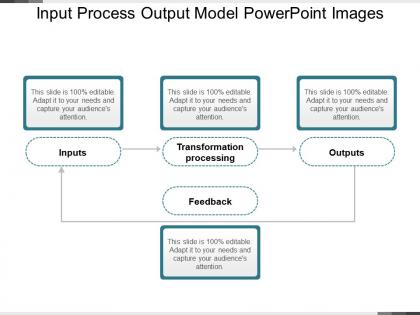
Highlight details of the input process output model by using the Input Process Output Model PowerPoint Images template. The input output PPT slide covers the IPO model in an extensive as well as visually interesting manner. A user can explain the major working of input output components as well as how they interact with one another. You can use this readily available input output process presentation slide to provide a conceptual framework of the model, elucidate the overall input output cycle, and many more. A user can take the help of this input output model example presentation template to display the logical sequence of business development and business process. For all those who want to draft an informative IPO model presentation in less time, this is really a very useful template for them. The input output cycle template design for PowerPoint is perfect for project managers, leads, trainers, educators, IT consultants, subject matter experts, system consultants, software engineers, and many more. The input output model diagram PPT slide design is an ideal slide for a team to figure out all relevant elements of a business project before beginning work.
People who downloaded this PowerPoint presentation also viewed the following :
Input process output model powerpoint images with all 5 slides:
You will come up with inspired designs due to our Input Process Output Model Powerpoint Images. It allows for intelligent innovations.
FAQs for Input process output
So IPO basically breaks down into three parts - you've got your Input (whatever data or stuff you're feeding in), Process (how you're actually working with that input), and Output (what comes out the end). Think about making dinner, right? Ingredients = input, all your chopping and cooking = process, final meal = output. Super useful when something's going wrong because you can just work backwards through each step. I actually use this all the time at work now. Makes troubleshooting way less of a headache since you're not just randomly guessing where the problem is.
So the IPO model is actually pretty solid for this stuff - inputs are your resources and team skills, processes are your workflows, and outputs are what you deliver. What's cool is it shows you bottlenecks before they wreck everything. I always use it when planning gets messy and everyone's just throwing ideas around randomly. Map out what you've got, what you're doing, and what comes out the other end. You'll catch missing resources early instead of scrambling later. Honestly, just sketch your current project this way - I bet you'll spot gaps you totally missed.
Dude, IPO is literally everywhere once you notice it. Restaurants are perfect examples - ingredients go in, chefs do their thing, meals come out. Manufacturing's the same deal with raw materials becoming finished products on assembly lines. Your customer service department? Complaints flow in, team fixes stuff, solutions go back to customers. Even boring payroll works like this - hours and rates enter the system, software crunches numbers, paychecks pop out. I swear, mapping workflows becomes way easier when you just ask: what's coming in, what happens to it, what goes out? You'll spot this pattern in basically every business function.
So the IPO model basically takes any complicated system and chops it into three parts - inputs, process, outputs. Super helpful when you're staring at something crazy complex like a manufacturing line or even just a basic circuit. I'd start by figuring out your inputs and outputs first, then work backwards from there. Once you break it down like this, spotting problems becomes way easier. You can find bottlenecks, fix processes, all that good stuff. Way better than trying to wrap your head around the whole mess at once - that'll just drive you nuts.
So the IPO thing is actually pretty useful - you've got inputs (what students already know, your materials), processes (how you teach stuff), and outputs (what they should learn). I'd start with just one lesson and sketch it out. Like, what are kids bringing in knowledge-wise? Then figure out activities that'll get them to your end goal. Honestly, it's kind of like backwards planning but with more structure. The cool part is you'll catch when your teaching methods don't actually match what you want them to learn. Makes those gaps super obvious.
Honestly, the hardest part is just getting people to agree on what counts as an "input" vs a "process" - I've seen actual arguments break out over this stuff. Everyone's got different ideas about detail too. Some folks want to map out every tiny step, others just want the big picture. Oh, and here's the fun part - your team's inputs are probably another department's outputs, so tracking dependencies gets messy real quick. I'd say start with one simple template that forces everyone to use the same format. Makes life way easier once people actually stick to it.
Look, feedback loops are pretty straightforward - you just connect your results back to the beginning of your process. Monitor what's coming out and use that info to tweak your inputs or methods. Like how a thermostat works, right? It reads the temp and adjusts the heat accordingly. You can automate this with dashboards and metrics, or do it manually through reviews and surveys. The trick is actually acting on what you learn - too many people collect feedback then do nothing with it (honestly drives me crazy). Just pick one output metric that really matters to start with.
So basically tech speeds up your whole IPO process at every step. You'll get way better data collection with sensors and APIs - way more accurate than doing it manually. The processing part is where things get really cool though - AI and machine learning can crunch numbers like crazy. Your final outputs end up being super precise and personalized, plus you can deliver everything in real-time. Oh and here's the thing - don't just pick whatever tech looks flashy. Actually match it to what your process needs or you'll waste a ton of money.
So the IPO model basically breaks everything down into inputs, processes, and outputs - super helpful when your supply chain feels like a mess. You look at what you're working with (demand forecasts, inventory, supplier info), figure out your actual processes, then nail down what you want to achieve. Honestly saved my butt more than once. When everything's chaotic, you can spot exactly where the bottleneck is instead of just panicking about everything at once. Just pick one decision and map it out first - you'll be shocked at the gaps you didn't even realize were there.
Yeah totally! IPO works really well for coding. Functions are easy - params go in, your logic does its thing, return value comes out. System-wide it's the same deal: user input, business logic processing, then responses. Honestly it's probably the most straightforward way I think about architecture. When I'm debugging I just trace through each stage and usually find the problem pretty quick. Oh and it's super helpful for spotting where you forgot error handling - that always bites me later. Definitely try mapping your next feature this way, you'll see what I mean.
Honestly, just pick 2-3 metrics for each part that actually matter to whoever's paying attention. Input stuff - quality scores, how complete things are, timing. Process metrics are where things usually go wrong, so track cycle times and error rates. I'd focus there first if I were you. Output measurements should match whatever you promised at the start - accuracy, happy customers, whatever success looks like. Don't get caught up measuring everything just because the data's there. That's a rabbit hole you don't want to go down.
IPO's way simpler than the other two - just input, process, output. That's it. SIPOC throws suppliers and customers into the mix for more context, and PDCA is really more about fixing problems than mapping anything out (kind of different beasts, honestly). Go with IPO when you need something quick and dirty. Perfect for those initial brainstorming sessions or explaining stuff to people who'd zone out with all the bells and whistles. I always start there first. Then if you need more detail later, you can always level up to SIPOC.
IPO works great for manufacturing and healthcare since you can trace everything from raw materials/patients right through to final products/outcomes. Tech companies dig it because it's basically how they already build software anyway. Most industries with repetitive stuff benefit, but logistics and food service are perfect fits too - honestly, food service might be even better than tech in some ways. The catch is your processes need to be standardized enough that you can actually define what goes in and what comes out. I'd just pick one main process in your company and test how well it maps to the model first.
Honestly, visuals are a game changer for explaining the IPO model. Flowcharts work great - just draw boxes with arrows showing data moving from inputs to processing to outputs. People zone out hard when you try explaining it with words alone. Different colors for each stage helps too. I always throw in real examples from whatever project we're working on. Clean diagrams beat messy ones obviously, but don't stress about making them perfect. Your stakeholders will actually get what you're building instead of pretending they understand. Way better than watching them nod while internally panicking about the budget meeting later.
So the IPO model is basically too rigid for dynamic systems. It assumes this straight-line flow that just doesn't exist in real life. Missing all the feedback loops where outputs circle back and mess with your inputs. Plus it can't handle when systems actually change over time - which, let's be honest, they always do. It's like trying to explain a conversation with a megaphone analogy... completely misses the point. Your process won't stay the same anyway. Better off using systems thinking approaches that actually account for how everything connects and evolves. Way more realistic.
-
Excellent work done on template design and graphics.
-
Editable templates with innovative design and color combination.