

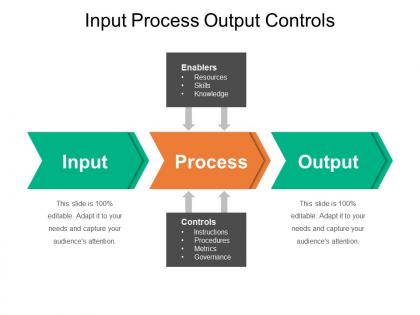
Input process output controls example of ppt presentation




Try Before you Buy Download Free Sample Product
 Impress Your
 Audience
 100%
100% Editable
 Save Hours
 of Time


Build the belief in folks of being fit again with our Input Process Output Controls Example Of Ppt Presentation. It will give hope to the injured.
People who downloaded this PowerPoint presentation also viewed the following :
Input process output controls example of ppt presentation with all 5 slides:
Have all the answers available with our Input Process Output Controls Example Of Ppt Presentation. They keep the data coming along.




FAQs for Input process output controls example
So IPO basically breaks everything down into three parts: what goes in (inputs), what happens to it (processes), and what comes out (outputs). Like when you're cooking - ingredients, the actual cooking part, then your meal. Honestly, this framework works for analyzing almost any workflow at work. Map out where stuff gets stuck or what controls you need at each step. I started doing this whenever something's broken and it's way faster than just guessing what went wrong. Pretty simple but actually useful - which is rare for business concepts, let's be real.
So IPO controls are basically like having checkpoints when you're making decisions - you can catch problems early instead of wondering "wait, how did this go so wrong?" Map out your inputs first, then watch your process in real-time, and finally measure if you actually got what you wanted. The feedback loops are honestly game-changing because you'll spot issues before they blow up. I mean, we've all been there with projects that seemed fine until suddenly they weren't. Start by figuring out where you're currently flying blind in your decision process.
So here's the thing - if your input data sucks, everything after that will suck too. Garbage in, garbage out, right? You need validation rules and data cleaning right when stuff enters the system. Required fields, format checks, range validations - all that basic stuff catches problems early. Otherwise your fancy processing downstream won't matter because you're working with junk data. I'd honestly start by just auditing what you have now. You'll probably find weird stuff slipping through that you didn't even know about. Clean data going in means you'll actually get useful results coming out.
Manufacturing's the obvious one - they're checking raw materials, watching production lines, then inspecting stuff before it ships out. Hospitals do this religiously too, honestly. Patient data coming in, treatment protocols, outcome tracking. Airlines are crazy thorough about it - passenger screening, flight ops, arrival times, all of it. Even restaurants use these controls way more than you'd expect. Fresh ingredients, kitchen procedures, how happy customers are when they leave. Really, any business where screwing up costs serious money has these systems baked in everywhere you look.
Start by figuring out where stuff gets stuck in your current workflow - those are your bottlenecks. Track things like how long tasks take, error rates, that kind of thing. Yeah, it's boring as hell but you need the data. After that, automate what you can and cut out any duplicate steps. I'd also standardize your processes where it makes sense. Oh, and definitely get your team involved - they deal with the annoying stuff daily so they'll spot problems you miss. Regular check-ins help catch issues early too.
Ugh, honestly the money part hits hardest - you're looking at serious cash for tech, training, all that stuff. Staff pushback is brutal too because everyone thinks it's just more paperwork to slow them down. Mapping out where everything fits gets messy fast, especially without breaking your actual workflow. Oh and here's what nobody tells you - keeping it all updated as things change? Way harder than the initial setup. I'd probably just tackle your biggest risk areas first, then build from there. Don't try to boil the ocean right away.
Honestly, tech integration is a game-changer for this stuff. It automates your controls everywhere - catches data errors right at input, monitors things in real-time while processing, and flags weird outputs automatically. Way better than having someone stuck reviewing spreadsheets all day (trust me, nobody wants that job). You'll catch problems faster and everything stays consistent. Plus audit trails just generate themselves, which is pretty sweet. I'd definitely start with whatever processes scare you most risk-wise, then build from there once you see how well it works.
Look, you'll want to focus on three main things: quality metrics, timing stuff, and costs. Track defect rates, customer satisfaction, cycle times - basically whatever shows if your process actually works. Honestly, I'd put quality and speed first most of the time. Don't get caught up in those dashboard metrics that just look pretty but don't mean anything. Figure out what success looks like for your specific situation first. Then work backwards to see which outputs actually tell you if you're nailing it. Oh, and make sure everything connects to your real business goals, not just random numbers.
So feedback loops are basically how you make your whole system actually learn instead of just being a one-way process. You take whatever comes out and loop it back to adjust your inputs or fix your processes. Like a thermostat adjusting heat based on the temp it reads (boring example but whatever). The trick is setting up real ways to capture that output data and actually doing something with it - not just collecting it in a spreadsheet somewhere. Most people skip this part honestly. Start by figuring out which results should trigger you to change your input rules or process steps.
Honestly, the worst mistakes are skipping data validation and just assuming your inputs are clean. They never are - learned that the hard way! You gotta check for completeness and format issues before anything hits your system. Also, don't accept inputs without proper verification first. Missing this step will bite you later. Document your input criteria clearly too, or your teammates will hate you when they can't figure out what you were thinking. Oh, and define what "good input" actually looks like upfront. Saves so much headache down the road.
Regulatory stuff basically builds your whole control framework for you. First thing - figure out which regulations hit your specific processes, then work backwards from there. Data validation for inputs, audit trails through processes, retention rules for outputs - you've gotta map it all out. SOX is honestly the worst because they're super prescriptive about exactly what you need. Other regs give you more wiggle room on how you actually get compliant. The trick is designing controls that automatically create the evidence auditors want to see. Otherwise you'll be scrambling during audit season trying to prove you did everything right.
Honestly, flowcharts are game-changers for the IPO model. Way better than trying to explain it verbally - people actually *see* how inputs flow through processes to outputs. Your team can spot exactly where controls need to go when it's mapped out visually. Screenshots and real examples help too, makes those abstract concepts click. We used interactive whiteboards at my last job and everyone could jump in and draw connections together, which was pretty cool. Create a simple template they can adapt for their own stuff. Trust me, once you go visual you won't go back to boring text explanations.
So the Process stage is where value actually gets created in IPO. Raw inputs are just... well, raw materials and data sitting there. But during processing? That's when your workflows and operations transform everything into something worth more. Your quality controls and procedures are doing the heavy lifting here - honestly, this is the most critical part. The output just reflects whatever value you managed to create during that middle stage. When you're setting up IPO controls, don't skimp on the process side since that's literally where you're building worth. You'll want to track that value creation as it happens.
Start with output validation - just double-check your data's actually accurate and complete. Performance monitoring helps too (track response times, error rates, that stuff). User feedback is honestly the most underrated method - people will tell you if your outputs suck or not. Oh, and set up some formatting standards so everything looks consistent. Error logging catches problems before users see them, which is clutch. Quality audits are good for periodic check-ins. Don't go crazy though - pick like 2-3 methods that work with what you've already got. Way better than overwhelming yourself trying to implement everything.
Honestly, inconsistent input data is such a pain - it'll tank your whole process. Missing fields, wonky formats, outdated info... all that stuff forces your system to work way harder than it should. Processing times drag out, your team ends up doing tons of manual cleanup (which nobody enjoys), and error rates go through the roof. The worst part? Those problems snowball as they move downstream. I'd focus on getting your data collection standardized first. Set up some validation rules right at the input stage - way easier to catch issues there than chase them through your entire workflow later.
-
Wonderful templates design to use in business meetings.
-
Easy to edit slides with easy to understand instructions.