

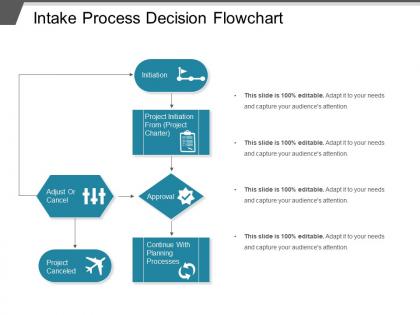
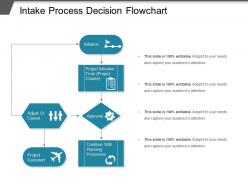
Intake process decision flowchart




Try Before you Buy Download Free Sample Product
 Impress Your
 Audience
 100%
100% Editable
 Save Hours
 of Time


Enable folks to identify bigoted attitudes with our Intake Process Decision Flowchart. Generate awareness among the ignorant.
People who downloaded this PowerPoint presentation also viewed the following :
Intake process decision flowchart with all 5 slides:
Evaluate global influences with our Intake Process Decision Flowchart. Assess the impact on domestic growth.


FAQs for Intake
Okay so first thing - get all their paperwork and basic info right off the bat. Don't skip the initial assessment part, that's where people always mess up by rushing. You'll want to figure out what they actually need and set realistic expectations. After that, pick your team members and map out a timeline with milestones. Document everything immediately in whatever system you use (seriously, do this same day or you'll forget). Send them a summary within 24 hours - clients love that. Oh, and create some kind of checklist so you don't accidentally drop the ball on something stupid.
Look, a solid intake process is like giving your clients a GPS instead of making them wander around lost. They know what's coming next and feel way less anxious about the whole thing. Plus you'll get better info upfront instead of playing twenty questions over email later - which honestly saves everyone's sanity. Map out your current client journey first, then tackle the messiest parts. Those "wait, what now?" moments? That's where you start fixing things. It's basically about making people feel heard while keeping things moving smoothly.
Honestly, the worst part is people submitting half-baked requests with zero details. Then you're chasing them down for basics they should've included from the start. Different teams handle things completely differently too - what works for marketing is nothing like IT's process. Without solid workflows, the volume gets overwhelming fast. Oh, and stakeholders hate not knowing where their request stands. I'd say start with standardized intake forms first. Build a simple dashboard so people can actually see what's happening with their stuff. Makes a huge difference once everyone's on the same page.
Oh man, digital tools are a lifesaver for this stuff. They basically turn all that paperwork chaos into something that actually works. Online forms automatically send requests where they need to go, plus your clients can submit things whenever - even at like 2am if they want. No more phone tag during business hours. The tracking part is honestly game-changing because you can see exactly where things get stuck. Those endless email threads where someone always gets left out? Gone. I'd start with whatever forms you use most - that's where you'll notice the biggest difference right away. The speed improvement alone makes it worth it.
Track time-to-completion and approval rates first - those are your bread and butter. Missing info requests are huge red flags that your process sucks. Stakeholder satisfaction scores help too, but honestly quarterly surveys work fine for that. Resource utilization is worth checking since people hate waiting around for approvals. Don't go crazy with metrics though - pick 3 or 4 max or you'll drown in spreadsheets. Start next month, review monthly. Trust me, the bottlenecks will jump out once you have baseline numbers to compare against.
First thing - map out where stuff actually gets stuck. Nine times out of ten it's approval chains or people submitting half-baked requests. Make intake forms that capture what you need (but don't go overboard asking for their life story). Set up auto-routing so things don't just die in someone's inbox. The real win though? Clear SLAs communicated upfront. People hate uncertainty more than waiting. Give priority lanes to certain teams if that makes sense. Oh, and tackle one bottleneck at a time. I learned this the hard way - trying to fix everything simultaneously just creates chaos.
Honestly, communication makes or breaks the whole thing. Without it, requests just disappear and people get frustrated waiting around. I always set up quick automated confirmations so people know their stuff actually went through. Then regular updates with clear timelines - even if it's just "hey, still working on this, expect an update Friday." Oh, and spending time upfront to really understand what they need? Total game changer. Saves you from those annoying email chains where you're going back and forth forever. The transparency thing might feel like extra work but trust me, it's worth it.
Honestly, good training is a game-changer for intake speed. Your staff won't be constantly second-guessing themselves or passing cases around like hot potatoes when they actually know what they're doing. Catching problems early beats dealing with a mess later - trust me on that one. Quick decisions happen when people feel confident about the process. Oh, and don't just focus on the step-by-step stuff. They need to know how to handle those weird judgment calls that pop up every day too.
Okay so honestly, I'd focus on three big things when screening people. Does their actual situation match what you're trying to fix? That's step one. Then look at logistics - can they actually show up consistently? Like do they have reliable transportation, childcare sorted, all that boring but crucial stuff. Programs mess this up constantly and then act shocked when half their people disappear. The third thing is figuring out what kind of support they'll need and whether you can actually deliver it. Just be super honest about all this upfront during intake instead of finding out later when it's awkward to redirect them somewhere else.
Honestly, just start simple - send clients a quick survey right after onboarding, then check back in like 30-60 days later. Your team probably has tons of opinions about what's broken, so do monthly debriefs with them too. I'd track stuff like how long intake takes and where people bail out. Oh, and actually USE the feedback you get (seems obvious but you'd be surprised). The whole point is catching problems before they snowball. Maybe just pick one survey to launch this month? You can always tweak it later once you see what kind of responses you're getting.
Honestly, get everything down in real-time with forms or templates - your memory will totally fail you later. I mixed up two cases once and felt like an idiot. Write specific dates, names, exact problems instead of vague notes. Also grab their contact preferences and how urgent things are. Red flags too if you spot any. Oh, and make sure your whole team uses the same terms so someone else can jump in if needed. Quick review before you close it out - trust me, you don't want to miss something obvious that'll come back to haunt you later.
Depends totally on what you're doing! Healthcare places ask for medical history and insurance stuff. Legal firms? They want case details and need to check for conflicts of interest. Tech companies care more about project requirements and technical specs. Nonprofits usually gather donor info or do client assessments. Manufacturing is all about order specs and when you need it delivered. Pretty cool how different they all are, honestly. But everyone's basically trying to get the most important info right away. I'd check out what 2-3 competitors are asking their clients - gives you a good starting point for your own thing.
Honestly, start with the basics - make sure they actually understand what they're getting into and what you can/can't share. Document everything because it saves your ass later, trust me. Don't assume anything about their background or what they need. If you've got any conflicts of interest, just be upfront about it from day one. Short sentences work. Also watch out for weird dual relationship stuff - like if they're your neighbor's cousin or whatever. That gets messy fast. Cultural stuff matters way more than people think, so don't wing it there.
Honestly, visual aids are a game-changer for intake sessions. People's brains just work better when they can see what's happening instead of listening to you ramble through policies. Flowcharts showing their journey, simple diagrams breaking down processes - that stuff actually sticks. I've watched clients go from completely lost to asking really good questions just because I threw together a basic infographic. Maybe it's just our short attention spans these days, but whatever works, right? Definitely make yourself a one-page visual overview of everything. You'll use it constantly and clients won't feel like they're drowning in information.
Oh man, start with automated forms that route requests to the right people - seriously, this alone will save your sanity. No more digging through random submissions all day. Chatbots can handle the basic screening stuff upfront. Set up auto-replies so people know you got their request and what to expect next. Data entry can be automated too, plus you can trigger reminders for incomplete forms (people always forget something, right?). Honestly though, just pick whatever's eating up most of your time right now and automate that first. You'll wonder why you waited so long.
-
Design layout is very impressive.
-
Out of the box and creative design.